
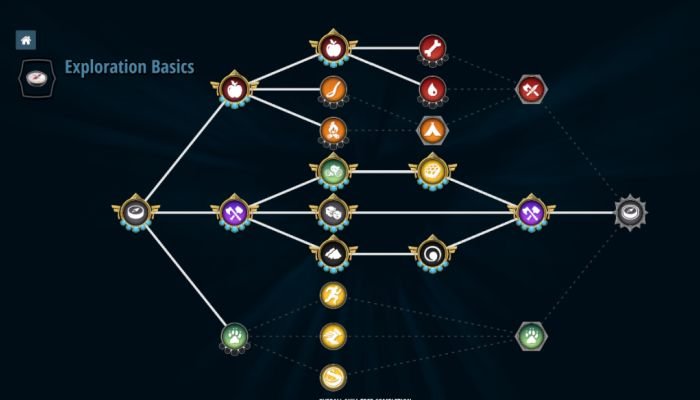
Effective Roblox skill tree design utilizes branching paths, clear upgrade descriptions, and progression systems that feel rewarding to players.
Have you ever played a Roblox game and felt a satisfying sense of accomplishment as you powered up your character? That feeling often comes from well-implemented progression systems, and skill trees are a big part of that. Understanding good roblox skill tree design is key for creating experiences that keep players engaged. A carefully planned tree with logical upgrades makes a huge difference.

Roblox Skill Tree Design: A Deep Dive
So, you want to make your Roblox game super fun and engaging? One way to do that is by adding a skill tree! Think of it like a path where players can choose special abilities for their characters as they play. It’s like leveling up, but with a visual map. But designing a good skill tree isn’t as simple as just adding random powers. It takes planning and creativity. Let’s jump into how you can make an awesome skill tree for your Roblox game!
Why Skill Trees Are Awesome
Skill trees are super popular in games, and for a good reason! They add a lot of cool things that make games more fun:
- Choices: Players get to make their own choices about how their character grows, which makes them feel more in control and invested in the game.
- Progression: It’s satisfying to see your character become more powerful over time. Skill trees show that progress visually, which is pretty cool.
- Variety: Skill trees can lead to many different types of characters, even if they start the same way. This makes the game more exciting to play again and again.
- Strategy: Players need to think about what skills will help them the most in the game, and plan their path. This adds a layer of fun and strategy.
All of these things combine to keep players engaged and interested in your game. A good skill tree can make the experience feel personal and rewarding.
Key Elements of a Great Roblox Skill Tree
Before you start drawing lines and boxes, let’s discuss what makes a skill tree really work. These are the core ingredients you’ll need to consider.
Clear Structure
First, your skill tree needs to be easy to understand. Nobody wants to spend hours trying to figure out what skills they can get! Think about how the tree is laid out. Here are some popular structures:
- Linear: This is like a straight path. Players get skills one after another in a set order. Great for beginners.
- Branching: The tree splits into different paths, so players can choose which direction they want to go. This offers more choice.
- Hybrid: Combines linear and branching elements. Players start with a basic path, and then can choose to go on different branches.
- Grid: Skills are arranged in a grid. Players may need to unlock certain squares to access others. This gives a visual sense of many options.
The best structure for you depends on your game. For a simpler game, a linear or branching tree might work best. For something more complex, you might like a hybrid or grid structure.
Meaningful Skills
No one wants to spend skill points on skills that do not help them, right? The skills should feel important and impactful. A good skill should either:
- Boost Stats: Give the player more health, speed, damage, etc. These are basic, but can be essential.
- Add Abilities: Let players do new things like heal other players or create shields. Make sure the powers have a purpose in the game.
- Change Play Style: Make the player experience the game in a new way. Maybe they can use different items or have special techniques.
Think about what skills would make your game more fun and interesting. Don’t just add boring skills for the sake of it. Make each skill feel valuable!
Cost and Balance
Every skill needs a cost. This is usually skill points or in-game currency. The cost of each skill should make sense based on how powerful it is. Powerful skills should cost more, while less powerful skills can be cheaper. It’s all about balance.
If a skill tree is unbalanced, players will all go for the same skills, and other parts of the skill tree will be ignored. Try to make it so that different builds and play styles feel equally valid.
Visual Design
Make your skill tree visually appealing! A good design is easy to navigate and looks good, too. Consider:
- Icons: Each skill should have a unique icon. These icons should match what the skill does. A health boost could have a heart icon, or a speed boost could have a lightning bolt.
- Colors: Use different colors for different types of skills. This helps players see the connections. Maybe attack skills are red, and defense skills are blue.
- Layout: Make sure the tree isn’t too cluttered. Give skills enough space so players can see them and not get lost.
- Animations: Add animation to when the player unlocks a new skill. Little touches like this make the experience more rewarding.
Planning Your Roblox Skill Tree
Okay, now let’s talk about how to plan your skill tree. Here’s a step-by-step process:
1. Brainstorm Ideas
Start by just writing down any ideas you have for skills and abilities in your game. Don’t worry about if it fits in the game or not at this point. Just let your imagination run free.
Think about your game’s theme and goal. What kinds of powers make sense? What kind of play styles do you want to allow?
2. Organize Skills
Once you have a good list of skills, start grouping them together. Which skills go well together? Are there skills that are similar but maybe one is stronger than the other?
Try sorting your skills by categories like damage, defense, movement, etc. Then, consider which skills should be available earlier, and which ones should be saved for later in the game.
3. Sketch Your Tree
Now it’s time to sketch out the structure of your skill tree. You can do this on paper, or use a digital drawing tool. Experiment with different layouts.
Try drawing out all the branches, or a linear path, and try to see which one is a better fit for your game. Think about the visual flow and make sure the tree isn’t too hard to follow.
4. Implement and Test
After you have a good sketch, it’s time to start building your skill tree in Roblox Studio! Use scripts and UI elements to make your tree interactive.
Test it often! See if all of the skills are functioning, and try the game with the skill tree. See if players enjoy the skills, or if something needs to be changed.
Advanced Skill Tree Design Tips
Want to make your skill tree even better? Here are some more advanced ideas to explore.
Respec Options
Sometimes players change their minds about the skills they chose. Respec options allow players to reset their skill tree and choose new skills. This is a player friendly approach, and will allow them to experiment with the skill tree. It gives players some freedom and removes the fear of making mistakes.
You can add respec options as a limited resource, like an in game item that players must find. Alternatively, you can add the option to reset the skill tree, but with a fee. This will balance the game, while also keeping it fair to all players.
Synergies
When skills work together really well, that’s called a synergy. You could make certain skills more powerful when they’re used with other skills.
Synergies encourage players to try different builds and skills that they might not otherwise choose. This adds even more depth to the game.
Unique Skill Trees
What if you have different characters in your game? Each character could have their own unique skill tree with their special skills.
This can make each character more interesting to play. This can give a huge amount of variation, and encourage the player to try out all the characters. You can have one skill tree dedicated to a specific class or type of character. This will help balance the game, while adding some exciting variation.
Multi-Tiered Skills
Skills don’t have to be static! Some skills can have different levels to them. Maybe you have a skill called ‘power hit’, you can add an upgrade to this skill that increases its damage and range.
This adds more progression, and gives the player something to aim for. This adds a layer of depth to the skill system, and allows for more complex progression.
Visual Feedback
Make the game show the player when they are using their skills. If the player picks a speed boost skill, show them how fast they are moving, with a visual effect. Maybe a speed trail, or a special icon.
This will help make the skill tree more satisfying to use. A player needs to feel the impact of the skill they chose. Giving good feedback will make it clear they are using a skill, and that it is working.
Tools for Creating Skill Trees in Roblox
To make your life easier, you can use some Roblox tools that will help in creating your skill tree:
- UI Design: Use Roblox Studio’s UI editor to create the look of your skill tree. Experiment with different shapes, sizes, and colors.
- Scripts: You’ll need to use Lua scripting to make your skill tree work. Scripting will allow the UI to interact with player data.
- Data Stores: Data stores allow you to save each player’s skill tree, so they can keep their progress.
- Community Resources: There are many open source tutorials and models that can help. Don’t be afraid to use community made resources to help!
Remember, building a great skill tree takes time and practice. Don’t be afraid to experiment and keep improving as you go. A well-made skill tree can make all the difference in how players experience your game.
Designing a great skill tree can feel like a lot of work, but it will pay off with a more fun and exciting experience for all the players in your game. Don’t be afraid to try new things, and remember that the most important thing is to create a fun game. Take it one step at a time and you will get it done!
Making Skill Trees and Levels | Roblox Devlog #2
Final Thoughts
Good skill tree design in Roblox focuses on clear progression and meaningful choices. Developers should prioritize user experience, making it easy for players to understand the paths available. Thoughtful planning of the tree structure enhances gameplay.
Careful consideration of ability balance is vital, avoiding overpowered skills. Effective implementation of the tree gives a sense of accomplishment. Ultimately, great Roblox skill tree design contributes to compelling game loops.

