
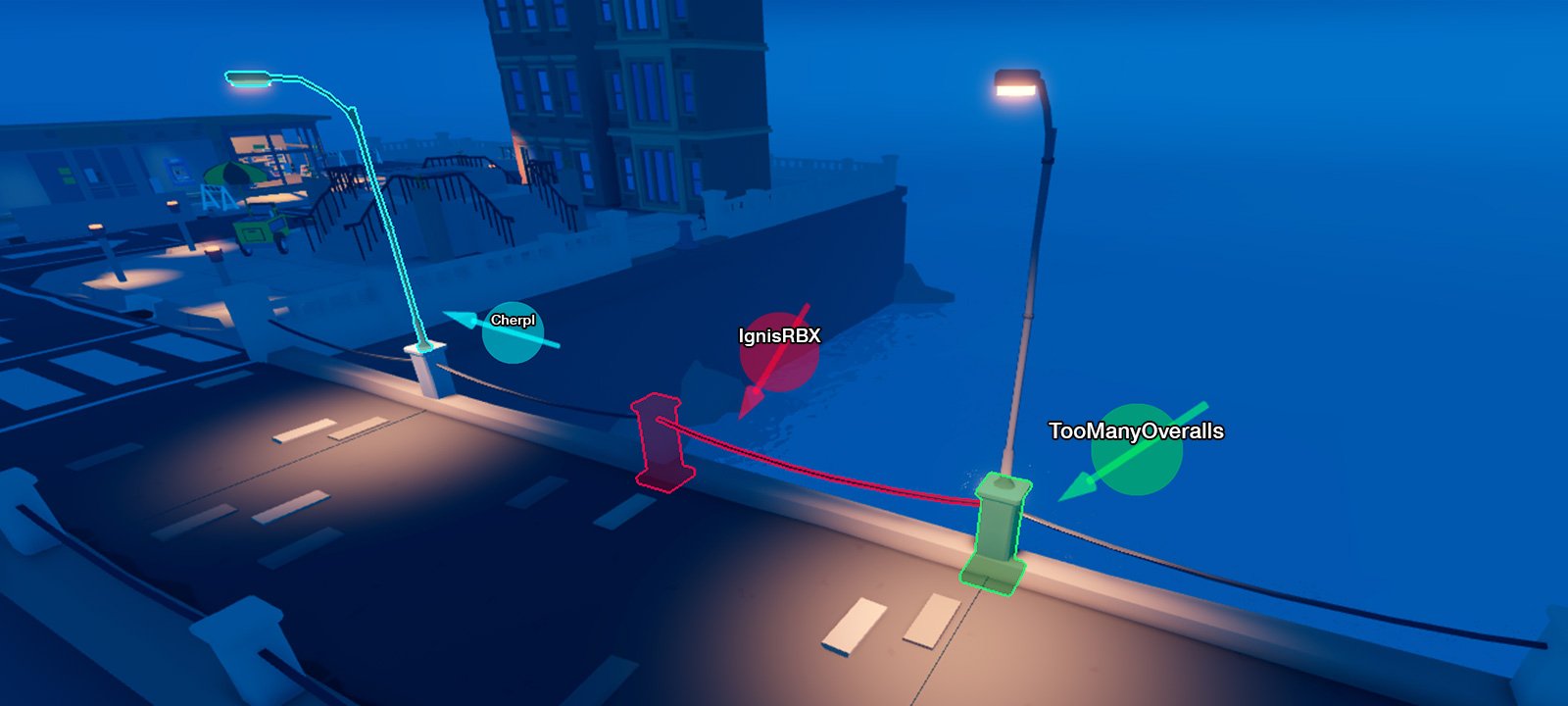
Roblox team collaboration tools include features like Team Create within Studio, group messaging, and shared assets, allowing developers to work together efficiently.
Building a successful Roblox game often requires teamwork. Coordinating efforts can be tricky. That’s why understanding the power of Roblox team collaboration tools is crucial for any aspiring game developer.
These tools provide the structure for multiple people to work on the same project simultaneously. Shared access to projects and easy communication methods make collaboration much simpler.
Effectively using Roblox team collaboration tools can greatly improve your game development workflow, saving time and effort. It helps you create more complex and engaging experiences for your players.

Roblox Team Collaboration Tools
Making a Roblox game is super fun, but it’s even better when you work with friends! Just like building a LEGO castle with your buddies, creating a Roblox game often needs more than one person. That’s where collaboration tools come in. These are special features and methods that help you and your teammates work together smoothly and efficiently, turning your awesome game ideas into reality.
Understanding the Need for Collaboration
Imagine trying to build that LEGO castle with your friends all shouting different instructions at the same time. It would be chaotic, right? The same thing can happen when building a Roblox game without good teamwork. Different people might accidentally change each other’s work, or everyone might be working on the same part, causing confusion. Collaboration tools solve these problems by providing a way for teams to communicate, share files, and work on the game together without stepping on each other’s toes.
The Benefits of Working Together
Working as a team has so many great benefits:
- More Creative Ideas: When you put your ideas together with your teammates, it’s like mixing colors – you get something even better! Different people have different ways of thinking and building, which can lead to more creative game features.
- Faster Development: With more hands on deck, you can get things done much quicker. One person can work on building, while another works on scripting, making the process go faster.
- Sharing the Load: Making a game can be a lot of work for one person. When you team up, you can split the work and make sure no one person gets too tired or burned out.
- Learning From Each Other: Working with others helps you learn new skills and techniques. You might pick up some cool building tricks from your teammates or figure out new scripting shortcuts.
- Better Games: When lots of people put their talents together, the end result is often a more polished and fun game experience.
In short, using collaboration tools in Roblox lets you achieve more than you could alone and leads to much better game experiences!
Roblox Studio’s Built-in Team Create
The most basic and commonly used way for Roblox developers to collaborate is by using a feature built right into Roblox Studio called Team Create. This feature allows multiple developers to edit the same game at the same time. It’s like having a shared canvas where everyone can add, move, and change things together in real-time.
How Team Create Works
Here’s a breakdown of how Team Create functions:
- Enabling Team Create: The person who owns the game (the game creator) first needs to enable Team Create from the “View” menu in Roblox Studio.
- Inviting Collaborators: Once enabled, the owner can invite other Roblox users to join the project. These people must be your Roblox friends.
- Real-Time Editing: After being invited, collaborators can open the game in Roblox Studio and work on it together. You can see each other’s changes happen as they are made!
- Saving and Publishing: When you are done working, the game can be saved and published with all the changes that everyone has contributed.
Features of Team Create
Team Create includes some helpful tools to help teams work more efficiently:
- Live Editing: As mentioned, you can see changes happen in real-time. This is very useful for knowing what everyone is doing and avoids accidental overlaps.
- User Icons: Each collaborator has a specific colored icon that shows where they are working in the game. This makes it easy to see who is editing what.
- Chat Feature: There is a built-in chat feature, located at the top of the editor where your team can message each other directly. This allows for quick communication without needing to use external messaging apps.
- Version Control (Basic): Roblox saves versions of your game automatically. If anything goes wrong, you can revert back to a previous save.
Best Practices for Using Team Create
To get the most out of Team Create, consider these tips:
- Plan Ahead: Discuss with your team what each person will be working on beforehand. This will help avoid confusion and keep everyone focused.
- Communicate Regularly: Use the in-studio chat or another communication method to keep everyone on the same page. Don’t hesitate to ask questions and share updates.
- Save Frequently: Encourage everyone to save their changes often to avoid losing work.
- Use Branches (Advanced): If you are more advanced, learn how to use different “branches” in Roblox Studio to have people working on different versions at the same time. This helps you test new things without breaking the main game.
Beyond Team Create: External Tools and Platforms
While Team Create is a great way to start working together, there are other external tools and platforms that can boost your team’s workflow, particularly if you are working with a larger team or want more sophisticated ways to organize and track your game’s development.
Discord for Communication
Discord is a very popular free platform for text and voice communication. It’s an excellent tool for Roblox teams because it allows for more detailed and organized discussions than the in-studio chat. You can have different channels for different parts of your project, for example, a channel for bug reports, general ideas, or voice calls.
Why Use Discord?
- Organized Channels: You can create specific channels for different topics, keeping discussions focused.
- Voice Communication: Real-time voice calls can be much more effective for quick discussions and making fast decisions.
- Screen Sharing: Sharing your screen makes it easier to show each other what you are working on or troubleshoot problems.
- File Sharing: You can easily share images, audio files, and other project files.
- Roles and Permissions: You can customize roles and permissions to control who can access different parts of the server.
Trello for Project Management
Trello is a project management tool that helps you organize your work into boards, lists, and cards. It’s very helpful for teams to track what needs to get done, who’s working on what, and how much progress has been made.
How Trello Helps Roblox Teams
- Task Management: Create cards for specific tasks, assign them to team members, and track their progress.
- Visual Progress: See the overall progress of your game at a glance. You can visually see how much is “to do,” what’s “in progress,” and what is “completed”.
- Deadlines: Set due dates for tasks and get reminders when deadlines are approaching.
- Customizable Boards: You can design Trello boards to match how your development works, organizing them into different categories like “building,” “scripting,” and “testing.”
- Collaboration: Trello lets you leave comments on cards and see what others are doing.
GitHub for Advanced Version Control
GitHub is a platform designed to track changes in code. For Roblox developers who are serious about coding, this platform is extremely useful. It provides a sophisticated way to keep track of every little change you or your team members make, allowing you to revert back to previous versions, merge codes from different people, and so much more. While it may be a bit advanced for beginner developers, it’s a must-have for anyone seeking a better version control method compared to Roblox’s basic version control system.
Why use GitHub?
- Detailed Version History: See who made which change and when.
- Branching and Merging: Create branches to work on different features separately and then merge them together without breaking code.
- Code Reviews: Have team members review each other’s code to find any potential bugs or issues before they are put into the main game.
- Collaboration: Work on the same code together without overwriting each other’s changes.
- Safe Backup: You can back up your project to GitHub in case something goes wrong with your Roblox Studio project.
Other Tools
There are various other tools that can be valuable depending on your team’s needs:
- Google Docs/Sheets: Great for writing out detailed game design documents, creating spreadsheets for organizing assets, or planning out level designs.
- Figma/Canva: Useful for creating visual assets such as logos, icons, and user interfaces.
- Roblox Asset Marketplace: Allows you to share and use scripts, models, and other assets among your team members.
Effective Team Communication Strategies
Tools are important, but how you communicate with your team is just as crucial. Good communication can help prevent miscommunication and ensure everyone is working together smoothly.
Clear and Concise Communication
Be clear about what you need and what you are doing. Avoid being too vague or using jargon that others might not understand. Try to make sure everyone understands what is being said.
Regular Updates
Let your team know what you’ve been working on and if there are any problems. Consistent updates keep everyone in the loop and prevent surprises down the road.
Active Listening
Pay attention when your teammates are talking. Make sure you hear what they’re saying, and ask questions if you’re not sure about something. Everyone has ideas and thoughts that are valuable to the team. Also, be polite and respectful when you are talking to your teammates.
Constructive Feedback
When offering feedback on someone’s work, be kind and helpful. Focus on how things can be improved rather than just pointing out mistakes. It is a great way to learn from each other and make everyone better as a game developer.
Using Multiple Channels
Use different communication channels for different purposes. For example, use Discord for real-time conversations and Trello for managing tasks.
Building a Great Roblox Team Environment
Creating a positive and friendly work environment is just as crucial as having the right tools. If everyone on your team feels valued and happy, then it’s much easier to work together and build fun games.
Respect and Inclusivity
Treat everyone on your team with respect, no matter their skill level or background. Make sure everyone feels welcome and comfortable sharing their ideas.
Shared Goals and Vision
Make sure everyone understands and agrees on what the game is going to be like and what you’re trying to achieve. Having a common goal will help your team work towards the same thing.
Celebrate Successes
Recognize and celebrate your team’s achievements, both big and small. This will help build team spirit and keep everyone motivated. Don’t forget to give everyone shoutouts for their effort and make them feel like a valuable part of the team.
Be Open to Learning
Remember that everyone is always learning. Be open to trying new things, learning new skills, and helping each other improve. If there’s a problem or a question, work as a team to come up with a solution.
Troubleshooting Common Collaboration Issues
Even with the best tools and teamwork, things can sometimes go wrong. Here are a few common problems and how to fix them:
Overlapping Work
If multiple people accidentally work on the same area, discuss it with your team and figure out whose changes should remain. Using branches in Team Create can help avoid these situations.
Miscommunication
If someone is confused or not sure about something, ask them to repeat the questions or rephrase so that everyone is understanding. Use a clear channel for messaging and make sure everyone feels comfortable asking questions.
Technical Issues
If you are having trouble with Team Create, check your internet connection and make sure Roblox Studio is updated. If the issue is persistent, ask more experienced developers for guidance or look for solutions online. Always take screenshots so that you can show the error and have a better time with finding the issue.
Lost Work
If you lose your work, see if you can revert to a previous save using the Roblox Studio Version History or your GitHub backup. Save frequently!
Personality Conflicts
If there is an argument or a disagreement on the team, try to talk it out calmly. It’s important to try to understand each other’s viewpoints and find a solution that everyone is okay with. Sometimes, it is best to step away from the project, take a break, and come back to the team fresh.
By understanding these tools and strategies, you and your team can make your game-building process fun and successful! The important thing is to communicate, collaborate, and keep learning. Remember, the best games are made by the best teams!
Find the Ideal Team Collaboration Tools Discover the Best Options short#
Final Thoughts
In short, effective Roblox development hinges on good teamwork. Therefore, utilizing available tools is essential. These tools facilitate communication, and help with code management.
These platforms enable developers to work simultaneously on projects. Proper use of these features drastically speeds up development. This means more efficient workflow and fewer errors.
Ultimately, effective roblox team collaboration tools are not just beneficial, they are absolutely crucial for successful game creation. Developers must explore these to optimize their process.

