
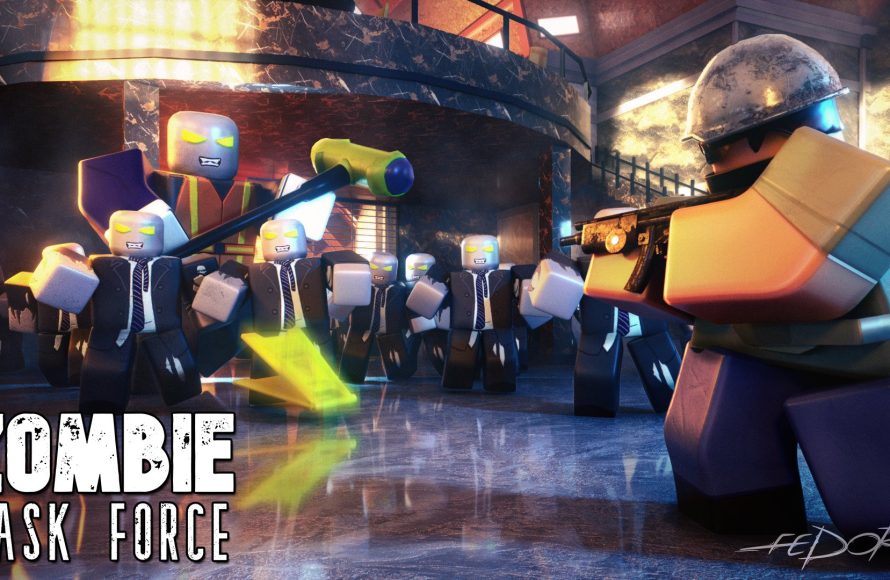
The key to effective Roblox thumbnail design for games is to create eye-catching visuals that clearly represent your game’s core experience, using bright colors, dynamic elements, and legible text.
Creating a great first impression matters significantly when it comes to your Roblox game. A compelling visual is crucial for attracting players. The right image will not only grab attention but also convey what your game is all about. This makes thoughtful roblox thumbnail design for games a must.
Think of your game’s thumbnail as a tiny advertisement. It’s your chance to draw players in and get them clicking. Make sure it stands out from the crowd, and players will be more likely to explore your world.

Roblox Thumbnail Design for Games
Okay, so you’ve made an awesome Roblox game! That’s fantastic! But here’s a secret: having a great game isn’t enough. People need to see how awesome it is. That’s where a super cool thumbnail comes in. A thumbnail is like the cover of a book – it’s the first thing people notice. A good thumbnail makes people want to click and play your game. A bad one? Well, it might just get skipped over. So, let’s dive into how you can make eye-catching Roblox thumbnails that will get your game noticed.
Why Thumbnails Are So Important
Think about walking down a toy aisle. What makes you stop and look at one toy over another? Usually, it’s the packaging! The same idea goes for Roblox games. Thumbnails are small pictures that represent your game on the Roblox platform. They’re your game’s first impression. If your thumbnail looks boring or confusing, people might not even give your game a chance, no matter how amazing it is.
Here’s why they’re so important:
- Grabs Attention: A great thumbnail stands out from the crowd of other games. It makes people stop scrolling and actually look at your game.
- Shows What Your Game Is About: A good thumbnail gives players a quick idea of what kind of game you made – is it a scary horror game? A fun adventure game? A building game?
- Attracts Players: A well-designed thumbnail can encourage more people to click and try your game. More clicks mean more players!
- Builds Your Brand: Consistent and high-quality thumbnails can help players recognize your games and become familiar with your brand.
Key Elements of a Great Roblox Thumbnail
So, what makes a thumbnail amazing? It’s a mix of several important elements that work together to make something that’s eye-catching and clear. Let’s break them down:
Compelling Visuals
This is the most obvious part: the picture itself! You need visuals that are exciting and show off the best parts of your game. But you can’t just take any screenshot, you have to think strategically:
- Use Vibrant Colors: Bright and colorful thumbnails attract more attention. Don’t be afraid to use a good color palette to make your thumbnail pop out.
- Include Action: Show something exciting happening in your game! Maybe a character is jumping, racing, fighting, or building. Avoid static or boring scenes.
- Feature Main Characters/Elements: If your game has unique characters or items, make sure they’re visible in the thumbnail. This lets players see what makes your game special.
- Good Lighting and Angles: Make sure your screenshots are well lit and show off the action from a good angle. Avoid dark or blurry screenshots.
Text and Typography
Adding text to your thumbnail can help give a good idea of what your game is about, it’s helpful for people who are quickly scrolling through many games on roblox, these few words will help them.
- Keep it Short and Sweet: Don’t clutter your thumbnail with too much text. Use only a few words that quickly tell people what your game is. For example, “Tycoon,” “Survival,” “Obby,” or the name of your game.
- Easy-to-Read Fonts: Choose fonts that are clear and easy to read, even on a small screen. Avoid cursive or complex fonts that are hard to decipher.
- Strategic Placement: Make sure your text is placed where it doesn’t cover important visuals and is easy to see.
- Use Outline or Shadow: Adding a stroke (outline) or shadow behind the text will make it stand out against the background.
Branding and Consistency
Think of your Roblox game as a brand, like a company. If all your thumbnails look the same (or similar), people will start to recognize your games more easily.
- Use a Style: Pick a style that fits your game and use it across all your thumbnails. This could be the same colors, fonts, or even a specific character design.
- Use Your Game’s Logo: Include your game’s logo (if you have one) on your thumbnails, so people can instantly recognize your games.
- Watermarks: Some designers use watermarks with their names or usernames to protect their work, though this is completely optional.
Clean and Simple Design
Remember, people only glance at thumbnails for a split second. Keeping things simple and easy to understand will get the most results.
- Avoid Clutter: Don’t try to cram too much into one thumbnail. Less is often more.
- Use Space Wisely: Make sure your elements have enough space around them, so they don’t feel crowded or messy.
- Keep it Focused: Make sure there’s one main focus point that guides the player’s eye.
Tools for Creating Roblox Thumbnails
You don’t need to be a professional artist to make great thumbnails! There are lots of free and easy-to-use tools available. Here are some popular ones:
Roblox Studio
The best place to start is Roblox Studio itself! You can take screenshots from inside your game and use them in your thumbnails. You might not get the same level of polish as using other design tools, but it’s a good starting point.
How to Take Good Screenshots in Roblox Studio:
- Camera Angle: Use the ‘Camera’ or use ‘shift’ + ‘p’ to move the camera freely in studio, find the perfect angle for your screenshot.
- Use High Graphics Settings: Change your in-game graphics settings to the highest possible for the best quality.
- Hide UI: Hide all the in-game user interface (menus, health bars, etc.) before taking your screenshots. In most cases, you’ll want to show your game in a clean state, without any UI covering it up.
- Lighting: Consider carefully how the light is playing in your scene, adjust the skybox and lighting settings to get the perfect shot.
Photo Editing Software
These programs allow you to edit and adjust your screenshots, add text, and more.
- GIMP (Free): GIMP is a free and powerful image editor, which is a great option for beginners. You can do most of the basics needed for good thumbnail creation.
- Canva (Free and Paid): Canva is a very easy-to-use design tool that has lots of pre-made templates and features to make creating thumbnails simple. It also has free and paid options.
- Pixlr (Free and Paid): Pixlr is a web-based photo editor, which is very similar to Photoshop. It’s very powerful and is great for more complex edits.
- Photoshop (Paid): If you’re serious about making Roblox thumbnails, you could try using Photoshop, which offers tons of features to fine-tune your designs, however it requires a paid subscription.
Most of these tools are easy to use, and you can find lots of tutorial videos on YouTube.
Step-by-Step Guide to Creating a Roblox Thumbnail
Okay, let’s put it all together! Here’s a simple step-by-step guide to help you make your first eye-catching thumbnail:
Step 1: Plan Your Thumbnail
Before you start, take some time to think about what you want your thumbnail to show. Ask yourself:
- What is the main focus of my game?
- What action or scene will be most exciting to show?
- What text should I include to give more context?
- What colors fit the theme of my game?
Step 2: Take Screenshots in Roblox Studio
Go into your Roblox game in Studio and take multiple screenshots of the scenes you’ve planned. Use good lighting and angles. Take several, so that you have more to pick from.
Step 3: Choose Your Editing Tool
Pick your favorite photo editing software (GIMP, Canva, Pixlr, Photoshop). If you’re just starting out, I would suggest using Canva as it’s very easy to use.
Step 4: Import Your Screenshot
Import your chosen screenshot into your editing software.
Step 5: Enhance the Visuals
Use the editing software to:
- Adjust brightness, contrast, and saturation to make the visuals pop.
- Crop or resize your screenshot to make it fit the thumbnail dimensions.
- Add any special effects like blur, sharpening, etc. to improve the quality.
Step 6: Add Text
Add your text. Choose a clear and easy-to-read font, and place it in a spot where it’s easy to see. Add stroke or shadow to make the text pop.
Step 7: Add Your Brand Elements
Add your game’s logo and any other brand elements you are using.
Step 8: Check for Clarity
Zoom out and make sure your thumbnail is easy to understand, even when small. If anything is unclear, edit it!
Step 9: Export and Upload
Save your thumbnail as a JPG or PNG file, and upload it to your Roblox game settings.
Examples of Great Roblox Thumbnails
Sometimes, the best way to learn is by looking at good examples. Here are some elements that make Roblox thumbnails great:
Action-Packed Thumbnails
These thumbnails show exciting things happening. You might see characters fighting, jumping, or racing, they get the players to click on the game due to this.
Character-Focused Thumbnails
If your game has memorable characters, make them the star of the show. Good use of vibrant colours and dynamic posing.
Simple and Clean Thumbnails
Sometimes, less is more! Clean thumbnails with a focus on one key element and well-placed text can be very effective, you don’t always need something that is filled with actions.
Branded Thumbnails
Games from well-known brands have consistent styles. The color and font are consistent, making them instantly recognizable.
Tips for Improving Your Thumbnails Over Time
Making great thumbnails is something that can be learned and improved upon, no one gets it right from the start, it’s a learning process, here are some tips on improving your thumbnails over time.
Experiment
Try out different things! Try different styles, colors, text, and actions to see what works best for your game. Don’t stick to just one thing, explore all the possibilities.
Ask for Feedback
Show your thumbnails to friends, family, or even other Roblox players and ask what they think. Their feedback can help you get better ideas to improve your design.
Look at Successful Games
Check out the thumbnails of popular games in your genre. What do they have in common? What makes them stand out? You can learn a lot from them and get inspiration.
Track Performance
Roblox provides game analytics. Track how your thumbnails perform. Are certain thumbnails getting more clicks than others? Use this data to improve your designs in the future.
- Click-Through Rate (CTR): The CTR is the percentage of people who click on your game after seeing your thumbnail. A higher CTR means your thumbnail is working well.
- Impressions: Impressions are how many times your thumbnail has been shown on the Roblox website, this helps you understand how much exposure you are getting.
These tips can guide you in making and improving your thumbnails, the only way to get better is to practice and try.
Creating an effective Roblox thumbnail is very important for your game’s success, making people want to click on your game and try it out, and by following all the steps and suggestions mentioned above you can make that happen. Remember to keep practicing and experimenting and your skills will improve over time. So, go ahead, start making your thumbnails now and watch your game get the attention it deserves!
How I Make My Thumbnails For A Roblox Bedwars YouTuber 😳 #shorts
Final Thoughts
Effective roblox thumbnail design for games requires bright colors, clear text, and compelling imagery. A good thumbnail grabs attention instantly. Use contrasting elements for a more engaging visual experience.
Consider your target audience when choosing the style and elements. Experiment with different compositions and fonts. This helps to create effective game thumbnails.
Ultimately, creating strong visuals is crucial for success. Strong roblox thumbnail design for games drives clicks and attracts players. Remember, a great thumbnail often equals more engagement.

