
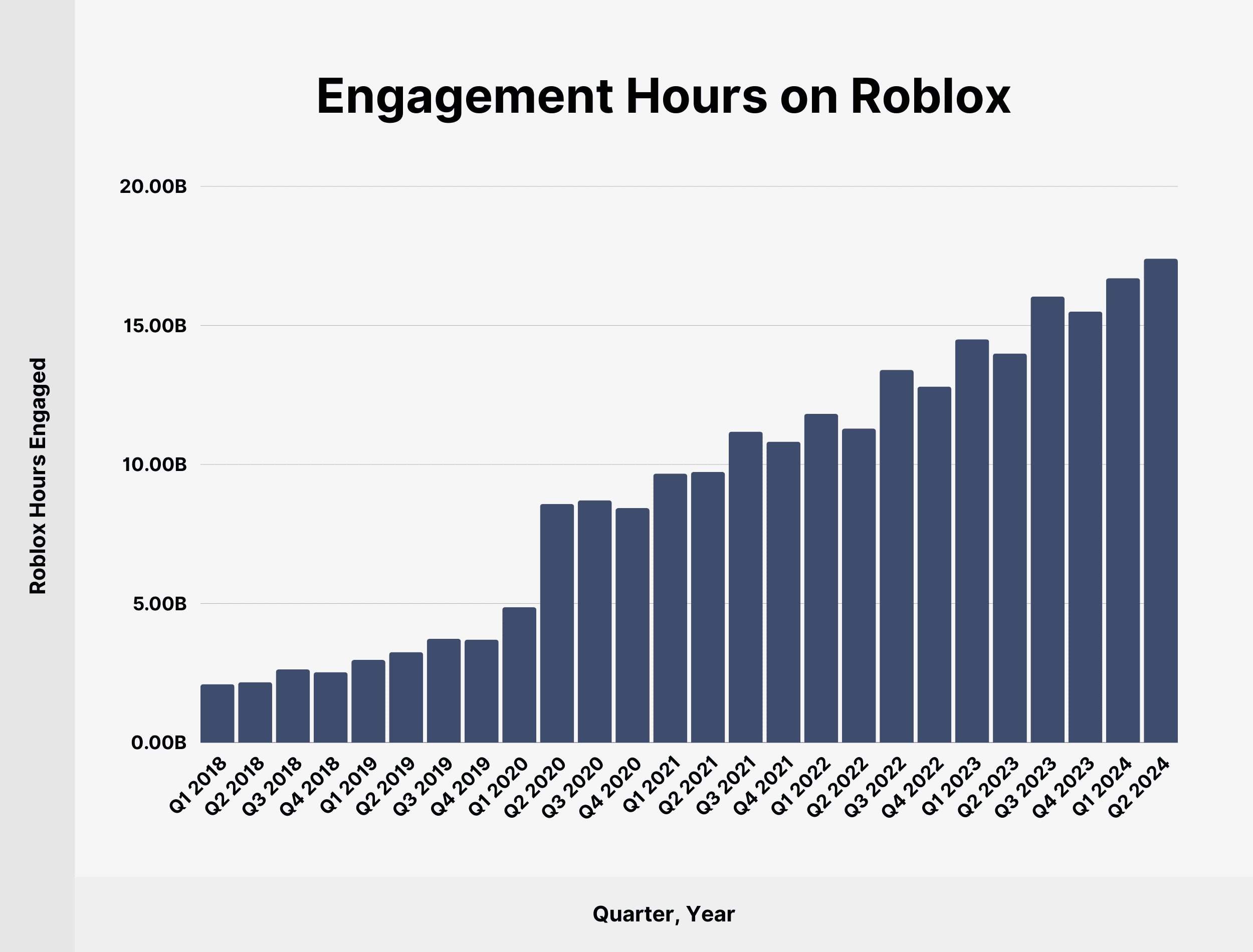
Effective Roblox user engagement analysis requires tracking metrics like playtime, session frequency, and in-game purchases to understand player behavior and optimize game design.
Have you ever wondered what makes a Roblox game truly captivating? Understanding player behavior is key to creating successful experiences on the platform. Deep diving into the data through Roblox user engagement analysis provides valuable insights for game creators. This analysis lets developers see how players interact with their games.
By observing key performance indicators, developers can pinpoint areas for improvement. This data-driven approach allows for targeted game updates and more engaging content. Improving player retention and satisfaction will definitely boost the success of any Roblox creation.

Roblox User Engagement Analysis: Diving Deep into Player Behavior
Ever wondered why some Roblox games are super popular while others are… well, not so much? It’s all about how players interact with the game – that’s what we call user engagement. Figuring out how players behave can help creators make their games even better, more fun, and keep players coming back for more. This is where Roblox user engagement analysis comes in. It’s like being a detective, but instead of solving crimes, you’re solving the mystery of what makes players tick! Let’s explore the cool tools and ideas we can use to understand what players are doing in Roblox games.
Why is User Engagement Analysis Important?
Imagine you build a fantastic LEGO castle, but no one wants to play with it. That’s kind of what it’s like if your Roblox game isn’t engaging. User engagement analysis helps you avoid that. It allows you to see:
- What players like: Are they spending hours in one area? Do they love a specific game mode? Knowing this helps you focus on what’s working.
- What players don’t like: Are players leaving quickly at a certain point? Is there a confusing part of the game? Identifying these pain points allows you to make improvements.
- How to keep players coming back: Understanding player behavior helps you build a game that people want to play again and again. This means more fun for them and more success for you!
- To build Better Game : It gives insights for creators to build their game on players needs and what they like the most.
- Improve Overall User Experience: It makes players journey through the game more enjoyable and keeps them engaged.
In short, analyzing player engagement helps you make a much better game! It’s all about making sure that playing your game is a blast.
Key Metrics for Roblox User Engagement
To analyze user engagement, we need to look at certain numbers called “metrics.” These metrics are like clues that help us understand how players are interacting with our game. Here are some important ones:
Playtime
Playtime is simply how much time players spend in your game. It’s a crucial metric because the longer they play, the more they’re enjoying it. A higher average playtime usually means your game is doing a great job of keeping players interested. If you notice that players leave your game within a few minutes, you can then see what part of the game is not keeping them and make changes accordingly. For example, if you notice new players exit at a particular point, you can add more tutorials, simplify the game or provide more engaging content.
Retention Rate
Retention rate is like checking how many players return to your game the next day, the next week, or the next month. If lots of players come back, that means your game is sticky – people like it enough to play it again! A good retention rate is a sign that your game is consistently fun and engaging. If you see a drop in retention, it’s time to see what can be done to keep the players from leaving.
Session Length
Session length is the average time that players spend in the game per visit. If the session length is long, it can mean they are enjoying it. If the session is shorter, it might mean they aren’t finding it engaging enough to stay. Longer sessions indicate that players are fully invested in the game.
Average Revenue Per User (ARPU)
ARPU shows how much money each player spends on average in your game. While it’s about making money, it’s also an engagement metric. Players who spend money on a game often enjoy it a lot. If the ARPU is going up, it often means that players are investing more into the game which is good sign. This is a key metric when you are creating a game and you are trying to make money.
Daily/Monthly Active Users (DAU/MAU)
DAU/MAU measures the number of players who play your game daily or monthly, respectively. It’s a simple but powerful metric. A growing DAU or MAU is a sign that you are gaining players and they are liking the game. On the other hand, a drop in these can show that your game is losing engagement. This will indicate that you need to analyze what went wrong.
Conversion Rate
Conversion rate measures the percentage of players who actually complete certain actions, like finishing the tutorial, or a certain level, or buying an in-game item. A high conversion rate shows that players are understanding how to play and enjoying the experience. A low rate can tell you that the gameplay is too complicated or they are just losing interest.
Player Feedback
Player feedback isn’t a number, but it’s super important! This is about hearing what players think about your game. You can do this through:
- In-game polls: Asking players quick questions.
- Chat: Reading what players talk about.
- Reviews: Seeing what players write about your game.
- Social Media: See how people are talking about your game.
Player feedback is essential as it allows you to know what they are liking and not liking in your game. It’s a very important part of the process to get feedback from the players.
Tools for Analyzing Roblox User Engagement
Luckily, Roblox gives creators some helpful tools to understand their game’s user engagement. These tools are like having a secret spy kit, where you can see what is happening in your game. Here are some ways to access these tools:
Roblox Developer Stats
Roblox Studio provides access to the Developer Stats section, and these stats will allow creators to see all types of metrics for the game. Creators can see how many players are playing, how long they are playing, where they are in the game, and more. This information helps you understand what is working and what is not in your game. Roblox analytics are very helpful when you are creating a game.
Roblox Analytics Dashboard
The analytics dashboard gives you easy-to-read charts and graphs of your key metrics. It allows you to see if the game is doing well, or if you need to make some adjustments. With the help of analytics dashboard, developers can easily make changes based on the analysis. It provides a visual way to understand the data without making it complicated.
Third-Party Analytics Platforms
Some developers use external tools to get even more detailed information. These might provide more advanced data or help integrate data with other platforms. These tools can give creators a deeper and more complex view on how their game is performing and where to focus more.
How to Apply User Engagement Analysis
Okay, so now you know about the metrics and tools. But what do you do with all this information? It’s time to put the pieces together! Here’s how to actually use player engagement data to make your game better:
Identify Problem Areas
First, look for the problem spots. For example, if players drop out after a certain level, then it might be too difficult, boring or repetitive. By identifying the areas where players are leaving the game, you can focus on fixing these areas. Maybe your tutorial is unclear, or the game becomes too hard or too boring at a certain point.
Make Small Changes
Don’t make huge changes all at once. Try tweaking one small thing at a time. For example, if you realize players are leaving the game in the tutorial level, you can make small changes such as adding more detailed instructions or making it simpler to understand. If you change many things at the same time, it will be harder to know what fixes are working or not.
Track Changes
After making a change, carefully track your metrics. Did playtime go up? Is retention rate better? By tracking the changes, you can determine whether the changes you made are working or not. It’s important to see if the changes had the intended effect or not. If the metrics are not improving, you might need to try something different.
Listen to Players
Always remember to listen to your players! Read their comments, reviews, and chat messages. What do they like? What are they struggling with? Players are the best source of what works or what isn’t working. This will tell you a lot about your game. Hearing them and listening to them is also an important part of the process.
Use A/B Testing
A/B testing allows you to compare two different versions of your game and see which performs better. For example, you might change the tutorial in one version, while the other one remains the same. This lets you see if one tutorial performs better than the other. By testing different versions of the game and comparing the data, you can make more informed decision on what changes to make.
Specific Examples of User Engagement Analysis in Action
Let’s see some examples of how understanding user engagement can help you!
Example 1: The Confusing Tutorial
Imagine you notice that many players leave after the tutorial. This can mean the tutorial is confusing. By carefully watching how the players are going through the tutorial, you can see where they might be getting stuck. You can simplify the instructions, add visual cues, or make the tutorial more fun and engaging.
Example 2: The Repetitive Level
Let’s say players get bored during level 5. By looking into the analytics, you see many players leave at that point. You can then try to spice things up. This can be done by adding some new obstacles, introducing new types of enemies, or adding some exciting rewards at the end.
Example 3: The Underused Feature
If you notice players are not using a specific feature, try to make it more attractive. For example, if there is a building feature but no one is using it, it could mean that the feature is not exciting. Make it more clear how it works or make it more fun or add some benefits to using it.
Tips to Improve User Engagement on Roblox
Want your game to be a hit? Here are some tips to keep players engaged:
- Make it fun! This might seem obvious, but your game needs to be a fun experience for players.
- Clear goals: Players should know what they are supposed to do and what they are working toward.
- Regular updates: Adding new content and features can keep players coming back for more.
- Variety: Don’t let things get too repetitive. Keep things exciting with different challenges.
- Listen to Feedback: Pay attention to what players are saying and make changes to keep them coming back.
- Make it social: Make it easier for players to interact with each other. Add some social features to your game.
Remember that a fun game is an engaging game! If you focus on making the game fun to play, you can keep your players coming back for more.
By carefully analyzing how players interact with your game, you can continuously make your game better, more engaging, and more enjoyable for everyone. And that’s the key to making a game that players will love to play for a long time!
Is ROBLOX Dying? I've Played for 3 Years and Still Hooked #roblox #robloxedit
Final Thoughts
Effective Roblox user engagement analysis requires tracking key metrics like playtime, retention, and social interactions. Analyzing these elements helps identify successful game features. User feedback also provides valuable insight into player experience and satisfaction.
Properly understanding user behavior patterns allows for targeted improvements. These improvements directly boost engagement and overall game popularity. This rigorous approach to Roblox user engagement analysis is crucial.

