
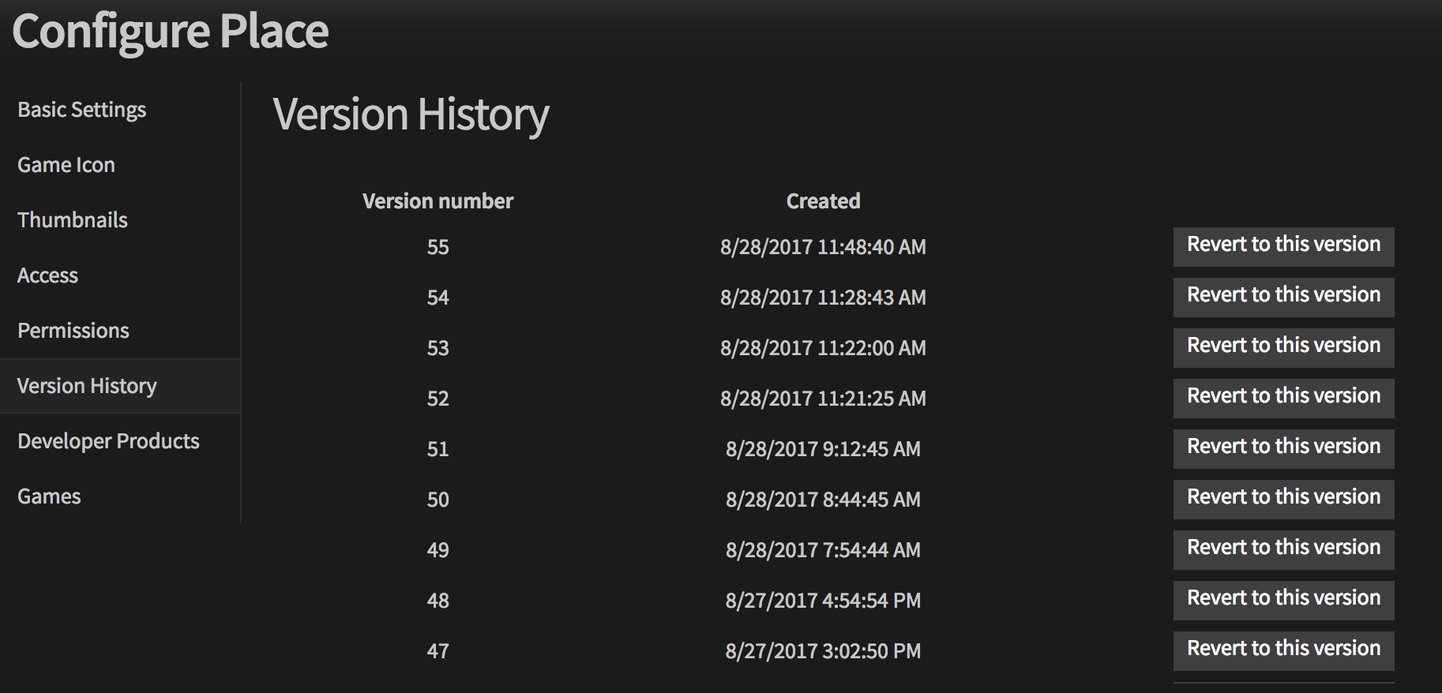
Roblox version control explained is about utilizing tools and practices to manage changes to your game’s files, allowing you to track revisions, collaborate effectively, and revert to previous states if necessary.
Ever accidentally deleted a crucial script or wished you could undo a change? Many Roblox developers face this hurdle. That’s where the concept of roblox version control explained becomes very handy. It provides a structured approach to managing your game’s development.
Implementing version control, you can track every modification made to your game. This makes collaborative projects much more manageable and safe, preventing accidental overwrites. You can easily compare versions of the game and even go back to previous iterations.

Roblox Version Control Explained
Ever built something really cool in Roblox Studio, only to accidentally mess it up and wish you could go back? That’s where version control comes in! Think of it like a magical “undo” button for your entire game, not just the last thing you did. It lets you keep track of all the changes you make to your Roblox projects, so you can always go back to a previous version if something goes wrong. It’s like having a time machine for your creations! In this article, we’ll explore how version control works in Roblox, why it’s super helpful, and how you can use it to make your game development process much easier.
Why is Version Control Important in Roblox?
Imagine building a massive castle in Roblox. You spend hours adding turrets, walls, and secret passages. Then, you try something new – maybe adding lava, but it goes horribly wrong! The lava spreads everywhere and destroys your hard work. Without version control, you might have to start all over again. But with version control, you can simply rewind to a point before you added the lava. This is why version control is so important. It saves you time, reduces frustration, and helps you experiment without the fear of losing everything. Let’s break it down further:
Avoiding the Dreaded “Oops!” Moment
We’ve all been there. That moment when you accidentally delete something important or make a change that ruins hours of work. Version control is like a safety net. It captures snapshots of your project at different stages, so you can always revert back to a previous, working state. It’s like having an unlimited supply of “undo” buttons.
Experimenting Fearlessly
Want to try out a new feature, a different style, or a crazy new game mechanic? Version control encourages experimentation. You can explore new ideas without worrying about messing up your main game. If the experiment works, great! If it doesn’t, you can easily go back to your previous version and try something else. It’s like having a playground for your game development.
Teamwork Made Easy
When working with others on a Roblox project, version control is crucial. It allows multiple people to work on the same game at the same time without overwriting each other’s work. Each person can make their changes, and version control helps combine all those changes smoothly. It’s like having a traffic controller for your game, keeping everything in order.
Tracking Changes and Progress
Version control isn’t just about going backward; it’s also great for tracking how your game has changed over time. You can easily see what was done on which day, who made the changes, and what exactly was modified. This helps you keep organized and understand how your game evolved.
How Does Roblox Version Control Work?
Roblox doesn’t have a built-in version control system like some professional software. Instead, it relies on a combination of saving game versions, creating copies of your game, and using Roblox Team Create for collaborative projects. Here’s how these methods generally work:
Saving Game Versions
The simplest form of version control in Roblox is saving different versions of your game. Here is how you can do it:
- Go to “File” in Roblox Studio.
- Select “Save to Roblox as.”
- Make sure to write a meaningful name that will describe the changes. For example, “Castle with walls” or “Before new lava feature”.
- You are now able to save all the changes and revert back to this version if needed.
It’s important to get into the habit of saving your work frequently and giving your saves meaningful names so that you can easily go back to them.
Using the “Save As” Option Effectively
Instead of just overwriting your previous game saves, use the “Save As” option to create a new version each time you make significant changes. This way, you have multiple checkpoints to go back to if something goes wrong. Think of it as creating different save points in a video game.
- Before Big Changes: Always save a new version before making a major change to your game.
- After Reaching Milestones: Save a new version after completing important tasks, such as finishing a new map area or adding a new game mechanic.
- Regularly: Save new version frequently in order to save all of your changes.
Using Roblox Team Create for Collaboration
If you are working with other people on a Roblox game, Team Create is extremely helpful. Here is how to setup Team Create:
- First save the game to Roblox.
- Next, go to “View” in Roblox studio and select “Team Create”.
- A new window will open and you can enable the team create setting.
- You can now invite all the people who you are working with.
Roblox automatically saves changes from different collaborators in separate edits. This helps prevent you and your teammates from overriding each other. It doesn’t provide a full history of versions, but it lets you and your teammates collaborate better on the same game.
Understanding the Limitations of Roblox’s Built-in System
While Roblox’s methods help with basic version control, they are not as advanced as dedicated systems like Git. Here are some of the limitations:
- No Detailed Version History: Roblox doesn’t show you the exact differences between different versions of your game in an easy-to-read format.
- Manual Management: You need to manually save and manage your versions, making it more prone to error if you don’t do it systematically.
- Limited for Complex Projects: For larger, more complicated games with many developers, the built-in version control might not be as robust as needed.
Alternatives and Advanced Techniques for Version Control
Because of the limitations of Roblox’s version control, some developers use other tools. Let’s explore them.
Git and GitHub: The Professional Standard
Git is a powerful version control system widely used by professional software developers. GitHub is a popular website that hosts Git repositories online. While setting up Git for Roblox can be complex, it offers much more control and flexibility. Here are some things that Git and Github have:
- Detailed Commit History: Track changes to individual scripts, models, and more.
- Branching and Merging: Easily create experimental branches and merge them back into your main game when ready.
- Collaboration: Seamless collaboration with multiple developers with tools to handle conflicts.
How Git Can Help with Roblox Projects
Here are some ways Git can help with Roblox Projects:
- Script Management: track changes to scripts, making it easier to see when you added new features, fixed bugs, or made changes.
- Model and Asset Management: track changes in your models, images, and other assets.
- Team Collaboration: Git is excellent for collaborative projects. It lets multiple developers work on a game at the same time without overriding each other’s work.
How to Integrate Git with Roblox Studio
Setting up Git with Roblox Studio requires a few extra steps, as Roblox Studio does not have built-in Git support. Here’s the general process:
- Setting Up Git: First you need to install Git on your computer and create a GitHub account.
- Storing Project Files: Your Roblox project files need to be saved somewhere that Git can access.
- Using Git in the Command Line: After saving your project, you will use the Git terminal/command line to commit the changes in your projects.
- Integrating with Roblox Studio: You usually need additional tools or scripts to automatically link Roblox Studio changes to Git. This usually involves scripts that sync your Roblox files to a local Git repo.
While integrating Git can be more complex than using the basic Roblox system, it provides much more flexibility and is definitely worth learning, especially for larger games or for developers who want to collaborate with others more effectively.
Other Tools and Techniques
Besides Git, there are other tools and techniques to help with version control in Roblox. Here are a few of them:
- External Backup Software: Using cloud services like Dropbox or Google Drive to back up your Roblox project folder.
- Custom Scripts: Developing custom scripts to save game files with specific version numbers or automatic backups.
- Plugins: Using plugins developed by other developers to help automate part of the process.
Best Practices for Roblox Version Control
No matter what system you use, here are some important tips to help with Roblox version control:
Save Often and Meaningfully
Don’t just save your game, save your game often, and give your saves meaningful names. This way, when something goes wrong, it will be easy to revert back to a working version. This is especially important before making major changes to your game. If you make a mistake, you’ll be able to revert to the saved version before the mistake was made.
- Save Regularly: Get into the habit of saving your work every 10 to 15 minutes.
- Use Descriptive Names: Use descriptive names, such as “Before New GUI” or “Finished Level 1”.
Communicate with Your Team
When working in a team, good communication is essential. Let your teammates know about major changes you’ve made or any issues you run into. This helps prevent conflicts and confusion when merging code.
- Share What You’ve Changed: Let teammates know before making a big change so they can prepare to avoid conflicts.
- Ask Questions: If you are confused about what changes to make or if something goes wrong, then you should ask your teammates for help.
Keep Your Project Organized
A well-organized project is easier to manage and control. Use folders and categories to organize your models, scripts, and other assets. A structured project will help you track changes and understand your game’s development.
- Use a Folder Structure: Organize your files in a logical way, for example, putting all scripts in a “Scripts” folder, models in a “Models” folder, etc.
- Name Things Clearly: Make sure your models, scripts, etc., have names that explain what they are.
Test Changes Thoroughly
Before committing a version, make sure you’ve tested your changes thoroughly. Run your game and look for bugs or issues that might have been introduced with the changes you’ve made. Testing before you commit can help save a lot of time and frustration.
- Playtest: Always test your changes before marking them as finished.
- Look for Errors: Check for any error messages or unexpected behavior.
Be Patient and Learn Continuously
Version control is a powerful skill, and learning to use it effectively takes time and practice. Don’t get discouraged if you have some difficulty using version control, especially when using more complex tools like Git. As long as you continue to learn and practice, you’ll get better at it.
In conclusion, version control is an essential practice for any Roblox developer. It doesn’t matter whether you’re working alone or with a large team, using a form of version control will save you a lot of time and frustration. By using the save features effectively or a more advanced version control like Git, you can manage your Roblox projects efficiently and make your game creation experience better. Remembering to make frequent saves, organize your projects, and communicate with your teammates will help you create a better game and will also make game development more fun!
Professional Roblox Game Development with Rojo + Visual Studio Code + Git Version Control
Final Thoughts
In essence, effective Roblox version control lets developers track changes and collaborate smoothly. Utilizing a system like Git allows for easy management of script and place file revisions. This system is a must for any serious team.
Roblox version control explained is crucial for large projects. It helps prevent errors from conflicting edits and also lets teams revert to earlier stable versions. This process greatly improves development efficiency.

