
Building a great Starfield outpost requires focusing on resource extraction, choosing an ideal location, and carefully planning modules for maximum efficiency.
So, you’re diving deep into the cosmos of Starfield and itching to create your own little slice of settled space? A functional, even beautiful, outpost is within reach. This Starfield build guide for outpost builder will help you construct an effective base of operations.
We’ll discuss the core elements: choosing the right planet, selecting the best layout, and strategically connecting resource extractors to power sources. You will also see how to optimize storage and crafting. Get ready to build something awesome!

Starfield Build Guide for Outpost Builder
Alright, future space pioneers! So you’re ready to set up shop in the vastness of Starfield? Building outposts is a key part of the game, and with the right know-how, you can create sprawling bases that will make even the Crimson Fleet jealous. This guide is designed to help you become a top-notch outpost builder, whether you’re just starting out or looking to refine your existing techniques.
Understanding the Basics of Outpost Building
Before we dive into the nitty-gritty, let’s cover some foundational stuff. Think of your outpost as a mini-town that you get to design and manage. Here’s what you need to know:
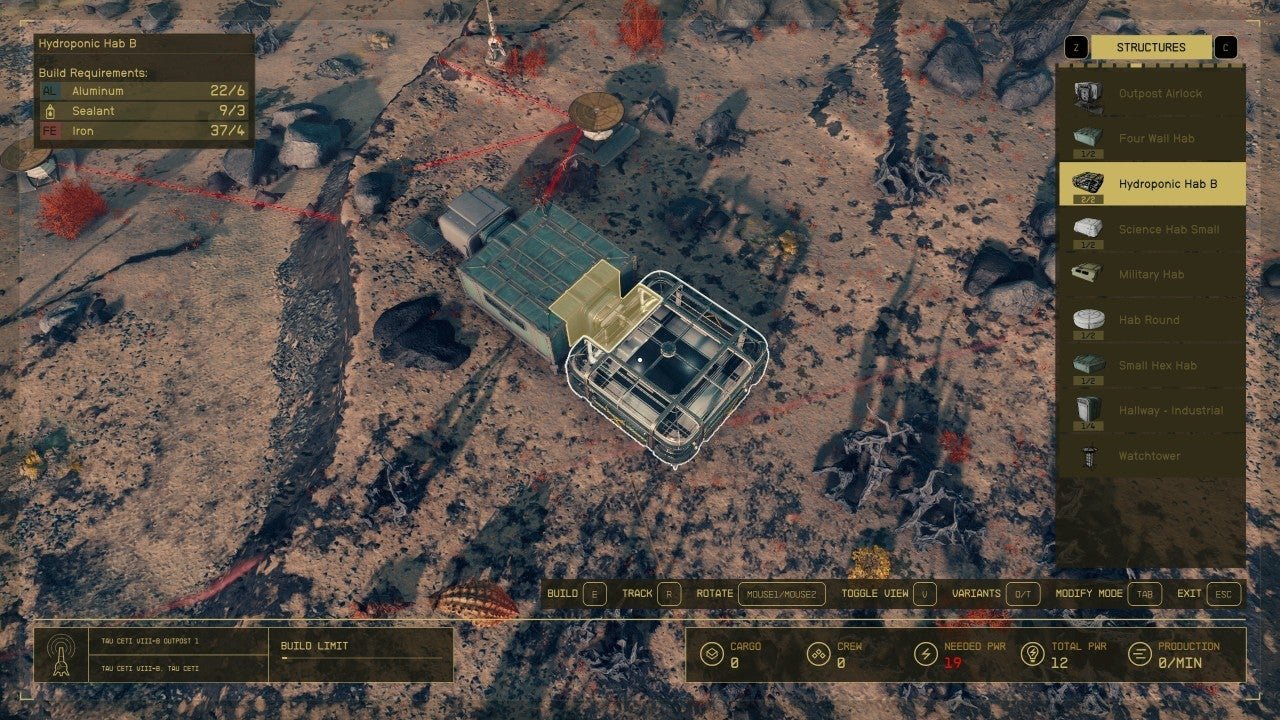
The Outpost Builder Menu
Accessing the outpost builder is simple. When you’re on a suitable planet, open your scanner and look for the “Build Outpost” option. Once activated, a menu will appear. This is your command center for building structures. This menu shows you everything from habitats to resource extractors, all neatly categorized for easy selection. Take some time to familiarize yourself with the available options and their functions. You’ll use this menu a LOT!
Choosing the Right Location
Location, location, location! Just like in real estate, where you build your outpost matters a lot in Starfield. Key things to consider:
- Resource Availability: Are there the resources you need nearby? Scan the area with your scanner. Look for icons that show the type of resource and its quantity. Copper, Iron, Aluminum – these are essential for crafting and building.
- Terrain: Try to find a flat area. This will make it easier to place your structures and avoid wonky-looking buildings. Hills and valleys can make building more complicated.
- Environmental Hazards: Be mindful of extreme temperatures, toxic atmospheres, or other hazards. Check your scanner for warnings before settling down. You might need to research specific technologies to make your outpost habitable in harsh environments.
- Natural Beauty: Hey, even in space, a pretty view is nice! If possible, pick a location that you find visually appealing. You’ll be spending a lot of time there.
Remember, you can have multiple outposts, so you don’t have to cram everything into one spot. Sometimes, focusing on one specific type of resource in each outpost is the best approach.
Outpost Modules: The Building Blocks
The menu is full of all kinds of modules. Here are some essential types to help you understand what you can build:
- Habitats: These provide a safe place for you and any crew members at your outpost to live. Different sizes and styles are available. They also provide a safe place to sleep and pass the time when you don’t want to wait for certain events to finish.
- Storage: You’ll need containers to hold all the resources you are gathering. Different sizes are available. Don’t underestimate how quickly you will fill containers. Start with several and be prepared to add more as your operation grows.
- Extractors: These are vital for harvesting resources. You’ll need to choose the right extractor for the specific resource you’re looking to obtain. Make sure you are connected to power when building these, or they won’t do anything.
- Power: Nothing will work without power. Solar arrays, wind turbines, and fusion reactors are all options. The type of power source you’ll want to use will depend on your planet’s environment.
- Research Facilities: If you want to craft better buildings, equipment, and upgrades, you’ll need research facilities. This is where you can spend your skill points and conduct important projects.
- Crafting Stations: If you’re looking to build or modify something, you’ll need the appropriate crafting station. Workbenches are also included here.
- Defenses: Don’t leave yourself unguarded! Turrets and other defenses can protect your outpost from aggressive alien wildlife and pirates.
Each module has a build cost in materials, so you’ll want to check on the material requirements before you place the item.
Powering Your Outpost: A Critical Element
As previously mentioned, power is the lifeblood of any successful outpost. Here’s how to keep the lights on and your operations running smoothly:
Power Generators
Starfield offers a few options for generating power:
- Solar Arrays: These are good for planets that receive plenty of sunlight. They generate power during daylight hours. Solar arrays are cheap to build but are intermittent.
- Wind Turbines: If you’re on a planet with decent wind, wind turbines can be a great option. They are also cheap but, like solar, are intermittent.
- Fusion Reactors: These are the heavy hitters of power generation, producing a large amount of power that runs constantly. They require advanced research to build but provide the best solution for consistent power.
Start with solar or wind power to get a base going, and then shift towards fusion as your outpost expands. You’ll need to balance the power requirements of your outpost with your power generation. If you are having trouble getting your power needs met, you should consider adding additional power generators.
Power Management
Pay attention to how much power your structures use. Each one has a specific power draw. If you overload your power supply, your modules will not run. If you find you are running out of power, simply add more generators or upgrade to better options.
Resource Management and Logistics
Having a well-managed resource system is crucial for a thriving outpost. Here’s how to handle the movement of materials efficiently:
Extracting Resources
Extractors come in different forms. The most important thing is matching the extractor to the resource you intend to collect. For example, you’ll need an Aluminum extractor to pull Aluminum from the ground. Once you have the right extractor, make sure it is located at a resource node by scanning the area. Place it right over the node and make sure it is connected to a power source.
Storing Resources
Storage containers are necessary to store the resources you are collecting. Place storage containers near your extractors and crafting areas. This will make your work much more efficient. Remember, your storage will fill up fast, so be prepared to add more containers as your operation grows.
Linking Outposts with Cargo Links
You can connect multiple outposts using cargo links. This is a vital step if you want to move materials from one location to another automatically. This will allow you to create a complex network of linked bases that can supply your main outpost with all of the necessary materials. A single cargo link can be used for incoming and outgoing shipments. Here is how to set up a cargo link:
- Select the Cargo Link module in your build menu.
- Place the Cargo Link module in an appropriate spot at your outpost.
- Connect the Cargo Link to your outpost’s power grid.
- Choose your destination outpost. You need to have created the destination outpost first.
- Select the resource you want to transfer. This can be an automated delivery of materials to another location.
With Cargo Links, you will be able to create a completely automated resource management system.
Building Efficient and Beautiful Outposts
Now that you understand the basic elements, let’s look at some ways to build a more functional and appealing outpost:
Layout and Design
Think of the flow of your outpost. Place your extractors near the resource nodes, your storage close by, and your habitats in a central area. This will make it easier to move around and get things done. Don’t be afraid to try new configurations to find a way that you like.
- Cluster modules. Group similar modules together for a more organized feel.
- Create pathways. Use landing pads, hallways, and walkways to connect areas.
- Use decoration. There are lots of decorative items available. Use these to personalize your space.
Always think about how you can optimize your outpost’s layout for the task you intend to complete.
Advanced Techniques and Tips
As you become a more experienced outpost builder, you will begin to use advanced strategies:
- Stacking. You can stack some modules on top of each other. This will help you to conserve space. Make sure you are not blocking access to doors and other items.
- Use skills wisely. The skills you learn will help you to build more advanced facilities and unlock important outpost options.
- Optimize your resource routes. Use cargo links to move materials efficiently. You should be able to build a completely automated system for resource collection and transportation.
- Don’t be afraid to experiment. Try out new things and see what works for you. You can always remove and rebuild modules. Don’t be afraid to try something new!
Dealing with Problems
Sometimes, things might not go according to plan. Here are a few things that can go wrong and how to deal with them:
- Power Failures: Double check your power grid and add more generators if needed. Make sure that no modules are overloaded and shutting down your system.
- Resource Depletion: Move your extractors to new nodes when the current ones are empty. This can also be solved by using cargo links to import resources from other outposts.
- Attacks: Add more turrets and defenses to protect your base from attacks.
- Bugs: Sometimes a game will have issues. If you are encountering something that just doesn’t seem right, you may want to save your game and try restarting the game.
Planning Your Outpost Network
As you build, think about how your outposts will interact with each other. Do you want some to specialize in resource gathering, while others focus on research and crafting? By using cargo links, you can create a supply chain that supports all of your needs.
Building Outposts Across Planets
Don’t limit yourself to just one planet. You can set up outposts across multiple planets and even solar systems. Each planet can be unique and provide different opportunities for resource collection and other activities. Experiment with building outposts across the cosmos and see what you can find.
Remember that a successful outpost isn’t just about resource gathering. It’s also about creating a functional and personally satisfying space that you can be proud of. A well-designed outpost will increase your enjoyment of the game and make you feel like you have really conquered the vastness of space. So, take the time to learn the ropes, experiment with your design, and build the outpost of your dreams!
By keeping these points in mind, you will be able to build the ultimate outpost, making you the master builder of the Starfield universe. Now get out there and start building!
Starfield – The Beginner's Guide to Building Outposts
Final Thoughts
For efficient resource management, prioritize extractors near veins and maximize cargo links. Plan your layout carefully, considering habitation needs and crafting stations. A strong power grid is essential to keep everything running smoothly. These basics will help you create a functional outpost.
Starfield build guide for outpost builder emphasizes a foundation of resource gathering and logistical connections. Remember to regularly survey your area and adapt your plans as you go. This process will create optimized bases across the galaxy.

