
Early in Starfield, players find helpful guides, interactive maps, and item databases, created by the community to aid their exploration and progression.
Starting your spacefaring journey in Starfield can feel overwhelming. The vastness of the game and its many systems can be challenging for new players. However, the good news is a very active community formed to help each other.
These players actively create a range of Starfield early game community resources. They provide useful tools to navigate, craft, and improve in the game. Therefore, getting familiar with them early is a smart move for anyone stepping into this universe.

Starfield Early Game Community Resources
So, you’ve jumped into the vast world of Starfield! It’s huge, exciting, and maybe a little bit confusing at first. Don’t worry; you’re not alone. Many players are just starting out, just like you. The good news is that the Starfield community is awesome and has created tons of helpful resources to make your early game experience much smoother. Let’s explore some of these fantastic tools and how they can assist you in becoming a space-faring pro!
Interactive Maps: Navigating the Stars
One of the first things you’ll realize is that Starfield has a massive amount of planets, moons, and locations to explore. Remembering where everything is can be tricky. That’s where interactive maps come in really handy.
What are Interactive Maps?
These aren’t your typical in-game maps. Think of them as super-powered versions that fans have created. They often include:
- Detailed Location Markers: These mark cities, points of interest, resources, and other important spots. No more wandering aimlessly!
- Resource Locations: Know exactly where to find that precious Iron or Helium-3.
- Quest Markers: Some maps even include important quest locations, making it easy to follow those tricky side stories.
- Filter Options: Need to find a specific type of shop? Many maps let you filter by type.
Where to Find Them
You can usually find these maps on:
- Fan-made Websites: Many dedicated Starfield websites host these interactive maps.
- Gaming Forums: Check out popular forums like Reddit or the official Bethesda forums; players often share links.
- Community Discord Servers: A number of community servers maintain their own maps and resource databases.
Using an interactive map is a fantastic way to get your bearings and plan your early adventures. It saves time, reduces frustration, and helps you make the most of your time in the Settled Systems.
Crafting and Research Databases: Your Recipe Books
Crafting and research are core parts of Starfield. Figuring out what you need and where to find it can be a bit of a puzzle. Community-created databases are here to help you solve that puzzle easily.
What’s in a Database?
These databases organize all the information you need about crafting and research:
- Crafting Recipes: Get detailed lists of all the resources needed for weapons, armor, and aid items.
- Research Projects: See what you need to build new tech and gain special skills.
- Material Locations: Learn where to find the raw materials to create all the things.
- Perk Information: Some databases show which perks help with crafting and research.
Why are These Databases Helpful?
Having a database at your fingertips saves you the time of guessing. You can easily:
- Plan ahead: Know which resources to collect on your next planet visit.
- Optimize your character: Discover the most useful research projects to level up your character fast.
- Avoid wasting resources: Spend your resources wisely by having a clear idea of what you’ll craft.
Think of these databases as your handy recipe books for Starfield. They are invaluable tools that make the crafting and research process far less confusing and much more efficient.
Quest Guides and Walkthroughs: Never Get Stuck
Starfield is filled with interesting quests, but sometimes you might hit a wall or get stuck on a confusing objective. Fortunately, the community has got your back with quest guides and walkthroughs.
What do Quest Guides Offer?
These resources give you step-by-step instructions on how to complete quests. You can find:
- Detailed steps: Clearly written directions for every part of the quest.
- Tips and tricks: Find out about hidden objects or quicker ways to complete tasks.
- Branching paths: Learn about the results of the choices you make, ensuring you select the outcome you desire.
- Troubleshooting: Get solutions for common problems or glitches you may encounter.
When to Use a Quest Guide
While exploring and figuring things out on your own is a big part of the game, quest guides can help you when:
- You’re totally stuck: If you’ve been wandering for ages and still haven’t found the next objective, a guide can save you time and stress.
- You want the best outcomes: If your quest gives you choices, a guide can help you pick the best one, if that’s something you like.
- You want to finish a quest quickly: When you’re in a hurry to see what’s next, guides help you finish quests faster.
Quest guides are a fantastic way to make sure you don’t miss out on the best parts of Starfield because you are unsure how to move forward. They enhance your gameplay experience and keep you moving through the game’s stories at your own pace.
Ship Building Guides and Blueprints: Constructing Your Dream Ship
Building and customizing your ship is a key part of Starfield. It lets you create a vessel that suits your unique play style and preferences. But where do you start? Community ship building guides can help you to understand the basics, providing useful advice and ideas.
Understanding Ship Building Guides
Community ship guides will offer:
- Basics of Ship Design: Helpful tips for building better ships and understanding different ship parts.
- Component Information: Details on different components, like weapons, engines, and shields, and how each one changes your ship.
- Blueprints and Design Ideas: See different ship builds created by other players and learn how they work.
- Tips for Customization: Find out about painting and personalizing your ship to make it really your own.
Why Ship Guides are Essential
Using these guides can be the key to crafting a powerful and great-looking ship. They help you:
- Avoid costly mistakes: Learn which components to prioritize and which ones to avoid, saving time and credits.
- Create specialized ships: Build ships suited to combat, transport, or exploration.
- Get creative: See examples of other players’ builds and get inspired for your own ships.
Ship building guides are amazing for new players and veterans alike. They provide ideas and insights that allow you to build the best possible ship for your space adventures.
Modding Communities: Adding New Fun
While Starfield itself is a massive game, modders are always working to add new features, quests, and items to enhance the experience. Modding communities are a place to find and share these game changes.
What are Modding Communities?
Modding communities are groups of players who create and share modifications for the game. They often include:
- Mod Websites: Places where people share their mods and let others download them.
- Forums and Discord Servers: Spots where mod creators and users talk about mods, ask for help, and share ideas.
- Tutorials and Guides: Instructions that explain how to install and use mods safely.
Benefits of Using Mods
Mods can significantly change how you play the game. For example, mods may:
- Add New Content: Get new quests, places, and items.
- Improve Gameplay: Fix bugs, make the game run better, or change the game balance.
- Enhance the Graphics: Make the game look even more beautiful.
Things to Remember When Modding
While modding can be a lot of fun, keep these things in mind:
- Read Instructions Carefully: Always follow the mod creator’s instructions for installing and using mods.
- Backup Your Saves: It’s a good idea to backup your game saves before installing new mods.
- Be Careful with Old Mods: Sometimes outdated mods can cause the game to crash or have other problems.
Modding communities add a whole new level of fun to Starfield. They can change the game in lots of interesting ways and make your gaming experience even better.
Tips and Tricks Shared by Players: Learning from Others
The Starfield community is filled with experienced players who love sharing tips and tricks. These can help you to learn useful game mechanics, find shortcuts, and improve your overall gameplay.
Where Can You Find These Tips?
You can find tips and tricks in these places:
- Reddit and Forums: Look at threads where players share game advice.
- YouTube and Twitch: Watch streamers and content creators who often share tips and explain game techniques.
- Discord Servers: Chat with other players and ask for advice.
Common Tips You’ll Find
Some common tips you might see include:
- Resource Gathering Techniques: Learn where to find rare resources fast.
- Combat Strategies: Discover better ways to fight enemies and win battles.
- Exploration Shortcuts: Find out where to find hidden locations and shortcuts.
- Character Build Advice: Get recommendations for the best skills and perks for your character build.
Learning from other players is a fast way to become better at the game. These tips and tricks can save you a lot of time and trouble, and can help you to experience the game in new ways.
Community Discord Servers: Real-Time Help
For real-time conversations and quick answers to your questions, Community Discord servers are the go-to places. Here you can interact directly with other players, get instant feedback, and form groups for playing together.
Why Join a Discord Server?
Community servers offer you:
- Live Chat: Talk with other players about the game.
- Quick Help: Ask a question and get instant answers from other community members.
- Team Up with Others: Find other players for missions and explore together.
- Share Ideas: Talk about your game experiences and give your suggestions.
How to Find Discord Servers?
You can discover servers through:
- Social Media: Look for links to Discord servers on Facebook, X (formerly Twitter), and other social platforms.
- Forums and Reddit: Check forum posts and Reddit threads for community server details.
- Content Creators: Some YouTubers and streamers have their own Discord servers that you can join.
Community Discord servers create a very useful space where you can easily communicate with other players. It helps you connect with other players, learn more about the game, and find new friends to explore the Settled Systems with.
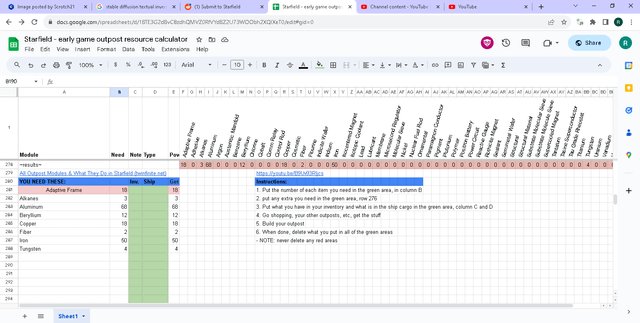
Spreadsheet Tools for Starfield: Organizing Your Gameplay
Some players enjoy diving into the detailed aspects of Starfield. This is where spreadsheets come into play, providing a space to organize and track all different game information. The community has created some amazing spreadsheet tools that can give you an advantage in the game.
What Can Spreadsheets Track?
Starfield spreadsheets can track:
- Inventory: Keep a detailed record of the resources you have collected.
- Crafting Materials: Track what you need to craft different items and weapons.
- Ship Components: Organize and plan what parts you need to build your perfect ship.
- Mission progress: keep track of the different tasks you have started and have yet to complete.
Why Use These Tools?
Spreadsheets are very helpful for:
- Better Organization: Keep all your game information in one organized place.
- Improved Planning: Plan crafting projects, and prioritize your resource gathering effectively.
- Making Calculations: Calculate which materials are required for specific projects.
Where to Find Spreadsheets
Look for helpful spreadsheets on:
- Google Sheets: Look for shared Google Sheets by other players.
- Reddit Forums: The community will often share links to their tracking spreadsheets.
- Fan websites: Some Starfield fan websites also have download links to spreadsheets.
Spreadsheets help players get very detailed in how they play the game. They help to keep everything in order, which lets you focus more on the fun of exploring the galaxy and less on managing the smaller details.
The Starfield community is a fantastic resource for new and experienced players alike. By utilizing these tools, you’ll improve your early game experience and prepare for the challenges and excitement that awaits you in the Settled Systems. Don’t hesitate to dive into these resources, join the conversations, and make the most of everything Starfield has to offer. Happy travels, space explorer!
Starfield Guide: 15 Things You NEED To Do First
Final Thoughts
For smooth exploration, numerous player-created guides and databases exist. These resources cover various aspects, from basic combat to crafting. Early game help is readily available.
These provide crucial item locations, quest walkthroughs, and building tips. You can find solutions to common issues early on. They’re excellent for a better experience.
Therefore, take advantage of these Starfield early game community resources. They help players navigate the initial gameplay. The guides offer plenty of support.

