
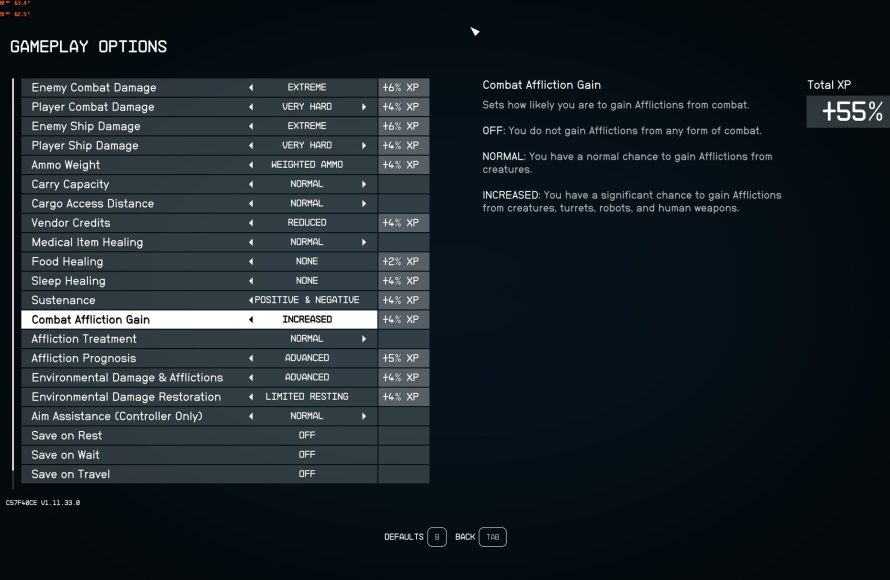
Starfield’s difficulty settings range from very easy to very hard, influencing enemy damage, health, and resource availability. Players can adjust these settings at any time during gameplay.
Choosing the right challenge is crucial in any game, and Starfield is no different. The game presents various options, each drastically impacting your experience. Understanding these Starfield game difficulty settings allows for a more personalized and enjoyable journey through the stars. Selecting a harder setting provides intense combat and resource management challenges.

Starfield Game Difficulty Settings
Alright, space explorers! Let’s talk about how hard you want your adventure in Starfield to be. The game offers a bunch of ways to change the challenge, so you can have a blast no matter what kind of player you are. Whether you’re a seasoned space veteran looking for a tough fight, or a newbie just learning the ropes, Starfield has something for you. We’re going to dive deep into all the options, so you can make your galaxy-hopping experience just perfect.
Understanding the Core Difficulty Levels
Starfield has four main difficulty settings, and each one changes a few key things about the game. These are the big choices you’ll see right at the beginning, but you can actually change them anytime you want during your game. Let’s break down each one:
Very Easy
This mode is perfect for players who want to enjoy the story and explore without too much trouble. Enemies don’t hit very hard, and you can take a lot of damage before you’re in danger. This is the ideal setting if you are new to first-person RPGs, or if you are just interested in learning the lore and story of the game. You also deal a lot of damage to enemies in this mode.
Easy
Easy mode is similar to Very Easy, but things are just a little bit more challenging. Enemies are a bit tougher, and you’ll need to be a little more careful in battles. It’s still pretty forgiving, letting you focus on exploration and the narrative. If you want a little challenge but don’t want to be killed too often, this mode is for you.
Normal
Normal mode is designed to provide a balanced experience. The enemies are stronger and hit harder compared to ‘easy’. You’ll need to use cover, watch out for enemies, and manage your resources carefully. Most players will find this level of challenge just right. It is a good starting point if you are unsure which difficulty mode to pick at first, you can always change later.
Hard
Hard mode is where the challenge really ramps up. Enemies deal a lot of damage, and you need to be strategic about your combat and how you use resources. It’s great if you enjoy a thrilling combat experience and want to be tested. You will need to pay attention to your gear, your build, and your surroundings to make it through difficult fights, especially early in the game.
How Difficulty Affects Gameplay
So, what exactly do these difficulty levels change? It’s not just about how much damage you deal or how much damage you take. Here’s a breakdown of the main factors that shift with each setting:
- Enemy Health: On easier difficulties, enemies will have less health. This means you’ll be able to take them down more quickly. On harder difficulties, enemies will have more health, leading to longer and more intense battles.
- Enemy Damage: On Very Easy, you’ll barely feel a scratch from most enemies. On Hard, they can quickly take you down if you’re not careful. This makes positioning, cover, and choosing your fights important.
- Enemy Aggression: While enemy aggression does not significantly vary between each difficulty, you will notice more enemy presence on hard mode. In easier settings enemies can be less aware of you and do not come after you in large numbers, making it a smooth sailing experience.
- Resource Availability: While the difficulty level does not directly affect how much ammo or items are available in the game. It has an indirect effect. When you play on an easier difficulty mode, you take less damage, which means you use less med packs and the enemies die faster, which means you need less ammo to kill them. Hard mode is on other hand a resource hog, as you constantly need to use med packs and ammo, making scarcity of items a challenge itself.
- Enemy Level Scaling: The game does not scale the levels of your enemies according to the difficulty settings, but it does increase their level according to your level. This means you always face a level appropriate challenge, but when you choose to play in hard mode, the same level enemies are much more challenging than if you face them on an easy difficulty level.
Fine-Tuning Your Experience: Custom Difficulty
Beyond the four main difficulty levels, Starfield gives you a lot of power to customize the game to your liking. You can tweak certain elements to get just the right mix of challenge and fun. Here’s a look at some of the custom options:
Combat Settings
Combat is the core of the Starfield experience. The game allows you to make some very minute and detailed adjustments to your combat, including:
- Damage Output: You can change how much damage you deal to enemies, separately from the damage you receive. This is great if you want to feel powerful, but still need to think strategically when facing your enemies.
- Damage Input: You can change how much damage you receive from enemies, which gives more flexibility to challenge. If you feel like the enemies are too strong, you can simply dial this down and you will take less damage.
- Crit Multiplier: You can change how much damage a critical hit does, making it easier to kill enemies when you make precise shots. By adjusting this, you can make the combat feel more dynamic.
- Enemy Weakness: You can choose to make the enemy weaker to certain damage types like ballistic, laser, etc. This will allow you to adjust the damage type you want to play with. This means you have a flexible combat system, where you can adjust the parameters you like.
Survival and Exploration Settings
Starfield allows you to experience exploration and survival in the way you want to. You can set it so it feels like a walking simulator or you can add survival elements which test your true limits. This includes:
- Resource Scarcity: you can adjust how many resources you find in the game. If you want a true survival experience, you can lower the number, and you will have to scavenge more. If you want to have an easy experience, you can crank this setting up.
- Food/Water Requirements: The game also allows you to manage how quickly your character gets hungry or thirsty. If you are looking for a true challenge, crank this up to max and you will need to find food and water all the time. If not, then you can simply turn it off and make it a less resource management heavy experience.
- Environmental Hazards: The environment has its own challenges. Some planets have extreme temperatures or lack a breathable environment. You can adjust this setting to be easier or harder. If you are looking for a relaxing experience, you can lower the effect or remove the effect completely. If you are looking for a tough time, then you can increase the hazards, and you have to make sure you have proper gear before you go out and explore the surface.
- Weight Restrictions: You can adjust how much you can carry in your inventory before you become over encumbered. If you don’t want to be worried about inventory management, then you can disable this option or increase the limit. If you want a true challenge, then you can decrease it so that you can only carry a few items.
Other Settings
There are many more settings that can also drastically change how you play the game. These are:
- Companion Health/Damage: You can change how much damage your companions take and how much damage they deal. This is a great way to make the experience of playing with the companion better and more fun. If you find your companion is always getting killed, then you can give them more health. Similarly, if you think they are too weak, then you can increase their damage output.
- Ship Combat Difficulty: You can also adjust the difficulty of the ship combat. You can make it easier or harder separately from the ground combat.
- Experience Gain: You can adjust how much experience you get from quests and activities in game. This means you can increase your character level faster or slower, based on your preferences.
- Auto Save Frequency: You can change how often the game auto-saves. If you like to play it safe, then set it more frequently. If not, you can set to it once in a while. This means that you can have full control over your game experience and the game won’t make too many or too few save files.
- Enemy Density: You can also adjust how many enemies are spawned on planet surfaces. This means, if you want to fight a lot of enemies, you can make the enemy numbers very high. If you don’t want to face too many enemies, you can make the density low.
Why Difficulty Settings Matter
The beauty of having so many difficulty options in Starfield is that it lets you tailor the game to your personal preferences. There’s no “right” way to play. Here are a few things to consider when choosing your settings:
Your Play Style
Are you someone who likes to explore and enjoy the story without many interruptions? Then, lower difficulty is the way to go. Or, do you prefer to be always challenged and feel that adrenaline rush when facing a tough enemy? Then, hard mode is for you.
Your Experience With RPGs
If you are new to RPG games, then you should stick to an easier difficulty. If you are a veteran and know the ropes, then try out the hard difficulty to experience the true challenge the game offers.
Your Time
If you only have limited time to play games, then playing on a lower difficulty can be less frustrating. On a higher difficulty, you might spend more time dying and restarting at a checkpoint. Lower difficulties are best if you only have a few hours to play a game and want to make sure you get the most out of it.
Your Goals
What do you want to get out of the game? Do you want to take it easy and enjoy the journey, or do you want to test your skills and push yourself to the limit? Your goals will help determine the best difficulty setting for you.
Changing Difficulty Mid-Game
The good news is that you are not stuck with the difficulty setting you choose at the start. Starfield allows you to change the difficulty mid-game whenever you like. So, if you feel like the game is too easy, you can make it more challenging. Or, if you feel overwhelmed, you can tone down the challenge. This flexibility makes the game more approachable and enjoyable. To change the difficulty mid-game, you need to go to the settings menu and you will see all the options to modify the difficulty of your game.
Ultimately, the best difficulty setting for Starfield is the one that lets you have the most fun. Try different settings and see what works for you. Don’t be afraid to experiment and find the balance that makes your space adventures the best they can be. With so many customization options, you have the power to create the perfect experience for yourself. Have a great journey through the Starfield universe!
How to enable Extreme difficulty settings in Starfield
Final Thoughts
Starfield game difficulty settings significantly affect your experience. Choose from very easy to very hard, each presenting unique challenges. Adjusting difficulty alters enemy health, damage and resource availability. Consider your play style when selecting a setting.
Experimenting lets you find the perfect balance. You can always change it later if needed. Enjoy your journey through the cosmos with the right Starfield game difficulty settings.

