
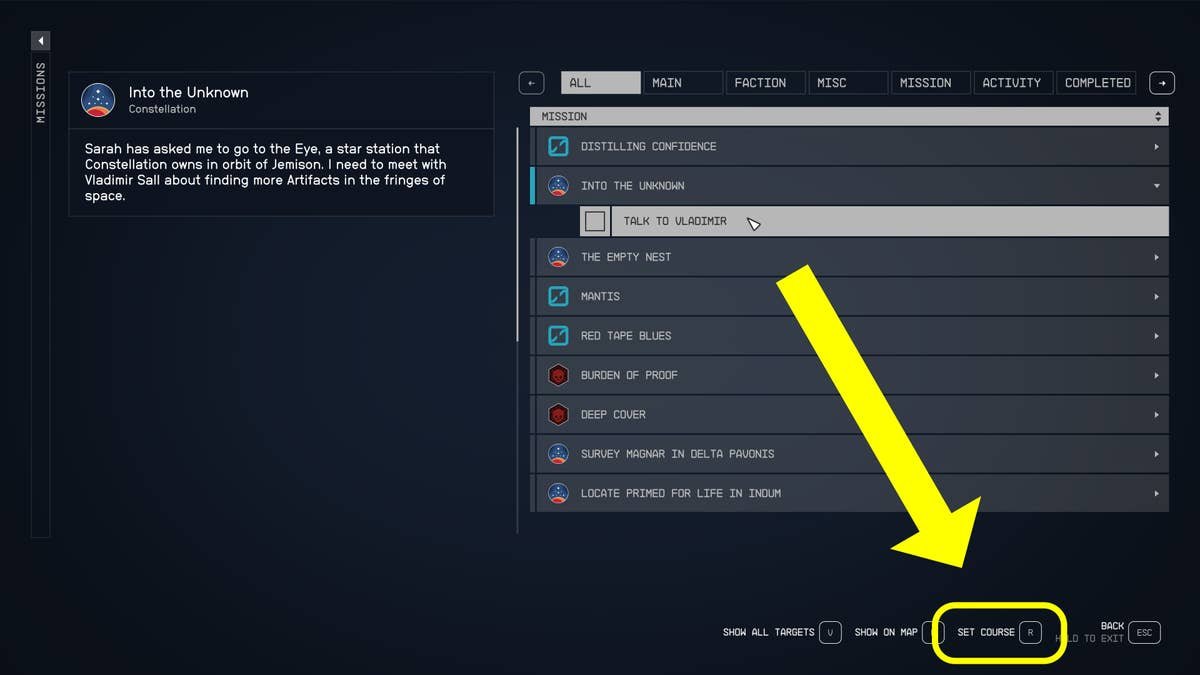
To fast travel effectively in Starfield, you must first visit a location, then open your map, select the visited location, and confirm your travel.
Navigating the vast expanse of space in Starfield can feel daunting. Getting from point A to point B efficiently is crucial for your adventures. Starfield how to fast travel effectively becomes a vital skill you will quickly want to develop to save your time.
Understanding how fast travel works, will greatly enhance your gameplay experience and allow you to quickly return to familiar places. It lets you focus more on exploration and story rather than tedious backtracking.

Starfield How to Fast Travel Effectively
Okay, space explorers! So you’re ready to jump between planets and zoom across the galaxy in Starfield? Fast travel is your best friend for getting around quickly, but it’s not always as simple as pressing a button. This guide will show you all the ins and outs of how to fast travel effectively in Starfield, so you spend less time walking and more time exploring. We’ll cover everything from when you can fast travel to different ways to get around, and even some cool tricks to make your travels even quicker.
Understanding the Basics of Starfield Fast Travel
In Starfield, fast travel isn’t like teleporting. It’s more like taking a super speedy spaceship ride to a specific location you’ve already visited. You can’t just jump anywhere anytime. There are some rules. First, you need to have visited the place before for it to appear on your map as a fast travel point.
What Makes a Place a Fast Travel Point?
Locations that you can fast travel to are usually:
- Cities and towns like New Atlantis or Akila City
- Specific landmarks, such as the Lodge, your base or important structures
- Your own ship
- Landing locations of the planets you visit
When you find a new place, your ship will create a marker. This marker turns into a fast travel point when you leave the planet or location, allowing you to return anytime. If you see a location on your map, but it’s grayed out, it means you haven’t been there yet and you need to visit it to enable fast travel.
How to Fast Travel on the Map
The most common way to move quickly in Starfield is using your Starmap. Here’s a simple step-by-step guide:
- Open your main menu.
- Select the “Starmap” option. This shows you all the star systems you’ve visited.
- Choose the star system containing the place you want to go to.
- Click on the specific planet where your destination is located.
- Now choose the location or the landing location point that you want to go to.
- Click the interact button to initiate fast travel.
Remember, you can only fast travel to locations you’ve already visited. If you don’t see a destination, you’ll need to travel to it the old-fashioned way, by flying in your ship.
Using Your Ship for Fast Travel
Your ship plays an important role in fast travel. Think of your ship as your mobile fast travel hub. It’s a handy way to jump between planets and even different locations on the same planet.
Fast Travel From Anywhere using Ship
If you want to travel to your ship, you can do that from anywhere, even while walking around on a planet. Here’s how:
- Open your scanner by pressing LB (if you are on Xbox) or your equivalent key on PC.
- With your scanner active, look around to find the ship icon, and then select it, it will be labeled as “Ship”.
- Interact with the ship icon and you will fast travel to your ship.
How To Fast Travel Using Ship Landing Location Point
If you are on a planet, you can fast travel from your ship to any location you have visited on that planet, here is how you do it:
- Open the menu.
- Select the ‘Starmap’ option from the menu.
- Select the specific planet you are located on.
- Now select the location you want to fast travel to and then click interact button to initiate travel.
Ship as a Landing Zone
Your ship also acts as a fast travel point. Any time you land, you can fast travel back to it if you are in a different location on the same planet. This is very helpful for quickly returning to your ship to take off for another destination.
Fast Travel Tips and Tricks
Here are some extra tips that will make your fast travel even more effective:
Clearing Landing Zones
Sometimes, landing zones might be blocked by something like an enemy ship. Before you can fast travel to a landing zone, you might need to clear the area of any threats. Don’t worry, this usually involves a quick space battle or eliminating hostile lifeforms on the ground.
The Value of Exploration
The more places you visit, the more fast travel options you get. Take time to explore and see as much as you can to make moving around the universe easier. When exploring, always keep a lookout for new areas and landmarks to add to your map, adding more places to fast travel to.
Fast Travel and Quests
Quests sometimes give you new locations. So following a quest line can also give you access to new locations to fast travel. Completing quests makes your fast travel network grow naturally as part of your adventure.
Fast Travel Within Cities
Once you are on a planet or in a major city, you don’t always have to walk around. When you arrive at a big city like New Atlantis or Neon, locations like the residential district and commercial district will appear in your local map, allowing you to quickly jump between areas instead of running around the entire city.
When You Can’t Fast Travel
It is very important to understand that fast travel isn’t always available. There are some conditions when you cannot fast travel:
- During combat: You cannot fast travel when you are in a combat situation, either on a planet or while flying through space. If you are being chased or are in the middle of a fight, you’ll need to finish it before you can fast travel.
- When over-encumbered: If you are carrying too much loot, you may not be able to use fast travel. You will need to either store some of your stuff, so that you are not over-encumbered, or take advantage of using your ship and transferring your loot to your ship’s cargo storage.
- Story Restrictions: Sometimes, certain quests or story events may temporarily block fast travel. This is usually to keep you in the moment, and it will unlock after you finish the related story part.
Advanced Fast Travel Techniques
Once you get good at the basic fast travel, you may learn some more efficient ways of getting around.
Using the Scanner to Quickly Locate Fast Travel Points
When you’re exploring a new planet, you can use your scanner. When your scanner is active, locations that are fast travel points will appear highlighted. This makes it easy to find new locations and mark them for later use.
Planning Your Routes
Think ahead! When you are going for a mission or want to explore a planet, take a quick look at the map before starting. This way you may avoid unnecessary travel and make sure you hit all the important spots, like the main city, a quest location, a landmark etc.
Using Multiple Landing Zones on Planets
Some planets have multiple landing locations. Using all the landing zones can save time. If you want to visit two locations on the same planet that are far from each other, consider flying to them separately, because this may turn the locations into separate fast travel points. This saves you time later since you can jump between them easily.
Common Fast Travel Mistakes to Avoid
Let’s cover some common mistakes people make with fast travel, so you can avoid them:
- Forgetting to explore: If you only fast travel to known locations, you miss out on new places. Make sure to take the time to walk around and visit new areas.
- Ignoring your ship: Using your ship to fast travel is quick and easy. Always make sure you know where your ship is.
- Not clearing landing zones: Remember, if you can’t fast travel to your landing zone, then try to clear the zone. It will take a few minutes of your time, but it’s going to be helpful.
- Overlooking local maps: Don’t forget that cities have their own maps with fast travel points. This will save you a lot of walking.
By remembering and avoiding these mistakes, you’ll be able to move around in Starfield much faster and more effectively.
In Starfield, fast travel is your go-to way for quickly moving around the galaxy. It’s a very useful way to save time and focus more on the exploring aspect of the game. By following the simple steps and tips in this guide, you’ll be a fast travel expert in no time. So go on, get out there and explore all that Starfield has to offer, with the help of fast travel.
Starfield Beginners Guide: How To Fast Travel To Your Ship, Planets, Areas, Missions & Cities
Final Thoughts
To travel efficiently in Starfield, always utilize the map to select your desired location. Fast travel is possible directly from the map to any previously visited location. Remember that you must visit a place first for fast travel to become available.
Understanding the mechanic is key to avoiding lengthy space travel. Explore thoroughly and the map becomes your best ally. By strategically using this feature, you can dramatically decrease travel time across the vast universe.
Starfield how to fast travel effectively is about planning. Don’t waste time manually flying between planets if you’ve been there before. This tactic saves considerable game time and gets you back to the action quickly.

