
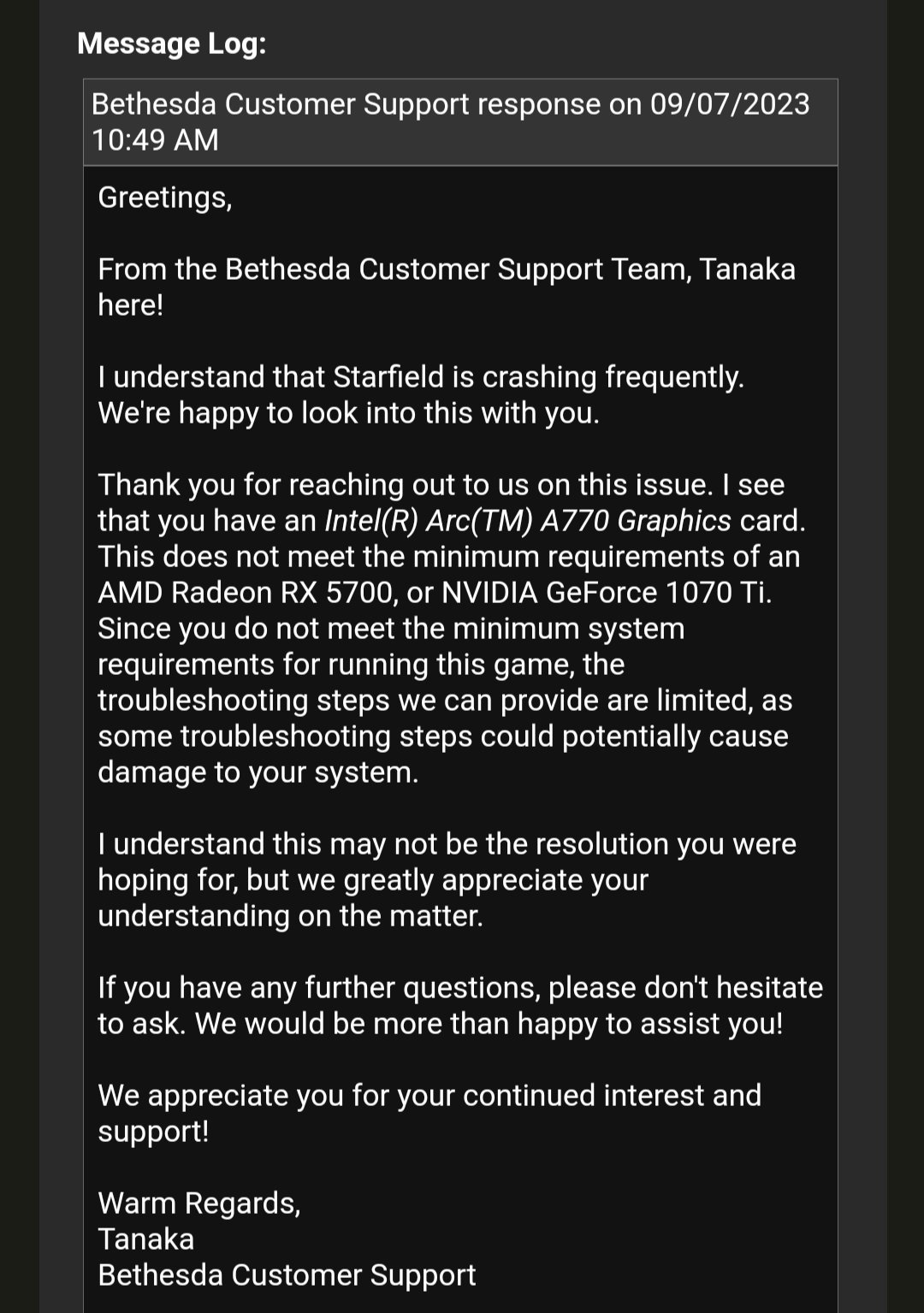
To get support for Starfield game issues, visit the official Bethesda support website. You can also check the community forums or contact their support channels directly.
Experiencing problems with Starfield can be frustrating. When you encounter glitches, bugs or have gameplay issues it is important to know where to seek help. Figuring out Starfield how to get support for game issues should not take away from your space exploration.
This guide offers a quick path towards getting the assistance you need. We’ll point you to the right resources for resolving your Starfield challenges. Get back to your interstellar adventures quickly.

Starfield How to Get Support for Game Issues
Okay, so you’re out exploring the vast reaches of space in Starfield, and suddenly…bam! Something goes wrong. Maybe the game crashed, a quest broke, or you’re just plain stuck. Don’t worry; it happens to everyone! This guide is here to help you navigate those tricky moments and find the help you need to get back to your cosmic adventure. We’ll explore all the ways you can get support for Starfield game issues, so let’s jump in and get you back on track.
Identifying Common Starfield Issues
Before we start looking for solutions, let’s talk about some of the common issues you might run into in Starfield. Knowing what you’re dealing with can make it easier to find the right kind of help. Sometimes, problems can seem confusing, but many players encounter similar hurdles, so you’re not alone!
Game Crashes
Game crashes are those frustrating moments when Starfield suddenly closes on you, sometimes without even a warning. These can happen for all sorts of reasons. They could be caused by your computer not being powerful enough, a bug in the game, outdated graphics drivers, or even conflicting software.
Troubleshooting Tips:
- Check Your System Specs: Make sure your computer meets the minimum (or recommended!) requirements to run Starfield.
- Update Your Drivers: Old graphics card drivers can cause trouble. Visit the website for your card (NVIDIA or AMD) to get the newest ones.
- Close Other Programs: Sometimes other programs running at the same time can interfere with the game. Try closing unnecessary programs before you start Starfield.
- Verify Game Files: Steam or the Xbox app lets you check if any of the game’s files are damaged. This can fix many crash issues.
Quest Bugs
Quest bugs happen when a part of a mission doesn’t work correctly. Maybe a character you need to talk to isn’t there, or an item you need isn’t showing up. Quest issues can stop you from completing important story moments and are very common across open world games. Sometimes they can have workarounds but can be very annoying for a player.
Troubleshooting Tips:
- Reload an Earlier Save: Going back to a previous save point might reset the quest and allow you to continue.
- Look Online for Help: Search for the specific quest bug on forums or in guides. Someone might have found a solution or a way around it.
- Use Console Commands: (If you’re on PC) You might find a command online that will fix the quest. Be careful when using commands, because they could have unexpected outcomes.
- Submit a Bug Report: If no other solutions work, let Bethesda know about the bug, so they can fix it in an update.
Performance Issues
Performance issues include things like low frame rates, stuttering, and lag. This can make the game feel slow and choppy. These issues can reduce the fun of exploration and combat in Starfield.
Troubleshooting Tips:
- Lower Graphics Settings: Reduce the graphical quality in the game settings. This can make the game run smoother on less powerful computers.
- Check Background Processes: Programs running in the background might be slowing your computer down. Close any unneeded programs before starting the game.
- Ensure Sufficient RAM: Make sure your system has enough RAM. If your computer is running low on memory it will begin to slow down all tasks, including gaming.
- Update Windows: Make sure your Windows operating system is fully updated. Older versions of the OS might not interact well with newer games.
Stuck or Glitched Characters or Objects
This can happen when you get stuck in the environment or characters or items don’t move correctly or are in the wrong locations. These glitches, while funny sometimes, can be disruptive to gameplay.
Troubleshooting Tips:
- Try Fast Traveling: If you’re stuck in a place, fast traveling to a different location might get you unstuck.
- Reload a Previous Save: This is a common fix and might reset your position in the game.
- Interact with the Environment: Sometimes, moving objects or interacting with other parts of the environment can dislodge you or the object that is glitched.
- Report the Bug: If you see a recurring issue, make a note of it and report it, so the team at Bethesda can review and make changes.
Where to Seek Help for Starfield
Now that you know what kind of problems you might have, let’s talk about where you can go to get help. There are several ways to get support for Starfield game issues. Let’s discuss some of the main avenues.
Official Bethesda Support Website
The official Bethesda Support website should be your first stop for help. Bethesda provides comprehensive support materials for their games, including Starfield. Their website is full of helpful information, FAQs, and articles. You can also submit a support ticket directly to Bethesda through their website. It is often the best place to start.
What You Can Find There:
- FAQ Section: Find answers to common questions and solutions to common issues.
- Troubleshooting Guides: Step-by-step guides to fix known problems, including game crashes, quest bugs, and performance issues.
- Support Ticket System: The ability to directly contact Bethesda support staff and get help for issues that are difficult to fix.
- Community Forums: Access to forums where players discuss various game aspects and share fixes and workarounds.
To access the Bethesda Support website, just search “Bethesda Support” on your search engine. The website will vary from time to time so familiarise yourself with the platform to get the most out of it.
Official Starfield Forums
Official Starfield forums can be an amazing place for help. Other players have probably encountered the same issues as you and someone in the community has probably found a fix or a workaround. You can share your experiences and offer solutions as well. These forums can be a valuable tool for all players.
What to Expect in Forums:
- Player Solutions: A place where players share their fixes and workarounds for specific issues.
- Discussions: You can discuss and participate in threads on various game-related topics.
- Developer Interaction: Sometimes, developers from Bethesda will join in on discussions and offer help or clarify things.
- A Great Community: You can connect with other players who love the game and discuss anything that interests you, game related or not.
Bethesda often monitors these forums, so it’s a great way to get their attention for issues that need a solution. You can search the forums for a problem you’re having or share a new problem that hasn’t been reported yet. It’s a great way to share your experiences, learn from others, and be part of the Starfield community.
Steam Forums and Community Hub
If you bought Starfield on Steam, their community forums and hub can provide fantastic support. You can find various guides, user-created fixes, and a lot of other player-made support.
What to Find on Steam:
- Discussions: A place where players discuss everything Starfield-related.
- Guides: Fan-made guides for various aspects of the game, including technical support.
- Workshop: Sometimes people create mods or fixes through the Steam workshop that can help with problems.
- Reviews: See what other people are saying about the game, which can provide extra insight into issues you might be having.
Using the Steam Community Hub is very similar to the Bethesda forums. You can search for different topics and interact with other players who are playing the game. To find the Starfield Steam Community, just go to the game page in your Steam library and select “Community Hub.”
Xbox Support
If you’re playing Starfield on Xbox, the official Xbox Support website is a helpful place to start. Xbox provides support for various game issues related to their console. This will often be more of a generalized support than specific to Starfield but can help with general technical problems relating to gaming on the platform.
What Xbox Support Offers:
- Troubleshooting Guides: Xbox provides guides for issues like game crashes, error codes, and general console problems.
- Account Support: They can help with issues related to your Xbox account and subscriptions.
- Support Ticket System: You can submit a ticket to Xbox support for issues that aren’t resolved by other troubleshooting guides.
- Device Support: You can also get help with hardware problems such as controller issues.
To access Xbox Support, just search “Xbox Support” in your search engine. Remember that issues specific to the game itself may not be something that the Xbox Support team can assist with, so the Bethesda support or community forums should still be your first point of contact.
Reddit Communities
Reddit is another place where people discuss and give support to various games, Starfield included. There are many subreddits that have discussions and help available. Reddit is another good option for player-made solutions, guides, and discussions.
Subreddits to Consider:
- r/Starfield: The main subreddit for Starfield, where people talk about almost everything related to the game.
- r/StarfieldTechSupport: A specific subreddit for technical support issues with the game.
- r/BethesdaSoftworks: The main subreddit for all Bethesda games.
- Other Game Specific Subreddits: There are many other game specific subreddits that may contain relevant posts.
Reddit communities are great because they can provide quick answers and player solutions, as well as being very active forums. Be aware that they are not officially supported so take any fixes that are recommended with caution. Always double check that it is not going to damage your saved game or hardware.
YouTube and Other Video Platforms
Video platforms like YouTube can be a goldmine for Starfield support. Many content creators post guides and tutorials to fix game issues. It is always a good idea to see gameplay of a solution before attempting it. Watching a video may be a lot easier than reading through pages of text.
What to Find on YouTube:
- Troubleshooting Guides: Watch videos on fixes for various game issues, like quest bugs, crashes, and other problems.
- Gameplay Solutions: Check out different ways to approach tricky parts of the game.
- Mod Spotlights: See user-made mods that can help with game bugs or enhance your gameplay.
- General Tips and Tricks: You can discover advice and helpful strategies shared by experienced players.
To search for Starfield support on YouTube, simply type “Starfield bug fix” or “Starfield troubleshooting” in the search bar, and see what comes up. Look for channels that are well-known and that are trustworthy. Be careful of suspicious videos that make outrageous claims.
Contacting Bethesda Support Directly
If you have tried everything, you can contact Bethesda Support directly using their official support ticket system. This is usually done through the Bethesda Support Website, discussed earlier in the article. This will often involve you entering details of the problem you are having, your device specifications and sometimes the save game itself.
How to Contact Support:
- Gather Information: Before you contact support, collect as much information as possible about the problem you’re having. The more detail you give the support team the more likely they are to be able to assist with the problem.
- Submit a Ticket: Log onto the Bethesda Support website, log in and submit a support ticket describing the issue you are facing.
- Follow the Instructions: Follow the instructions given to you by the Bethesda Support staff and send any additional details they request.
- Be Patient: Depending on the complexity of the issue it can take some time for support to respond to you.
Direct support is the most useful form of support you can get. Sometimes Bethesda support can tell you of problems that you might not have been aware of. Support staff can sometimes suggest an alternative fix that might not be available anywhere else.
Tips for Effective Support Seeking
Getting the most effective help for your Starfield issues comes down to how you ask and what information you provide. Let’s discuss some tips to make your support seeking more efficient and easier for others to help you.
Be Specific
When you’re reporting a problem, the more details you give, the better. Don’t just say “my game crashed”. Describe exactly what you were doing when it crashed. What were you doing? What had you done just before? How long had you been playing? The support team or community will need this information to understand the nature of the problem.
Include System Information
Always provide your computer specs or console details when asking for tech support. If you’re on PC, mention your processor, graphics card, RAM, and operating system. If you are using a console provide the model type. These details are really important for people to figure out the problem you’re having.
Example of System Information on PC:
- Processor: Intel Core i7-12700K
- Graphics Card: NVIDIA GeForce RTX 3080
- RAM: 32GB
- Operating System: Windows 10
Screenshots and Videos
A picture is worth a thousand words. If possible, take screenshots or record a video of the problem you are having. This can help people understand the problem and give more tailored solutions. It’s much easier to see what’s wrong rather than reading a description.
Tips for Screenshots and Videos:
- Capture the Issue: Make sure that your screenshot or video clearly shows what the problem is.
- Include Context: Where are you in the game? What are you doing? These are important details that will help with the problem.
- Be Brief: Keep videos as short and concise as possible, to show the problem and no more.
Check for Updates
Before you submit a support ticket or a forum post, make sure that your game is completely up to date. The most recent patch may have already fixed the problem you are having. You also need to ensure that your operating system and drivers are up to date as this may help the issue you are having.
Where to Check for Updates:
- Steam or Xbox App: Most of the time game updates will download automatically but it is always a good idea to check.
- Official Websites: Check the Bethesda website or forums to find if there are any updates you might have missed.
Be Polite and Patient
People are trying to help you, be they support staff or community members. It is good to always be polite and respectful. Do not get angry or abusive, because it will not help solve your problem. If you are polite and clear people are more likely to respond and want to help you with your problem.
Try Common Fixes First
Always try basic fixes before asking for help. Things like restarting your game, checking your connections, or checking game files can solve a lot of problems. It saves people from having to suggest solutions that you could have already checked yourself.
Common fixes to try:
- Restart the game
- Restart your computer/console
- Check internet connection
- Update drivers
- Check game files
By following these guidelines, you’ll be able to get support much more easily and efficiently. This will make your time in Starfield more enjoyable and reduce the time you spend trying to find solutions.
Getting support for game issues can sometimes be a bit of a task, but with these resources and a bit of patience, you’ll be back to exploring the stars in no time. Remember to always be detailed in your problem descriptions, stay polite when seeking help, and don’t be afraid to use all of the support options available. Happy gaming, and may your travels through the cosmos be glitch-free!
Starfield 2024: Official Mod Support Confirmed by Bethesda – Game-Changing Details! | Game Crunch
Final Thoughts
For any Starfield problems, visit Bethesda’s official support website. They provide help articles, and a place to submit a ticket detailing your specific issue. You must describe clearly what you’re experiencing for faster solutions.
Check their community forums, too. Often, other players have encountered the same issues and shared fixes. ‘Starfield how to get support for game issues’ is key for a smooth gaming experience.

