
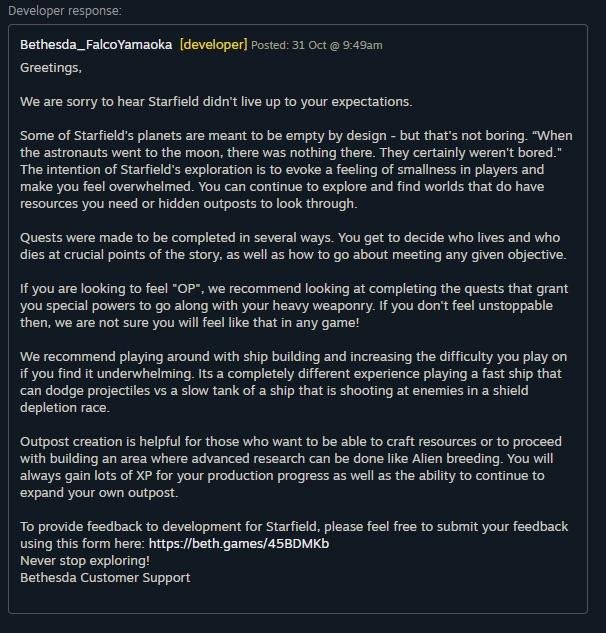
Use the official Bethesda support website or forums to report feedback regarding Starfield.
Want your voice heard about the vast world of Starfield? Providing feedback directly to the developers can greatly help shape the game’s future. It’s important to know precisely how to share your thoughts, whether they’re about a bug you encountered or a suggestion for improvement. This guide will quickly explain the process of how to report feedback to developer concerning Starfield.

Starfield How to Report Feedback to Developer
So, you’ve been exploring the vast universe of Starfield, zipping between planets, and maybe even building your own awesome space base. But what if you’ve found something that doesn’t seem quite right? Maybe a bug that’s making your game a little wonky, or perhaps you’ve got a fantastic idea that you think the developers should add. Good news! You can totally tell the folks at Bethesda Game Studios about it. They actually want to hear from you! This article will walk you through the different ways you can give them your feedback, so they can make Starfield even better.
Why Reporting Feedback is Important
You might be wondering, “Does my feedback really matter?” The answer is a big YES! When you report a bug or share a suggestion, you’re helping the people who made Starfield. It’s like being a detective, finding clues and pointing them out. The more information the developers have, the better they can make the game. They use your input to fix problems, make improvements, and even think about adding cool new features. Think of it as a team effort – you’re a player, but you’re also a helper!
Understanding Different Types of Feedback
Before you start sending your thoughts to the developers, it’s helpful to know the different kinds of feedback you can give. It’s not just about saying “This is broken!” It’s about providing useful information that can actually help make the game better. Let’s explore the main types of feedback:
Bug Reports
A bug is a problem in the game that stops it from working properly. For example, you might fall through the floor, or the game might freeze up. When reporting a bug, you should try to be as specific as you can. What were you doing when the bug happened? What equipment were you using? What was the game doing?
- Describe what happened: Explain in clear words what went wrong. For instance, “My game froze when I tried to open the crafting menu.”
- Explain when it happened: Were you in a certain location? Was it during a specific mission? Give as much context as you can. Example: “This happened on Mars, while I was trying to complete the ‘Space Salvage’ mission.”
- Tell them how often it happened: Did the bug happen once, or does it happen all the time? Example: “This crash has happened three times in the past hour.”
- If possible, provide a picture or video: If you can, capture the bug with a screenshot or video. This really helps the developers to understand the problem.
Feature Requests
A feature request is when you have an idea for a new thing you want to see in the game. Maybe you want to build a spaceship with extra big guns, or perhaps you think the settlements need more decorations. When suggesting a new feature, explain clearly what you have in mind and why you think it would be cool.
- Clearly explain the feature: What do you think needs adding to the game? Be descriptive. Example: “I would love to see a feature where we can customize the inside of our ships with different furniture and decorations.”
- Tell them why it’s a good idea: How would the new feature make the game more fun or better? Example: “This would allow us to make our ships more unique and feel more like home.”
- Suggest how it could work: Explain how the new feature might fit into the game. Example: “Maybe we could unlock new furniture options through side missions or by completing research.”
General Feedback and Suggestions
Sometimes, you have thoughts that don’t fit into the ‘bug’ or ‘feature’ boxes. You might have general comments about the story, the way the game looks, or how well the characters behave. This kind of feedback is still valuable. When giving general feedback, tell them what you liked and what you didn’t like. Give them clear explanations.
- Be specific about what you are talking about: Don’t just say “I don’t like it.” Say, “I didn’t find the main story very engaging, especially in the second act”
- Explain why you feel that way: Give them reasons why you think it’s not great. “I felt like the characters didn’t react to my decisions in a meaningful way”
- If you have suggestions, share them: Instead of just complaining, you can also give ideas. “Perhaps you could add dialogue options that let us see the direct consequences of our decisions.”
Official Channels to Report Feedback
Alright, now that you know what kind of feedback to give, let’s look at where you should actually send it. The best place is through official channels; These channels are designed to handle your feedback efficiently, and ensure that it reaches the right people.
Bethesda Support Website
The most direct way to share your feedback or bug reports is through the official Bethesda Support website. This is a structured way to send details about problems and game improvements. You can search for FAQs for common problems, and also submit detailed reports or suggestions.
How to use the Bethesda Support Website
- Go to the official Bethesda Support website. Just search “Bethesda Support” on your internet browser.
- Find the ‘Starfield’ support section. There will be a section or area for specific games, click the one for Starfield.
- Look for the ‘Submit a Ticket’ or similar option. You will probably need to create an account, if you haven’t done so yet.
- Choose the type of issue you are reporting. Is it a bug? A feature request? General Feedback? Select the correct option.
- Fill out the form with all the details. This is where you will need to be descriptive! Explain your feedback using the guidance you have learned here.
- Attach any screenshots or videos. You can attach any helpful files.
- Review and submit. Check if the information is accurate and send the ticket.
Official Starfield Forums
Another great place to share feedback, or to report bugs, is on the official Starfield forums. It’s a place where players and the developers talk about the game. Sharing in public forums also allows other players to share their thoughts or show the developers a common problem that they might have.
How to Use Official Starfield Forums
- Go to the official Starfield forums. You can easily find these by doing a quick internet search.
- Look for the correct sub-forum. There will be different areas depending on the subject. If you have a bug you would post it in the bug report section.
- Use the search option. It’s useful to see if someone else has reported the same thing. You can add to an existing thread rather than creating a new one.
- Create a new thread, if needed. Make a new post if no one has reported the problem or suggestion you have.
- Be clear, polite and descriptive. Explain the bug or your suggestion in clear and accurate terms. Don’t forget to include any screenshots, and be polite.
- Interact with other players. You can see the thoughts of other players in the forums, and also join in on their conversation, if needed.
Social Media (with Caution)
Social media platforms such as Twitter (X), Facebook, and Reddit can be a way to share your ideas or reports about the game. Bethesda staff often monitor social media and will sometimes respond to players, but be aware that these platforms aren’t always the best way to make sure your feedback is properly processed.
Tips for Using Social Media
- Use relevant hashtags: Include hashtags like #Starfield or #StarfieldBugs to help Bethesda find your posts.
- Keep it concise and clear: Twitter is limited in how much text you can use, so keep your post focused and to the point.
- Tag the relevant accounts: If you know the social media handles for Bethesda, tag them in your posts so that they see it.
- Don’t only use social media: Social media should be used alongside the other official channels, not instead of them.
Tips for Effective Feedback
No matter which method you choose, keep these ideas in mind to make sure your feedback is as helpful as it can be:
Be Clear and Specific
The more details you give, the more helpful you are being to the developers. Instead of saying “The game is bad”, say “The textures of the mountains in this area are not very clear, which makes them hard to navigate.”
Be Polite and Respectful
The people who made Starfield put a lot of hard work into it. Even if you’re frustrated with a bug, make sure that your feedback is polite and positive. This will encourage the developers to read and consider what you are saying. Being rude won’t make your feedback more useful.
Stay Organized
Before you send your feedback, make sure you organize your thoughts and keep them in order. List the bugs, the feature requests, and the general feedback separately. This way, the developers know exactly what you are talking about. You can create your own structure, or use the one we have provided here.
Use Visuals
If you are reporting a bug, take a screenshot or video to show the problem. Visual examples are really helpful for the team, and they can understand better what you are talking about. If you have a feature request, you can even use the video to show what you might be thinking of.
Be Patient
The developers will not be able to reply to everyone individually. They may not be able to fix everything straight away, as it takes time to develop. So have patience and keep providing feedback when you have it.
Keep Testing
Keep playing the game and testing the different features. You might find more bugs, and you might have even more great suggestions. Continue giving feedback so that the developers can make Starfield the best it can be.
Follow Updates
Check the official sources regularly to see if there have been any updates. The developers might already have replied to similar feedback and maybe already fixed the bug you are reporting. Following the updates will show you that your feedback is useful, and helps the developers.
Reporting your feedback about Starfield is an important way that you can make the game better. By being clear, specific, and polite, your comments can help the developers make the game more fun for all players. Remember to report bugs, share your ideas, and tell them what you do and don’t like about the game. Your input really does make a difference!
Starfield Lead Dev Quits Bethesda SO IT STARTS
Final Thoughts
Reporting feedback directly improves the game. Players can use official forums and social media channels to share thoughts. This helps developers address issues quickly.
You can also submit feedback via support tickets on Bethesda’s website. They actively monitor player input to improve the game further. ‘Starfield how to report feedback to developer’ is essential for a better gaming experience.
Providing detailed reports with clear examples greatly assists them. Use available options to communicate your thoughts directly. This collaborative process leads to a refined and enjoyable Starfield.

