
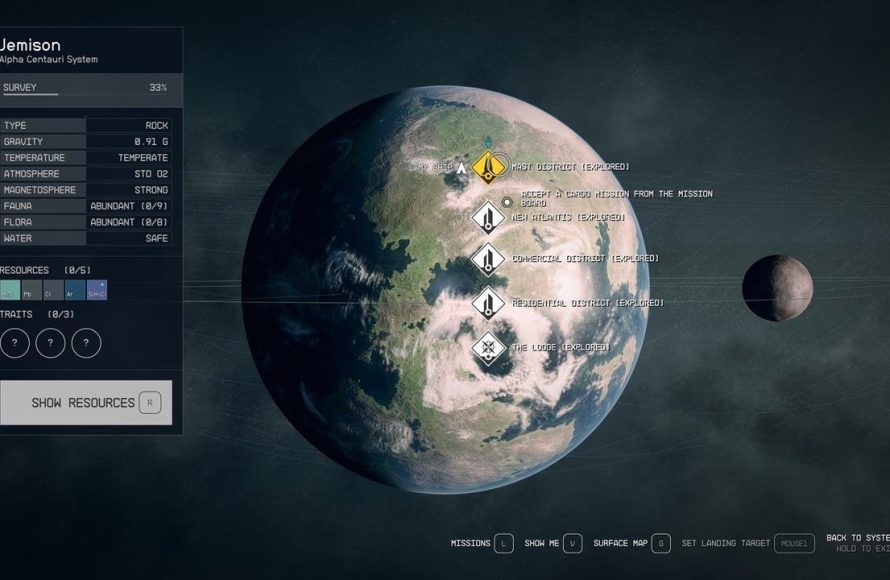
You can use Starfield’s fast travel system by opening your map and selecting a previously visited location to instantly travel there.
Jumping across star systems in Starfield can be a bit tiring, right? Nobody wants to spend hours flying through empty space. Luckily, Starfield how to use fast travel system is actually quite simple.
The game lets you travel instantly to places you’ve been to before, making exploration more convenient. The game has a map feature for this. Use it often to save time!

Starfield How to Use Fast Travel System
Getting around the vast universe of Starfield can seem daunting at first. With countless planets, moons, and space stations to explore, walking everywhere just isn’t practical, or possible. That’s where the fast travel system comes in! It’s your key to quickly moving between locations, allowing you to jump from one exciting adventure to the next without wasting precious time. In this guide, we’ll break down exactly how to use the fast travel system in Starfield, making your spacefaring journeys much more convenient. We’ll cover different ways to use it, when you can’t use it, and some tips for getting the most out of this helpful feature.
Understanding Starfield’s Fast Travel Mechanics
Unlike some other games where you can instantly teleport anywhere, Starfield’s fast travel has a few rules you need to keep in mind. It’s not as simple as clicking a button on the map. The game uses a system tied to discovering locations and using your ship. Here’s a basic overview:
- You Need to Visit a Place First: Before you can fast travel there, you must visit a location at least once. This is because your ship’s computer needs to record the coordinates.
- Travel Through Your Ship: Fast travel in Starfield mostly involves using your ship as a hub. You won’t be teleporting around on foot, instead you’ll be using your ship to take you to space around the planet and then land on your target area.
- Grav Jumping Between Star Systems: For long distances between star systems, you’ll use your ship’s grav drive, which is used to travel faster than light. This is also done through your ship’s interface.
These rules help make the vastness of space feel a bit more real. You can’t just instantly pop up anywhere; you need to actually go there first. This encourages exploration and discovery.
How to Fast Travel Within a Star System
Let’s start with fast travel within a single star system. This will be your most common type of fast travel as you move between planets and moons in the same system. Here’s how you do it:
Accessing the Starmap
First, you need to get to your ship. Once aboard, find your ship’s cockpit and look for the pilot’s seat. Sit down, and an interface will appear on the screen. This interface will show different options for your ship. Find and click on the option to open the starmap.
Selecting Your Destination
When the starmap appears, you’ll see all the celestial bodies within your current star system. These could be planets, moons, or space stations. Select the location you want to travel to. If you’ve already visited it before, you’ll see that the location is highlighted on the starmap. If not, the planet/moon is usually greyed out and is not clickable.
Confirming Your Travel
After selecting your destination on the starmap, an option to fast travel to that location will appear on your screen. It might say ‘Set Course’ or a similar option. Click on that option to confirm your travel. Your ship will then go through a short loading screen as it prepares for the jump to your chosen location, this will involve flying above the surface of the planet and then landing at the designated point. You’ll appear at your destination shortly after.
Fast Travel from the Surface
You can also initiate fast travel from the surface. If you are on a planet, open your local map through your scanner and then select your ship location and fast travel to it. This will transport you directly to your ship so you can begin your fast travel process from there. If your ship is not nearby, you will not be able to fast travel to it, but if you have nearby landing pads they will also appear as an option to fast travel.
Example: Let’s say you’re on the planet Jemison and you want to quickly go to its moon, Kreet. You would enter your ship, sit in the pilot seat, open the starmap, select Kreet, and then confirm your jump. After a brief loading screen, you’ll be on Kreet and ready to explore!
How to Grav Jump Between Star Systems
Moving between star systems requires a special type of fast travel, called a grav jump. This allows your ship to travel vast distances, covering lightyears of space. Here’s how to do it:
Open the Starmap
Just like with short-distance travel, begin by opening the starmap from your ship’s cockpit. Your current system will be in the center.
Select Your Destination System
Now, zoom out on the starmap to see other star systems around you. Select the system you want to travel to. You can only grav jump to star systems you have visited before, they will be highlighted on the map.
Plan Your Route
Before you can grav jump, the game will sometimes show you that the route you plan to take is not able to be followed, this is because of the distance you have to travel and the type of grav drive your ship uses. You will need to upgrade your grav drive in order to travel further with your ship, otherwise you will have to choose a closer system for your next grav jump. Also, if you are carrying too much cargo your grav drive will not function correctly and you may not be able to grav jump.
Execute the Grav Jump
Once your route is planned and you have the necessary power for a grav jump, you will be prompted to make the jump by clicking ‘set course’. A loading screen will appear and your ship will travel at faster than light speeds and deposit you in the next system.
Landing on a Planet/Moon after a Grav Jump
Once in your target system you will still have to select which location you want to go to on the planet/moon before you can land. This is the same process as the fast travel mentioned earlier. Select the landing spot, and confirm travel to land at the desired location.
Example: Imagine you’re in the Alpha Centauri system and you want to go to the Narion system. Open your starmap, zoom out to see the Narion system, select it, plan your route and then confirm the jump. After a loading screen, you’ll be in the Narion system, ready to explore its planets.
Restrictions on Fast Travel
While fast travel is extremely useful, it’s not always available. Here are some common situations where you can’t fast travel:
- During Combat: If you are in the middle of a fight, you can’t fast travel. You have to get out of combat before you can travel. This is a safety measure to make sure you deal with the threat first before you escape.
- When Overencumbered: If you’re carrying too much stuff, your ship might not be able to make a grav jump. You’ll need to reduce your load by storing some items in your ship or in a storage unit at an outpost/settlement.
- Story Related Locks: Sometimes the game story will restrict fast travel in order to push players to carry out specific tasks, these restrictions are usually temporary.
- Unexplored Planets: If you are in a new system, you will need to explore the planets and moons to be able to fast travel there later.
Tips for Efficient Fast Travel
Here are some tips to make your fast travel experience as smooth and efficient as possible:
- Explore Thoroughly: The more places you visit, the more fast travel options you’ll have. Take some time to visit different locations on each planet or moon.
- Use Your Scanner: Scan areas to find new points of interest and ensure they are added to your fast travel locations.
- Manage Your Inventory: Keep an eye on your inventory. If you are carrying too much, you won’t be able to fast travel, so sell or store your excess items.
- Upgrade Your Ship: Having a better ship with a good grav drive will make fast travel between systems more reliable. Also, higher-end grav drives often have better fuel capacity, and lower usage, which are helpful for long trips.
Different Types of Fast Travel in Starfield
Besides the standard fast travel explained above, there are some minor differences that can be helpful. Here is some information about them.
Fast Travel Within Cities and Settlements
Once you have explored larger settlements like New Atlantis, Neon and Akila City, you can fast travel to several different parts of the city. This means you won’t have to trek through each location to reach a particular vendor or quest marker, it will be instantly available to you via fast travel.
Fast Travel to Quest Locations
When you have a mission active and the mission marker is a location you have already been to before, you can quickly fast travel to the quest marker using the ‘open quest log’ function and selecting that mission, there you will have the option to fast travel to the quest marker on the planet you have to go to.
Fast Travel to Different Landing Zones on a Planet
On a planet you can discover several different places to land. For example, if you land at a particular location and then walk further away from your landing site and locate a structure, then that structure location will be automatically added as a landing zone where you can fast travel to later.
By understanding how the fast travel system works in Starfield, you can traverse the vast universe quickly and efficiently. Just remember to explore, manage your inventory, and upgrade your ship. With these tips, you will be zipping between planets like a pro!
Starfield how to grav jump, space travel guide
Final Thoughts
Starfield’s fast travel system lets you quickly move between visited locations. You access it through the map. Open the map, then select a previously visited place and choose to fast travel there. This saves considerable time during exploration.
Use fast travel to avoid long journeys. It’s essential for efficient gameplay. ‘Starfield how to use fast travel system’ is simple once you get the hang of it.

