
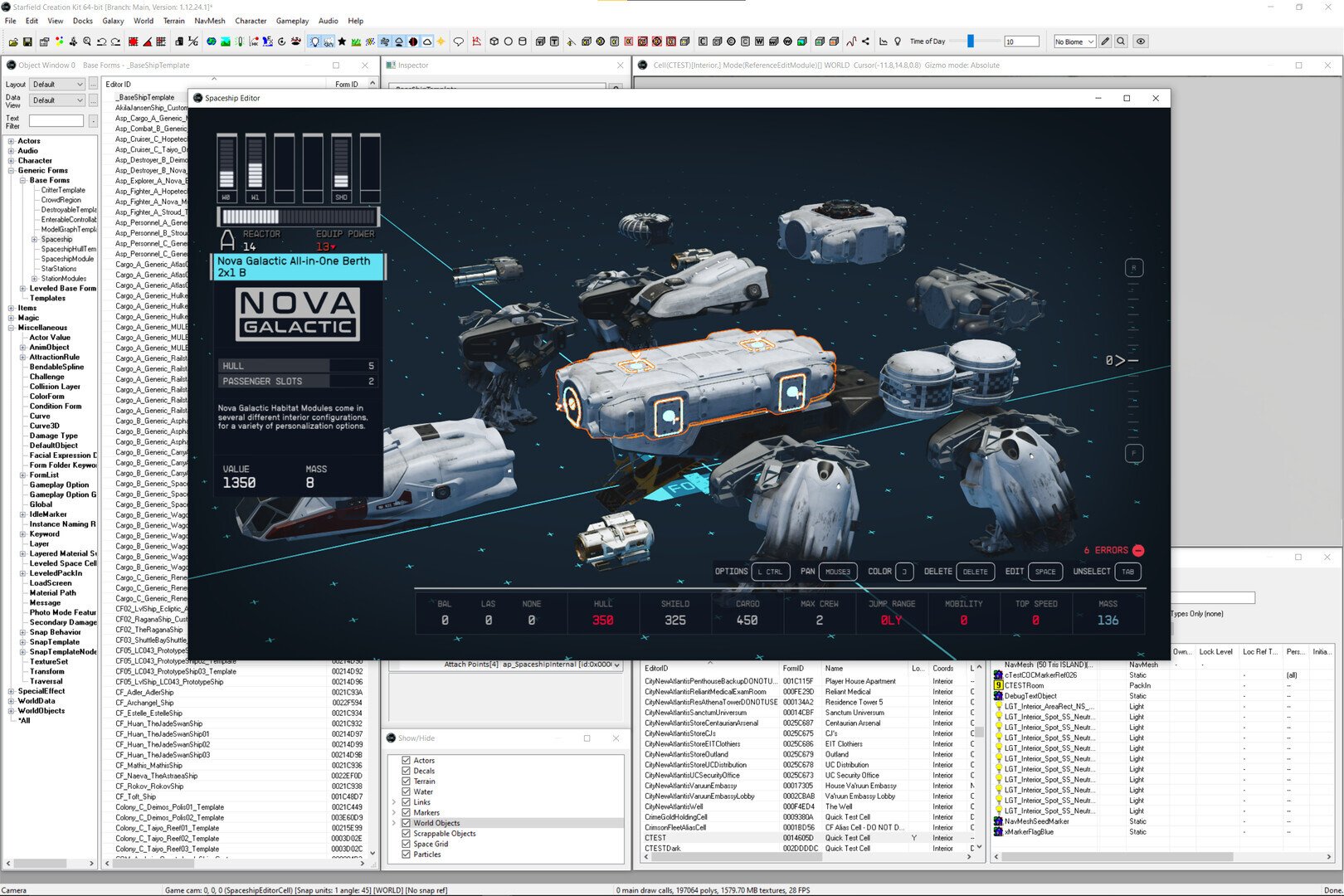
The primary tools for Starfield modding include the Creation Kit (once released by Bethesda), community-made editors, and various script extenders.
Venturing into the vast universe of Starfield just got even more exciting with the possibilities that modding offers. This Starfield modding tools guide aims to equip you with the essential knowledge needed to begin creating your own experiences. We will cover the core resources you’ll likely utilize for modifying Bethesda’s space RPG.
The landscape of modding tools can initially appear daunting, but with some basic understanding, you will begin to alter the game to your liking. Expect to utilize both official tools and community driven resources. These options allow you to modify textures, game mechanics, and add brand new content.

Starfield Modding Tools Guide
Ready to make your Starfield adventure even more amazing? Modding lets you change the game in all sorts of cool ways. You can add new spaceships, tweak how weapons work, or even create entire new quests! But to do all this, you’ll need the right tools. This guide will walk you through the popular modding programs and explain what each one can do. Let’s jump in and see what kind of fun we can have.
Understanding Starfield Modding
Before we get into the tools themselves, it’s important to understand the basic idea of modding. Think of Starfield as a big Lego set. The game developers give you the initial instructions and pieces. Modding is like getting new instructions and special pieces that change what you can build. These changes are made by other gamers, the modders, who create the additions using the modding tools. Modding changes the game by modifying existing files or adding new ones. But why would you want to mod your game?
Why Mod Starfield?
Modding can dramatically change your gaming experience. Here are some common reasons why players dive into modding:
- Fixing things that bother you: Did you think a certain weapon was too weak? Mods can change that!
- Adding new features: Want more spaceships or different building options? Mods can provide new content.
- Making the game harder or easier: Adjust the difficulty levels to fit your playing style.
- Improving graphics or performance: Certain mods can make the game look better or run smoother on your PC.
- Creating a unique experience: Combine various mods to get a game experience that’s completely your own!
Modding is great, but it’s also important to remember to download mods from safe places, and it’s always a good idea to read instructions carefully before using them. This helps keep your computer safe and avoids any game-breaking issues.
Popular Modding Tools for Starfield
Several tools can help you mod Starfield. Each tool has a specific role, from creating new mods to managing and installing them. Here are some of the most widely used ones:
The Creation Kit
The Creation Kit is the official tool from Bethesda, the company that made Starfield. Think of it like the master control panel for the game. You might hear it referred to as Starfield Creation Kit. It’s very similar to tools they released for other games like Skyrim and Fallout. You can use the Creation Kit to build new areas, design quests, create items, and much more. The Creation Kit gives you almost unlimited ways to modify the game. It’s a very powerful tool but also requires some learning and a good understanding of game files. If you want to make really in-depth changes, the Creation Kit is what you need. This is the best option for someone wanting to create a completely new experience. It’s a free program, but you need a copy of Starfield to use it. Learning this program takes a good amount of time, but the end results are worth it.
Starfield Script Extender (SFSE)
SFSE is a program that extends the abilities of Starfield. It’s not a tool for making mods directly, but it makes other more powerful mods possible. It acts as a bridge for modders to get deeper into how the game works. Many complex mods rely on SFSE, so it’s an important piece of the modding puzzle. It’s usually the first thing you’ll want to install after the base game. It allows the game to read and run mods that do more than the game normally allows. Think of it as an extra set of instructions for the game engine, making all sorts of new functions possible.
Nexus Mod Manager (Vortex)
Vortex is a mod manager that helps you keep track of the mods you install. It makes installing, disabling, and updating mods very simple. It acts like a library for all of your mods, keeping everything organized. You can easily download mods from the Nexus Mods website and install them with Vortex. It helps avoid errors when installing, makes sure you have the proper versions, and keeps track of what you change. You won’t have to drop mod files in the game folder manually and worry about messing things up. Vortex also provides a load order system, making sure your mods work well together. If you’re new to modding, Vortex is a great starting point. It’s free, too.
Baka Achievement Enabler
This small tool may seem insignificant, but it is quite useful. When you use mods, the game may turn off achievements. This tool reactivates achievements even with mods enabled. It’s a tiny but very important tool if you like getting achievements while using mods. It allows you to enjoy the game the way you want without sacrificing progress. If you are a bit of a completionist, Baka Achievement Enabler is essential. This tool is small and straightforward to install, and it makes sure you can get all the achievements while modding. This is a very popular tool in the modding community, for good reason.
Starfield Plugin Tool
The Starfield Plugin Tool is used to enable and disable plugin files (ESM or ESP files). It ensures they get loaded by the game. This tool makes managing plugin files simple. It’s a fast and easy way to enable or disable your mods by activating or deactivating plugins. It shows you which mods are active and in which order they load. This tool is especially useful when you have a lot of mods installed and need to troubleshoot them. By managing the load order, you can reduce the risk of mods conflicting with each other, and thus prevents crashes.
How to Use Modding Tools: Step-by-Step
Installing and Configuring SFSE
SFSE is normally a must for modding Starfield. Here is how to get it set up correctly:
- Go to the website where you can download the SFSE. Usually, this is the mod’s official page.
- Download the file for the current version of Starfield.
- Extract the file you downloaded. You should now have a few files and folders.
- Go to the main Starfield folder. This is where the game is installed on your computer.
- Copy the SFSE files into your Starfield game folder.
- Now, when you want to launch Starfield, launch it using the ‘sfse_loader.exe’ instead of ‘Starfield.exe.’
That’s it. SFSE should be ready. Now you can install mods that rely on it. You might have to adjust some settings within the game or within the launcher, depending on the mods you will use.
Setting Up and Using Vortex
Vortex helps you keep your mods organized and makes them easy to install. Here’s how to get started:
- Go to the Nexus Mods website and download Vortex.
- Install Vortex on your computer.
- When you open Vortex for the first time, it will ask you to choose a game. Select Starfield.
- Log into your Nexus Mods account in Vortex.
- Now you can go to the Nexus Mods website, find Starfield mods and click the ‘Mod Manager Download’ button.
- Vortex will automatically download and install the mods.
- Vortex will often ask if you want to activate your new mod.
Vortex will show you which mods you have installed and if there are updates available for them. It is very helpful for modding and it will be much simpler to do everything with Vortex than doing it manually. Remember to always read the description of mods, they will often tell you if other mods are required to function correctly.
Using the Creation Kit
The Creation Kit is the official tool, meaning that you can do practically everything with it. If you want to create mods yourself, it is the best option. Here are the first steps:
- Download the Creation Kit from the Bethesda website.
- Install the Creation Kit.
- Open the Creation Kit.
- Open the game data.
- Now you can modify everything you want and save your new mod.
Using the Creation Kit effectively takes time to learn. There are plenty of tutorials online to help. You can change anything from how much damage a weapon does, to creating entire new missions. It’s a deep tool, but it can greatly enhance your modding capabilities.
Troubleshooting Modding Issues
Mod Conflicts
Sometimes, mods might conflict with each other, making the game unstable or causing it to crash. Here’s how to deal with conflicts:
- Check Load Order: In Vortex or another mod manager, make sure your mods are loading in the proper order. Some mods need to load before others to work correctly.
- Read Mod Descriptions: Modders usually leave instructions on mod pages about compatibility. Pay attention to this.
- Disable Mods: If your game is crashing, try turning off mods one at a time. This can help you find the mod causing problems.
- Use LOOT: LOOT is another tool that is frequently used by gamers. It helps order mods automatically.
It is important to follow all the instructions given by the modder. Usually, mods should be placed in a specific order, so it’s important to follow this to avoid problems. Sometimes you can find the conflict by looking at which mods are modifying the same files in the game. You may need to choose which one you want to use.
Game Crashes
Game crashes can happen for a variety of reasons. Here are a few tips to help you fix them:
- Check your system requirements: Mods can sometimes use extra processing power. Make sure your computer can handle the extra stress.
- Update Graphics Drivers: Outdated drivers can cause problems with mods.
- Verify Game Files: If your game files are damaged it can also cause the game to crash. Try to verify the game files in Steam if you have this problem.
- Remove recently installed mods: If a recent mod is crashing the game, removing it will fix the issue.
It’s always a good idea to test your game after installing new mods. This can help you find problems early before they become bigger issues.
General Tips for Safe Modding
Here are a few key things to keep in mind to make your modding experience as smooth as possible:
- Backup your saves: Before installing mods, always make a backup of your save files. That way, if something goes wrong, you can always go back to before.
- Read mod pages: Always read the mod description. The modder will usually add instructions or other relevant information.
- Check for updates: Always check if your mods have a new version, as these new versions usually fix previous problems.
- Start small: Don’t install a huge bunch of mods at once. Start with a few and make sure they all work fine before adding more.
- Be careful where you download mods: Only get mods from well-known sites like Nexus Mods to avoid viruses.
Staying Current with Starfield Modding
The modding world is constantly changing. New tools and new mods are always being released, so here are a few tips to keep up to date:
- Follow Modding Communities: Find places like forums or Reddit communities dedicated to Starfield modding. It is here you will find new mods.
- Watch Mod Videos: Many gamers create videos showing off new mods and tools. These are great to see what’s out there.
- Check Modding Websites: Regularly check websites like Nexus Mods for new tools and mods.
Modding Starfield opens up a lot of new ways to play. It’s a bit of an adventure in itself, and you can create something really unique. With the right tools and some patience, you can take your game to a whole new level. Have fun exploring!
How to Make Mods in Starfield – Essential Tips Before Starting – Starfield Creation Kit Tutorial
Final Thoughts
This guide helps navigate the complexities of enhancing Starfield. We covered the essential tools for mod creation. They include the Creation Kit and various third-party utilities.
These tools let you create new content. They also allow you to tweak existing game features. Modding opens a wide range of possibilities for player experience.
Using this Starfield modding tools guide, you can begin your modding journey. Remember to explore the community and available resources.

