
Efficient resource gathering in Starfield primarily involves scanning planets for desired materials, using the Cutter effectively on resource veins, and building outposts with extractors to automate the process.
Running low on vital components while exploring the vast expanse of space in Starfield? It’s a common problem, but with a few smart strategies, you can significantly improve your haul. Knowing where to find the best deposits and how to collect them quickly are essential.
This guide offers Starfield tips for efficient resource gathering. These tips will help you spend less time searching and more time building, exploring, and progressing through the game.

Starfield Tips for Efficient Resource Gathering
Hey there, space explorers! Getting all the stuff you need in Starfield can feel like a big task, right? There’s so much to see and do, and sometimes you just need a ton of iron, copper, or other goodies to build awesome outposts or upgrade your gear. Don’t worry, I’ve got your back! Let’s dive into some smart ways to become a super-efficient resource gatherer in Starfield. We’re going to make sure you spend less time hunting for materials and more time exploring the galaxy!
Understanding Resources in Starfield
Before we jump into the ‘how,’ let’s talk about the ‘what’. In Starfield, resources are everything. They’re the building blocks for your outposts, ship modifications, weapon upgrades, and even crafting yummy food and chems. There are two main types of resources:
Raw Materials
These are the basic resources you mine from planets. Think iron, aluminum, copper, nickel, and more. They usually come in the form of big rocks or deposits on the ground. You can find different types of materials on different planets, so it’s important to explore far and wide to locate what you need. Understanding which planet has what is half the battle won.
Manufactured Components
These are resources you create using raw materials. These components are often more complex and used for higher-tier crafting and building. Examples include things like adaptive frames, polymers, and more. You create these at workbenches or in your outposts with the proper facilities.
Planetary Scanning for Resource Hotspots
The first step to efficient resource gathering is finding the good stuff! This is where planetary scanning comes into play. When you’re in orbit around a planet, hit the scan button (usually ‘F’ on PC or the equivalent on your console). You’ll see a map of the planet, along with a list of resources that can be found there. Don’t just land anywhere! Look for areas that have a lot of what you need. When you see a high-density resource area, you can land in a specific location where you can find all the resources around your landing point. This way you won’t have to travel very far to get the resources.
Tips for Effective Planetary Scanning
- Pay Attention to Biomes: Different biomes (like forests, deserts, or mountains) often have different resources. A volcanic area, for example, might have a lot of iron or nickel, while a jungle might be good for organic resources.
- Use the Surface Map: Once you’re on a planet, use your scanner to see if the resources are concentrated. This will help you find the best spots for mining.
- Look for Resource Icons: When you’re using your scanner, keep an eye out for the little resource icons that pop up. These show you exactly where you can find the materials on the ground. The more of these, the better!
Mining Resources Effectively
Now that you know where to find resources, let’s talk about the best ways to get them. Here’s how you can speed up your resource collection:
Manual Mining
The first and most basic way to get resources is by hand. You will use your cutter tool to blast rocks and get the resources. Just point, shoot, and watch the resources fly into your inventory. It is slow to do it manually, but if you don’t have any tools, it can get you the resources you need.
- Upgrade Your Cutter: As you play, you will come across better cutters. The better the cutter, the faster you will mine. A high-powered cutter will make resource gathering faster and easier.
Setting up Outposts for Automated Mining
Want to make your life much easier? Setting up outposts with automated extractors is the key to effortless resource gathering. An outpost will automatically mine resources for you as you go about your space adventures. Here’s how to get started:
Choosing the Right Location
- Select Resource-Rich Areas: Look for areas where multiple resources are available close together. This means you can place extractors that produce multiple resources from one location. The closer the resources, the easier it is to setup multiple extractors.
- Flat Terrain: Make sure the area is relatively flat so that you can build the base easily. Some areas are too rocky, uneven, or steep. Avoid them when you set your outpost.
- Proximity to Landing Spot: Set your landing spot near where you will place your outpost. This way it is easy to go back and forth from your ship to your outpost as you expand and improve your mining and production.
Building the Necessary Structures
Once you have selected an area for your outpost, you can start building the different structures that you will need to start automated resource gathering.
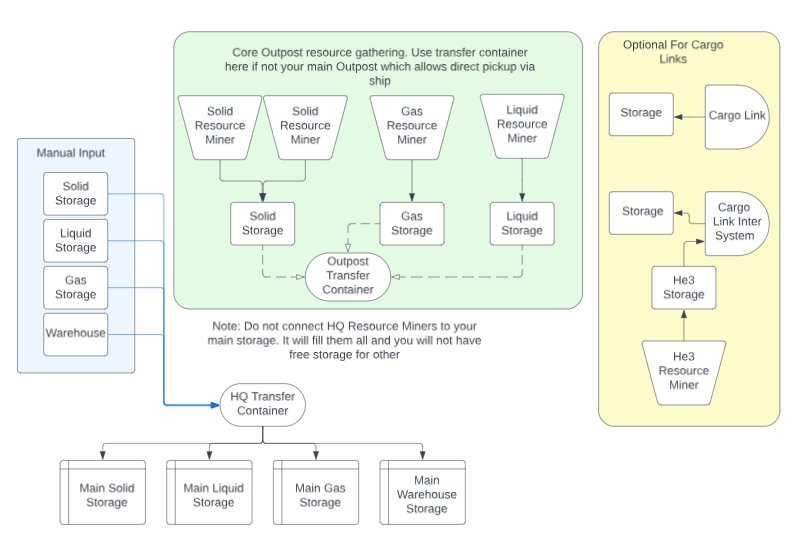
- Extractors: Place these on resource nodes. They will gather materials automatically, giving you the ability to do other tasks. You will be able to pick up the collected resources at the transfer storage unit.
- Storage Containers: Set up storage containers for the resources extracted from your extractors. You can have multiple storage containers for each kind of material you have in your production chain. You will need to link your storage containers to your extractors.
- Power: Extractors need power. Set up generators or solar panels to make sure your outpost runs smoothly. Use wind turbines when available if the conditions allow, as they don’t require any fuel.
- Transfer Storage: You need transfer storage to be able to pick up all the resources being produced at your outpost. All of your extractors and storage will be sending resources to the transfer storage for you to pick up.
Linking Your Components
You have to link your extractors, storage units, power and the transfer container. Here is how you do it:
- Select the Outpost Builder mode.
- Then select the resource extractor, and connect it to the resource storage unit using the link option.
- Next, connect the resource storage unit to your transfer storage.
- Do the same thing with your power. Select the power generator and link it with your resource extractor and other buildings that may need power to function.
Tips for Outpost Optimization
Once you have your first outpost up and running, here are some ideas on how to improve its performance:
- Expand your Outposts: As you get more resources and unlock more blueprints, expand your outpost to include more extractors, storage, and other manufacturing facilities.
- Use Inter-System Cargo Links: Once you have established multiple outposts on different planets, you can use cargo links to send resources back and forth between your outposts. This will save you time and effort as you will have all the resources gathered in one location.
- Research for Advanced Tools: Research at the research lab to unlock new blueprints for better equipment and extractors. This will help you get more resources much faster.
Efficient Inventory Management
Carrying a ton of resources can quickly become a problem. Managing your inventory effectively will help you spend less time going back and forth to your ship. Here are some tips to keep your inventory tidy:
Utilizing Storage Spaces
- Ship Cargo Hold: Your ship’s cargo hold is your main storage. Upgrade it to carry more resources.
- Outpost Storage: Use your outpost storage containers to hold your collected resources.
Lighten Your Load
- Drop Unnecessary Items: If you are over-encumbered, drop extra gear that you don’t need. You can always return to retrieve it, or sell it at a shop.
- Store it on the Ship: As soon as you acquire resources, send them to your ship’s cargo hold.
Crafting and Selling
- Craft Components: Use the resources to create items at the crafting benches. Once you have created the components, store them, use them, or sell them to make money.
- Sell Excess Resources: Once you have more resources than you need, go to a store and sell them. That way you will free up more room and you will be making money in the process.
Skills to Boost Resource Gathering
As you level up, you’ll gain access to skills that can improve your resource gathering efficiency. Here are some key skills to focus on:
Geology
This skill enhances your ability to find resources on planets. You will be able to locate even rare resources on planets.
Surveying
This skill improves your scanning ability, allowing you to get a better idea of the planet’s resources. You will be able to find more resources with less effort.
Outpost Engineering
This skill is a must for any outpost builder. You can set up bigger and better extractors, which will produce more resources faster. This will be an important skill to get for anyone who is planning to build multiple outposts in different locations.
Weight Lifting
This skill increases how much you can carry. This will make you more productive during your explorations of different planets. It will also improve your ability to travel long distances.
Advanced Resource Gathering Strategies
Now that you have the basics covered, let’s explore some more advanced techniques that will allow you to become a true resource-gathering champion.
Using Specific Crew Members
Some crew members in Starfield have skills that can boost your outpost production. For example, having a crew member with the Botany skill at your outpost will increase the production of plants at your outpost.
Exploiting Resource Respawn
Resources on planets will respawn over time. Use your outposts to keep extracting resources, and visit them from time to time to pick up the collected materials. If you visit the planet later, the resources you mined previously will have respawned.
Special Planets for Unique Resources
Some planets have rare resources that you will not find anywhere else. Make sure you scan all the planets you travel to for these unique resources. This will expand your access to components and items to help you build more outposts, weapons, and ships.
There you have it – a full guide to efficient resource gathering in Starfield! Remember, it’s all about exploration, planning, and a little bit of patience. You will soon have more resources than you will know what to do with. With these methods, you’ll be crafting, building, and exploring the galaxy like a pro in no time. Happy exploring!
Starfield Outposts INCREDIBLY IMPORTANT! The BEST Planet For Resource Farm & Starfield Outpost Guide
Final Thoughts
Employ the Cutter efficiently for faster mining. Prioritize planets with abundant resources. Utilize the scanner to locate deposits quickly. Trade excess resources at vendors for credits.
Building outposts allows continuous resource production. Consider setting up storage near your mining locations. These are key aspects of efficient resource management. The ultimate goal remains resource maximization.
Remember these Starfield tips for efficient resource gathering. Proper planning and tool usage significantly improve your resource collection. With these methods, you’ll gather essential elements swiftly.

