
To start the game Starfield, you need a compatible PC or Xbox Series X/S console, a copy of the game, and sufficient storage space.
Excited to jump into Bethesda’s new space epic? Before you can explore the galaxy, you’ll need to know what’s required. The question on everyone’s mind is: Starfield what do you need to start game? We are ready to help you prepare for your journey among the stars.
First, make sure you own a platform that runs it – either a fairly capable PC or a recent Xbox console. Then, you’ll need a copy of the game, whether physical or digital. Finally, make sure you have enough free storage space for installation.

Starfield: What Do You Need To Start the Game?
So, you’re itching to blast off into the vastness of Starfield? That’s fantastic! Before you can begin your epic space adventure, there are a few important things you need to check. Think of it like preparing for a big trip – you wouldn’t want to forget your passport or your toothbrush, right? Well, getting ready for Starfield is similar. This guide will walk you through everything you need to ensure a smooth launch.
The Right Platform: Where Can You Play Starfield?
First things first, where are you planning to play Starfield? It’s not available on every console or computer. This is key information to know before going any further. Starfield is primarily available on:
- Xbox Series X/S: If you own one of these consoles, you’re in luck! Starfield was designed with these consoles in mind, offering the best possible experience, especially on the Series X with its higher graphical capabilities.
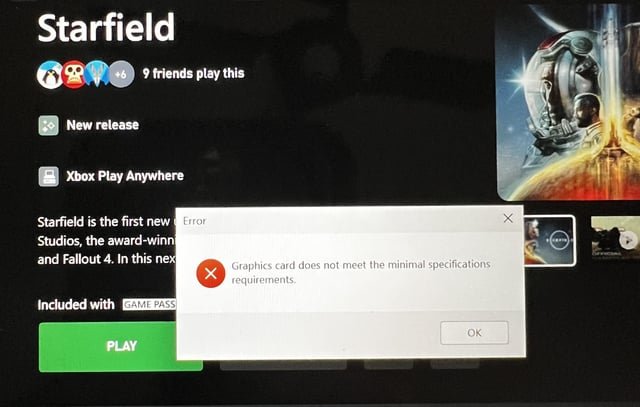
- PC (Windows): Starfield is also available on PC, so if you have a gaming computer, you’re set to explore. You will need to make sure your computer meets the minimum specifications, which we will discuss later.
Unfortunately, if you have other consoles like PlayStation, Starfield is not currently available for those. So double check that you have either an Xbox Series X/S or a PC for your interstellar journey.
Starfield System Requirements for PC Gamers
If you’re planning to play on PC, there are two sets of system requirements you’ll need to keep in mind: minimum and recommended. These will give you an idea of what kind of performance to expect.
Minimum System Requirements
These specs will allow you to run the game at lower settings, meaning the game may not look as amazing as it could. The game may also not run as smoothly at times. Let’s see what you need to be able to just get Starfield running.
- Operating System: Windows 10 version 21H1 or higher
- Processor: AMD Ryzen 5 2600X or Intel Core i7-6800K. These are processors that you need to at least have to be able to play the game.
- Memory: 16 GB of RAM, that’s how much your computer needs to be able to run the game properly.
- Graphics: AMD Radeon RX 5700 or Nvidia GeForce GTX 1070 Ti, which is your video card or GPU, will need to be these or better.
- DirectX: Version 12, is important for visual quality and performance.
- Storage: 125 GB of available space on an SSD, for fast loading times and best performance.
Recommended System Requirements
If you want to play Starfield at higher settings, the game will look better and run smoother, you will need a better computer. These are the specs to shoot for to have an amazing gaming experience.
- Operating System: Windows 10/11 with the latest updates, so that your system is optimized for the game.
- Processor: AMD Ryzen 5 3600X or Intel Core i5-10600K, this is an upgraded CPU to handle the game’s more intense moments.
- Memory: 16 GB of RAM, still the same amount as the minimum, but having more is always good.
- Graphics: AMD Radeon RX 6800 XT or NVIDIA GeForce RTX 2080, better GPUs make the game more realistic and beautiful.
- DirectX: Version 12, this is for the latest features and best visuals.
- Storage: 125 GB of available space on SSD, using an SSD over a Hard Drive is best for speed.
These are the hardware components that will affect your game the most. You can always play with the settings to find what works best for your computer.
The Game Itself: Digital or Physical Copies?
Once you’ve confirmed your platform, the next thing to decide is how you want to get the game. You have a couple of choices:
- Digital Download: This involves purchasing the game online and downloading it directly to your console or PC. It’s fast and convenient.
- Physical Copy: This is the traditional disc version of the game you buy in a store. It’s great for collectors, or people who like to have a physical copy of their games.
Which one you choose is up to you. If you plan on using the Xbox Game Pass, you won’t have to purchase Starfield.
Xbox Game Pass: A Subscription Option
If you have an Xbox or a PC, you may already have or plan on getting the Xbox Game Pass. This is a great option because it allows you to play Starfield without paying full price for the game, and it gives you access to many more games as well.
Here’s how the Xbox Game Pass can impact your access to Starfield:
- Game Pass on Console: If you have Xbox Game Pass, you can play Starfield on your Xbox Series X/S at no extra cost beyond your subscription. This is a great way to experience the game.
- Game Pass on PC: If you are a PC user, having PC Game Pass gives you the same access to Starfield as on an Xbox console, included in your subscription price.
If you don’t already have it, consider looking into Xbox Game Pass, it may save you money and allow you to experience more games.
A Good Internet Connection: Essential for Downloads
No matter if you are downloading the game, or playing the game, you’ll require a solid and stable internet connection. This is especially important if you are getting the digital version of the game.
Here is what to expect with your internet connection:
- Game Download: Downloading Starfield requires a good internet speed so that the process won’t take a long time, depending on your internet connection it could take a few hours.
- Game Updates: Game developers often release updates, having a good connection will make sure you get these updates quickly.
- Multiplayer (Future): Starfield doesn’t have multiplayer currently, but in the future, a strong and steady connection will be crucial if it’s ever added.
If you’re going to purchase the physical copy, you might think you won’t need internet. However, even with the physical copy, most of the time the game will have a Day 1 patch or update, so a good connection is needed regardless.
Setting Up Your Game Account
Before you can jump into the game, make sure that you have a valid account created on the device you are playing on.
For Xbox it will be an Xbox account, for Windows, you will need a Microsoft Account.
Having an account means:
- Save Progress: Game data will be saved to your account so you can return to where you left off.
- Access Achievements: Keep track of your in-game achievements, it’s a good way to show off your skills.
- Connect with Friends: If you have friends who also play, having an account will allow you to connect with them online.
Setting up an account is quick and easy, so make sure to do this so you don’t miss out on features or save data.
Game Controllers and Input Devices
How will you be navigating space and engaging in combat? It all comes down to your controller or other input devices. This choice will largely depend on the platform that you’re playing on.
For Xbox Series X/S:
The Xbox Series X/S is designed to work with the latest Xbox controllers, but you can also use previous gen Xbox controllers as well.
- Xbox Wireless Controller: Comes with your console, is the most commonly used way to play. It’s easy to use and is designed for comfort.
- Xbox Elite Controller: A more premium controller with extra buttons and customizations. Perfect for more serious gamers.
- Other Compatible Controllers: There are third party controllers that may work as well, as long as they are designed for Xbox.
For PC (Windows):
There are more options for PC players in terms of controllers and input devices.
- Keyboard and Mouse: This is a very common way to play on PC, it provides very precise control of your character.
- Xbox Controller (Wired or Wireless): The same controller from Xbox consoles, can also be used on PC for a more relaxed, console style of play.
- Playstation Controller (Wired or Wireless): You can even use a PlayStation controller on your PC if that is your preference.
- Other Compatible Controllers: There are many controllers from other manufacturers that can work on a PC, just make sure that they are compatible.
If you’re not sure, try out a few different ways to play, before settling on a comfortable setup for you.
Optional: Headphones or Speakers
While it’s not required to play the game, sound is very important in most games. To get the best experience you will want either good headphones or speakers.
Here’s why:
- Immersive Experience: Headphones or speakers can greatly improve your gaming experience by allowing you to hear all the in-game audio clearly.
- Sound Cues: In a game like Starfield, sound cues can indicate nearby enemies, or alert you of hidden dangers.
- Enjoy Music and Dialogue: You’ll be able to enjoy the game’s music and dialogues with high clarity.
So even if you don’t need headphones or speakers to play, having them will make the experience that much more enjoyable.
Final Preparations Before Playing
So you have all your hardware set, your game account ready, and you are ready to launch. However, let’s go through one last check list to make sure you have everything you need before you start playing Starfield.
Your pre-launch checklist:
- Platform check: Make sure you’re on either an Xbox Series X/S or a PC that meets the requirements.
- Game acquisition: You have either purchased the game, or have a subscription such as Xbox Game Pass.
- Account Setup: You have an account created and logged in on your console or PC, so your progress and achievements will be saved.
- Internet Connection: You have a stable internet for download and updates.
- Controller or Input device: You have a comfortable way to control your character in the game.
- Audio setup: Headphones or speakers ready if you want them.
And that’s it! You have everything you need to jump into the game.
Now you can finally embark on your space journey in Starfield!
By following these steps, you’ll be fully prepared to dive into the captivating universe of Starfield. Happy exploring!
Ultimate Guide to Starfield New Game Plus – (Starfield NG+ Secrets, Tips and Tricks And More!)
Final Thoughts
To begin Starfield, you absolutely need a compatible PC or Xbox Series X/S. You will also need a copy of the game. A stable internet connection helps if you plan to access cloud saves or any online features.
Starfield what do you need to start game includes these basic requirements. Ensure your system meets the specified minimum specs. Check for updates before launching.
Having a game controller or keyboard and mouse available is also essential. These are core to navigation and controls. With the basic items, you’re ready for adventure.

