
Tekken 8’s accessibility features provide options like customizable button layouts, adjustable game speed, and audio cues to aid players with various needs, greatly improving game access.
The thrill of the fight in Tekken 8 is now more inclusive than ever. A detailed look at the Tekken 8 accessibility features review reveals a serious effort to make the game playable for a wider audience. These changes mean more players can experience the intensity of its combat.
Options for remapping controls and adjusting timing allow people with different abilities to find their groove. The inclusion of audio cues further enhances the experience for those with visual impairments. This focus on accessibility shows a commitment to inclusivity by the developers.

Tekken 8 Accessibility Features Review
Alright, fighting game fans! Let’s talk about something super important: how easy it is for everyone to play Tekken 8. Video games are awesome, and they should be fun for as many people as possible. Tekken 8 has some really cool features that make it easier for people with different needs to jump in and start throwing punches. We’re going to dive deep into all the good stuff, so you know what to expect.
Visual Accessibility Options in Tekken 8
Let’s start with what you see on the screen. Visuals are a big part of fighting games, so having options is key. Tekken 8 doesn’t disappoint here.
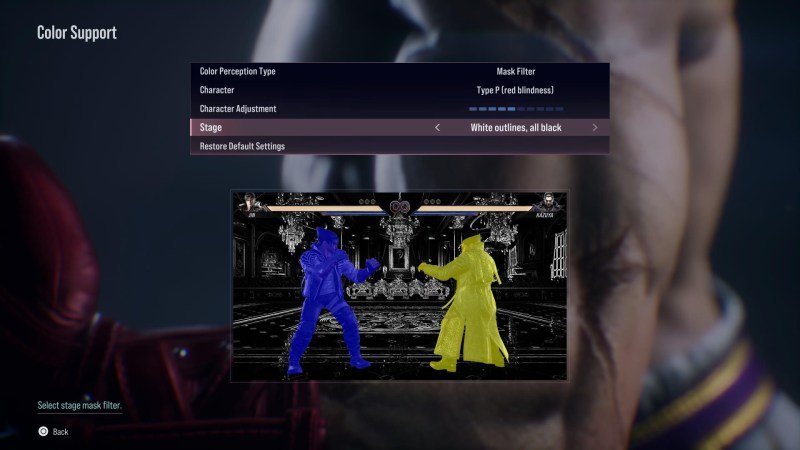
Colorblind Support
Colorblindness affects lots of people, and it can make some games hard to see. Tekken 8 has colorblind modes that change the game’s colors to make them easier to see. This helps those with protanopia, deuteranopia, and tritanopia. Now, everyone can easily tell who’s who during intense battles. To change it you can go to options menu and select accessibility option. In that setting you will get various colorblind modes. You can pick which one suites you.
Contrast Adjustment
Sometimes, the background can get in the way of the action. Tekken 8 lets you change the contrast. If the bright background is making it difficult to see the characters and actions, you can darken the background so that fighters are more prominent and easily visible. You can adjust this contrast as per your need. Just go in the options menu and select the accessibility settings and adjust the contrast option from there.
Text Size Options
Reading small text can be a challenge for some players. Tekken 8 provides you an option to make the text bigger in the menus and even during gameplay. This change can help anyone who is struggling to read the smaller text. So now everyone can understand all the information that is present in the game easily. The option to change the text size can be found in the options menu under the accessibility setting. Change the text size according to your need.
Screen Reader
Tekken 8 includes a screen reader feature. This is super helpful for people who have trouble seeing the screen. The screen reader will read the text on the screen out loud, so you know exactly what the menu says or any other kind of textual information. This enables everyone to navigate the game easily, including those who have a hard time seeing the screen. This can be turned on from the accessibility settings under the option menu. And you can choose different languages for your screen reading option.
Auditory Accessibility in Tekken 8
Sound is crucial in fighting games. It gives you clues about what your opponent is doing. Tekken 8 makes sure the sound is accessible for everyone.
Adjustable Volume Levels
You can adjust all the volume levels to your liking. For example, you can set the volume for in game music, or SFX, or characters and narration volume. For some players, too much noise can be distracting. Tekken 8 gives you the option to adjust the volume of different sound categories separately. This helps players focus on specific sounds, like character noises or the background music. This is also great for people who are sensitive to loud noise. You can find these settings in the options menu under the audio tab.
Subtitles
Subtitles are essential for people who are hard of hearing, or who like to play the game without the sound. Tekken 8 has subtitles for all the cutscenes and character dialogue. This means everyone can follow along with the story and know what is being said. Subtitles provide information in text format so that everyone can have a great gaming experience. You can turn on the subtitles in the option menu. You can even select the subtitles sizes, background color and many other options to make the subtitles most easily visible.
Motor Accessibility Features in Tekken 8
Now, let’s talk about how you actually control the game. Tekken 8 is mindful of motor control needs.
Remappable Controls
Having the power to change the button layout is a game changer. Every player has their own preferred button mapping. Tekken 8 lets you change what each button does on your controller. You can set it up so it fits your own way of playing. This is super important for players who have trouble using certain buttons. This gives you the freedom to play with your favorite button configurations. You can remap the buttons in the options menu under the controller settings. You can even choose from various controller layouts that is available.
Simplified Input Options
Some fighting games require complicated button sequences to pull off cool moves. Tekken 8 includes simplified input options. This makes doing special moves easier. So you can perform these moves with less complex button presses. This can greatly help those who are new to fighting games, or for those who have some physical limitations. This helps everyone to have fun and enjoy the game with ease. You can find this simplified input option in the options menu. In simplified option you can also choose different assist levels for your fighting experience.
Customizable Controller Sensitivity
Sometimes, it can be hard to control characters if controller sensitivity is too high. Tekken 8 offers an option to customize the sensitivity of the controller. You can adjust how sensitive the buttons and analog sticks are to your inputs. This makes the game much more comfortable for a wide range of players. This gives more control over character movements for players who might struggle with default controls. You can set the controller sensitivity in the controller settings in the options menu.
Training Mode Features
Tekken 8 has a training mode for you to practice. This mode is perfect for mastering the moves of your chosen character. With the training mode, you can learn basic as well as advanced moves. The training mode has different options available for the player. You can choose the options as per your need, like the opponent behavior, position, type of attacks, etc. By utilizing this training mode, players can master the game and become pro.
Difficulty Options
Tekken 8 lets you choose the difficulty level of the game. If you are new to the game then it’s always best to start with an easy mode and work your way up.
Easy Mode
The easy mode is perfect for new players. It makes the game less challenging. This is a great place to learn basics without feeling overwhelmed. In this mode, computer opponent is not as powerful. This can give new players a chance to master their moves and learn the mechanics of the game. So if you are new to fighting games or Tekken itself, then it’s best to start with easy mode and then move up to higher difficulty levels.
Normal Mode
Normal mode is the default option for playing. This mode is best for those who are already familiar with the game or with fighting games in general. The computer opponent is pretty strong and is going to test your skill. This difficulty level provides a balanced gameplay for both beginners and pro. So if you are already familiar with fighting games then you should start with the normal mode and then gradually increase the difficulty level if you feel like it.
Hard Mode
The hard mode is for players who love a challenge. In this mode, the computer opponent becomes super skilled. You must use all the skills and abilities that you have gained to win in this mode. This level is designed for players who are experts at the game. Only seasoned players are going to enjoy the most difficult level of the game. If you are a pro player, then this mode is best for you to test your skills.
Other Accessibility Considerations
Here are a few more things Tekken 8 does to make the game enjoyable for everyone:
Tutorials and Guidance
Tekken 8 has tutorials for new players. These tutorials teach you how to move your characters and how to perform attacks. They also guide you on how to use different features that are present in the game. Tutorials are great for those who are new to fighting games or new to the Tekken series. These tutorials will make the learning process easy and fun. So that you don’t get lost in the game and enjoy all of its features.
Clear Menu Navigation
The menus in Tekken 8 are easy to navigate. It is important to have easy to navigate menus so that players of all skill level can easily find what they are looking for. This makes it easier to find the settings and options you want to change. Clear menus ensure that no one gets lost or confused while trying to set up their game. And you can always find the option that you need with ease. So menus in this game are very easy to understand and can be easily understood by players of all skill levels.
Consistent UI Design
Consistent User Interface throughout the game makes the game easier to understand. Tekken 8 keeps its UI style consistent throughout the game. So once you learn how to navigate one menu then you can easily navigate all of the menus. This helps to keep everything clear and easy to use. This is a crucial part of accessibility, ensuring everyone can get the hang of the game quickly and smoothly. Consistent design makes sure that no player is lost or confused, and they can focus on playing the game instead of figuring out the menus.
Input Delay Considerations
Tekken 8 has taken care to minimize the input delay. Input delay means the time it takes for the game to react when you press a button. A smaller input delay makes your actions in the game feel instant and responsive. This allows for a more precise and enjoyable gaming experience. This is crucial for fighting games, where timing is everything. You always want your actions in the game to feel fast and responsive. So that you can master the game easily. And if there is any input delay then it will hamper your gaming experience. Tekken 8’s developers made sure to address this to make the game as smooth as possible.
Practice Mode Tools
Tekken 8 offers a robust practice mode, which provides different training tools. This practice mode will help players learn the moves, combos and other advanced techniques. The training tools in this game help players become better in the game. Players of any skill level can learn the moves and combos and become pro at the game. So you can practice till you get better at the game and then you can play online and face off against other online players. The training tools that are present here are essential for new players.
Tekken 8’s accessibility features show that the developers want as many people as possible to play the game. With options for visuals, sounds, controls, and gameplay, Tekken 8 tries to make sure everyone can jump in and have fun. By paying attention to these accessibility elements, Tekken 8 is now a game that is available for everyone regardless of their needs.
Tekken 8 Accessibility Options #accessibility #spectrumgames #Tekken8
Final Thoughts
Tekken 8 provides valuable options, including subtitles, remappable controls and visual aids. These features greatly improve the playing experience for diverse gamers. The game notably includes audio cues, making the action more accessible for visually impaired players.
The ‘Tekken 8 accessibility features review’ reveals that developers put effort into inclusion. The features, like customizable UI, directly impact the enjoyment for various skill levels.
This game makes fighting genre more approachable, a key win.

