
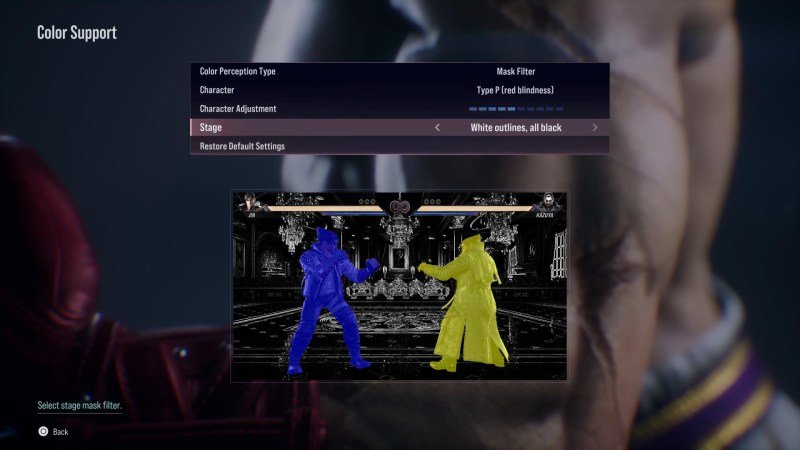
Tekken 8 games accessibility options include features such as button remapping, adjustable difficulty settings, and various visual and audio aids, catering to a range of player needs.
Fighting games can be tough, but not everyone plays the same way. Tekken 8 games accessibility options aim to make the experience enjoyable for all gamers. This means that everyone can join the Iron Fist Tournament.
These features include options to customize controls, adjust the game’s challenge, and adapt the visuals and sounds for different needs. This opens the game up to a wider player base. We will explore these options in detail.

Tekken 8 Games Accessibility Options
Hey everyone! Let’s talk about something really cool: how games are becoming more and more welcoming for everyone. Today, we’re diving deep into the accessibility features of Tekken 8. It’s not just about button mashing anymore! Developers are working hard to make sure that as many people as possible can join in on the fun, no matter their abilities. Tekken 8 has some awesome tools that help people play better and have more fun. We are going to explore these settings and how they can help you enjoy the game to its fullest!
Why Accessibility Matters in Fighting Games
Fighting games can be super fast and require a lot of quick thinking and even faster button presses. For some people, that can be a big challenge. Think about someone who has difficulty seeing small things or reacting quickly, or maybe someone who has trouble using a controller. That is where accessibility options step in and try to make a huge difference. It’s not about making the game easier for everyone; it’s about providing options so that more people can play comfortably and feel included.
When a game has good accessibility features, it means more people get to experience the fun! It also helps people who might get tired easily or who have different ways of doing things. Ultimately, it makes the game better for everyone by offering customization and options to fit different needs.
Tekken 8’s Core Accessibility Features
Tekken 8 has built-in accessibility options that make a huge difference for many people. Let’s take a closer look at the types of things available in the game’s menus:
Visual Accessibility Options
Being able to see the action clearly is important in any game, but especially so in a fast paced fighting game like Tekken 8. Here are some visual settings you can adjust:
Colorblind Modes
These settings are really helpful if you have trouble seeing certain colors. Tekken 8 likely offers different modes that change the color palette in the game to help you tell apart characters, health bars, or other important things on the screen. These modes are designed for different types of color blindness so you can find a setting that is best for you.
- Protanopia Mode: Adjusts the color palette for people with red-green colorblindness.
- Deuteranopia Mode: Changes colors for those with another type of red-green colorblindness.
- Tritanopia Mode: This mode adjusts for people who have blue-yellow colorblindness.
Contrast and Brightness Adjustments
Sometimes, the game can look too dark or too bright on your screen. Tekken 8 allows you to change how bright or dark the game looks, and also how different the dark and bright parts of the picture are. These changes help you to see everything clearly. This might be helpful for people with light sensitivity issues or those who play in various lighting conditions.
UI Scaling
The words and images on the screen, like health bars and menu options, can sometimes be small and hard to see. UI Scaling allows you to change the size of these things. If you need to make them bigger to see better, this setting is there for you. This helps anyone who has difficulty seeing smaller UI elements, making the game’s info more readable.
Auditory Accessibility Options
Hearing the game is just as important as seeing it. Especially for fighting games, sounds can really help to anticipate actions from the enemy player. Here are some audio settings you can tweak:
Separate Volume Controls
Tekken 8 has individual volume controls for different sounds. You can turn up the sound of the punches and kicks if you like, and turn down the music if it’s too loud. You can adjust the sound of the characters’ voices as well if the chatter gets too much and distracting. This way you can balance the game’s sounds to be just perfect for your experience.
Stereo/Mono Options
Some people need to hear all the sound coming from just one speaker. Others are used to the sound in two separate speakers. Tekken 8 will let you decide how the sounds come out of your speakers for maximum clarity and enjoyment. Switching to mono can be helpful for people with single sided hearing or other auditory processing differences.
Subtitles and Captions
If you have trouble hearing the game, or prefer to read the dialogue, you can turn on subtitles. Subtitles show the words that characters speak on the screen. Captions go further by also showing other important sounds like punches or explosions, which can really help understand what’s going on. These are important not just for hearing impairments, but also for playing in noisy environments.
Controller and Input Accessibility
Using a controller comfortably is key to playing well. Tekken 8 provides customization options that can make a big difference:
Button Remapping
Do you find some buttons harder to press? You can change what the buttons on your controller do. If you find the right trigger too hard to press you can move that function to a different easier to reach button. This helps people who have a hard time using certain buttons and can make the game much more comfortable to play. This ensures that all input methods feel natural and comfortable.
Simplified Input Options
Some fighting game moves are very complicated and have tricky input requirements. Tekken 8 might have a setting to make certain special moves easier to do. It can reduce the complexity of the inputs needed for complex moves. This is great for players who have trouble with the difficult controller inputs or who just prefer to focus on strategy rather than memorizing complex button combinations.
Gameplay and Difficulty Settings
Besides settings for visuals, sound, and controls, there are also accessibility options that affect how the game is played:
Adjustable Difficulty Levels
If you’re finding the game too hard, you can change the difficulty level. This setting makes the enemies less challenging. You can choose to play on an easy or medium difficulty when starting out to learn the gameplay better. As you get better at the game, you can turn up the difficulty to test your skills and provide more of a challenge.
Tutorial and Training Modes
Tekken 8 features good training and tutorial modes where you can get used to the game without the stress of a full fight. This is also a great way to test out new characters or complicated button inputs at your own pace. The game can teach you how to play without making you feel rushed or lost.
The Importance of Continued Development
The great part about accessibility is that it’s always evolving. Game developers are always coming up with new and better ways to make their games accessible for as many people as possible. Tekken 8’s existing accessibility options are amazing, and the community should always look for and suggest more options to help improve the game in the future.
It’s important to continue to have conversations about accessibility features. The more players talk about what they need, the more likely we are to get the great options we need in future updates and releases. If you have specific accessibility needs that Tekken 8 does not yet address, talk about them with the community, and if possible bring it to the developers’ attention. By working together, we can help make gaming better for everyone.
Final Thoughts on Tekken 8’s Commitment to Accessibility
Tekken 8 does a lot to make the game fun for lots of people, thanks to the accessibility options. These are great examples of how games can be made so that everyone feels welcome. Remember, the best part of gaming is having fun, and accessibility options help make that possible for so many more people. Tekken 8 is doing a fantastic job, and we can hope that other games follow their lead. These settings show that the goal is to make fighting games enjoyable for everyone, no matter what their skills or needs might be. By using the accessibility options, players can shape their gaming experience to be perfect for their specific needs.
Tekken 8 Accessibility Options #accessibility #spectrumgames #Tekken8
Final Thoughts
Tekken 8 games accessibility options significantly enhance the experience for many players. Options like remappable controls and customizable subtitles allow more gamers to enjoy the action. This focus on inclusivity is a big step.
These adjustments help people with different needs play at their best. The game’s commitment to accessibility ensures a wider audience can participate and have fun. Developers are taking accessibility seriously.

