
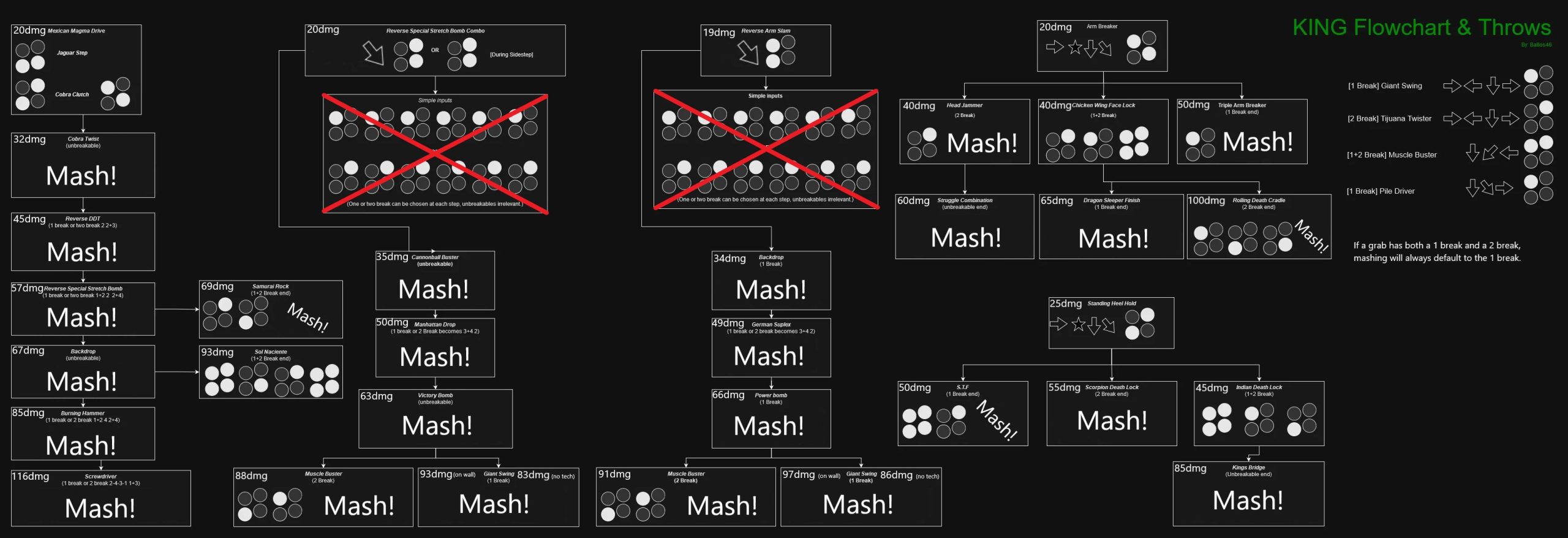
To tech a throw in Tekken 8, press either the 1 or 2 button (left punch or right punch) just as your character is grabbed. The specific timing window is tight, but proper timing will break the throw.
Getting thrown around in Tekken 8 can be frustrating, right? It feels like your opponent has all the power, but that’s not the case! Knowing how to counter throws is essential for survival. This blog post is going to help you understand how to tech a throw in Tekken 8, so you can start turning the tables on those grab-happy opponents.
It might seem daunting at first, but with practice you can get it down. It’s all about timing and button recognition. You will soon be anticipating the throws and effortlessly escaping.

Tekken 8 How to Tech a Throw
Hey there, Tekken fighters! Ever found yourself getting tossed around like a ragdoll by those sneaky throws? It’s a frustrating feeling, but don’t worry! Learning how to tech throws in Tekken 8 is a super important skill that will seriously improve your game. This guide will walk you through everything you need to know to become a throw-teching pro.
Understanding Throws in Tekken 8
Before we get into the nitty-gritty of teching, let’s talk about what throws actually are. In Tekken 8, throws are special attacks that bypass normal blocking. They usually involve your character grabbing your opponent and doing some kind of damage. There are different kinds of throws, each with its own animation and command. Throws can be done by pressing a specific combination of buttons, usually involving either the left punch, right punch, or both. They can also be different depending on the direction you are holding on the directional pad.
Types of Throws
Tekken 8 throws are typically classified into these basic types:
- Standard Throws: These are usually performed by pressing either the left punch (1), right punch (2), or both (1+2) buttons while standing near your opponent. Some standard throws are also directional throws.
- Chain Throws: Some throws can be followed by other throws, creating a chain. These can be tough to deal with if you’re not ready for them.
- Command Throws: These throws require specific button inputs and directional commands. Command throws tend to be more powerful than simple throws, and are a hallmark of Tekken gameplay.
- Low Throws: These throws hit low and often need a low tech to escape. They are not that common and some characters have them as a part of their kit.
What Does “Tech” a Throw Mean?
When we talk about “teching” a throw, we’re talking about escaping or breaking free from a throw attempt. Instead of just getting thrown, you’re pressing a button or a combination of buttons to stop the throw from working, kind of like a counter to a grab. It is crucial to understand that you need to react quickly to tech a throw. If your reaction time is not good, you might get thrown.
How to Tech a Standard Throw
Here’s the bread and butter of throw teching in Tekken 8. Most standard throws can be teched or broken using one of the following button inputs. Remember that throw breaking needs to be done as soon as the opponent grabs you.
1 or Left Punch Tech
When your opponent tries to throw with the left punch button, or when you see the hands of the character getting close to your face and the grab animation looks like the character is about to grab you with his left hand, you press the left punch button (1) to tech it. Timing is very important here. You can not press the button earlier or later. This is important to understand that you need to time the button press when the grab is about to happen.
2 or Right Punch Tech
Similarly, when your opponent tries to throw with the right punch button, or when you see the hands of the character getting close to your face and the grab animation looks like the character is about to grab you with his right hand, you press the right punch button (2) to tech it. Again, timing matters a lot here, you need to react instantly when the throw is going to connect.
1+2 or Both Punches Tech
When your opponent tries to throw using both punch buttons, (1+2) or when you are getting grabbed from the front and when the grab animation is from both hands, you need to press both punch buttons to tech the grab. Always remember to time your button presses when you see the character is about to grab you.
It’s very important to understand that the throw teching input will depend on the type of grab being done. The grab animation will hint you which button or buttons you need to press to tech the throw.
Directional Throws and Throw Teching
Some throws require specific directional inputs along with the punch button, these throws can be tricky to tech if you have never practiced. The same rules apply to directional throws as well. If you see the character grabbing you with their left hand, you will press 1, if it’s right, you press 2, and for both hands grab press 1+2 button combinations.
Common Throw Teching Scenarios
Let’s look at some very common throw situations and what you should do to tech them:
- Standard forward throw: If the opponent grabs you with one hand, tech using the corresponding punch button (1 or 2). If they are grabbing with both hands, tech by pressing both buttons (1+2).
- Side throws: Again, pay close attention to which hand is doing the grabbing, tech accordingly, with 1, 2 or 1+2.
- Back throws: Teching back throws can be very difficult. Because you don’t know when you will be facing backwards, you always need to be prepared when you are in the vulnerable state. Back throws can be teched with 1 or 2 depending on which hand did the grabbing and using the timing to break the grab. The character can also perform back throws using 1+2, in that case, the tech would be 1+2.
Advanced Throw Teching Strategies
Once you’ve grasped the basics, let’s move to the more advanced strategies. Here’s how to take your throw-teching game to the next level:
Understanding Throw Animations
Each throw in Tekken 8 has a unique animation. The animation provides clues as to which button you need to press to tech it. For example, if the character tries to grab you with the left hand, you know it’s a 1 tech. Learning character animations is very useful in predicting the throws, and then teching them easily. It’s all about careful observation.
Reacting vs. Predicting
At first, you might react to throws. However, as you improve, you will start to predict the throws. Instead of waiting to see the animation, you will start to predict when the opponent is going to throw. Predicting the throw allows you to get the tech much more easily. This is what separates the good players from the excellent players.
The Art of Option Selects
An “option select” is a technique where you perform a single input that has different outcomes depending on what the opponent does. In the context of throws, there are option selects that can help you tech a throw while also doing something useful. If the opponent does not throw, something else might come out of it. Option selects are not recommended to use when you are learning. After you are very comfortable with throw teching, then you should explore this.
Practice, Practice, Practice!
The most important thing for learning how to tech throws is to practice. Spend time in training mode focusing on throw teching. Set the computer to throw you and practice reacting with the correct button input. This will improve your reaction time, and will build up the muscle memory needed to tech the throws. You should do this training for at least 10 minutes every day.
Specific Character Throw Tips
Every character in Tekken 8 has different throw animations. Here are some general tips and key takeaways from some of the characters:
Paul Phoenix
Paul is a very powerful character who relies on heavy strikes and throws. Practice throw-teching against his various command throws such as “Deathfist”. These command throws can be confusing so pay attention to the animation. You will get accustomed to his animation after enough time.
King
King is the master of chain throws. Be prepared to tech multiple throws in a row. It is usually very hard to tech all of the throws in chain throw sequences. When you are just starting out, you should focus on teching the first one or two throws. As you get better, you can try teching all the throws in a chain throw sequence.
Nina Williams
Nina has a variety of throws with different timings. Practice against her quick, tricky throws. Because Nina is fast and relies on quick attacks, her throws are very hard to react to, so focus on improving your reaction time when playing against Nina.
Common Mistakes to Avoid
When learning how to tech throws, it’s easy to fall into some common traps. Here are some pitfalls to watch out for:
- Mashing buttons: Don’t mash. Press the button at the correct time for maximum effectiveness. If you mash, you won’t tech the throw, and you might get punished.
- Not reacting fast enough: Try to react the moment you see the grab animation, if you wait too much, you might get thrown.
- Giving up too easily: Throw teching takes time to learn. Don’t get discouraged if you can’t tech every throw right away.
Why is Throw Teching Important?
Throw teching is not just a cool trick. It’s a necessary skill for any player who wants to improve their game in Tekken 8. Here’s why:
- Reduces damage taken: Teching throws stops you from taking big damage from opponent throws, which can turn the tide of the match.
- Keeps the match fair: If you don’t tech throws, you’re essentially giving your opponent free hits and it can become very frustrating.
- Improves your prediction skills: When you practice throw teching, you will also improve your prediction skills. This is important not only for throws but for also predicting other attacks.
- Boosts your confidence: Knowing that you can escape throws will make you feel more confident and ready for any opponent.
Remember, like any skill, mastering throw teching takes time and effort. But with practice and patience, you’ll be able to shut down those throws and dominate the arena in Tekken 8!
Five Steps to Never Get Grabbed Again – Tekken 8
Final Thoughts
Tekken 8 how to tech a throw involves anticipating the grab and quickly pressing either 1 or 2. Reacting fast is key to a successful throw escape. You must press the correct button depending on which arm the opponent initiates the throw with.
This counter technique provides a critical advantage. Practice timing your inputs for consistent escapes. Consistent training improves your performance significantly. Learning ‘Tekken 8 how to tech a throw’ is essential for higher-level play.

