
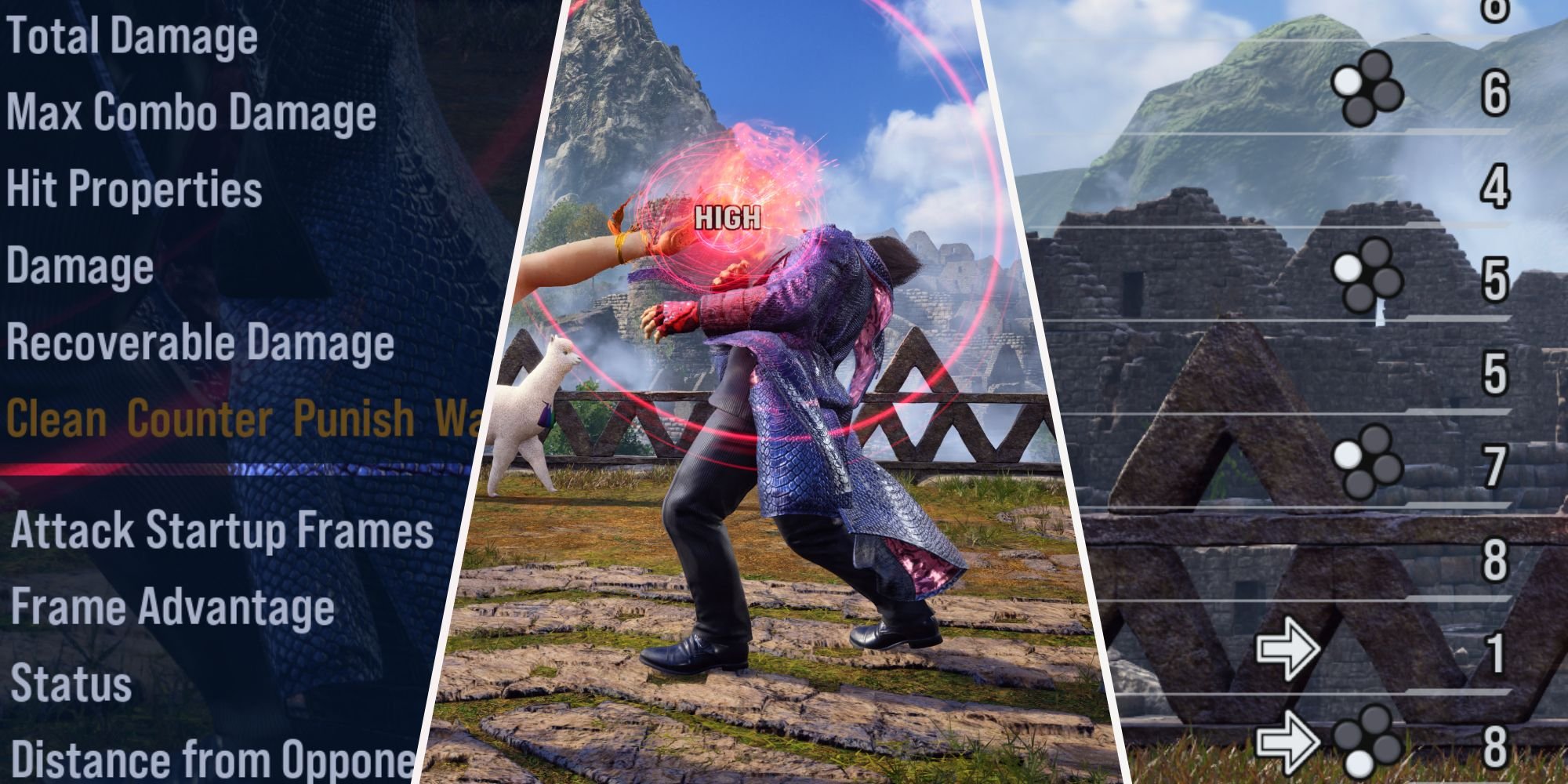
To use practice mode in Tekken 8, navigate to the main menu, select “Practice,” then choose your character and opponent. You can customize settings like health, rage, and recording options to improve your skills.
Want to get better at Tekken 8? Then, practice mode is essential. This mode lets you try out characters and refine strategies. Knowing Tekken 8 how to use practice mode can seriously improve your game.
It allows you to understand movesets and combos without the pressure of actual fights. You’ll find options to adjust the AI, see frame data, and much more. It’s the perfect place to learn and improve.

Tekken 8 How to Use Practice Mode
Okay, so you’ve jumped into Tekken 8, ready to rumble! But before you start throwing punches online, it’s super smart to spend some time in practice mode. Think of it as your own personal training dojo, where you can learn the ropes, figure out combos, and become a total Tekken master. This guide will walk you through everything you need to know about using Tekken 8’s practice mode effectively. Let’s get started!
Getting Started with Practice Mode
First things first, let’s find practice mode! From the main menu, you’ll usually see an option that says “Practice” or “Training.” Click on that, and you’re in! You’ll see a bunch of options to choose from. Don’t worry; we’ll go through each one. This is where the fun begins, so take a deep breath and get ready to learn.
Character Selection
The first thing you’ll do is pick your character – the awesome fighter you want to practice with. You can choose any of the characters available in the game. This is also where you choose the character you’ll be fighting against. The opponent character can be changed anytime as you practice. Try different match-ups and see how your character performs.
Understanding the Practice Mode Screen
Once you’ve selected your fighters, you’ll see a screen with your character facing off against the opponent. Let’s break down what’s on the screen:
- Health Bars: You’ll see your health bar and your opponent’s health bar at the top of the screen.
- Time Counter: The time counter is not so important in practice mode, since it is meant to practice different fighting styles, timing, combos etc. So, it may not be that useful here.
- Input Display: This is super helpful! It shows you which buttons you’re pressing and what moves you’re making. This allows you to check whether or not you performed the commands and inputs correctly. This is essential for learning advanced techniques.
- Training Settings: At the bottom or side of the screen, you’ll usually see a menu or option list for changing the settings of practice mode. This is where you set up all kinds of training drills.
Take a moment to look around and get familiar with everything. These elements will help you understand what’s happening during your practice sessions.
Key Training Features in Tekken 8
Practice mode is more than just hitting buttons. It’s about learning how to fight efficiently. Let’s talk about some of the key training tools that will help you improve:
Opponent Settings
These settings allow you to change how the opponent behaves, so you can practice in specific situations. Here are a few of the useful options:
- CPU Action: This is where you choose how the opponent acts. You can set it to “Stand” (for practicing on a stationary target), “Guard” (to practice breaking guards), “Attack Randomly” or more specifically selected moves, or various other options to help you learn different scenarios. Each mode helps you learn how to combat different opponent behaviors.
- Guard Setting: This option lets you choose if the opponent will always block, never block, or block randomly. This is really useful for practicing your combos and learning when to attack. If the opponent always blocks, you have to use a different combo to break the guard.
- Recovery Action: This is super helpful for practicing combos. When you knock the opponent down, this option controls if they will roll or bounce or get up in various ways. You want to make sure you are practicing what to do after your opponent gets knocked down, as there are various opportunities to strike them as they get up.
Recording and Playback
This is an advanced function that can help you plan strategies. With this feature, you can record what you do, and the game can repeat it. For example, you can record a combo that you’re having trouble with and play it back to watch how you’re doing it. You can also record an opponent’s specific moves to learn how to block them and counterattack.
Frame Data Display
Frame data is a little more advanced, but it’s incredibly valuable for understanding how moves work. In simple terms, each attack in Tekken takes a certain number of frames (short moments) to start and recover. The frame data display can show you things like:
- Startup Frames: How many frames it takes before a move hits. The lower the number, the faster the move.
- Block Frames: How many frames the attack is plus or minus on block, letting you know if you have an advantage or disadvantage after the move is blocked.
- Hit Frames: Similar to block frames but when you land a successful hit, letting you know if you have an advantage or disadvantage after the move lands.
Understanding frame data is like reading the matrix. It helps you learn which moves are fast, which are safe, and when you can interrupt your opponent. If your move is positive on block (or + numbers), you can potentially act sooner than your opponent, whereas if your move is negative on block (or – numbers) your opponent can act sooner.
Don’t feel like you have to master this right away. Start with the basics and gradually get more comfortable with the information provided by frame data. If you want to excel in online play, understanding and using the frame data is essential.
Practice Drills and Techniques
Now that you know the basic features of practice mode, let’s dive into some drills and techniques you can use to improve your game:
Combo Practice
Combos are a series of attacks that string together, making it very difficult for your opponent to defend. To get good at combos, here’s what you should do:
- Start Simple: Don’t try to learn the most complex combo first. Pick a simple combo for your character and practice it until you can execute it easily. Once you do, then pick another simple combo.
- Use Input Display: Watch the input display to see if you’re pressing the buttons in the correct order. Even a slight mistake in timing can cause a combo to fail.
- Practice Repetitively: Combos take time. The more you practice, the more comfortable you’ll become with the timing and the movements required. It’s normal to fail at the start, but don’t get discouraged. Keep trying and you’ll see the improvements.
- Experiment: Once you are comfortable with a few combos, experiment with combining them into longer and more complex strings. You can also explore new ways to do those combos.
Movement Drills
Good movement is very important in Tekken. You need to move around, dodge attacks, and get close to your opponent at the right times. Here’s how to use practice mode for movement:
- Sidestep Practice: Learn to sidestep, which is moving left or right to avoid attacks. Set the opponent to do certain attacks, and then practice moving away from their attacks.
- Backdash Practice: Use backdashes to create distance. Try using multiple backdashes to get further away from your opponent.
- Dash Practice: Learn the timing of dashing towards your opponent. If you dash too early you’ll be hit, but if you dash too late, you might lose the chance to get close to your opponent.
- Practice Forward and Backward Movement: Practicing moving forward and backwards will help you get a better sense of range and position in the game. You also want to practice walking and running, and getting used to the speed of your character.
Punishment Training
Punishing is when you capitalize on your opponent’s mistakes. Here’s how to practice this:
- Set the opponent to do unsafe moves: Use the options in practice mode to make the CPU do a certain move. After blocking, or dodging, or sidestepping these moves, make sure to take advantage of the recovery animation to punish them.
- Learn Safe Moves: Study the frame data to figure out which moves are safe, and which moves leave you open. Knowing the frame data will help you identify opportunities to punish your opponent.
- Practice Punish Combos: After learning the unsafe moves from your opponent, learn which are the best combos to use when you punish the opponent.
Character Match-Ups
Every character has advantages and disadvantages against other characters. By spending time in practice mode, you can learn:
- How Your Character Plays: You can learn the timing, speed, and range of all your character’s moves.
- How to Deal With Specific Characters: Practice against characters that you struggle with, and figure out how to approach them.
To get good at this, use the opponent settings to pick specific characters that you have trouble with, and figure out the best approach to fight them.
Wall Carry Practice
The walls in Tekken are a crucial part of gameplay. Learning how to carry your opponent to the wall using different combo strings is important for doing damage. Wall hits also change how the combo and damage is calculated. You should make sure that when you practice combos, you incorporate the walls in your training, and learn how to deal extra damage when your opponent hits the wall.
Tips for Effective Practice
Okay, so now that we know a lot about how to use practice mode effectively, here are some tips to help you make the most out of your training:
- Start Slowly: Don’t try to do too much at once. Start with the basic movement and combos, then build from there.
- Be Consistent: Spend a little bit of time in practice mode every day. Regular training is much more helpful than long training once in a while.
- Set Goals: Have specific things you want to accomplish during each practice session. Do you want to learn one new combo, or master one movement technique? Make a plan and follow it.
- Take Breaks: If you’re feeling tired or frustrated, take a break. Come back to practice later when you’re fresh.
- Watch Tutorials: There are many tutorials online that can teach you the secrets of the game. You might find great combo ideas or other strategies.
- Experiment and Have Fun: Don’t be afraid to try new things. Try out new characters, new combos, and new strategies. Have fun with the training, and enjoy the process of learning.
Tekken 8 practice mode is your path to getting good at Tekken 8. It’s a place where you can make mistakes, learn from them, and grow. It will help you become a better player, and make you more competitive online. So don’t be shy and start training right now!
Get Good at Tekken 8! Using Training Mode Efficiently
Final Thoughts
Effective practice hinges on utilizing all aspects of the mode. Experiment with different options to improve your skills. Recording and playback features help you understand your mistakes.
Use the frame data display to analyze move properties. Knowing frame advantage and disadvantage is a must for improvement. Utilize these options for a focused learning experience.
In conclusion, ‘Tekken 8 how to use practice mode’ effectively centers on repetition and observation. This will rapidly improve your gameplay. Consistent use provides the foundation for competitive success.

