
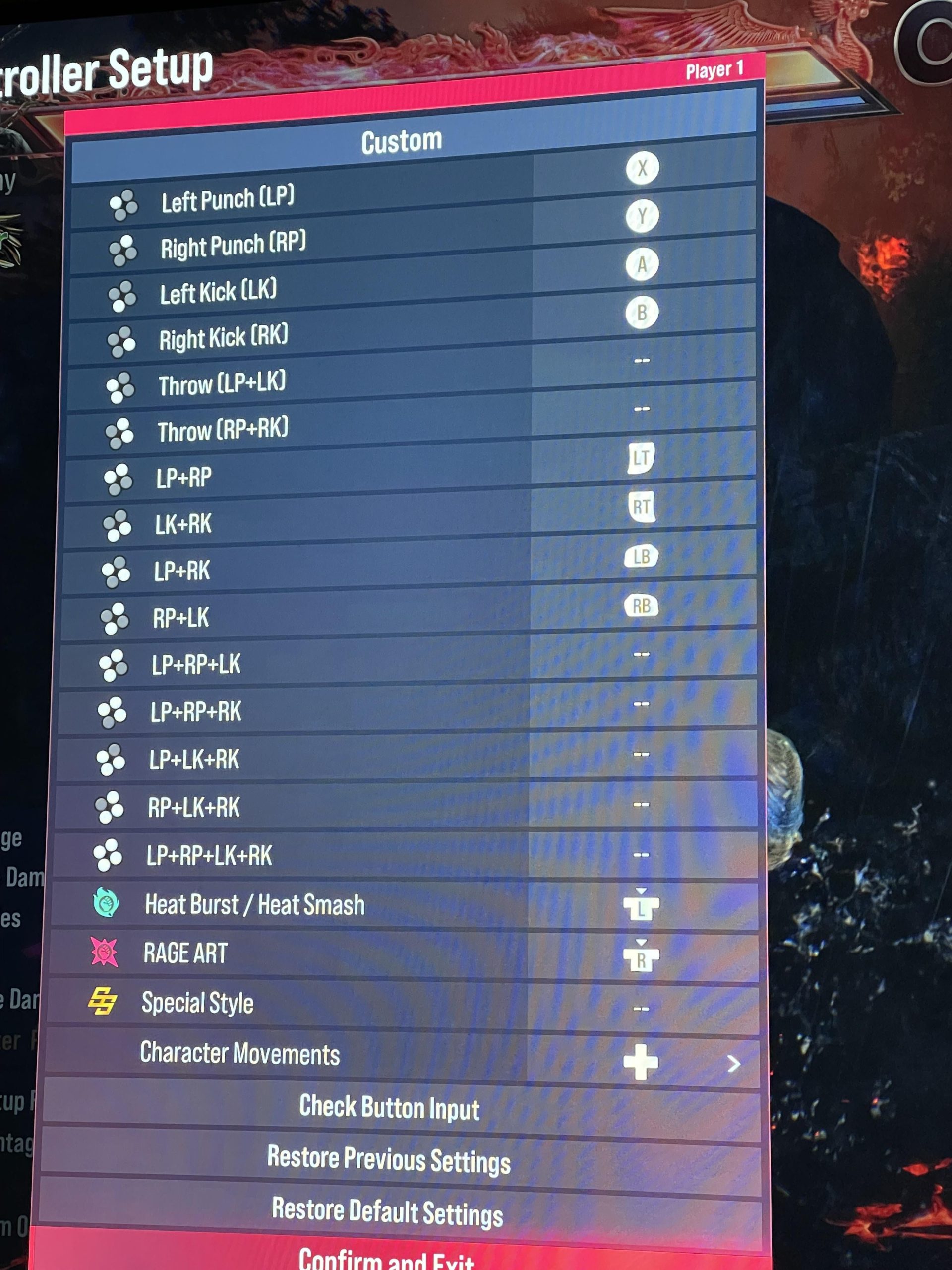
Optimizing your Tekken 8 controller layout involves assigning frequently used moves and commands to the most accessible buttons and ensuring comfortable grip for extended play.
Juggling complex combos in Tekken 8 demands more than just skill; it requires a controller layout that feels intuitive. A poorly configured button mapping can hinder your performance and make even the simplest moves difficult to execute consistently. Finding the perfect setup significantly impacts your gameplay experience.
This guide helps you understand the essential elements of Tekken 8 optimizing controller layout. We will explore the key configurations that can improve your responsiveness and make you feel more in control. By fine-tuning the button placement, you will find yourself improving faster.

Tekken 8 Optimizing Controller Layout
Alright, let’s talk about something super important for getting good at Tekken 8: your controller setup! It’s like having the perfect tools for a job. If your controller buttons aren’t set up just right, it can feel like trying to build a skyscraper with a toy hammer. We want to help you find the best way to press those buttons so you can pull off awesome combos and win more fights.
Understanding the Basics of Tekken 8 Controls
Before we dive into fancy layouts, let’s make sure we all know what the main buttons do in Tekken 8. Think of it like learning the alphabet before writing a story. Each button controls a different part of your character’s moves. We have:
- Left Punch (LP): Usually square or X on most controllers. This makes your character punch with their left hand.
- Right Punch (RP): Usually triangle or Y on most controllers. This makes your character punch with their right hand.
- Left Kick (LK): Usually X or A on most controllers. This makes your character kick with their left leg.
- Right Kick (RK): Usually circle or B on most controllers. This makes your character kick with their right leg.
These four buttons are the core of how you attack and move in Tekken 8. You’ll be using them all the time. There are other important buttons too, like the L1/LB, R1/RB, L2/LT and R2/RT which can be assigned for different functions like, Rage Art, Heat or assigning a particular set of keys which is helpful in performing fast combos, but for now focus on the main four buttons.
Beyond these main buttons, you will also use the directional pad or analog stick to control your character’s movement – forward, backward, left, and right, and also to do various commands. Getting comfortable with movement is just as crucial as mastering attack inputs.
Why Customizing Your Layout Is Crucial
Why not just use the default settings? Well, it’s like wearing shoes that are too big or too small. You can walk, but it’s not comfortable or easy. When we talk about optimizing, what we really want is to find a control setup that feels natural and lets you do everything you need to do without any struggles.
- Comfort: A good layout won’t make your hands cramp up after playing for a while.
- Speed: You’ll be able to press the buttons quickly, which is super important in fast-paced fights.
- Precision: You’ll be able to do the exact moves you want to do, without pressing the wrong button by mistake.
Everyone is different, so what works for your friend might not work for you. That’s why it’s good to spend some time thinking about how you want your controller to feel.
Exploring Different Controller Options
Before diving into button mapping, let’s quickly see the kind of controllers we can use for Tekken 8. The best one often boils down to your personal preference.
Standard Console Controllers
These are the controllers that come with your PlayStation or Xbox. They are a good starting point because they are familiar and easy to use. Here are some common options.
- PlayStation DualSense: The main controller for PlayStation, good for most players.
- Xbox Controller: The main controller for Xbox, also very popular.
They are usually very accessible for most of the players and good for regular use.
Fight Sticks
Fight sticks, also known as arcade sticks, are designed for fighting games. They have a joystick and buttons arranged like an old arcade machine. Many people find them more comfortable and precise for certain moves, particularly directional inputs.
While they often seem complicated and may have higher price tags, some players just play much better on a fight stick.
Hit Boxes
Hit boxes are like a keyboard for fighting games. They replace the joystick with buttons for movement. Some players prefer them, finding them the most precise option since there’s no ambiguity of the direction you want to input in the game, and often the players on hit box perform the most technical and complicated inputs effortlessly.
Finding the Right Button Mappings
Now we get to the exciting part: figuring out how to set up your buttons. This is where your personal preference really matters, and there is no right or wrong answer, but below we have provided some considerations while making that decision:
Common Layout Considerations
There are some common button setups that many Tekken players use. These can be a good place to start.
The Traditional Setup:
- Square/X: Left Punch
- Triangle/Y: Right Punch
- X/A: Left Kick
- Circle/B: Right Kick
This setup matches the original arcade layout for Tekken. Many veteran players prefer to stick with this configuration, as this is what they have been used to for years.
The “Easy Access” Setup:
Some players like to put the buttons they use the most on the top face buttons for easier access. This may look like this:
- Square/X: Left Punch
- Triangle/Y: Right Punch
- L1/LB: Left Kick
- R1/RB: Right Kick
The above setup puts the kicks on the shoulder buttons, which makes it quicker to press them while already using face buttons. This is convenient for some combos.
Advanced Button Mapping Techniques
Once you are comfortable with the basics, you can explore more complex button mapping ideas to suit different characters, or play styles.
Using Shoulder Buttons
Many players use shoulder buttons (L1/LB, R1/RB, L2/LT and R2/RT) for complex inputs. You can map these for a particular set of keys that could be combined with one key to perform difficult to input combinations. A common use case for the shoulder buttons is to bind the L1/LB or R1/RB to “All Punches” or “All Kicks”, which can reduce the effort it takes to perform a lot of powerful attacks.
Button Buffering
Some players set buttons that buffer common moves. For instance, a player might assign an attack that needs LP and RK to a single key. This means you’ll press that one button instead of two different keys at once. This is helpful in certain situations when fast combinations are needed or you have difficulty pressing two buttons at the same time.
Considerations for Special Moves
When mapping buttons, it’s important to think about special moves that your characters use frequently. Place those attacks that require similar keys near to each other or combine them into a single button which is easier for you to press. This allows you to perform those moves quickly and reliably, especially in the heat of the battle.
The Impact of Input Shortcuts
Some players like to map shortcuts for certain moves to make them easier to perform. For instance, moves that involve several button presses in quick succession can be mapped to just one or two buttons. Experiment with these shortcuts and see if they improve your game.
Experimentation and Practice
The most important thing to remember is that there’s no magic setup that will make you an instant pro. The best setup is the one that feels comfortable and allows you to perform the moves you want without thinking about it too much. A little bit of time spent experimenting will ultimately yield the best results, so consider this while making the best layout.
Start Slow
Don’t try to change everything at once. Start with small tweaks and get used to each one before making more changes. It’s like learning a new dance: you start with the basic steps before adding the fancy moves.
Practice Regularly
Once you’ve found a setup that feels good, practice a lot with it. The more you use your layout, the more natural it will feel. You have to build the muscle memory, so that you won’t have to think what key you are pressing, but it will automatically flow through your body.
Test Different Setups
Don’t be afraid to try different layouts and see how they feel. What works for one player might not work for another. You are building something for yourself, so it has to feel the best for you and you only. There are no wrong answers here.
Use Training Mode
Spend a lot of time in the training mode. This is the perfect place to test out new controller configurations and practice new combinations, and you will be away from any pressure or tension that you might feel while playing against other players. You will be able to practice without worry of any punishment.
Advanced Configuration Tips
For those who are ready to dig deeper, let’s look into some advanced configuration tips. These settings may seem complex, but they can offer better control and flexibility.
Custom Button Mapping on Different Platforms
The process of custom button mapping might differ slightly based on what console or platform you are playing on. Be sure to check the specific settings of your console.
Controller Profiles
Some controllers allow you to save multiple controller profiles. This is very useful if you play different characters with different play styles. This can give you that extra boost of speed while switching from one character to another.
Using Macros
Some advanced players use macros to perform complicated series of inputs with a single button press, but it is worth noting that using Macros can have its own drawbacks so be sure to proceed with caution. You might be using it at your own risk.
Making Adjustments Based on Character
It’s also important to adjust your controller settings based on the character you play. Some characters require different inputs to pull out their combos. As you learn more about these characters, you may want to remap some buttons to take advantage of their unique moves.
Characters with Complex Inputs
Some characters have specific moves that require more precise inputs. For these characters, you might need to carefully place keys and combinations that feel the best for you.
Characters with Unique Stances
Characters that shift into stances or use different fighting styles may require different finger placement or button access. So, try to plan that out beforehand and try out your new configuration in training mode.
Optimizing your controller layout is a continuous journey. It takes time and effort to find the best setup for you, but it is worth it. Keep practicing and keep experimenting, and you’ll be on your way to becoming a Tekken 8 champion in no time!
CHANGE THIS Before You Play TEKKEN 8 Best Settings
Final Thoughts
Experimentation is key to finding what works for you. Tekken 8 optimizing controller layout offers different options. Finding comfort and precision is the goal.
A well-configured controller greatly improves gameplay. Consider your hand size and typical move execution. It makes all the difference to your inputs in Tekken 8.

