
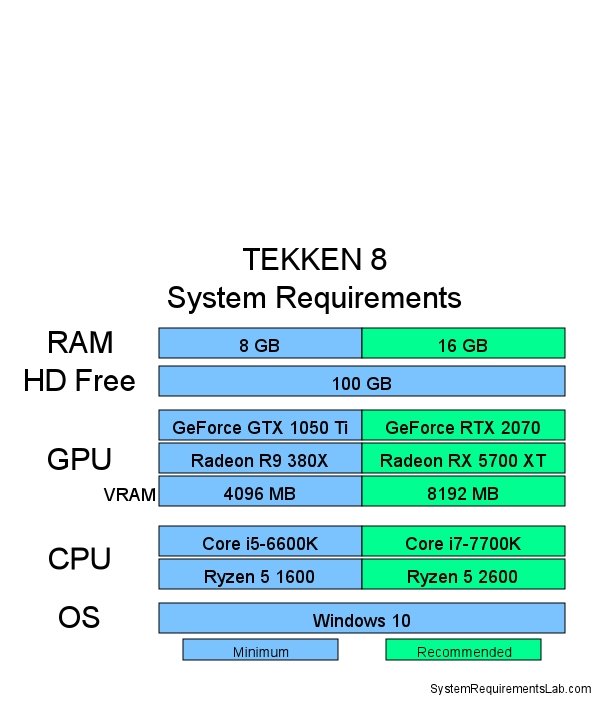
Tekken 8 PC requirements specify the minimum and recommended hardware needed to run the game smoothly, including details about the processor, graphics card, memory, and storage.
The hype for Tekken 8 is real, and many gamers are eager to jump into the action. Before you do, you’ll need to make sure your computer is up to the task. Checking the Tekken 8 PC requirements is crucial to have a great playing experience without performance problems.
This means carefully reviewing the listed specifications. Both the minimum and recommended settings will help you understand what your PC needs to handle the game properly. This ensures that you can enjoy Tekken 8 without frustrating lag.

Tekken 8 PC Requirements: What You Need to Know
So, you’re itching to jump into the King of Iron Fist Tournament with Tekken 8 on your PC? That’s awesome! But before you start practicing those devastating combos, let’s talk about what your computer needs to run the game smoothly. Just like how a race car needs the right fuel and tires, your PC needs the right parts to play Tekken 8 without any problems. This guide breaks down everything you need to know about the Tekken 8 PC requirements so you can get ready to fight.
Minimum PC Specifications: The Bare Essentials
First up, let’s look at the minimum specifications. These are the absolute lowest PC parts needed to run Tekken 8 at all. Think of it like this: if your computer is below these specs, the game might not run well, or might not even start. It’s like trying to run a marathon with sneakers that are way too small – it won’t be a good time. These specifications allow you to play the game, but not at the highest graphical settings or frame rates. Expect lower resolution and less detailed visuals if your setup is just meeting these requirements.
- Operating System: Windows 10 64-bit
- Processor: Intel Core i5-6600K or AMD Ryzen 5 1600
- Memory (RAM): 8 GB
- Graphics Card: Nvidia GeForce GTX 1050Ti or AMD Radeon R7 360
- DirectX: Version 12
- Storage: 100 GB available space
Let’s break this down further. The operating system needs to be Windows 10 64-bit. Older versions of Windows, like Windows 7 or 8, will not work. For the brain of your computer, the CPU, you need at least an Intel Core i5-6600K or an AMD Ryzen 5 1600. Both are older processors, but they provide enough processing power to handle basic gameplay. RAM, which is like your computer’s short-term memory, needs to be at least 8 GB. For visuals, your graphics card must be at least an Nvidia GeForce GTX 1050Ti or an AMD Radeon R7 360. This part handles the images you see on your screen. Tekken 8 also uses DirectX 12, so make sure you have it installed. Finally, you need 100 GB of free space on your hard drive or SSD to install the game.
Recommended PC Specifications: For a Smooth Experience
Now, let’s move onto the recommended specifications. These are the PC parts that are best for a great playing experience, allowing the game to run at higher frame rates and with better visuals. Think of recommended specs as what you’d like your race car to be equipped with – great engine, best tires, etc. – so you can race at peak performance.
- Operating System: Windows 10/11 64-bit
- Processor: Intel Core i7-7700K or AMD Ryzen 5 2600
- Memory (RAM): 16 GB
- Graphics Card: Nvidia GeForce GTX 1060 or AMD Radeon RX 5700
- DirectX: Version 12
- Storage: 100 GB available space
Notice that the recommended specifications have better parts than the minimum. You still need Windows 10 or 11 64-bit, but now you’d want a more powerful CPU like an Intel Core i7-7700K or an AMD Ryzen 5 2600. You need more RAM, 16 GB, to make the game run smoothly without any hiccups. Your graphics card needs to be an Nvidia GeForce GTX 1060 or an AMD Radeon RX 5700 at least, which handles the more demanding graphic settings. DirectX remains at Version 12, and storage space is the same at 100 GB. With this setup, you can get smoother gameplay at higher resolutions and higher graphic settings. This means less lag and better visuals, making the game much more enjoyable.
Understanding Key Components in Detail
Let’s dive into each of the main components and what they actually do. If computer parts sound confusing, this section will help you understand what each piece does for Tekken 8.
The Processor (CPU)
The CPU, or Central Processing Unit, is like the brain of your computer. It does all the calculations for the game. Think of it as the person that thinks out all the complex moves you do during a fight. A stronger CPU allows the game to run complex calculations and processes more quickly, allowing for smoother gameplay. If your CPU isn’t strong enough, you might see the game slow down or “stutter”, which means the game freezes for a very short time. For Tekken 8, a good CPU is important, especially with all the fast-paced action.
Memory (RAM)
RAM, or Random Access Memory, is where the computer keeps information it needs quickly. If the CPU is the brain, RAM is the brain’s short-term memory. The more RAM you have, the more information your computer can store at once, making it easier to quickly access the game’s data. Tekken 8 needs a fair amount of RAM, especially for its detailed visuals and fast movements. If you don’t have enough RAM, the game might run slowly, or you might see loading screens taking forever. So, having enough RAM (16 GB for recommended) lets the game load quickly and run without a hitch.
The Graphics Card (GPU)
The Graphics Card, or GPU, is what creates the visuals you see on your screen. If the CPU calculates moves and events, the GPU takes those calculations and creates the images and effects. This includes the fighter models, stages, particle effects and visual details. A better GPU creates smoother, more detailed images and visuals. In Tekken 8, having a good GPU can make a huge difference in the visual quality and the speed of the game. If your GPU is too weak, the game might look blurry or choppy. If it’s strong enough, you will have the most detailed characters and stages, smooth, sharp, and clear.
DirectX
DirectX is a set of technologies that Microsoft created to help games run better on Windows computers. It helps the software (the game) talk to the hardware (like your graphics card). Tekken 8 needs DirectX 12, which is the latest version. Having the correct version of DirectX means the game can better use your GPU and show you the graphics properly. Without the right version, you might run into issues or missing features. Just make sure your Windows system is updated.
Storage Space
Storage space is where the game is kept on your PC. Think of it like the closet or cabinet where you keep your toys. Tekken 8 needs 100 GB of free space, which is a lot. You will need enough space on your hard drive or SSD to install the game and for it to load properly. An SSD (Solid State Drive) is faster than a traditional hard drive, so using one will allow the game to load quicker. If you run out of space, the game might not install, or might not load at all.
Understanding Performance
Now, let’s talk about what these parts mean for how the game actually performs. There are a couple of main things you need to be aware of: framerate and resolution.
Frame Rate (FPS)
Frame rate is how many images the computer shows you every second, often measured in frames per second (FPS). The higher the frame rate, the smoother the game looks. If the frame rate is low, it might look like the game is jumping from frame to frame instead of smooth movement. Tekken 8 is a fast paced game, and you’ll want a high frame rate, at least 60 FPS or higher, so that all the moves flow smoothly.
Having a higher FPS is important in fighting games where timing is crucial. If you’re playing with a low frame rate, you might react too late because the action on the screen doesn’t update fast enough. You want smooth gameplay so you don’t miss a frame or key moment when you’re playing competitively. The recommended specs are designed to allow for 60+ FPS without causing dips, leading to a more competitive and satisfying experience.
Resolution
Resolution refers to how many pixels (tiny dots of color) make up the picture on your screen. A higher resolution has more pixels, which means the image is clearer and sharper. If you have a lower resolution, the game might look fuzzy or blurry. The most common resolution for gaming is 1080p (1920×1080 pixels), but a lot of gamers play at 1440p (2560×1440) or 4K (3840×2160) resolutions. Higher resolutions are usually more demanding for the GPU. So, a strong GPU is needed to run the game well at 1440p or 4K. If your PC is close to minimum spec, you’ll need to drop the resolution and other settings to get smooth performance.
Can My PC Run Tekken 8?
Now that you know the specifications, let’s figure out if your PC is ready to take on Tekken 8. Here’s a simple approach:
- Find Your PC Specs: On Windows, you can check your computer’s parts by searching for “System Information” in the start menu. There, you can find info on your CPU, RAM, OS, and other information. To find out your graphics card, open the “Device Manager,” and look under “Display Adapters.”
- Compare to the Requirements: Check the specifications mentioned earlier in this article, comparing each part of your computer to both the minimum and recommended specifications.
- Check Minimums: If your computer meets the minimum, the game will run, but probably not at the highest settings, or highest framerate.
- Check Recommendations: If your computer meets the recommended specifications, you’re set up for a smooth playing experience with higher framerate and visual quality.
- Upgrade if Needed: If you don’t meet minimum specifications, it might be time to consider upgrading parts of your computer, like your graphics card, CPU or RAM.
Graphical Settings in Tekken 8
Tekken 8 will likely have several graphics settings that you can adjust based on your PC’s capabilities. Here’s a look at what kind of graphical settings you can expect:
- Resolution: You can change the resolution to match your screen’s, or to lower it to improve performance. Common settings like 1080p, 1440p, and 4K will probably be available.
- Graphics Quality: This usually has options like “Low”, “Medium,” “High” and “Ultra.” Setting this to “Low” will result in less detail, but smoother performance. On the opposite side, “Ultra” offers the best visuals but needs a more powerful PC.
- Texture Quality: Textures are the images placed on the surface of the 3D models, such as the characters and arenas. Setting this to a higher option gives you richer visuals, but it uses more of your GPU.
- Shadow Quality: How detailed the shadows are in the game. Higher quality shadows look better, but also require more processing power.
- Effects Quality: This controls how detailed effects look, such as fire, explosions, and other visual effects. Turning them down reduces strain on your GPU.
- Anti-Aliasing: This makes lines in the game look smooth by getting rid of jagged edges. Turning this up uses more power, but makes the image look better.
By changing these settings, you can adjust the game to run best with your own computer. If you’re not sure, starting with medium and then experimenting is a good approach.
Tips for Improving Performance
Even if you meet the requirements, you might run into some problems while playing Tekken 8. Here are some tips you can use to improve how the game runs.
- Update Your Graphics Card Drivers: Always make sure that your graphics card driver is up to date. New drivers often include performance enhancements and fixes for bugs. You can usually get the latest drivers from the website for Nvidia or AMD.
- Close Unnecessary Programs: Before you play the game, close any programs that you are not using, because they can use valuable RAM and CPU resources. Closing these programs will allow Tekken 8 to use more resources to run more smoothly.
- Lower In-Game Settings: If your game is still not running smoothly, try turning down some of the graphics settings. Adjust the resolution, texture quality, or shadows. Each small change can make a big difference.
- Check Background Processes: Make sure no other programs are running in the background that may be using up your computer’s power.
- Adjusting Power Settings: Set your computer to its “High Performance” power option. This makes sure that the computer is using its full capacity, which might give a little performance boost.
- Clean Up Your Computer: If you’re still having performance problems, it might be a good idea to clean up any unwanted files, programs or applications.
By trying these tips, you may be able to run Tekken 8 more smoothly even if your computer is not very powerful.
Is Tekken 8 Worth Playing on PC?
So, is Tekken 8 worth playing on PC? The answer is a big YES! The PC version lets you enjoy the game with improved visuals and potentially better frame rates, if you have a decent setup. The flexibility of PC gaming, including the ability to customize controls and adjust settings, adds to the overall experience. If you have a computer that meets the required specs, you can expect the PC version of Tekken 8 to be an excellent experience.
Tekken 8 is going to be an amazing fighting game experience for PC players as long as your computer meets at least the minimum specs, but ideally the recommended specs. This guide should give you a solid understanding of what you need to get fighting in Tekken 8. Now get out there and get ready for the battle!
Tekken 8 System Requirements || Tekken 8 Requirements Minimum & Recommended
Final Thoughts
Meeting the Tekken 8 PC requirements is crucial for smooth gameplay. You will need a decent graphics card and processor. These are the minimum specs, and recommended settings will offer a better experience.
Ensure your PC has enough RAM and storage space. Carefully checking these details will allow you to enjoy the game. Tekken 8 PC requirements are important to consider before you purchase.

