
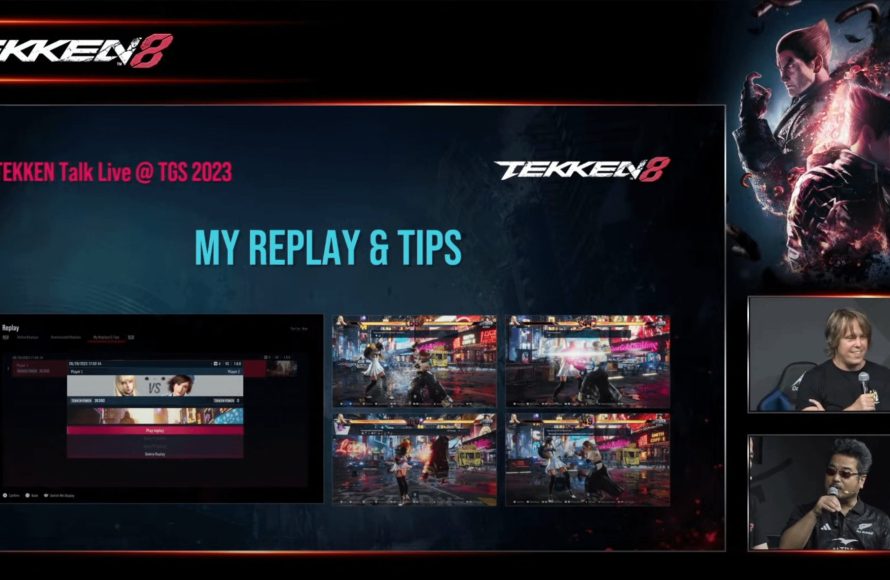
Tekken 8 provides system assistance through Heat Engager, Special Style controls, and replay features with frame data.
Tekken 8 aims to be more approachable, and many players are curious about the tools available. Let’s explore exactly what assistance the game offers to players. Tekken 8 what help is provided by the system? We’ll break down the various gameplay features designed to make the game easier to learn.
Heat Engager simplifies complex moves, making them easier to execute. Special Style gives beginners a basic control option for quick combos. And the replay feature with frame data analysis helps players to understand their mistakes and learn from them. These are some great assists that Tekken 8 gives.

Tekken 8: What Help is Provided by the System
Tekken 8 is a super cool fighting game, but it can be tricky to learn all the moves and strategies. Luckily, the game has lots of helpful tools built right in to make it easier for everyone to play, from brand new beginners to experienced pros. Let’s explore what kind of help the game offers.
The Practice Mode Playground
First up, we have the Practice Mode, which is like your personal training dojo. This isn’t just a place to punch and kick randomly. It’s packed with features to help you get better at Tekken 8.
Setting Up Your Training
In Practice Mode, you get to choose your character and your opponent. You can even pick the stage you want to fight on! But it’s not just about picking a location. You have a lot of control over what your opponent does. Here are some neat things you can change:
- CPU Action: Make your opponent stand still, walk around, jump, duck, or even fight back. This is great for practicing against different kinds of behaviors. You can make the opponent do specific moves, making it easy to counter them
- Damage Display: See exactly how much damage each of your moves does. This helps you figure out which attacks are most powerful. You can see your combos more effectively
- Command History: See the exact button presses of your inputs, making it very helpful for you in timing the combos, and understand different move sets.
- Stun Recovery: Helps you practice recovering from stuns effectively.
- Block Settings: Practice blocking, you can set the CPU to block all the moves, or you can set to block some moves, and even not to block.
Record and Replay
One of the coolest parts of practice mode is the ability to record and replay what your opponent does. You can record a specific sequence of moves and have the opponent repeat that same sequence. This is really handy for learning to defend against tricky combos. For example, you can record the opponent doing a complicated move, then you try to block it, making practice more effective.
Frame Data Display
For more advanced players, the game offers the option to display frame data. This information shows the exact timing of each move in fractions of a second. While this might be a lot to take in for new players, understanding frame data is very useful if you are serious about the game, and it helps players to optimize the combo timings, and learn more on the pros and cons of the moves. This shows the startup time, active time, and recovery time of a specific move, allowing you to understand when it’s safe to attack or defend.
The Super Ghost Battle
Tekken 8 has a unique feature called the Super Ghost Battle. This mode allows you to fight against “ghosts” of other players. These aren’t real people playing live, but rather computer programs that learn from their playstyle. Imagine fighting against a computer that adapts its strategy based on how you play.
How It Works
The game records how people play, including what moves they use, how they block, and when they attack. Then, the game creates a “ghost” that acts like that person. You get a chance to see how other people play, which can give you new ideas for your own strategy. It helps you see how your opponents play and allows you to find ways to beat them.
Learning from Others
Fighting ghosts is a very helpful way to learn. You can see what moves different characters use effectively. It’s like a free training session against different fighting styles. It shows you how players use different characters, how they move, and what tactics they employ. This can help you to develop your style and figure out how to use your character to the fullest.
The Replay and Tips System
Tekken 8 offers very useful ways to review your past matches to make you a better player. Whether you are fighting against the ghosts, or in a ranked battle, you can record and replay every match you play. This system is very useful for understanding your mistakes, and then correcting them.
Detailed Match Replays
After a match, you can watch a full replay of the whole fight, which is very helpful in terms of understanding the mistakes and areas of improvement. You can see each and every move you or your opponent makes. If you made a mistake, you can go back and watch what happened, to understand what you did wrong. With the replay system, you can see your actions from a better point of view, and then you can work on your flaws.
Tips and Insights
During the replay, the game provides useful tips that help you understand specific points of the game. It highlights things that you did well, and it highlights the moves you did wrong. This provides valuable learning to players. For example, the game might suggest that you block more often or try to incorporate different types of moves.
Special Style Mode
Tekken 8 introduces a new mode called Special Style mode, which is designed for both beginners and experienced players, especially for those who want to make the game more accessible, it uses simplified controls for executing advanced moves, allowing players to focus on strategies rather than complex button inputs. This new mode allows you to perform advanced moves by just pressing one button, or a combination of one button and a direction.
Simplified Controls
The special style mode is for people who are having difficulty with the complex move sets of Tekken 8. This mode allows you to perform advanced moves by pressing a single button, making the game easier for new comers to the genre. When in the special mode you don’t have to memorize complex combo strings, instead the game automatically links the moves, which is very helpful for newcomers, making it easier for them to understand the game flow. The simplified controls make the game less intimidating for newcomers and make the gameplay more accessible, which is a huge plus for players who are not familiar with fighting games.
Focus on Strategy
By using special style, players can concentrate on strategy, rather than focusing on complex moves. This allows you to learn the game’s strategic mechanics, such as spacing, timing, mixups, without being bogged down by difficult combos. By simplifying the controls, players can understand the game more effectively, leading to more engaging matches.
The Movelist and Command Input Display
Tekken games are known for having a large variety of moves, and to help you with that, Tekken 8 offers the in-game movelist. You can access the list for your chosen character through the pause menu. Each character has a list of moves, where it gives you a description and explanation of the move, making it very easy for players to understand different kinds of moves. This also allows players to familiarize themselves with the moves of different characters.
Detailed Descriptions
The movelist in Tekken 8 provides more than just the button input sequences, and it gives very detailed descriptions, and information about the moves. For example, it explains the move properties, like is it a high, mid or a low attack, and also gives other details like speed, range, and damage of the specific move. Each move is described in a simple way, which helps you learn them more quickly.
Input Display
During battles, you will be able to see the command input display, which is very helpful in understanding the buttons you have just pressed, and what moves are you executing. This feature is incredibly helpful for timing complex combos and understanding different types of moves. If you are struggling to land a particular move, looking at the input display can help you understand what you are doing wrong.
Tips on Character Selection
In fighting games, choosing the right character is crucial, and Tekken 8 makes it easy to learn different characters by giving a difficulty level, ranging from beginner friendly to expert-level ones. In the character selection menu, it highlights the basic gameplay style of each of the characters, making it easier for new players to pick a character that matches their play style.
Character Styles
Each character in Tekken 8 has their own unique fighting style, some are more aggressive and have strong attacks, others are defensive with good movement, and some excel in the mix-ups. By knowing each play style of different characters, players can choose a character that best fits their style. For new players it is very helpful to start with the character that suits them. For example, some characters are very easy to play and learn, making the learning process easier, while some characters need a lot more practice to play with effectively.
Difficulty Indicators
Tekken 8 has difficulty indicators displayed beside each character, which can help new players a lot, as they will know exactly what the level of difficulty to play with a certain character. By showing the difficulty of characters, the game helps new players choose the characters that are more beginner friendly, like Kazuma, and then slowly progress to the difficult ones, when they have mastered the basics of the game. These indicators are essential in making the character selection process more accessible and user friendly.
Accessibility Options
Tekken 8 also focuses on accessibility, and there are many customisable options to make the game more accessible, allowing for more people to enjoy the game. The game has many features to accommodate different needs of players.
Customizable Controls
Tekken 8 lets you change the control settings for each button. This is great if you have trouble using the default button layouts. You can change the controls to fit your needs, and your own controller setups. For example, if you have a specific button that you use the most, you can change its function, to suit your needs. This accessibility is very important for players with different needs.
Audio Options
The game has many audio options as well, like separate volume controls, and stereo options to make sound easier to hear. These options help players that have different needs. You can adjust background music, and match sound effects volume to what you prefer. You can hear the sound of attacks clearly, making you able to react faster and make blocking easier.
Visual Assistance
Tekken 8 includes visual assistance as well, which helps with screen readability. If you are having trouble seeing some elements, you can turn on these visual assistance options, which can help greatly with your experience. These options include adjustments for the brightness, contrast, colorblind mode, allowing all players to play the game.
Online Training and Community
Tekken 8 allows you to train with others online. You can join lobbies, and train with other players, or you can use the online training tool, which lets you see what the other players are doing. This online support is very good in terms of improving your skills in the game. You can learn new skills from different players all around the world.
Training With Friends
You can easily invite your friends to join the training lobby. You can either work on your skills, or play against each other. Training with friends can be very fun and effective. This provides a good way to play, learn and improve at the game with your friends.
Community Hubs and Forums
Tekken 8 has a very active community and you can join different forums or social media platforms, to get tips and tricks from the other players. These communities are a great source of information and they help you improve your skills, by reading the tips and tricks posted by other players. If you are stuck at a point in the game, and you need some help, the community is always there to help you.
Tekken 8 provides many ways to help you improve, from in-depth practice sessions to learning from other players’ strategies. These helpful features make the game enjoyable for everyone, whether you’re just picking up the controller for the first time or you’re looking to compete at a high level. The tools available help new players get into the game more easily while providing more experienced players ways to improve their skills and refine their strategies. Tekken 8 helps you every step of the way, from understanding your characters moves, to getting the most from each match.
Everything You Need to Know about The Heat System in Tekken 8
Final Thoughts
Tekken 8 provides various assistance tools. These include combo demonstrations and frame data displays, aiding new players in learning the game’s mechanics. The game also features ghost battles where players can improve against AI opponents mirroring their own style.
‘Tekken 8 what help is provided by the system’ is extensive, enabling players to grasp complex techniques faster. The system offers practice modes, showing move properties and helping execution. These support systems really do facilitate growth within the game for any player.

