
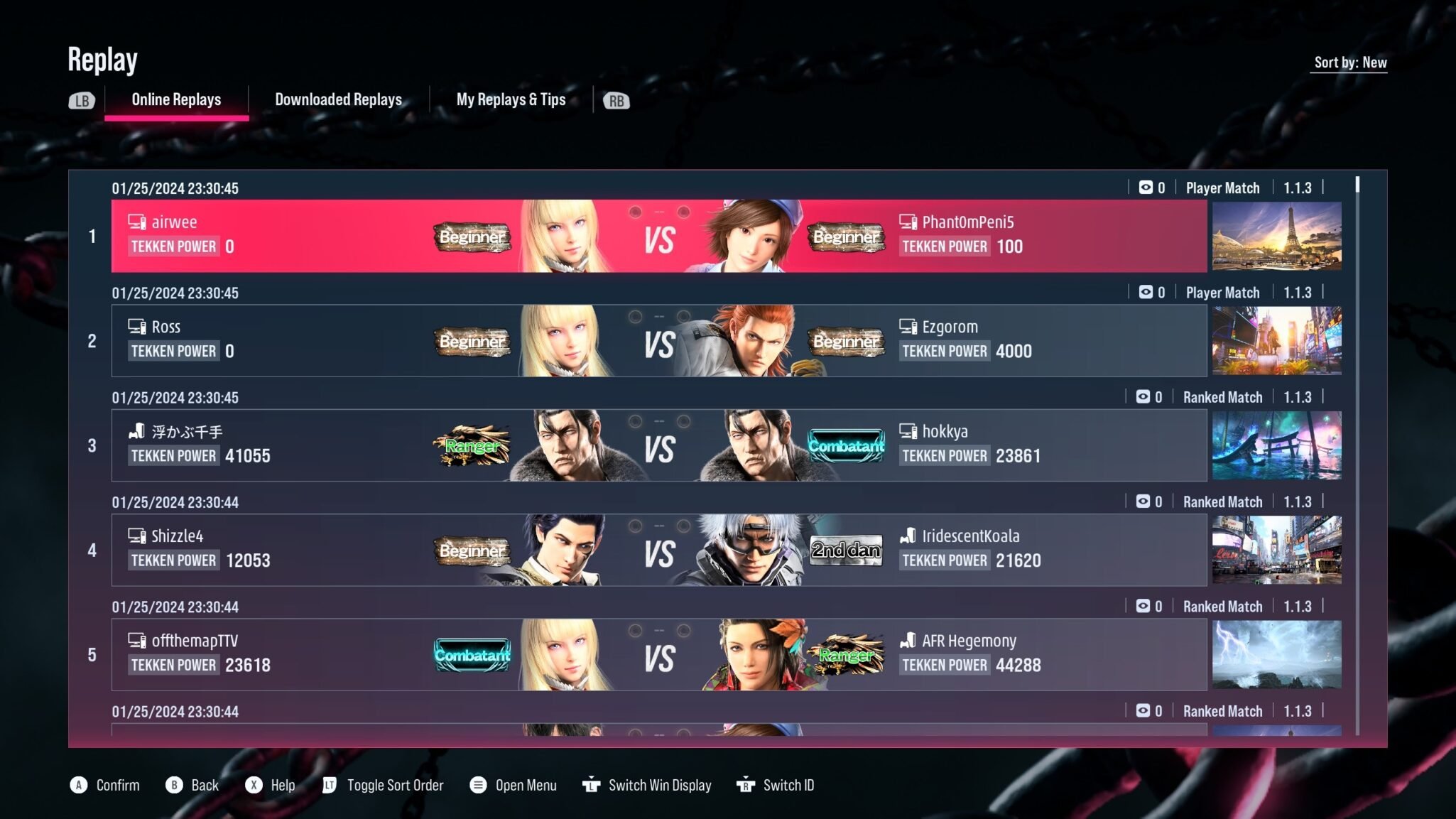
Tekken 8’s replay system allows you to save and watch your previous matches. You can analyze your own gameplay or study opponents’ techniques with playback controls.
Ever wondered how that last fight went so badly? You are not alone! Many players ask: Tekken 8 what is the replay system? It’s actually a core component for improving your skills.
The replay system in Tekken 8 lets you save your battles. You get the chance to see what worked and what didn’t. This lets you analyze your moves and identify weaknesses.

Tekken 8 What is the Replay System?
Hey there, Tekken fans! Ever landed an amazing combo or got totally schooled by a tricky opponent? Tekken 8’s replay system is like having your own personal movie studio for all those epic battles. It’s not just about watching a recording; it’s a tool that helps you understand the game better and become a stronger player. Think of it as your secret weapon to improve your fighting skills!
Understanding the Basics of Tekken 8 Replay System
The Tekken 8 replay system lets you record and rewatch any of your matches, whether it’s online ranked fights, casual friendlies, or even offline matches against the CPU. It captures all the action, from the first punch to the final knockout, and allows you to revisit it whenever you want. It’s a great way to see what went right, what went wrong, and learn from your mistakes. The system keeps a history of your most recent fights, which you can then browse.
Accessing Replays
Finding your replays is easy! You’ll typically find the replay option in the game’s main menu or under a section dedicated to your player profile. Here is how you generally access them, note this can vary a bit depending on the platform (PlayStation 5, Xbox Series X|S, PC):
- From the Main Menu: Look for options like “Replay,” “My Replays,” or “Match History.” It’s usually within a section that deals with data or profiles.
- Post-Match Screen: Sometimes, after a fight ends, there might be an option to save or directly watch a replay. Pay close attention to the on-screen prompts after your matches.
- In Your Player Profile: This is another common place to find your replay data. Check the area that shows your statistics, rankings, and progression.
Once you are in the replay menu, you’ll see a list of your matches. Each one should have some information like who you fought, what characters were used, and maybe the date and time of the match. This helps you easily locate the specific replay you are looking for.
Navigating the Replay Viewer
Once you’ve selected a replay to watch, the real fun begins! The replay viewer isn’t just a video player; it is full of controls and tools to help you analyze every single moment of the fight.
Playback Controls
These are the most basic controls, similar to your standard media player. They are essential for simply watching the fight.
- Play/Pause: Start or stop the replay.
- Fast Forward/Rewind: Move through the replay quicker or go back to review a past moment.
- Frame-by-Frame: This is a crucial feature for detailed analysis. You can move through the replay one frame at a time, which allows you to see how individual moves connect and what actions were taken at each stage of an animation.
- Skip Rounds: If a match has multiple rounds, this lets you jump directly to a certain round without fast-forwarding through the whole match.
Camera Control
Tekken 8’s replay system often gives you some control over the camera. Here are some common types of control:
- Default View: This is the normal view you see when playing the game.
- Free Camera: Move the camera around the battlefield to view the fight from any angle. This helps you examine movement and spacing.
- Character Focus: You can usually choose to lock the camera on one character, enabling you to keep a close eye on their movements and strategy.
Display Options
The replay system gives you the power to change the information on the screen. These display options are key to understanding what is happening in the game. They help you look at data alongside the visual replay, so you get a better understanding.
- Input Display: This shows what buttons each player pressed during the match. Seeing the actual inputs allows you to examine the move sequences and timing in greater detail.
- Frame Data: Some games offer frame data within the replay. It shows how fast moves happen, when they connect, and how much advantage or disadvantage there is after each move. Understanding this can help you improve your execution.
- Hitboxes: A hitbox is the area around a character that can make contact with an opponent. You can show the hitboxes during a replay to see precisely where attacks are connecting, which is key for understanding how to position and connect your own moves.
- Damage Numbers: Turning on damage numbers displays how much damage each hit does. This gives you a better grasp of which attacks are the most powerful.
Why is the Replay System Important?
The replay system in Tekken 8 isn’t just for watching cool fights. It’s also a tool for serious training and improvement. Here are some main reasons why the replay system is important:
Analyzing Your Own Gameplay
First and foremost, you need to understand where you need to get better. This involves taking a look at your matches critically. The replay system helps you do this in several ways:
- Identifying Mistakes: By watching yourself, you can notice errors you may have missed in the heat of the moment, like poor spacing, predictable attacks, or missed opportunities to punish.
- Recognizing Patterns: You will be able to see if you are making the same mistakes over and over, which can help you identify areas of improvement.
- Evaluating Your Strategy: See how well your game plan worked out in reality. Did it work against your opponent? If not, what should you change?
Learning from Your Opponents
Watching your opponent is as important as watching yourself. It’s a key way to learn new techniques and strategies that you can use in your own gameplay. Here’s how:
- Studying Their Techniques: Notice how your opponent uses certain characters, identify their favorite strategies, and pick up their techniques for yourself.
- Understanding Their Patterns: By watching their replays, see what they tend to do when they’re winning or losing. This lets you understand their thought process.
- Adapting Your Own Approach: You can then start preparing for their favorite moves and start making your own strategies on how to counter them.
Training Tool
The replay system can become your best training buddy, giving you the ability to get better in your own way:
- Practicing Punishes: Identify when you missed a chance to punish an opponent’s move, and then you can practice the timing of the move you will use.
- Learning Combos: By using frame-by-frame playback and input display, you can study combos and learn how to execute them perfectly.
- Improving Spacing and Movement: By using the different camera angles, you can see how you and your opponent move around the stage, and start to make adjustments.
Advanced Tips for Using the Replay System
To fully benefit from the replay system, you should know these tips. These tips can take your training to the next level. Use these tips to go further into learning the game, and improve your overall skill:
Focus on Specific Areas
Don’t just watch the full replay each time, focus on what you want to improve. For instance, you might just want to examine your movement in the round you lost. Focus on the mistakes you are making, instead of looking at your perfect combos:
- Analyze Specific Situations: Focus on a few key moments in the fight instead of just watching the whole replay.
- Isolate Problem Areas: Identify the part you’re struggling with. If you keep getting hit after a certain move, focus on that aspect.
Compare Different Matches
Don’t focus on a single replay. Look at how you performed in different situations and against different opponents:
- Look for Improvement: Track your progress by watching replays of your matches over time.
- Adjust Your Strategies: See what works in certain matchups, and start planning for it.
Take Notes
It can be very helpful to take notes. After watching a replay, write down what you noticed and what you will work on next time. This way you can keep track of how you are learning:
- Note Strengths and Weaknesses: This is a great way to see how you can get better.
- Keep a Training Log: Keep a record of all the things you are working on in your replays.
Use Community Resources
The internet is a great place to learn more about the game. The Tekken community is a great place to start! Look up tutorials, guides, and discussions about different strategies:
- Watch Tutorials: Look for replays of pros or experts who can explain their moves in the game.
- Join Forums: Talk to other players about the replays and ask questions about parts of the game you don’t understand.
The Future of Replays in Tekken
Replay systems in fighting games are becoming more and more advanced, and Tekken 8 is keeping up! In the future, you may see features like:
- More Detailed Data: The games might give even more in-depth frame data, including information on blockstun and hitstun.
- Integrated Coaching Tools: Replay systems could suggest what you could have done better.
- Sharing Replays: You could be able to easily share replays with other players directly through the game.
By using the replay system effectively, you can easily turn your matches into a powerful training ground, helping you master the game! So get out there, play some games, then jump into those replays and start getting better!
How To Use Tekken 8 Replay Feature To Improve!
Final Thoughts
Tekken 8’s replay system offers valuable tools for improvement. Players can analyze their matches, identifying mistakes and opportunities. They can examine frame data and inputs. This detailed review helps refine gameplay strategies.
The system includes adjustable playback speeds and camera angles. These options allow focused examination. Therefore, Tekken 8 what is the replay system promotes learning. Players gain a much better understanding of their play.

