
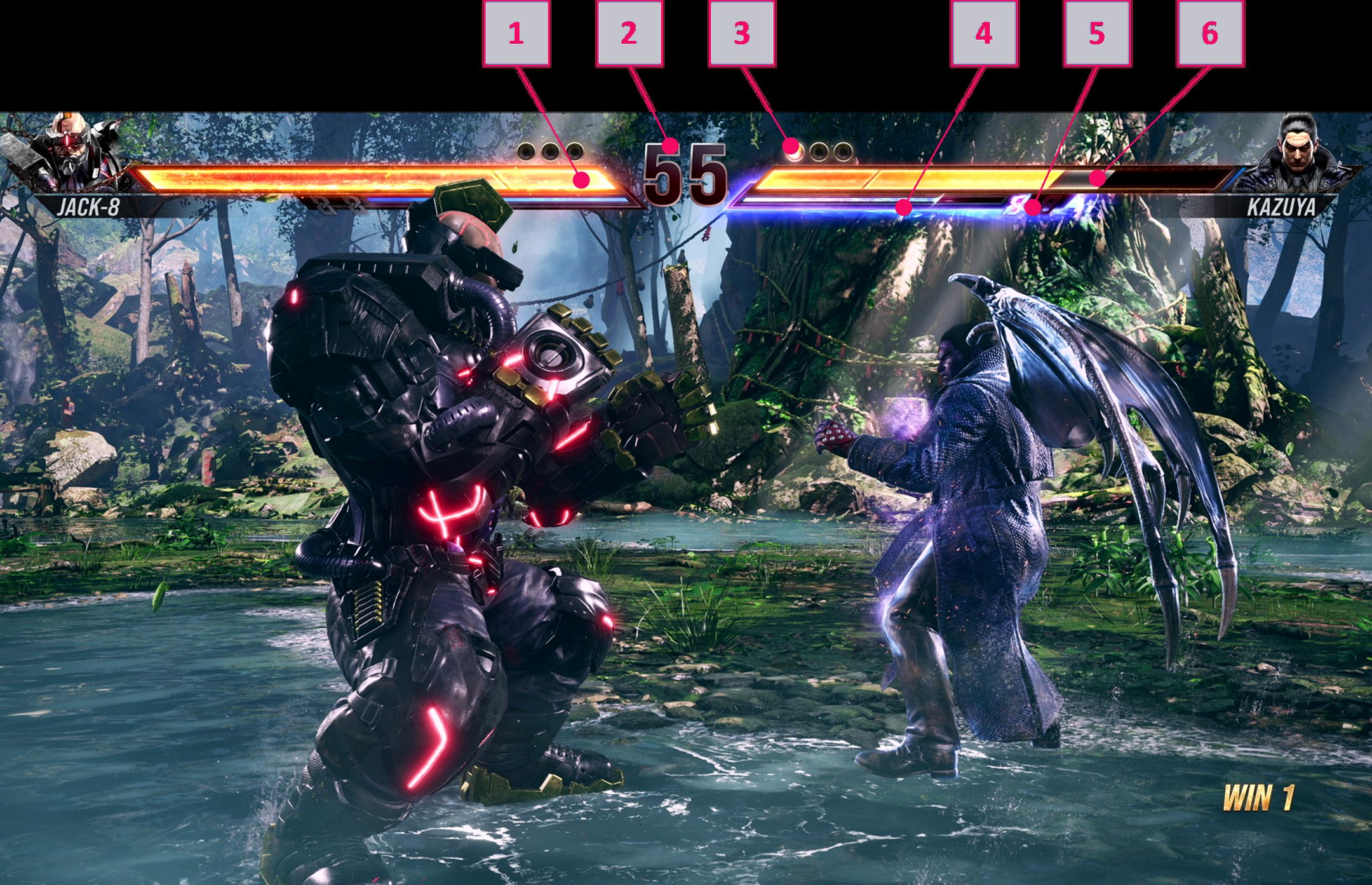
The Tekken 8 user interface is clean and modern, with clear menus, easily accessible character selection screens, and a readily understandable health bar and round indicator during matches.
Have you ever jumped into a fighting game and felt utterly lost navigating the menus? It’s a common frustration, but with Tekken 8, what the games user interface is like is a genuine pleasure. The developers clearly put effort into making it intuitive for both new players and seasoned veterans.
The menus are well-organized, making finding different game modes or customizing your character a quick process. The action during a match is also easy to follow, with key info displayed efficiently.

Tekken 8: What the Game’s User Interface is Like
Hey there, fellow Tekken fans! We all know a great fighting game needs more than just awesome characters and cool moves – it needs a user interface (UI) that’s easy to use and understand. In Tekken 8, the UI is like the steering wheel of your car; it helps you navigate the game smoothly. So, let’s dive deep into what makes the Tekken 8 UI tick.
The Main Menu: Your Gateway to the Fight
When you first fire up Tekken 8, the main menu is where your journey begins. This is your central hub for everything the game has to offer. It’s designed to be super clear, so you won’t get lost trying to find what you’re looking for. Let’s break down some key areas:
- Game Modes: This section lets you choose how you want to play. You’ll find options for Story mode (where you experience the awesome Tekken narrative), Arcade mode (for classic battles), Versus mode (to fight your friends or the computer), and Online mode (for battles with players worldwide). Each mode has a clear icon and title, making it simple to choose the option you want.
- Customization: Here, you can personalize your favorite characters. Change their outfits, add cool accessories, and even adjust their battle intros and victory poses. The customization screen is very visual, with large, clear images of the characters and their items. You can easily see how your changes will look.
- Replay & Gallery: Want to watch your awesome wins again? Or perhaps see some cool art from the game? The Replay & Gallery section is the place to be. Replays are saved for you to view at any time and the Gallery has concept art and cutscenes from the story.
- Options: Adjust the game settings to your liking in this section. You can change things like the difficulty, sound levels, button layout and other preferences.
- Player Profile: This shows your name, your player level, your stats and other information related to your gameplay progress.
The main menu uses a clean layout, with vibrant colours and clear typography which makes it easy for people of all ages to see and understand. The design feels modern but also stays true to Tekken’s overall vibe.
Character Select Screen: Choosing Your Fighter
Once you’ve picked a game mode, you’ll usually head to the character select screen. This screen is crucial for getting ready for a fight. It lets you pick your fighter and see their information:
- Character Portraits: Each fighter has a large portrait and their name displayed clearly. You can easily browse through the whole roster.
- Costume Variations: You can select a character and their various alternate costumes before picking them. This lets you choose what style you want to fight in.
- Character Information: Each character has a short bio or description, so that you can read about their background and fighting style.
The screen itself is well laid out, with the character portraits large enough to see clearly and a simple way to browse between the fighters. It’s also very responsive, so there is no lag between the buttons being pressed and the display updating.
The Heads-Up Display (HUD) During a Match
During the actual battles, the HUD is your main source of information. It provides everything you need without being too cluttered. Here’s a closer look at each element:
Health Bars
The health bars are at the top of the screen. Each player has their own, showing how much health they have left. The bars are clear and easy to read, so you will know how your health is without having to take your eyes off the action for too long.
Rage System
A part of the game that adds an element of high risk, high reward, when a character’s health gets critically low, they have access to rage moves. An indicator at the bottom of the screen will show when you can use these moves.
Round Counter
The amount of rounds won by each player, is clearly displayed at the top of the screen so that you know what you need to do to win the match.
Timer
There is a round timer displayed clearly at the top of the screen. This is used to manage the time remaining in the round, helping you track your progress.
Input Display (Optional)
If you’re trying to get better at the game, you can turn on the input display. This will show the button presses and movement inputs you are making. This can help in learning different combos and moves. It is located in a corner so that it is visible but does not block the action on the screen.
Tekken 8’s HUD has a dynamic feel. It updates very quickly to reflect what is happening during the fight. All the information you need is displayed clearly, so you can stay focused on the battle itself. The colours are bright and the fonts are clear, so you can quickly glance at it and take in the necessary information.
Pause Menu: Taking a Break
Sometimes, you need to pause the action, whether to take a breather, change settings, or just check out the move list. The pause menu is easily accessible mid-match and provides the following features:
- Resume: This lets you immediately return to the fight.
- Move List: Check out your character’s moves, combos, and special attacks. This is very handy for practice or trying new things in a fight.
- Settings: Adjust settings like game difficulty or the volume.
- Character Select: Pick different character without having to go through main menu.
The pause menu is made to be easy to use, so you will not get lost trying to find a particular setting. It has clean text, and large, easily selectable options.
Online UI: Battling Around the World
The online mode in Tekken 8 lets you battle with players worldwide. The user interface for this mode is designed to be very user-friendly. Here’s a look at how it works:
Matchmaking
The matchmaking screen shows you who you’re about to fight. It displays their rank, character they are using and the winrate. This helps you to prepare yourself for the upcoming match.
Lobby System
You can join a lobby to find other players to fight. Lobbies are like online rooms where you can chat with other players, and challenge them to matches. The lobby menu displays all the information you need, including names of the players, their connection strength, and their ranks.
Online Rankings
There is a detailed ranked system in the game, and the UI makes sure that the ranking information is clear. You can see your own rank as well as the rank of your opponents. There are also leaderboards, which allows you to compare yourself against other players.
The online UI is all about clear, easy-to-access information. The goal is to make it smooth to find matches and enjoy online play with others, without struggling with hard to find menus or information.
Customization Menus: Making it Your Own
Tekken 8 is all about expressing your style and personality. The customization menus let you personalize your characters with outfits and accessories. This section has all you need to customize and dress up the characters in the game.
Character Selection
First, you select a character to customize. The characters are displayed with their full body showing in a clear, bright manner. This lets you visualize what changes you will be making.
Customization Options
Once you have chosen a character, you will be taken to the character customization screen. Here you can browse through the many options and items. You can change the outfits of the characters, as well as hair and accessories. You are able to pick out specific items and see how they look on your character before confirming any changes.
Color Palettes
Each costume has various color palette options. This lets you pick how the colors look on each outfit. This adds yet more depth of customization.
The customization menus are visually appealing, making it fun and easy to make changes to your favourite characters. The system is well organised, allowing you to customize characters quickly and efficiently.
Accessibility Options
Tekken 8 includes accessibility options for different players, so that the game is easier for everyone to play.
Button Mapping
Players can map the buttons to their own liking. This allows for a comfortable and easy way to play.
Audio Options
There are various sound options which allow players to adjust game volume, music volume and SFX volume independently.
Visual Settings
Visual settings can be changed to improve visibility. Things like brightness, contrast and colourblind mode are available to alter the visuals as required.
These options ensure that the game is inclusive to all players. Accessibility options provide for the game to be enjoyed by everyone.
The user interface of Tekken 8 plays a vital role in how smoothly the game can be played. The game provides clear and accessible menus, easy to use customization features and a well thought out HUD. The developers have made the game in such a way that both new players and experienced fans alike can enjoy the fighting experience.
Tekken 8 is Flashier Than Ever – UI Spy
Final Thoughts
Tekken 8’s user interface presents clear, functional menus for navigating the game. Character selection screens are visually appealing and easy to use. The in-game HUD displays vital information efficiently without cluttering the screen.
Overall, the UI design prioritizes gameplay clarity. Tekken 8 what the games user interface is like is intuitive and allows you to focus on the fighting. This must allow any player enjoy Tekken 8 more.

