
GPU intensive games are those that heavily rely on the graphics card for rendering complex visuals, detailed textures, and demanding effects, pushing the card’s processing power to its limits.
Ever wondered which games truly test the limits of your gaming rig? What are GPU intensive games, exactly? These titles demand a lot from your graphics card, showcasing stunning visuals and intricate details. They often feature advanced lighting, realistic physics, and high resolution textures, requiring a powerful GPU to run smoothly.
Playing these games provides a great benchmark for your hardware. If your system is struggling, it may be time for an upgrade. You’ll notice significant differences between how such games perform on different graphics cards.

What Are GPU Intensive Games?
Have you ever played a video game that made your computer sound like a jet engine taking off? Or maybe the game looked super cool but moved like a slideshow? If so, you might have been playing a game that’s really hard on your graphics card, also known as the GPU. These are called GPU intensive games. But what exactly makes a game GPU intensive, and why do they need so much power?
Understanding the GPU: Your Computer’s Visual Artist
Before diving into games, let’s talk about the GPU itself. Think of the GPU as your computer’s visual artist. It’s a special piece of hardware that’s really good at drawing pictures, but super fast! It takes all the information about the game – the characters, the buildings, the trees, even the tiny blades of grass – and turns them into the pretty pictures you see on your screen.
The CPU, or central processing unit, is like the brains of your computer, making decisions and telling all the parts what to do. While the CPU manages the game’s logic and calculations, the GPU handles all the visual stuff. Games that demand a lot of visual work will rely heavily on the GPU, making them GPU intensive.
The Visual Feast: How Graphics Intensity Affects Gameplay
Many things contribute to how much work a game asks of your GPU. When a game uses really complex graphics, that means the GPU has a lot of drawing to do. Here are a few things that make a game more GPU intensive:
- High Resolution: This is like the sharpness of the picture. A higher resolution means there are more tiny dots (pixels) to draw, which requires more GPU power. Think of it like drawing a picture on a giant canvas versus a small piece of paper. The bigger the canvas, the more drawing work there is to do.
- Complex Textures: Textures are the surfaces of the objects in a game. A stone wall might have a rough, detailed texture, whereas a shiny metal surface might have a smooth one. The more detail in these textures, the harder the GPU has to work.
- Advanced Lighting and Shadows: Realistic lighting effects, like sunlight shining through leaves, or shadows that move and change with the environment, take a lot of effort to calculate and draw.
- Special Effects: Explosions, fire, water, and smoke look really neat but are very challenging for the GPU. These effects involve lots of tiny particles and movements.
- Anti-Aliasing: This helps to make the edges of objects look smooth and less jagged. This process requires more calculations, which can put stress on the GPU.
- Ray Tracing: A new and advanced lighting technique that creates very realistic reflections and shadows by mimicking the way light travels in real life. It can significantly increase the load on the GPU.
Games with lots of these features will definitely be tough for an older GPU to handle.
Common GPU Intensive Games
Let’s look at some types of games that are well-known for being GPU intensive. Note that these game titles are used as examples, and the list is not a complete comprehensive list of all GPU intensive games out there.
AAA Titles: The Big Budget Blockbusters
AAA games are the big budget, highly anticipated games that often push the limits of what is graphically possible. These games often have the latest graphical technology that demands a very powerful GPU to run smoothly.
Examples of AAA titles that can be very GPU intensive:
- Cyberpunk 2077: This game is known for its stunning graphics and detailed futuristic world, but it’s very demanding on the GPU, especially when ray tracing is turned on.
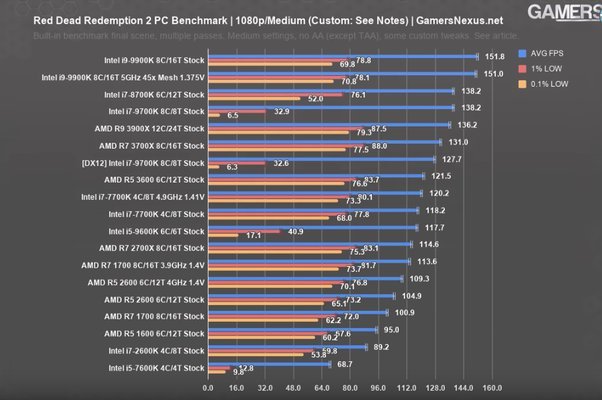
- Red Dead Redemption 2: The game’s vast open world, detailed environments, and lifelike characters make it a real test for any GPU.
- Assassin’s Creed Valhalla: This title with its large open world and detailed character models and environments really makes the GPU work hard, and requires a good graphics card for a better gameplay experience.
- Microsoft Flight Simulator: This game is known for its incredible realism with very detailed world environments, making it very demanding on the GPU, especially on higher settings.
- The Witcher 3: Wild Hunt: Even though released a while ago, the game is still popular and is demanding due to its extensive world and complex graphics.
Modern First-Person Shooters (FPS)
Many modern first-person shooter games are also quite demanding, as these games need to render many fast-moving action, weapons and explosive effects that requires a more powerful GPU to deliver smooth experience.
Examples of GPU-intensive FPS games:
- Call of Duty: Modern Warfare II (or later versions): These games use many modern graphical techniques, including detailed character models, advanced lighting and many special effects, making it very demanding on the GPU.
- Battlefield 2042 (or later versions): These games are known for their large-scale battles, destructible environments, and many detailed vehicles, which can be hard for the GPU to render smoothly.
Open World Adventure Games
Open world adventure games typically feature very large environments, lots of detailed characters and objects to render, making them very demanding on GPU, when you want to play at higher settings.
Examples of GPU-intensive Open-world Adventure games:
- Elden Ring: This game is well known for its detailed environments and impressive graphics making it very challenging for GPU to handle.
- God of War (2018 or later versions): With great graphics and detailed animations and combat, this game is also very demanding on the GPU.
Racing Games
Racing games also demand a good GPU, and these games focus on detailed car models and tracks, fast motion, and realistic reflections and lighting, which are very challenging for the GPU.
Examples of GPU-intensive Racing games:
- Assetto Corsa Competizione: Known for its realistic graphics and attention to detail in car and track models, this game is very demanding on the GPU.
- Forza Horizon series: These games are known for their open world environments and detailed car models, making them quite demanding for the GPU.
Why Are These Games So Demanding?
So, why do these games require so much power from your GPU? It all comes down to how much visual information the GPU has to process every second.
- More Pixels, More Power: High resolution screens have many more pixels to draw than lower resolution ones, which means the GPU needs to work harder to create the game image.
- Complex Calculations: Advanced lighting, shadows, and special effects require many mathematical calculations that the GPU handles.
- Lots of Objects and Detail: Open-world games with tons of characters, buildings, and trees to draw require lots of GPU work.
- Frame Rates: The number of frames the GPU draws each second (frame rate) determines how smooth the gameplay appears. Higher frame rates require more GPU power.
The more complex the game world and the higher settings you chose in the game menu, the more the GPU needs to work.
How GPU Intensive Games Affect Your Computer
Playing GPU intensive games can have several impacts on your computer. Here’s what you might experience:
Performance Issues
If your computer’s GPU isn’t powerful enough to handle a game’s demands, you’ll probably see:
- Low Frame Rates: The game might look choppy and slow because the GPU can’t draw enough frames per second.
- Lag or Stuttering: The game might freeze briefly or jump around because the GPU isn’t processing information fast enough.
- Game Crashes: If the GPU is pushed too hard, the game might crash completely.
These issues can ruin your gaming experience.
Hardware Impacts
Playing GPU intensive games can also impact the hardware of your computer.
- Overheating: The GPU works hard while playing these games, and it can generate a lot of heat. This heat can affect the lifespan of the components in your computer, and may also lead to crashes, or other computer issues.
- Fan Noise: The computer’s fans will run at high speeds to cool the GPU, and you’ll probably hear loud fan noise while gaming.
Upgrading for GPU Intensive Games
If you’re experiencing problems with GPU intensive games, you may need to upgrade your graphics card. But what do you need to consider before upgrading?
Understanding GPU Specifications
When you go looking for a new graphics card, you’ll see lots of numbers and terms. Here are some important ones:
- GPU Model: Different GPU models from NVIDIA or AMD have different performance levels. Newer models are usually better than older ones.
- VRAM (Video RAM): This is the memory that the GPU uses to store graphics data. More VRAM is important, especially for high resolution gaming with complex textures.
- Clock Speed: Clock speed tells you how fast the GPU processes information, measured in gigahertz (GHz). A faster clock speed typically means better performance.
Make sure to research and choose a GPU that fits your specific needs and budget.
Other Computer Components to Consider
When upgrading, remember that your GPU doesn’t work alone! The performance of your games also depends on other components of your computer. Here are a few things to consider:
- CPU (Central Processing Unit): The CPU and GPU work together, so your CPU needs to be powerful enough to keep up with a high-end GPU.
- RAM (Random Access Memory): You need enough RAM for the game to run smoothly. 16GB is a good start for modern gaming.
- Power Supply: Your power supply needs to provide enough electricity for all your components. An upgraded GPU might need a more powerful power supply.
Optimizing Settings for Better Performance
If upgrading isn’t an option right away, there are things you can do to make your games run better. You can tweak the game settings from the in game settings menu for performance. You can try the following:
- Lowering Resolution: Setting the game to a lower resolution will reduce the number of pixels the GPU needs to draw, which helps improve the performance of the game.
- Lowering Texture Quality: This will mean less detailed surfaces, reducing the burden on the GPU.
- Disabling Advanced Effects: Turning off features like anti-aliasing, ray tracing, motion blur or advanced lighting effects will reduce the GPU load and could increase the game’s performance.
- Updating Drivers: Always keep your GPU drivers up to date. Driver updates often include performance improvements for new games.
By tweaking these settings, you can achieve smoother gameplay on a less powerful computer.
GPU intensive games are fun and beautiful, but they demand a lot from your computer’s graphics card. If you love playing games with amazing visuals, it’s helpful to understand what makes them demanding on the hardware, how to make sure you get the most from your game, and what components you may need to consider upgrading in order to get the best gaming experience possible.
CPU VS GPU: How Do They Affect Video Games?
Final Thoughts
GPU intensive games push graphics cards to their limits. These titles often feature high resolution textures, complex lighting, and detailed character models. Ray tracing and other advanced visual effects are common demands.
What are gpu intensive games? They typically include recent AAA releases with cutting-edge graphical features. Simulators and open-world games frequently require substantial graphics processing power. Players need powerful GPUs to run these games smoothly.

