
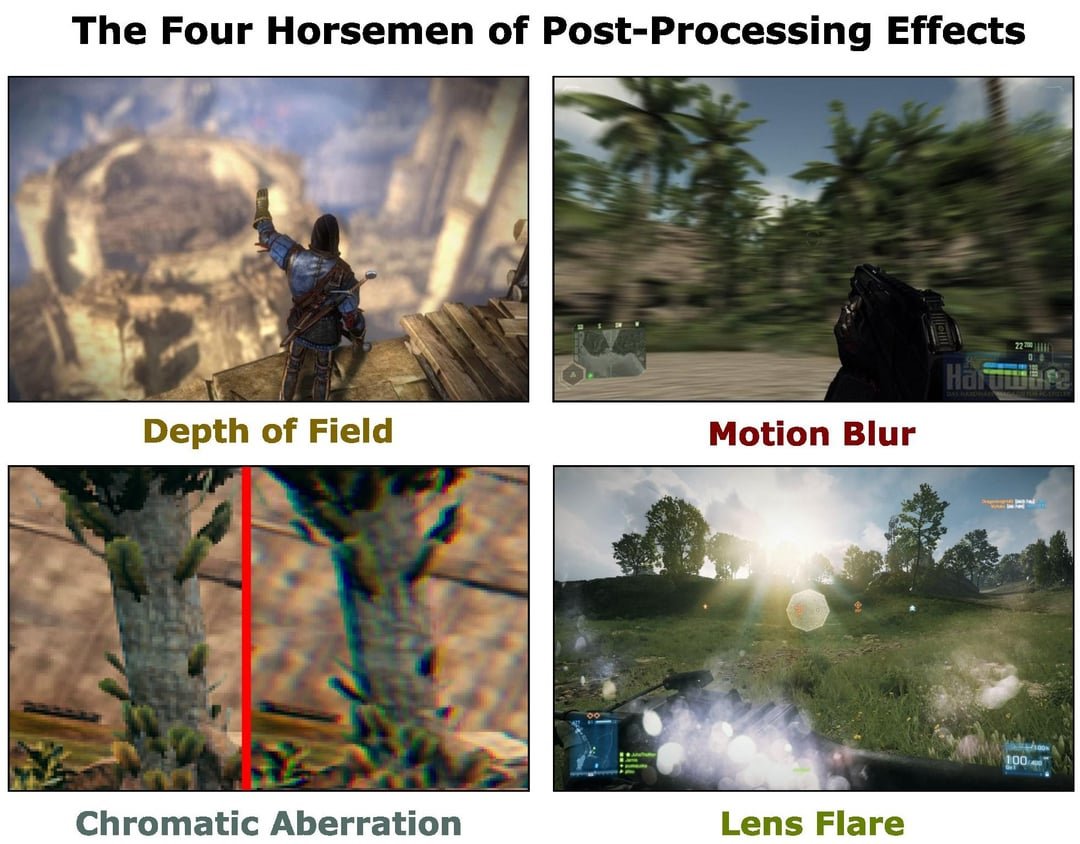
Chromatic aberration in games creates a color fringing effect, typically seen as red, green, and blue edges around objects, particularly in high-contrast areas.
Ever noticed those strange color fringes around objects in some games? You’re likely seeing chromatic aberration at play. What does chromatic aberration do in games exactly? It’s a visual effect, mimicking lens distortion found in real-world photography, where different colors of light bend at slightly different angles. This creates an optical anomaly with coloured edges on objects.
Many developers use this intentionally to add to the realism or visual style of the game. While some players appreciate the effect, others find it distracting and often prefer to disable it within game settings when available.

What Does Chromatic Aberration Do in Games?
Have you ever been playing a video game and noticed that the edges of objects, especially bright ones, seem to have a rainbow-like halo around them? That’s likely chromatic aberration at work. It’s a visual effect that game developers sometimes use to make their games look more realistic or stylized, but it can also be something that players find distracting or even annoying. Let’s dive deeper into what it is, how it works, and why you see it in games.
Understanding the Science Behind Chromatic Aberration
Before we talk about games, let’s quickly explore the science behind chromatic aberration. Basically, it’s what happens when light passes through a lens (like the ones in your eyes or a camera). White light is actually made up of different colors of light, each with a different wavelength. When this light goes through a lens, each color bends at a slightly different angle. This causes the colors to separate a little, resulting in a color fringe or halo. This effect is mostly noticeable in areas of high contrast, where bright and dark parts of an image meet.
Types of Chromatic Aberration
There are two main types of chromatic aberration:
- Lateral Chromatic Aberration: This is the most common type and is what we usually see in games. It causes color fringes around the edges of objects. It’s like the colors aren’t lining up properly, creating a visible separation. Think of it like the colors of a rainbow slightly shifting away from each other.
- Longitudinal Chromatic Aberration: This type happens when different colors focus at slightly different distances from the lens. This can make some parts of an image look blurry or have a color cast. You might see some colors looking closer while others recede into the distance. While less common in games, it can contribute to the overall effect when combined with lateral aberration.
It’s worth noting that both lateral and longitudinal aberrations can happen at the same time, but lateral aberration is more apparent in most cases.
Chromatic Aberration in Video Games: Intentional or an Artifact?
Now, let’s look at how this effect appears in video games. Sometimes, game developers use chromatic aberration intentionally as a visual effect. It’s not always a glitch or a mistake. There are a few reasons why they might use it:
- Realism: Lenses in real cameras and even our eyes can have chromatic aberration, especially inexpensive ones. By adding this effect, developers try to simulate how things actually look in real life, adding a layer of visual authenticity.
- Stylization: Sometimes, developers use chromatic aberration to give their game a unique or retro feel. It can make the game look like it’s being viewed through an older camera or lens. This effect can also enhance the visual appeal of the game.
- Immersion: Some developers believe that chromatic aberration adds to the game’s atmosphere and pulls the player into the game world. It can contribute to a sense of depth and visual complexity.
However, it’s also true that sometimes, chromatic aberration appears unintentionally in games. This can happen when game engines or graphics effects are not perfectly optimized. It might not always be the fault of the developer. It’s simply part of the challenge of creating complex virtual worlds.
Why Developers Might Implement Chromatic Aberration Intentionally
Let’s dig deeper into the motivations behind using chromatic aberration intentionally:
- Lenses Simulation: Game developers often use post-processing effects to mimic the look of real-world cameras and lenses. Chromatic aberration is one such effect that helps give the game visuals a more filmic quality. It makes virtual environments feel more ‘photographed’ than ‘rendered’.
- Nostalgic Look: Certain video games deliberately employ chromatic aberration to create a visual style that resembles the look of old film or camera lenses. This can give the game a retro or vintage look, appealing to players who appreciate that particular aesthetic.
- Cinematic Appeal: When combined with other visual effects, chromatic aberration can heighten the cinematic quality of a game. Think of it as an element of visual storytelling. It can help convey the tone, emotion, and overall atmosphere of the game, enhancing the storytelling.
- Highlighting Contrast: In some cases, game developers use chromatic aberration to highlight areas with high contrast. For example, it may accentuate the edges of bright explosions or the glow around bright light sources, drawing player’s attention to these moments.
Identifying Chromatic Aberration in Games
So, how can you tell if you’re seeing chromatic aberration in a game? Here are some common signs:
- Color Fringing: Look closely at the edges of bright objects or areas with high contrast. If you see a thin rainbow-like fringe of colors, that’s a good sign of chromatic aberration. These fringes are usually red, green, blue, or purple.
- Blurry Edges: In some instances, especially with longitudinal aberration, the edges of objects might appear slightly blurry or hazy, often with a hint of color. It may not be immediately apparent but contributes to the overall effect.
- Motion Smear: When objects move quickly, the color fringing might look more pronounced. This can create a sort of smear effect, especially around fast-moving objects or during rapid camera movements.
The effect is typically more noticeable in environments with bright light sources and high contrast scenes.
The Impact of Chromatic Aberration on Gameplay Experience
While chromatic aberration might be used intentionally, it doesn’t mean everyone enjoys it. Here’s a look at how it can affect players:
Positive Impacts
- Enhanced Realism: When well implemented, chromatic aberration can add to the realism of the game. The visual effect can contribute to the game world’s overall believability by making it look more like a photograph.
- Unique Art Style: For some games, chromatic aberration contributes significantly to the art style. It can give a particular game a memorable look that stands out from other titles.
- Increased Immersion: Some players appreciate the extra layer of detail that chromatic aberration brings. When used correctly, it can help make the game world feel more real.
Negative Impacts
- Visual Discomfort: Some people find chromatic aberration to be visually distracting or even uncomfortable. The color fringing can be an eyesore for some, potentially causing eye strain, especially during longer play sessions.
- Reduced Clarity: In some cases, especially when it’s too strong, chromatic aberration can reduce the overall clarity of the game’s visuals. The color separation can make details appear blurry or less sharp.
- Motion Sickness: When combined with fast camera movements, the color fringing can sometimes trigger motion sickness in some players. The visual distortion can disrupt the player’s sense of balance.
- Accessibility Issues: For players with certain visual sensitivities or disabilities, strong chromatic aberration can make a game unplayable. The color distortions can exacerbate existing visual issues.
Can You Turn Chromatic Aberration Off?
Many gamers wonder if they can disable chromatic aberration. The answer isn’t always straightforward. Here’s what you need to know:
- In-Game Options: Some games offer a setting in the graphics menu that lets you turn chromatic aberration on or off. If you don’t like it, always check the game’s settings first. This is becoming more common, as developers become more aware of player preferences.
- Modifications: For some games, especially PC games, there might be mods created by players that allow you to disable the effect. This can be very useful if the game doesn’t have a built-in setting. Modding communities can be excellent resources for customization.
- No Option: Unfortunately, some games don’t offer a way to turn off chromatic aberration. In these cases, you might have to learn to live with the effect or try to adjust other graphical settings that might slightly lessen its impact.
Settings That Can Affect Chromatic Aberration
Although direct control over chromatic aberration may not always exist, other settings can interact with the effect, making it more or less noticeable:
- Anti-Aliasing: Anti-aliasing smooths out jagged edges in graphics. Some forms of anti-aliasing can also reduce the visibility of chromatic aberration by blending pixels. It’s worth trying different anti-aliasing settings to see if they make a difference.
- Resolution: Higher resolutions can often make the effects of chromatic aberration less noticeable, as higher pixel counts lead to smoother visuals.
- Sharpness: In some cases, increasing image sharpness can make color fringing more obvious, while reducing sharpness may make it slightly less noticeable. Adjusting this setting may not eliminate the effect but could make it less distracting for some players.
- Color Settings: Changing the color settings of your display or within the game itself may alter the appearance of chromatic aberration. Experiment with different color modes to see if any of them reduce the prominence of color fringes.
How to Adapt to Chromatic Aberration
If you can’t turn off chromatic aberration, there are ways you can try to adapt to it:
- Take Breaks: If you find the effect straining on your eyes, make sure to take frequent breaks while playing. Give your eyes a rest, and don’t push yourself.
- Adjust Screen Distance: Sometimes, moving further away from your monitor can reduce the intensity of chromatic aberration. This might not be the most practical option, but it can help if the effect is particularly bothersome.
- Try Different Settings: Experiment with different display settings, such as brightness and contrast. While these won’t get rid of chromatic aberration, they might help lessen the discomfort.
- Focus on the Center: Some players find that if they focus more on the center of their screen, the color fringes on the edges are less distracting. This might require some practice, but it can be a useful technique.
The Future of Chromatic Aberration in Gaming
As gaming technology continues to grow, we’ll probably see more varied and sophisticated ways developers use chromatic aberration. Game engines are always getting more advanced, so we could see developers use it in ways that are both visually impressive and less prone to negative experiences. Also, the growing awareness of accessibility in games will likely mean more options for players to adjust or disable chromatic aberration and other effects they find unpleasant or hard to experience. The ultimate goal is to create games that are enjoyable for everyone.
In conclusion, chromatic aberration is a complex effect in video games. It can be a helpful tool for creating realism and style, but it can also cause issues for players. Knowing how it works and why it’s in games can help you appreciate it more and perhaps even find ways to minimize its impact if it bothers you.
What is Chromatic Aberration? (And why?)
Final Thoughts
Chromatic aberration in games simulates lens distortion, creating color fringes around objects, most noticeably at the edges of the screen. This effect often adds a sense of realism, mimicking camera imperfections.
Some developers use it to achieve a cinematic aesthetic, while others might use it more subtly as a visual detail. However, depending on the intensity, it can also cause eye strain. Ultimately, what does chromatic aberration do in games is to subtly or dramatically alter how visual elements appear, affecting your perception.

