
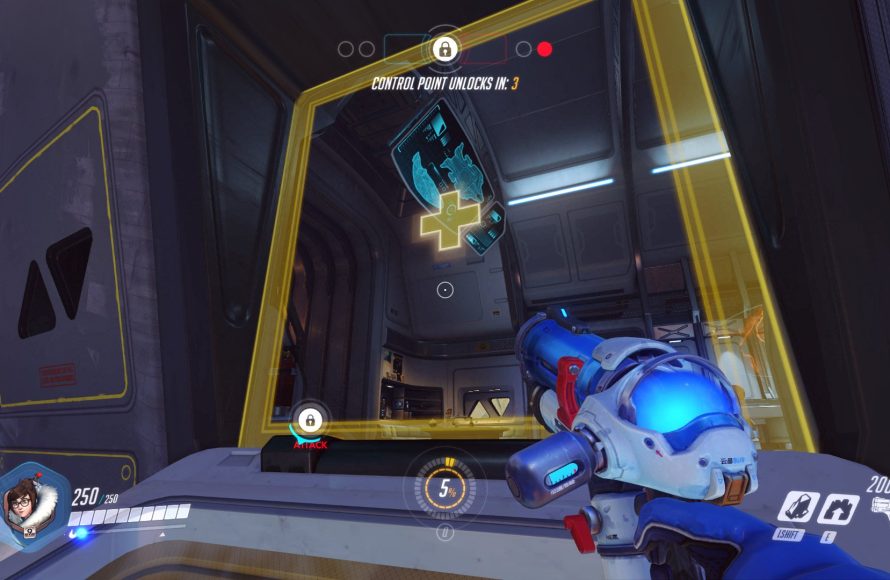
HUD stands for Heads-Up Display in games.
Ever wondered about those screen elements showing health, ammo, or maps during gameplay? Well, that visual information is all part of what makes a game playable. We often see this information but might not know the technical name for it, which leads to the question, what does hud stand for in games?
This interface, placed over the main game screen, helps players keep track of vital information without pausing the action. The HUD enhances the gaming experience by keeping key details readily available. Understanding the acronym can offer a basic insight into game design.

What Does HUD Stand For in Games?
Let’s dive deep into the world of video games! You know that stuff you see on the screen while you’re playing – the numbers, the maps, the little pictures? That’s usually part of what we call the HUD. But what exactly does “HUD” stand for? It’s actually an abbreviation, which means it’s a shorter way of saying a longer phrase. So, the answer is: HUD stands for Heads-Up Display. Now, that might sound a little complicated, but don’t worry, we’re going to break it all down in a way that’s easy to understand!
Understanding the Heads-Up Display Concept
Okay, so the “Heads-Up” part of “Heads-Up Display” is really important. Imagine you’re driving a car. You need to see the road in front of you, but you also need to know how fast you’re going, how much gas you have left, and maybe even what the radio station is. Instead of looking down at the dashboard every few seconds, these details are displayed directly in your line of sight. This lets you keep your “head up” and focused on the main thing: driving. That’s the same idea behind a HUD in games. Instead of having to go into menus all the time, the most important information is shown right on the game screen. It’s all about giving you information without you having to take your focus off the game itself.
The Importance of the HUD in Gaming
Why is the HUD so important? Well, think about playing a game without one. It would be like trying to drive a car without a speedometer or fuel gauge! You wouldn’t know how much health you have left, how many bullets you have, or where your next objective is. The HUD is your constant companion, giving you the essential details you need to play the game effectively. It tells you everything you need to know at a glance, which lets you stay immersed in the game world. Without a HUD, video games would be incredibly difficult and not nearly as much fun.
Common Elements Found in a HUD
HUDs in games can vary a lot depending on what kind of game you’re playing. But there are some common elements that you’ll see in many games:
- Health Bar: This shows you how much damage you can take before your character gets knocked out or dies. Sometimes it’s a number, sometimes it’s a bar that goes down as you get hurt.
- Ammo Counter: This tells you how many bullets you have left in your weapon. It is crucial for deciding when you need to reload.
- Mini-Map: A small map that shows you where you are in the game world and what’s around you. It helps with navigating.
- Score/Points: If the game involves scoring, the HUD will usually show your current score or points.
- Special Abilities/Power Ups: This part shows you when you can use special moves or power-ups. Sometimes it shows a timer or an icon.
- Objective Markers: These are markers that show you where you need to go to finish your task or mission, like arrows or symbols.
- Inventory: Sometimes you’ll see a simplified inventory on the HUD that shows the items you’re carrying.
These are just some of the most common pieces of information included. Game developers might include other information to make a game more user-friendly.
Different Types of HUDs
The way a HUD is designed can really change a gaming experience. There are several ways a HUD might look, and they all have their benefits depending on the type of game.
Minimalist HUDs
Some games use a very minimalist HUD. This means they only show the most essential information, like your health bar or ammo counter, and nothing else. This helps keep the screen clear, which makes it easier to get lost in the game world. These kinds of HUDs are often seen in exploration games or games where you need a lot of focus on your surrounding.
Information-Rich HUDs
On the other hand, some games use a very detailed or information-rich HUD. These HUDs can be crammed with many things at once. You might see a mini-map, a compass, your health, several ability icons, quest details, and more! These are common in more complex games, like RPGs (Role Playing Games) or strategy games. A lot of information can be very useful if you need a lot of details all at once. But, it can also be a bit overwhelming sometimes.
Customizable HUDs
Many modern games let you customize your HUD. This means you can change where different elements are located on the screen, how big they are, and even which ones you want to see at all. This is great because different players like different things. Some people might want a very minimal screen, while others might want to see everything. Customizing lets you set it up just the way you want. Game designers understand that what one player considers clear and helpful, another might find distracting. Allowing players to adjust the elements they see helps everyone find the best way to play.
Dynamic HUDs
A dynamic HUD changes based on what’s going on in the game. For example, some elements might appear only when they’re needed, or fade out when you aren’t looking at them. This helps keep the screen uncluttered when you don’t need certain pieces of information. So, when you need it, the information is available, and when you don’t, it disappears to give you more screen space. Dynamic HUDs can help maintain immersion since you don’t always have a lot of extra visual clutter.
The Evolution of the HUD
The concept of a HUD in video games has come a long way since the early days of gaming. In the beginning, games had very simple HUDs, often just showing a score or a limited number of lives. Now, HUDs are much more advanced and play a huge role in how games feel.
Early Game HUDs
Older games often had very basic HUDs, sometimes not even in the main view. In some, you’d have to pause the game to see your score or inventory. The available technology limited what game designers could do, so the information was usually simple and not very detailed.
Modern Game HUDs
Modern HUDs are much more advanced. They can display a huge amount of data on the screen. They are also designed to be more user-friendly and less distracting. The design of modern HUDs is very much about creating a great gaming experience. Developers work hard to make the game feel intuitive and easy to play. This includes designing a HUD that presents information quickly, without taking away from what’s happening in the game world. They experiment with different shapes, colors, and placements to make the HUD as helpful as possible for all kinds of players.
Future of HUDs
What about the future? We can imagine that HUDs will continue to evolve and become even more integrated into the game. Some games are experimenting with HUDs that project into the player’s environment through augmented reality. Virtual Reality games are also taking HUDs in new directions. These interfaces will be designed to look more like the real world, or to appear as part of the game environment itself. HUD design will almost certainly keep changing and adapting to new technologies and to what gamers are looking for in their gaming experience.
How the HUD Enhances Gameplay
A well-designed HUD is more than just a display of information. It’s a key part of what makes games fun and exciting. It enhances the whole gaming experience in many ways.
Provides Immediate Feedback
The HUD gives you immediate feedback on your actions. You can see your health go down when you get hit, or watch your ammo counter decrease when you shoot. This immediate feedback lets you understand what is going on in the game, and how your choices are affecting the game. With this immediate feedback, you can adjust your strategy accordingly.
Maintains Immersion
A good HUD helps you to stay immersed in the game world. By showing all the important information on the screen, you don’t have to open menus or leave the main view. This helps to keep you focused on the game. The HUD is a window into the game and the experience is better when you are not distracted by moving away from the action.
Aids Navigation and Exploration
Mini-maps and objective markers on the HUD are very helpful when navigating a game world. They make it easier to figure out where you are and where you are headed. These can help you get to your destinations, discover hidden areas, and explore the game in a way that feels smooth and natural.
Offers Strategic Advantage
The HUD shows you valuable information to create a winning strategy. Seeing how much health and ammo you have can help you decide when to attack and when to defend. Also, knowing when your special abilities are ready to use can be very important in key moments. The information on a HUD can directly improve the player’s tactics.
Customization and Accessibility
The ability to customize a HUD is a great step in making games accessible. Players who have specific visual needs, or who find certain arrangements more helpful, can easily customize their settings. This gives them a way to set up the game in a way that is comfortable for them.
The Future of Heads-Up Displays Beyond Gaming
The idea of a heads-up display isn’t just limited to games. It’s actually used in many real-world situations, and we can expect it will appear in even more areas as technology gets better.
Automotive HUDs
As previously mentioned, car manufacturers use HUDs to show important information like speed, navigation, and warnings. These HUDs project the information directly onto the windshield, so the driver can see it without taking their eyes off the road. This is a huge safety feature as it helps to reduce the amount of time drivers need to look away from their surroundings to get information about their vehicle.
Aircraft HUDs
Pilots rely on HUDs in aircraft to get important flight data and navigation information. It shows things like altitude, speed, heading, and other important things the pilot needs to fly the plane. With a HUD, they can always see what is happening without having to look away at the instrument panel.
Military Applications
The military uses HUDs for things like targeting systems, navigation, and real time information. These special HUDs give soldiers all the information they need at a glance. They help troops be more effective and aware of their surroundings. These displays are rugged and designed to work in all kinds of situations. They also help improve military operations.
Augmented Reality
Augmented Reality (AR) glasses and other similar gadgets can display information in your view. This can range from displaying maps while walking down the street to displaying information while you’re working with your hands. This technology is always improving, and the potential uses are exciting.
Wearable Technology
Some wearable technology, like smart watches, incorporates elements of a heads-up display. They provide essential information to the user on a small screen. These technologies might offer new options and ideas for how we use HUDs in the future.
In short, the concept of a heads-up display – showing information without making people look away – is valuable in all sorts of settings. In gaming, it enhances the experience. In other places, it can enhance safety, efficiency, and convenience. The basic principle of a HUD, giving relevant information directly within your line of sight, is a very good one and has proven useful across a lot of industries.
So, next time you’re playing your favorite game, take a moment to appreciate the HUD. It may seem like a small thing, but it’s actually a vital part of the gaming experience, as well as a very clever concept that’s used in real-world tools. Understanding what HUD stands for and how it works can help you appreciate all of the details in the game that developers have worked hard to provide.
The way we interact with technology is always changing and improving, and HUDs have an important role to play in that process. We can expect even more innovation in the future as tech developers continue to think of new ways to make sure the user experience is better and more user friendly.
Types of HUD
Final Thoughts
HUD stands for Heads-Up Display in games. It’s the visual interface players see on screen. This display relays critical information.
What does HUD stand for in games? It shows things like health, ammo, scores, and maps. These elements help gamers track their progress and understand the game’s world. It’s an essential component for interactive game play.

