
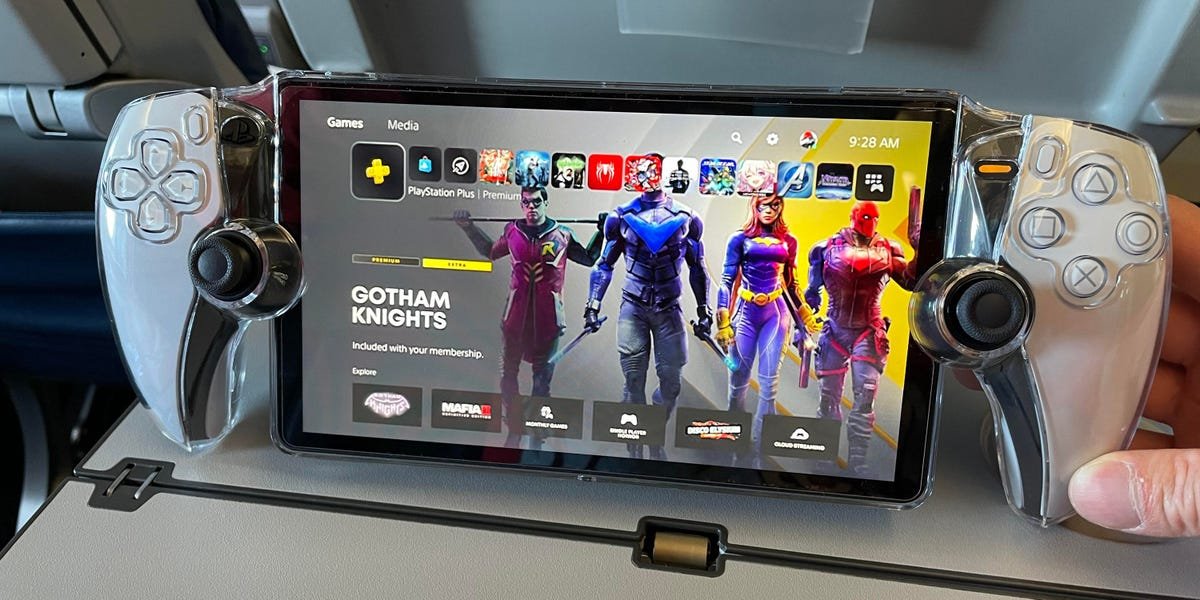
You can play any PS5 game installed on your console that doesn’t require a PS VR headset. Essentially, what games can you play on PS Portal boils down to standard PS5 titles playable via Remote Play.
Wondering what games you can play on PS Portal? It’s a common question with a straightforward answer. The PS Portal acts as a remote display for your PS5.
Think of it as extending your PlayStation 5 experience to a handheld device. This means you can play the vast majority of your PS5 game library on the go. Just keep in mind VR games are not compatible.

What Games Can You Play on PS Portal?
The PlayStation Portal offers a fantastic way to enjoy your PS5 games remotely. It streams games directly from your console over Wi-Fi. But what exactly does that mean in terms of compatibility?
The key thing to understand is that the PS Portal relies on Remote Play. It’s essentially a dedicated Remote Play device. This means the game must be installed on your PS5.
Remote Play Compatibility: The Foundation
The PS Portal is designed to play any game compatible with the PS5’s Remote Play feature. This is the main limitation, but it still offers a huge library of games.
Most PS5 games are Remote Play compatible. This includes a vast catalog of single-player adventures, multiplayer experiences, and everything in between.
Games That Work Seamlessly
The PlayStation Portal is compatible with most games that you can play on your PS5. This is because the PS Portal uses Remote Play, which mirrors your PS5 to the handheld device.
Single-player experiences shine on the Portal. You can get lost in sprawling open worlds or enjoy narrative-driven adventures.
Multiplayer games are also supported, provided your internet connection is stable. Team up with friends in online matches or competitive battles.
Here are some examples of games that generally work great:
- Spider-Man 2: Swing through New York City from anywhere in your home.
- God of War Ragnarök: Continue Kratos’ epic journey on the go.
- Horizon Forbidden West: Explore the vast and beautiful landscapes.
- Elden Ring: Tackle challenging bosses from the comfort of your couch.
- Final Fantasy VII Rebirth: Dive into this enhanced and expanded world.
Games That Don’t Work
Unfortunately, not all games are compatible with the PlayStation Portal. There are some limitations you need to be aware of.
PSVR games are not compatible. This is because the PS Portal doesn’t support the required hardware.
Games streamed through PlayStation Plus Premium’s cloud streaming service also won’t work. The PS Portal only supports Remote Play directly from your PS5 console.
Here is a breakdown:
- PSVR Games: Not supported due to hardware limitations.
- Cloud-Streamed Games (PS Plus Premium): Only games directly installed on your PS5 are playable.
- PS3 Games (Cloud Streamed): Again, reliant on cloud streaming, making them incompatible.
Why Certain Games Are Incompatible
The incompatibility stems from the PS Portal’s reliance on Remote Play. Remote Play streams gameplay directly from your PS5.
PSVR games require specific hardware and processing that the Portal can’t replicate. Cloud-streamed games bypass the PS5 entirely, rendering them unplayable on the Portal.
Understanding the Technical Requirements
The PS Portal’s performance is heavily reliant on your home network. A strong and stable Wi-Fi connection is essential.
Sony recommends a minimum internet speed of 5 Mbps, but 15 Mbps is recommended for the best experience. Lower speeds may result in lag or a poor visual quality.
Wi-Fi: The Crucial Connection
Your Wi-Fi network is the lifeline of the PS Portal. The quality of your connection will significantly affect your gaming experience.
Make sure your PS5 and PS Portal are connected to the same network. Also, minimize interference from other devices using the same Wi-Fi band.
Optimizing Your Network for Remote Play
To get the best possible experience, consider optimizing your home network. A dedicated 5GHz Wi-Fi band can help reduce interference.
You can also try moving your router closer to your PS5 or PS Portal. This can improve signal strength and reduce latency.
Troubleshooting Common Issues
Encountering issues with your PS Portal? Here are a few common problems and potential solutions.
Lag and stuttering can often be resolved by improving your Wi-Fi connection. Check your internet speed and try optimizing your network settings.
If you’re experiencing disconnects, make sure your PS5 and PS Portal are both connected to the internet. Restarting both devices can sometimes resolve connectivity issues.
Exploring the PlayStation Game Catalog
The PlayStation ecosystem boasts a massive library of games. From AAA blockbusters to indie gems, there’s something for everyone.
Here are just a few of the popular franchises available:
- Uncharted: Embark on thrilling treasure-hunting adventures.
- The Last of Us: Experience a gripping post-apocalyptic story.
- Gran Turismo: Immerse yourself in realistic racing simulation.
- Demon’s Souls: Test your skills in challenging action RPG combat.
AAA Titles on the Go
The PS Portal allows you to play these AAA titles on the go, within the range of your Wi-Fi. This is a major selling point for gamers with busy lifestyles.
Imagine playing God of War Ragnarök during your commute or tackling challenging Elden Ring bosses from the comfort of your bed. The possibilities are endless.
Indie Gems and Hidden Treasures
Don’t overlook the incredible indie games available on PlayStation. Many of these games are perfectly suited for the PS Portal.
From charming platformers to thought-provoking narrative experiences, indie games offer a diverse range of gameplay styles.
PS5 Exclusives: A Major Draw
One of the biggest draws of the PlayStation ecosystem is its exclusive games. These titles are only available on PlayStation consoles.
The PS Portal allows you to enjoy these exclusives remotely. This provides a unique advantage over other handheld gaming devices.
Expanding Your Gaming Horizons
The PS Portal opens up new possibilities for gamers. It allows you to play your favorite PS5 games in more places than ever before.
Whether you’re traveling, relaxing at home, or simply want to play in a different room, the PS Portal offers a convenient and immersive gaming experience.
The Future of Remote Play
The PS Portal represents the evolution of Remote Play. It provides a dedicated and streamlined experience for playing PS5 games remotely.
As technology advances, we can expect to see even more improvements in Remote Play capabilities. This will further enhance the PS Portal’s functionality and appeal.
Considering Other Remote Play Options
While the PS Portal offers a dedicated solution, other Remote Play options are available. You can use your smartphone, tablet, or computer to stream PS5 games.
These options may not offer the same level of integration as the PS Portal, but they can be a viable alternative for some gamers.
Remote Play on Smartphones and Tablets
The PlayStation App allows you to stream PS5 games to your smartphone or tablet. You’ll need to connect a DualSense controller via Bluetooth.
This can be a convenient option for playing games on the go, but the experience may not be as seamless as on the PS Portal.
Remote Play on PC and Mac
You can also use the Remote Play app to stream PS5 games to your PC or Mac. This allows you to play games on a larger screen.
However, you’ll still need a DualSense controller. The performance may vary depending on your computer’s specifications and network connection.
Is the PS Portal Right For You?
Ultimately, the decision of whether or not to buy a PS Portal depends on your individual needs and preferences. Consider your gaming habits and budget.
If you frequently use Remote Play and want a dedicated device for playing PS5 games on the go, the PS Portal is a great choice. If you’re just curious, Remote Play on your phone, tablet, or computer may be a better way to test it.
Cost Considerations
The PS Portal has a specific price point, so consider your budget. Also, take into account the cost of any accessories you may need, such as a high-quality headset.
Portability and Convenience
The PS Portal’s portability is a major advantage. It’s lightweight and easy to carry, making it ideal for travel or playing in different rooms of your home.
The PS Portal Display
The PS Portal screen is 8-inches, offering a great balance of size and portability. This makes games look sharp and vibrant.
The resolution and refresh rate are optimized for Remote Play. This helps ensure a smooth and responsive gaming experience.
Battery Life and Charging
The PS Portal’s battery life typically lasts for several hours of gameplay. This is enough for most gaming sessions.
You can charge the PS Portal via USB-C. It’s similar to charging a mobile phone or many other devices.
Controller Integration
The PS Portal features a built-in DualSense controller. This provides the same immersive experience as playing on your PS5.
The adaptive triggers and haptic feedback add a new level of realism to your games.
Audio Quality
The PS Portal has a built-in speaker, but using headphones is recommended for the best audio experience. You can connect headphones via the 3.5mm headphone jack.
The PS Portal also supports PlayStation’s Pulse series wireless headsets, offering high-quality audio and enhanced immersion.
PlayStation Plus: Enhancing the Experience
While a PlayStation Plus subscription isn’t required to use Remote Play, it enhances the experience. PS Plus is necessary for online multiplayer.
It also provides access to a library of free games and exclusive discounts.
Remote Play vs. Cloud Streaming
It is crucial to understand the difference between Remote Play and cloud streaming. The PS Portal supports Remote Play, not cloud streaming.
Remote Play streams games from your PS5, while cloud streaming streams games from a remote server. The PS Portal doesn’t have the ability to play PlayStation Plus Premium cloud streamed games.
Third-Party Accessories
There are a variety of third-party accessories available for the PS Portal. These can enhance your gaming experience.
Protective cases, screen protectors, and improved headphones are all popular options.
The Importance of a Strong Router
A powerful and reliable router is essential for smooth Remote Play. An older or weaker router may not be able to handle the demands of streaming games.
Consider upgrading your router if you’re experiencing lag or disconnects.
Testing Your Internet Speed
Before using the PS Portal, it’s a good idea to test your internet speed. This will give you an idea of whether your connection meets the recommended requirements.
There are many online speed test tools available. These can help you determine your download and upload speeds.
Adjusting Remote Play Settings
You can adjust the Remote Play settings on your PS5 to optimize performance. Lowering the resolution or frame rate can help reduce lag.
These settings can be found in the Remote Play section of the PS5’s settings menu.
Checking for Updates
Make sure your PS5 and PS Portal are running the latest software. Updates often include performance improvements and bug fixes.
You can check for updates in the system settings menu.
The Social Aspect of Gaming
While the PS Portal is primarily a solo gaming device, you can still connect with friends online. PlayStation Plus is required for most online multiplayer games.
Team up with friends in co-op adventures or compete against them in online battles.
Embracing the Future of Gaming
The PS Portal represents a step towards the future of gaming. It allows you to play your favorite games in new and exciting ways.
As technology continues to evolve, we can expect to see even more innovations in remote play and handheld gaming.
How to stream 120+ games directly to PlayStation Portal
Final Thoughts
In short, you can enjoy any PlayStation 5 game installed on your console that doesn’t require PS VR. The PS Portal mirrors your PS5’s display. Therefore, a must have game would be any titles in your library, from action-packed adventures to immersive RPGs.
Essentially, what games can you play on PS Portal? It’s a direct extension of your PS5. Any game accessible and playable on your PS5 (excluding PS VR titles) is playable through the Portal, as long as you have a stable Wi-Fi connection.

