
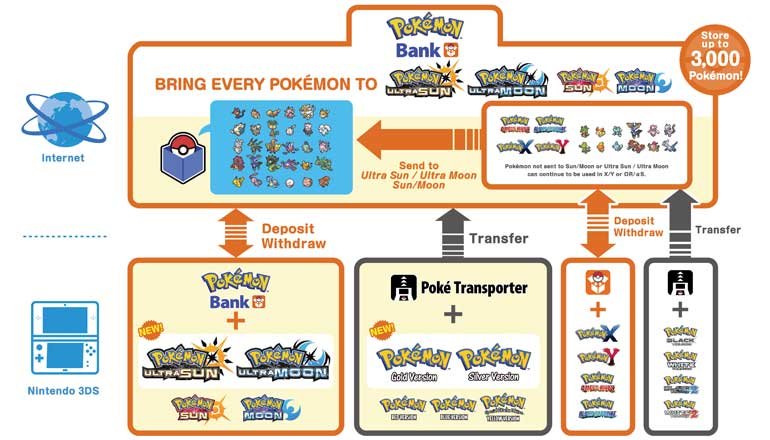
Pokémon Bank is compatible with Pokémon X, Pokémon Y, Pokémon Omega Ruby, Pokémon Alpha Sapphire, Pokémon Sun, Pokémon Moon, Pokémon Ultra Sun, and Pokémon Ultra Moon.
Figuring out what games is pokebank compatible with can feel like a puzzle. You want to move your cherished Pokémon between your various adventures, of course. It’s natural to wonder if a particular title will work with the service.
Thankfully, the answer isn’t too complicated. Several core series games on the 3DS family of systems connect to Pokémon Bank. This list should help you understand the full picture before you start transferring.

What Games is Pokébank Compatible With?
Okay, Pokémon trainers, let’s dive deep into the world of Pokémon Bank compatibility! You’ve probably heard about this handy online service, but knowing exactly which games it works with can be a little confusing. Don’t worry, we’re going to break it all down so you know which of your Pokémon can make the trip. Think of Pokémon Bank as a big, digital storage box in the sky, where you can keep your precious Pokémon safe. But just like a real storage box, not everything fits! Let’s see which games are welcome.
The Core Compatibility: Generation VI and VII
The main games that work with Pokémon Bank are from Generation VI (that’s the Pokémon X, Y era) and Generation VII (Sun and Moon, and their Ultra versions). These are the games that were specifically designed with Pokémon Bank in mind, so they have the most direct and easy connection.
Generation VI Games
First up, let’s talk about Generation VI. These games were the first to introduce Pokémon Bank. If you have any of these games, you’re good to go:
- Pokémon X
- Pokémon Y
- Pokémon Omega Ruby
- Pokémon Alpha Sapphire
With these games, you can deposit and withdraw Pokémon easily through the Pokémon Bank application on your 3DS. It’s like having a really large extra PC box right at your fingertips!
Generation VII Games
Next, we have Generation VII. These games continued the easy integration with Pokémon Bank, letting you move your Pokémon to and from your digital storage. The compatible Generation VII games include:
- Pokémon Sun
- Pokémon Moon
- Pokémon Ultra Sun
- Pokémon Ultra Moon
These games connect smoothly to Pokémon Bank, allowing you to move your Pokémon around. You can store Pokémon caught in the Alola region alongside Pokémon from the Kalos region. This allows a diverse collection of Pokémon within your account.
How Pokémon Bank Connects with These Games
The connection process with Generation VI and VII games is quite straightforward. When you start the Pokémon Bank application on your Nintendo 3DS, it recognizes these compatible game cartridges or digital versions. You can then select which game you want to access. After that you can start depositing or withdrawing Pokémon as you please. It’s designed to be user-friendly, making transferring your team between games a relatively simple task.
Navigating Pokémon Transporters
Now, here is where things get a little more interesting. What about your older Pokémon from the older games? That’s where the Poké Transporter comes in. This is a separate application that works in conjunction with Pokémon Bank. It’s your bridge between the older generations and the newer ones.
Poké Transporter and Generation V
The Poké Transporter was created to help transfer Pokemon from your older Generation V games. These Generation V games includes:
- Pokémon Black
- Pokémon White
- Pokémon Black 2
- Pokémon White 2
These games are not directly compatible with Pokémon Bank. Instead, you use the Poké Transporter application to move Pokémon from these games to your Pokémon Bank account. Once they’re in your Pokémon Bank account, they can then be moved to compatible Generation VI and VII games. It’s like taking a scenic train ride, instead of a direct flight.
How it Works:
With your Gen V game inserted into your 3DS system, you launch the Poke Transporter application. The application then lets you select Pokemon from your Gen V game and move them into the Poke Bank cloud storage. The process is pretty simple, just remember that once a Pokemon is moved from your old game, it cannot be moved back. Think of it as a one-way trip through time!
Important Notes about Poké Transporter
There are a few key things you need to keep in mind with Poké Transporter:
- One Way Trip: As mentioned before, once your Pokémon are transferred from your Generation V game using the Poké Transporter, they cannot be moved back. This is a permanent move, so make sure you’re ready to let them go on a one-way trip to the Pokémon Bank.
- Limitations: Only Pokémon can be moved through Poke Transporter, items cannot be moved to the Poke Bank account, they must remain in your older generation game.
Games Not Compatible With Pokémon Bank
While Pokémon Bank is great for moving Pokémon between generations, it does have its limits. Older games, such as those from Generation I, II, III, and IV, cannot connect to Pokémon Bank, and also the newer generation games too, for example, the Switch titles, like, Pokémon Sword and Shield, or Pokémon Scarlet and Violet or the Let’s Go Series of games. Here are some of the games that you just can’t use with Pokémon Bank.
Games From Older Generations (I-IV)
Unfortunately, the older games are not compatible with Pokémon Bank. These include:
- Pokémon Red, Blue, and Yellow (Generation I)
- Pokémon Gold, Silver, and Crystal (Generation II)
- Pokémon Ruby, Sapphire, FireRed, LeafGreen, and Emerald (Generation III)
- Pokémon Diamond, Pearl, Platinum, HeartGold, and SoulSilver (Generation IV)
The primary reason is due to the way that these games saved their data and how it would have been near impossible to make a connection to this service. These games don’t have the same online connectivity as the later games, and the save files are not compatible. The technology was just different back then! It makes it much more challenging to make a connection to the internet with these older games.
Newer Generation Games and Pokémon Bank
Even though Pokémon Bank is a handy tool, it has been rendered obsolete by the newest Pokémon title on Nintendo Switch, such as:
- Pokémon Sword and Shield
- Pokémon Brilliant Diamond and Shining Pearl
- Pokémon Legends: Arceus
- Pokémon Scarlet and Violet
- Pokémon Let’s Go Pikachu and Eevee
These games do not work with Pokémon Bank. The service was replaced by another called “Pokémon HOME”, which works with Nintendo Switch titles and other devices. This is because the Switch is a completely different console with different systems of transferring data. So, if you are trying to move Pokémon to these games, you will need to use the Pokémon HOME application. As this application is the modern-day version of Pokémon Bank, it is more up-to-date with new technologies, and newer generations of Pokémon.
A Quick Compatibility Chart
To make things a little clearer, here is a simple chart that outlines what works and what doesn’t.
| Game Generation | Compatible Games | Compatible with Pokémon Bank? | Requires Poké Transporter? |
|---|---|---|---|
| Generation I | Red, Blue, Yellow | No | No |
| Generation II | Gold, Silver, Crystal | No | No |
| Generation III | Ruby, Sapphire, FireRed, LeafGreen, Emerald | No | No |
| Generation IV | Diamond, Pearl, Platinum, HeartGold, SoulSilver | No | No |
| Generation V | Black, White, Black 2, White 2 | Yes (Via Poké Transporter) | Yes |
| Generation VI | X, Y, Omega Ruby, Alpha Sapphire | Yes | No |
| Generation VII | Sun, Moon, Ultra Sun, Ultra Moon | Yes | No |
| Generation VIII and IX (Nintendo Switch) | Sword, Shield, Brilliant Diamond, Shining Pearl, Legends: Arceus, Scarlet, Violet, Let’s Go Pikachu, and Eevee | No | No |
Why This Matters
Understanding Pokémon Bank’s compatibility is very important for any serious Pokémon Trainer. It helps you keep your Pokémon safe and sound. You don’t have to leave all your favourite Pokémon behind each time a new generation game comes out. Knowing what works and what doesn’t allows you to plan your Pokémon journey in a much more organised way.
In summary, Pokémon Bank works best with Generation VI and VII games, while older games can be brought across by using the Poke Transporter. The more recent Nintendo Switch titles use the service of Pokémon HOME instead. This knowledge allows you to transfer and store your Pokémon easily and make your journey of being the very best like no one ever was that much more fun and fulfilling. Enjoy catching them all!
Transferring Pokémon from FireRed to HOME! | Mikeinoid
Final Thoughts
Pokémon Bank works with several titles. It connects to Pokémon X, Y, Omega Ruby, and Alpha Sapphire on the Nintendo 3DS.
You can also use it with Pokémon Sun, Moon, Ultra Sun, and Ultra Moon. This service enables you to transfer Pokémon between these specific games. Remember, what games is pokebank compatible with is limited to those mentioned.

