
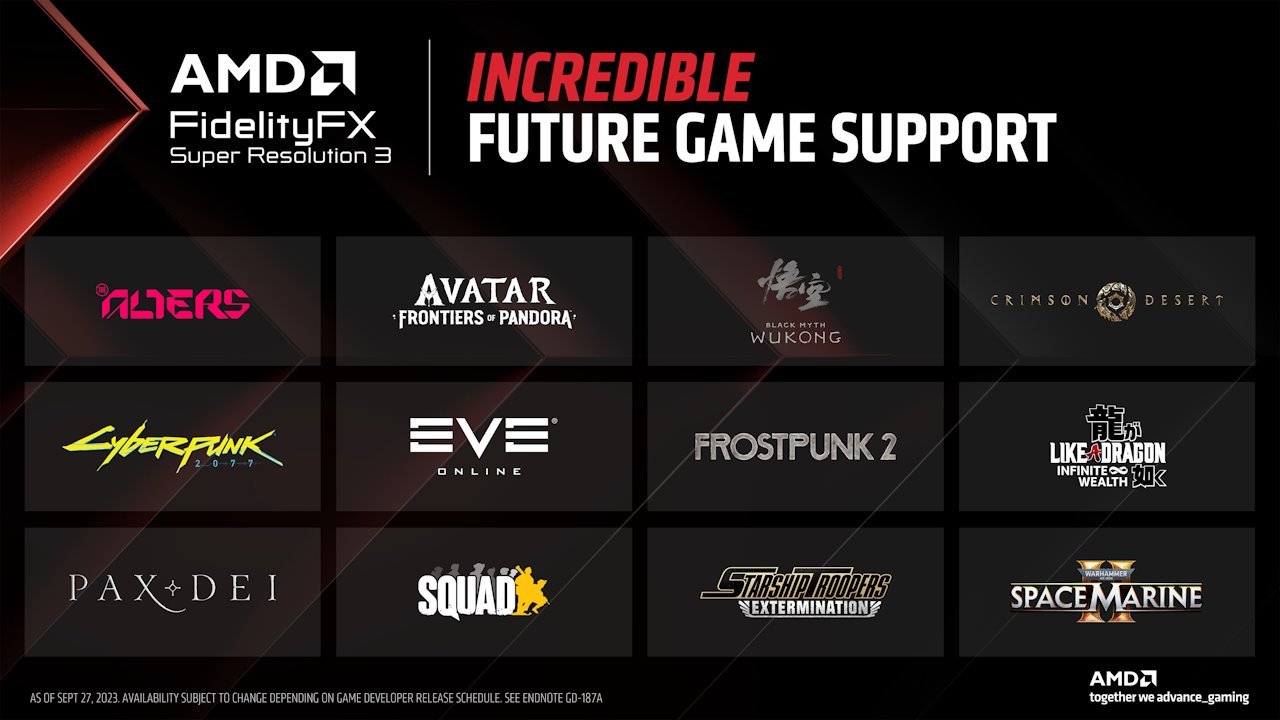
Currently, a limited but growing number of games support FSR 3, including Avatar: Frontiers of Pandora, Forspoken, Immortals of Aveum, and Like a Dragon Gaiden: The Man Who Erased His Name.
Wondering what games support FSR 3? You’re not alone! Many gamers are eager to experience the performance enhancements this new technology offers. The list is still relatively small, but it’s expanding rapidly as developers integrate the feature.
FidelityFX Super Resolution 3 is certainly making waves in the gaming world. Its ability to significantly boost frame rates, while maintaining a good image quality, is incredibly attractive. More and more titles are expected to receive updates including FSR 3 capabilities very soon.

What Games Support FSR 3?
So, you’re excited about AMD’s FSR 3 and want to know which games let you use this cool technology? You’ve come to the right place! FSR 3 is like a super boost for your games, making them run smoother and look better. It’s a bit like magic, but it’s actually clever computer science. It works by making your game run at a lower resolution and then using fancy techniques to make it look like a higher resolution. This means you get better performance without losing too much detail. But it only works on certain games, which is what we’re going to talk about today!
Understanding FSR 3: What It Does
Before we dive into the game list, let’s quickly understand what FSR 3 actually does. FSR stands for FidelityFX Super Resolution. Think of it as an upgrade to make your games look sharper and run faster. FSR 3 is the latest version, and it brings a significant upgrade with the addition of frame generation.
Here’s a breakdown:
- Upscaling: FSR upscales lower-resolution images to a higher resolution, making them look sharper on your monitor. Imagine blowing up a small picture without losing too much quality – that’s kind of what FSR does.
- Frame Generation: This is where FSR 3 really shines. It can create additional frames of animation by using artificial intelligence, making the game feel smoother, even if your computer hardware isn’t pushing out that many frames natively. This is like adding extra pages to a flipbook, making the animation look more fluid.
- Improved Performance: By rendering at a lower resolution and then upscaling, FSR 3 allows your computer to run games with less stress, resulting in higher frames per second (FPS). This is great for gamers with older or less powerful hardware.
In simple terms, FSR 3 helps your games look great and play well, even on less powerful computers.
The Growing List of FSR 3 Supported Games
The number of games that support FSR 3 is constantly growing. Game developers need to include this technology in their games, so it takes some time to see it spread throughout the gaming world. Here’s where we’ll discuss some of the games that already support FSR 3.
Officially Supported Titles
These games have been officially confirmed to work with FSR 3:
- Forspoken: This action RPG from Square Enix was one of the first games to receive the FSR 3 update. Players can expect a good performance uplift from using it.
- Immortals of Aveum: A magic-based first-person shooter, this game also supports FSR 3 which results in smoother frame rates, especially for gamers using mid-range hardware.
- Avatar: Frontiers of Pandora: This open world game uses FSR 3 to give better performance in its large and detailed world.
- Like a Dragon Gaiden: The Man Who Erased His Name: This popular game in the Yakuza series, benefits a lot from the frame generation in FSR 3, particularly during graphically intense moments.
- Call of Duty: Modern Warfare III: This first-person shooter is a very popular game that supports FSR 3 to offer players smoother gameplay.
- Warhammer 40,000: Space Marine 2: This upcoming action game is set to support FSR 3, to ensure players with a range of different hardware can experience smooth and action-packed gameplay.
- Starfield: Bethesda’s epic space RPG has FSR 3 support, allowing even more players to experience its vast universe smoothly.
- Cyberpunk 2077: This futuristic action role-playing game has gotten support for FSR 3.
- The Witcher 3: Wild Hunt: This fantasy action RPG is a game with stunning graphics that also gets the benefit of FSR 3.
This list is growing all the time, so always check for updates on your favorite games.
Games That May Get FSR 3 Support
Many developers are talking about adding FSR 3 to their games, but these haven’t been confirmed yet. These are titles we may see support for it in the future. These are some of the games that are likely to get FSR 3 support in the near future:
- Many AAA Titles: As FSR 3 gains more popularity, many big-budget games will likely add support for it.
- Indie Games: Some indie developers are also interested in FSR 3 because it helps their game reach more people.
- VR Games: FSR 3 is expected to be helpful for Virtual Reality, making VR games run smoother and more comfortably.
Keep an eye on game announcements and updates to see which games are officially getting FSR 3.
How to Check if a Game Supports FSR 3
It’s not always obvious if a game supports FSR 3. Here’s how you can check:
In-Game Settings
- Graphics Settings: Start your game and go to the graphics settings menu. Look for options related to upscaling or resolution.
- FSR Options: If a game supports FSR, you should see options like “FSR,” “FSR 2,” or “FSR 3.” If you see “FSR 3”, that’s the one to select to use frame generation.
Game Patches and Announcements
- Patch Notes: When a game gets an update, the patch notes often say what has been changed. Check these patch notes for FSR 3 updates.
- Official Websites and Social Media: The game’s website or social media pages may say if FSR 3 has been added, or is planned for a future update.
Community Forums and Websites
- Gaming Forums: Check gaming forums like Reddit or Steam discussions. Other players will likely be talking about FSR 3 support.
- Tech News Websites: Check tech websites that cover gaming news. They will often announce when FSR 3 is added to new games.
By using these methods, you can quickly see whether your game is already FSR 3 supported or whether it may be receiving the technology soon.
The Benefits of Using FSR 3
Why should you even care if a game supports FSR 3? Here are the main advantages:
- Improved Performance: You get higher frame rates, which makes your game feel smoother and more responsive.
- Better Visuals: FSR 3 can improve the visual quality of your games by making lower resolution images look sharper.
- Longer Gaming Sessions: Smoother frame rates and reduced stress on your hardware mean you can enjoy longer gaming sessions.
- Compatibility: FSR 3 works with a range of different graphics cards, not just AMD’s, making it more inclusive.
FSR 3 vs Other Upscaling Technologies
There are other technologies similar to FSR 3. Here are some comparisons:
FSR 3 vs DLSS
- DLSS (Deep Learning Super Sampling): NVIDIA’s version of upscaling. It generally has better image quality, but FSR 3 can run on more hardware.
- Performance: DLSS generally has slightly better image quality, but FSR 3 tends to be better optimized for certain games and hardware.
FSR 3 vs FSR 2
- FSR 2: The older version of AMD’s upscaling technology, it focuses on upscaling and doesn’t have frame generation.
- Performance: FSR 3 has the added advantage of frame generation, which gives it better performance than FSR 2, without losing too much quality.
FSR 3 vs Native Resolution
- Native Resolution: This is where the game runs at the resolution your monitor is. It gives the best visual quality, but can also be the most demanding on your hardware.
- Performance: Using FSR 3 gives you better performance than native resolution, with visual quality that is quite comparable.
The best choice depends on the game, your hardware, and what you care about most. If your hardware is struggling to run at a high resolution, FSR 3 can be very helpful.
Future of FSR 3
FSR 3 is a technology that will continue to get better over time. As more developers use it, you can expect to see:
- More Games: More and more games will include support for FSR 3.
- Better Image Quality: AMD is always making the image quality of FSR better.
- Improved Performance: Future updates will make FSR 3 even better at improving how your games run.
FSR 3 is an exciting technology with the potential to improve gaming for many people. By paying attention to new game updates and testing it for yourself, you can make the most out of this technology.
In conclusion, FSR 3 is a great technology for improving game performance and visual quality on a wide range of hardware. The number of games supporting FSR 3 is constantly growing. It’s always a good idea to check for game updates and patches to make sure you’re getting the best experience. With the addition of frame generation, it adds a good boost to games for those looking for a smoother gaming experience. So keep an eye out for FSR 3 support on your favorite games and get ready to enjoy smoother, better-looking gameplay.
AMD FidelityFX™ Super Resolution 3 Now in Over 60 Games
Final Thoughts
FSR 3 greatly enhances game performance through frame generation and upscaling. Many newer titles support this technology. It delivers smoother gameplay.
Several games currently implement FSR 3, such as Forspoken and Immortals of Aveum. This list will continue to grow. Developers are actively adding support.
To know what games support fsr 3, regularly check game patch notes and AMD’s official website for updates. More gaming experiences will benefit from its capability soon.

