
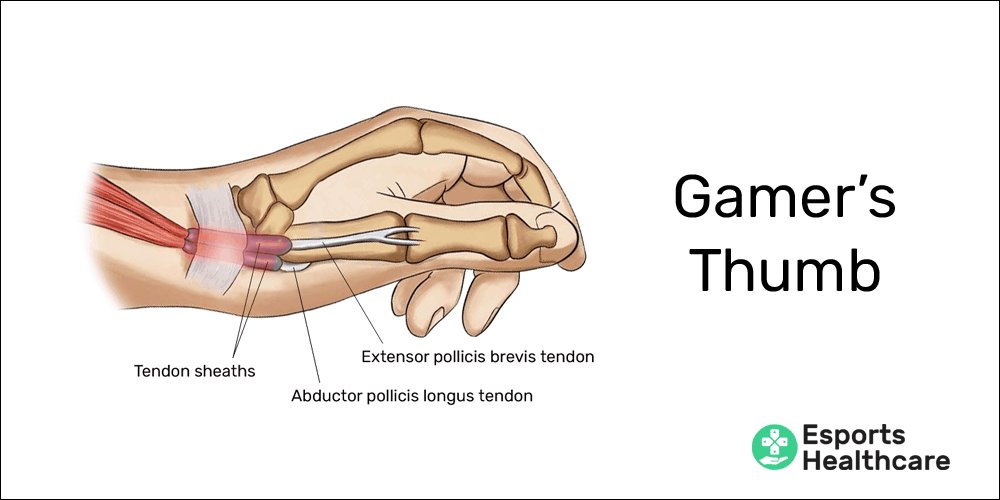
‘Gamer’s thumb’ is a colloquial term for De Quervain’s tenosynovitis, a painful condition affecting the tendons on the thumb side of the wrist, often caused by repetitive hand movements.
Have you ever felt a nagging pain in your wrist after an intense gaming session? What is gamers thumb, exactly? It’s more than just a temporary ache; it can indicate a real issue.
This discomfort usually stems from overuse and repetitive motions, common in activities like gaming or even excessive texting. These actions inflame the tendons causing pain and swelling in that area.

What is Gamer’s Thumb?
Ever felt a nagging pain in your thumb after a long gaming session? That might be what people call “gamer’s thumb.” It’s a common problem for people who play video games a lot, but it can affect anyone who uses their thumbs in a repetitive way. Let’s dive deep into what exactly gamer’s thumb is, why it happens, and how to keep your thumbs happy and healthy.
Understanding the Basics: The Medical Name
Okay, “gamer’s thumb” is a fun nickname, but doctors call it something a little more formal: De Quervain’s tenosynovitis. It’s a long name, we know! This fancy term describes what’s actually going on inside your wrist and thumb. It involves the tendons – these are like strong cords that connect your muscles to your bones – and the sheath that surrounds them. Think of it like the brake cable on a bike, which slides inside a protective tube. In De Quervain’s tenosynovitis, these tendons and their protective sheath become inflamed and irritated, causing pain and discomfort.
The Tendons Involved
Specifically, two tendons are usually affected in gamer’s thumb. These tendons are the extensor pollicis brevis (EPB) and the abductor pollicis longus (APL). They run along the thumb side of your wrist, through a narrow tunnel (called a sheath), and help you move your thumb, like when you’re gripping a controller or tapping a phone screen.
How Does It Develop? Repetitive Motion and Strain
The main culprit behind gamer’s thumb is repetitive motion. When you play video games, you often repeat the same thumb movements over and over again. Imagine constantly pressing buttons on a controller, using a joystick, or tapping a screen with your thumb – these small, repeated actions place stress on the tendons. Over time, this can lead to inflammation and swelling.
Risk Factors That Make It Worse
While anyone can develop gamer’s thumb, some things can make you more likely to experience it. Here are a few factors that might increase your chances:
- Spending long hours gaming: The more time you spend doing repetitive motions, the greater the risk.
- Using handheld devices a lot: Smartphones, tablets, and handheld gaming devices all require thumb use and can contribute to the condition.
- Poor posture while gaming: Sitting or holding your device in awkward positions can put extra stress on your wrists and thumbs.
- Not taking breaks: Continuous, uninterrupted gaming sessions don’t give your hands a chance to rest and recover.
- Underlying conditions: Conditions like arthritis can make you more prone to developing tendon issues.
- Age and sex: It is more common in females and in people between 30 and 50.
Spotting the Symptoms: What to Look For
Recognizing the signs of gamer’s thumb is important so that you can take action early. Here’s what to look out for:
Pain
The most common symptom is pain. This pain is usually located at the base of the thumb, on the side of the wrist. It might feel like an ache, a burning sensation, or a sharp, shooting pain.
Swelling
You might notice some swelling in the area where the pain is. The area can sometimes appear puffy or feel tender to the touch. This is the body’s natural response to inflammation.
Stiffness
Your thumb or wrist might feel stiff, especially in the mornings or after periods of inactivity. You might have difficulty moving your thumb smoothly and easily. It can feel like it doesn’t want to bend or straighten as easily as usual.
Difficulty with Grip
Simple actions like gripping objects, turning a doorknob, or holding a cup can become difficult or painful. This can be quite annoying in everyday life, not just during gaming.
Tingling or Numbness
In some cases, you might experience tingling or numbness in your thumb and fingers. This happens if the inflammation is pressing on nearby nerves.
The Finkelstein Test
One simple test you can do at home is called the Finkelstein test. To perform it:
- Make a fist, with your thumb tucked inside your fingers.
- Now bend your wrist towards your pinky finger.
If this movement causes sharp pain near the base of your thumb, it’s a good sign you might have De Quervain’s tenosynovitis.
Diagnosis: When to See a Doctor
If you suspect you might have gamer’s thumb, it is always a good idea to consult with a doctor. A doctor can provide accurate diagnosis, and a proper plan for treatment. Here’s how they might make the diagnosis:
Physical Exam
The doctor will typically start with a physical examination. They’ll ask about your symptoms, look for swelling, and perform range of motion tests. They might have you do the Finkelstein test we discussed earlier.
Imaging Tests
In most cases, imaging is not required for diagnosis. But if the symptoms don’t improve with conservative treatment, doctors might request some imaging tests, such as X-rays, to rule out other issues like arthritis or fractures, or an ultrasound to look at the soft tissue like the tendons and ligaments.
Treatment: Getting Your Thumbs Back on Track
The good news is that gamer’s thumb is often treatable with the right approach. Here are some common treatment methods:
Rest
One of the first things you need to do is to allow your hand, wrist and thumb some rest. Reduce or stop the activity that is causing the issue, at least for the time being. It is important to avoid things that aggravate the condition and give the tendons a chance to recover. This might mean temporarily putting down the controller or your phone.
Ice and Heat
Applying ice or heat can help reduce pain and inflammation. Try using ice packs for about 15-20 minutes at a time, several times a day, especially during the initial stages of the pain. Once the acute pain has subsided, you can use heat therapy to relax the muscles and promote blood flow.
Splinting
Wearing a splint can immobilize your thumb and wrist, preventing movement and further irritation of the tendons. Splints come in different shapes and sizes, and you can get them at most pharmacies. You might have to wear a splint for a few weeks, depending on the severity of the case. Some splints are designed for use specifically during sleep, while other splints allow for daytime use while carrying out regular activities.
Medications
Over-the-counter pain relievers, such as ibuprofen or acetaminophen, can help reduce pain and inflammation. If the pain is severe, your doctor may prescribe stronger anti-inflammatory medications or corticosteroids to help bring the symptoms under control.
Physical Therapy
A physical therapist can teach you specific exercises to strengthen the muscles around your wrist and thumb. These exercises focus on gentle stretches and movements to increase range of motion and reduce stiffness. They can also show you how to modify your gaming setup for less strain.
Cortisone Injections
If the pain doesn’t improve with other treatments, a doctor may suggest a cortisone injection. This involves injecting a corticosteroid into the tendon sheath, which can help reduce inflammation quickly. However, this is not a long term solution and can’t be repeated too often. It’s mainly used to manage the immediate symptoms while other treatments work.
Surgery
Surgery is very uncommon for gamer’s thumb, and it is generally considered to be the last option, if all other treatments don’t work. The surgical procedure aims to release the tendons from the tight sheath surrounding them. This can reduce pain and improve movement. It may take several months of healing and physical therapy to recover from the surgery.
Prevention: Keeping Gamer’s Thumb at Bay
It’s much better to prevent gamer’s thumb than to treat it. Here are some tips to help you avoid this painful condition:
Take Frequent Breaks
Try to take regular breaks every 20-30 minutes during gaming or other thumb-intensive activities. Get up, move around, and stretch your hands and fingers. This helps to prevent fatigue and reduces strain on the tendons.
Stretch Your Hands and Fingers
Regular stretching exercises can help improve flexibility and reduce the risk of developing gamer’s thumb. Here are a few stretches you can try:
- Thumb stretch: Hold your hand out with your fingers straight. Gently bend your thumb in towards your palm, holding for about 15-20 seconds. Then, do the opposite and stretch the thumb backwards. Repeat this few times.
- Wrist rotation: Rotate your wrists slowly in a circular motion, both clockwise and counterclockwise. Do it 10 times each direction.
- Finger stretches: Spread your fingers apart as wide as possible, hold for a few seconds and relax. Repeat several times. You can also try stretching your fingers one by one.
Adjust Your Gaming Setup
Adjust the way you hold your controller and make sure your hands and wrists are in a neutral position. You may want to try using a different grip or a different controller, or adjust the sensitivity of your control to reduce the amount of movement needed.
Use Proper Ergonomics
When gaming on a computer, make sure your chair is at the right height and you have your keyboard and mouse within easy reach. Proper ergonomics can help minimize stress on your wrists and thumbs. When gaming on a hand-held console, hold the device such that the wrists are in a neutral, straight position. Try using a stand to prop up the device so that the wrist does not have to be at awkward angles while using the device.
Strengthening exercises
Strengthening exercises of the wrist and fingers can support the wrist, hand and finger muscles, and take off some of the stress from the tendons. Simple squeezing exercises can help. You can use a tennis ball or a soft sponge ball to squeeze as part of hand and finger strengthening exercises.
Be Mindful of Device Use
Be mindful of how much time you spend using smartphones, tablets, and other devices that require a lot of thumb movements. If you notice any early signs of pain or stiffness, reduce the amount of time you are using your phone or other devices.
Gamer’s Thumb in Everyday Life
While it’s called “gamer’s thumb,” remember that it’s not just gamers who can experience this condition. Anyone who uses their thumbs for repetitive motions can develop De Quervain’s tenosynovitis. This might include people who text a lot, use their hands extensively at work, or do crafts that involve a lot of thumb movement. By understanding what causes this problem and how to manage it, we can all take better care of our thumbs.
In summary, gamer’s thumb is a real condition that can be painful and affect daily life. By paying attention to the signs and symptoms, and taking care to prevent the condition, we can all continue to enjoy our activities without experiencing unnecessary pain.
What is Gamer's Thumb and What Can You Do About it?
Final Thoughts
Gamer’s thumb, also known as De Quervain’s tenosynovitis, affects tendons in the wrist and thumb. Repetitive motions during gaming cause inflammation. Pain and difficulty moving the thumb are common symptoms.
This condition develops due to overuse. Symptoms might include swelling near the thumb’s base. Resting and icing the area provide some relief.
Ultimately, what is gamers thumb? It’s a painful inflammation, often caused by prolonged video game sessions. Seek medical advice if the discomfort persists.

