
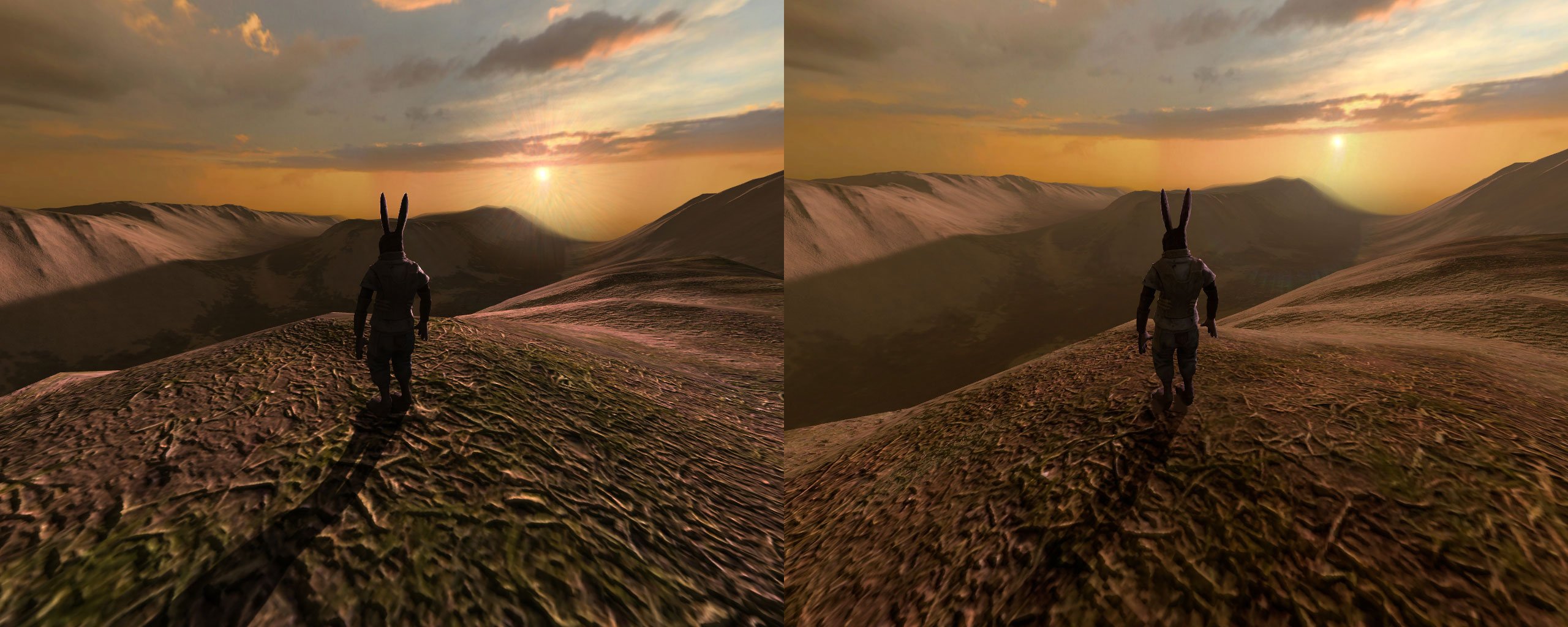
In games, gamma adjusts the brightness of mid-tones, impacting how light and dark areas appear, without affecting the very brightest or darkest parts of the image.
Ever wondered about that setting in your game’s menu, the one that adjusts something called gamma? What is gamma in games exactly? It’s not about making the game brighter overall, like turning up the monitor brightness. Instead, it focuses on the middle range of colors. This means it controls the perceived light and dark in your gaming experience, without washing out the whites or crushing the blacks.

What is Gamma in Games?
Have you ever been playing a video game and noticed that some areas look too dark, or maybe too bright? That’s where gamma comes in! Gamma is like a special adjustment tool for your game’s brightness. It helps make sure you can see all the details, even in the darkest corners or brightest skies. Think of it like adjusting the light in your room – you don’t want it so dark you can’t see anything, or so bright it hurts your eyes. Gamma helps games look their best.
Understanding Brightness and Contrast
Before we dive deeper into gamma, let’s quickly talk about brightness and contrast. These are like gamma’s cousins, and they all work together to create the picture you see on your screen.
Brightness
Brightness is simply how light or dark your overall image is. If you turn the brightness way up, everything will look washed out, like it’s covered in a white sheet. If you turn it way down, everything will be dark and hard to see. It’s about the overall amount of light.
Contrast
Contrast, on the other hand, is about the difference between the lightest and darkest parts of an image. High contrast means there’s a big difference between bright and dark areas, making things look sharper and more defined. Low contrast makes everything look dull and flat, with not much difference between the light and dark.
The Role of Gamma
Now, where does gamma fit in? Gamma is special because it doesn’t just change the overall brightness. Instead, it affects the mid-tones, the colors and shades that fall in between the very lightest and very darkest parts of the picture. Think of it like this: brightness is like a light switch, and contrast is like making the shadows deeper or lighter, but gamma is like fine-tuning the colors between the shadows and lights.
It manipulates the relationship between the input and output of light. This relationship is not linear, meaning, if you double the input of light, it might not double the brightness on the screen. Gamma correction is used to make sure that middle tones aren’t too dark or too bright and this adjustment makes sure everything looks right. A higher gamma value will result in lighter mid-tones, and a lower gamma value will make them darker.
Why Games Need Gamma
Games are made on computers, but we see them on different screens – TVs, monitors, laptops, even phones! Each of these screens can show colors and brightness in slightly different ways. This means that a game that looks perfect on one screen might look too dark or too bright on another. Gamma settings allow players to adjust the game for their screen, so they get the best possible picture.
Imagine a game where you’re exploring a dark cave. Without good gamma settings, the cave might be so dark you can’t see where you’re going. But with gamma adjusted just right, you can see the edges of rocks, the pathways, and any hidden dangers that might be lurking! Gamma is very important for gameplay, especially in scenes with a lot of shadows and highlights.
How Gamma Works: A More Detailed Explanation
Gamma correction is actually a mathematical process. The gamma value is used in an equation to change the way light is displayed. This equation involves a power function which is sometimes represented as xy. When y is less than 1, it lightens the image and if it’s higher than 1, it makes the image darker.
The gamma value, often seen as a number like 2.2, influences this equation. In most digital settings, an image is captured or produced in a non-linear way. Without gamma correction, these images, when shown on a screen that is linear, would not look as they should. To better understand, let’s break it down further:
- Input Light: This is the brightness information created by the game engine.
- Gamma Curve: This is a curve defined by a mathematical function, using your specified gamma value. The curve isn’t a straight line, so it changes the light differently across the brightness range.
- Output Light: The game’s image goes through this curve and changes before it gets shown on the screen. This is the final brightness you see.
The key part is that gamma does not simply scale the brightness linearly. It manipulates the mid-tones by compressing or expanding them. If you increase the gamma value, it makes the mid-tones lighter, and if you lower the gamma value, it makes the mid-tones darker. This allows to create a more balanced and detailed image.
Gamma Values
You often see gamma values around 2.2 or 2.4. A gamma value of 1 means there is no change or correction. 2.2 is very common because this is a common gamma value used for TVs and monitors. But, you might need to adjust this in your game to get the perfect picture on your particular screen.
Adjusting Gamma in Games
Most games provide gamma adjustments in their settings menu. It’s often labeled as ‘Gamma’, ‘Brightness’, or ‘Display Calibration’. When you find it, you’ll usually see a slider or arrows you can use to adjust the value. Some games will also show test images where you have to adjust the slider until you can clearly see a particular pattern, which gives a visual reference to see the changes.
Here’s how you might go about adjusting gamma in a game:
- Find the Setting: Look for ‘Display Settings’, ‘Graphics Settings’ or something similar in the game’s options menu.
- Locate the Gamma Slider: You should find a slider or a number representing gamma.
- Adjust Carefully: Move the slider slowly. Look at the changes in the in-game picture as you do so.
- Look for Details: Adjust it until you can clearly see detail in both dark areas and bright areas in the game. Don’t make it too dark or too bright.
- Play the Game: After making the changes, play for a little while to see if the new setting feels comfortable. You may need to tweak it a little more.
Sometimes, a game might have a built-in test image for you to adjust the gamma properly. This makes it easier to get it just right. Also, you might have to adjust the in-game gamma settings and the screen’s settings to get the best results.
Common Mistakes When Adjusting Gamma
It’s easy to make a mistake while adjusting gamma, and a bad setting can make your game look terrible! Here are some common mistakes to avoid:
- Making It Too Bright: Turning the gamma up too high can make the game look washed out, losing details in bright areas.
- Making It Too Dark: Turning the gamma too low can make dark areas completely black, hiding important details.
- Ignoring the Test Image: Some games provide test images to help you set gamma right. Ignoring this test image and only using your own judgment may lead to incorrect settings.
- Not Adjusting Based on your Display: Your monitor, TV, or laptop screen can affect how the game looks. Make sure to adjust the gamma settings according to what works best for your particular screen.
- Focusing too much on other settings: While brightness and contrast are important, do not forget to adjust gamma, as this affects the picture on another level.
Gamma and Different Game Genres
Gamma can be especially crucial for different game types. Let’s see some examples of how important gamma is in different game genres:
Horror Games
In horror games, gamma is extremely important. Too much light makes the scary atmosphere disappear. Too little light means you cannot see what is trying to kill you! You need to adjust it so that you can see enough of the environment to navigate while still keeping the suspense.
Shooter Games
In shooter games, you need to be able to spot enemies hiding in dark corners. Good gamma adjustments are important for fast reaction times and better overall gameplay.
Adventure Games
Adventure games often have a lot of different environments. You need to make sure the game looks great everywhere, whether it’s a sunny beach or a dark dungeon.
Racing Games
In racing games, gamma lets you see the track clearly, especially during sunsets or night races. This improves your overall awareness and gameplay.
Gamma Beyond Games
While we’ve focused on gamma in games, gamma correction is important in many other areas, too. It is very important in photography and video editing. When you’re editing photos or videos on your computer, you might see that the colors are different from how they looked on your camera. Gamma correction helps the colors look just right, making sure your images and videos are displayed accurately on different screens.
Gamma vs Brightness and Contrast: A Quick Table
Here’s a quick table that summarizes how gamma, brightness, and contrast differ:
| Feature | Effect | Use |
|---|---|---|
| Brightness | Overall image light/darkness | Adjusts the overall lightness or darkness of the whole image. |
| Contrast | Difference between lights and darks | Adjusts the level of difference between the lightest and darkest parts of the image. |
| Gamma | Adjusts mid-tones | Corrects the way brightness is displayed, affecting mid-tones to bring them closer to what should be seen. |
In Conclusion
Gamma is a key but often overlooked aspect of a good gaming experience. It is a tool that lets you customize the way light and colors show up on your screen, ensuring you see every detail. Gamma isn’t simply about making your game brighter or darker; instead, it’s about fine-tuning the mid-tones, that crucial section of color and light that can make or break the game’s look. By adjusting the gamma properly, you can make your games look their best and play their best. So next time you’re playing a game, pay attention to the gamma settings. Adjust them carefully until everything looks just right. You will see how much difference it can make to your gameplay. It’s a simple adjustment, but it can have a big impact on how you see and enjoy your favorite games.
Video Gamma explained | 4K
Final Thoughts
In short, gamma in games represents the nonlinear relationship between pixel values and perceived brightness. Adjusting gamma allows players to fine-tune the visual output, ensuring details aren’t lost in overly dark or bright areas. This adjustment impacts how we perceive color and contrast.
Therefore, understanding what is gamma in games is crucial for achieving the best viewing experience. Proper gamma settings helps maintain visual clarity and balance, making gameplay more enjoyable and immersive for players.

