
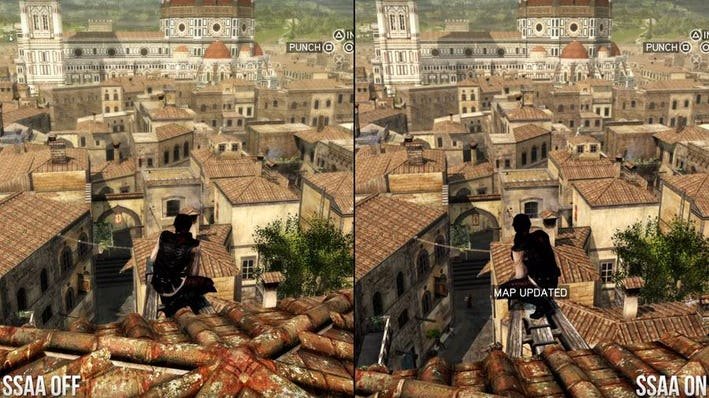
Supersampling in games is a technique that renders a game at a higher resolution than your display’s native resolution, then scales it down, resulting in a sharper and more detailed image.
Ever wondered how some games achieve such crisp graphics, even on less capable displays? The secret often lies in techniques like what is supersampling in games. It’s a clever trick that pushes rendering beyond your monitor’s usual limits.
This method essentially overworks your graphics card momentarily. The result is a smoother, cleaner image on your screen, even with the extra workload. It’s especially useful for minimizing jagged edges and improving overall visual fidelity.

What is Supersampling in Games?
Imagine your favorite video game looking even sharper and clearer than it already does. That’s essentially what supersampling does! It’s a clever technique used to make games look better by rendering them at a higher resolution than your monitor or TV can actually display, and then shrinking that image down to fit. This process essentially acts as a really powerful form of anti-aliasing, smoothing out jagged edges and making the game world appear more detailed and realistic.
How Supersampling Works: The Nuts and Bolts
Let’s dive deeper into the mechanics of supersampling. Think of it like taking a really big picture and then making it smaller. When you make something smaller, it tends to look sharper and more detailed, right? That’s the same principle at play here.
The computer’s graphics processing unit (GPU) works overtime to render the game at a much higher resolution. For example, if your monitor runs at 1920×1080 pixels (commonly known as 1080p or Full HD), the game might be rendered at 3840×2160 pixels (4K) or even higher. Then, a process called downsampling takes that high-resolution image and shrinks it down to your monitor’s native resolution. This act of shrinking carries a lot of extra image information that might be lost at native rendering, and effectively cleans it up and makes it cleaner in the process.
This has a few big benefits:
- Reduced Aliasing: The main advantage. Those jagged, pixelated edges on objects in games (known as “jaggies”) disappear, resulting in smoother lines. This makes the game look much more polished.
- Improved Image Clarity: Because the game is rendered with so much extra detail, when it’s downscaled it retains more fine details that would be lost at native rendering. Textures appear sharper, and small details are more noticeable, increasing overall image quality.
- More Stable Image: Because of extra processing, visual noise, sometimes noticeable in the rendering process, is minimized, contributing to a more stable image and a more pleasurable gaming experience.
Think of it like this: imagine you have a really high-definition photograph. When you print it out at its original size, it looks amazing. But if you shrink it down on your computer screen, it might still look great but also very clean and very crisp. Supersampling does the same thing for games – it creates a “really high-definition game image” and then shrinks it down for your screen.
Different Types of Supersampling Techniques
While the core idea of supersampling remains the same, different approaches and algorithms exist that refine the process. Here are some popular variations:
Full-Scene Supersampling (FSAA)
This is the classic form of supersampling where the entire frame is rendered at a higher resolution. It is the most resource-intensive approach but can give the best visual outcome if done correctly. It’s very powerful, creating the best possible image clarity. Older games and systems were more likely to use FSAA.
Multi-Sampling Anti-Aliasing (MSAA)
MSAA is a more efficient variant of supersampling that focuses its efforts on the edges of objects rather than the entire scene. It only renders more pixels at the edges of objects, making it more efficient than rendering the whole scene at higher resolution. This saves some processing power while still significantly reducing aliasing. MSAA is a good balance between performance and visual quality.
Adaptive Supersampling
Adaptive supersampling tries to intelligently adjust the amount of supersampling used depending on the complexity of the scene. When less complex imagery is on screen, less processing is done and when complex scenes appear on screen it will utilize all power, This ensures the game is running as smoothly as possible. Adaptive supersampling dynamically scales the rendering resolution according to the performance needs of the game, adjusting supersampling levels to keep the game running smoothly.
Temporal Supersampling (TSSAA)
TSSAA incorporates information from previous frames to enhance image quality in the current frame, making sure that the output is even more refined. TSSAA can be a more efficient method of supersampling, because it reuses information that was already computed in the past to improve clarity. This is a more recent method often seen in contemporary games.
Specialized Supersampling (vendor-specific)
Both NVIDIA and AMD have developed their proprietary supersampling techniques. NVIDIA has Deep Learning Supersampling (DLSS), while AMD offers FidelityFX Super Resolution (FSR). These technologies use AI and other advanced algorithms to upscale the game’s visuals intelligently, offering better performance and image clarity than traditional methods. Both of these technologies focus on trying to give a sharp image but with lower overhead on the GPU processing side. DLSS is often very specialized and hardware-specific as it utilizes special AI hardware. FSR is more versatile and can run on various hardware. These technologies are more complex and deserve their own deeper explanations.
The Impact of Supersampling on Performance
Supersampling isn’t without its drawbacks. Because it involves rendering games at a higher resolution, it puts a bigger load on your computer’s graphics card. Here’s how it affects the performance of the game:
- Increased GPU Load: The most direct impact is the increased demand on your GPU. Rendering at a higher resolution requires a lot more processing, which can result in lower frame rates (how many frames your game can display per second) if your GPU is not powerful enough. If your game runs smoothly at a lower resolution, using supersampling might cause it to stutter or lag.
- Higher System Requirements: Games with supersampling enabled might have higher overall hardware demands. If your computer is already struggling to run a game at its native resolution, supersampling will make the issue worse.
Therefore, using supersampling is a balancing act. You need a powerful enough GPU to handle the increased load while maintaining playable frame rates. The higher you set the supersampling level, the more strain it puts on your computer, so you must keep this in mind when you enable these settings on the game you are playing.
To get the best out of supersampling, you will need to make sure that you use appropriate settings. Often there is a setting that will control how much processing power is to be used. These settings have a trade-off between visual quality and performance. To get the best out of your system you will need to tinker with these setting and find an appropriate visual balance with the amount of frames per second you are getting during game play. You want the game to look great, but it also has to be fun to play, you need high framerates for this.
When to Use Supersampling
Knowing when to turn supersampling on and off is just as vital to knowing what supersampling is. Here’s some tips on how to determine if it is needed.
The Right Hardware
If you have a powerful gaming computer with a recent GPU, supersampling can be a great way to make your games look even better. This includes high-end graphics cards, a good central processing unit (CPU), and lots of random access memory (RAM). If your PC is struggling, it is best to avoid supersampling. If you have a modern graphics card with the latest drivers you may also have access to newer technologies like DLSS or FSR, which might be more efficient than typical supersampling.
Native Resolution
If you’re playing a game on a 4K display with good frame rates, you might not need supersampling, because the game is already at a very high resolution natively. In contrast, if your screen resolution is only 1080p, and you still want a sharper image, then supersampling might be a good choice.
The Type of Game
Supersampling works well in most games, but the most benefit is gained with graphically intense games that have a lot of sharp lines, objects, and textures. These sorts of games have a lot of aliasing, and supersampling really makes a positive visual impact. Less visually intensive games might not benefit that much from supersampling, meaning it is an optional enhancement.
Personal Preference
In the end, the decision to use supersampling often comes down to personal taste. Some players prefer the sharpest possible image, even if it comes at the cost of some performance. Others might not see the value and prefer a smoother frame rate. Experiment and see what works best for you.
Supersampling vs. Other Anti-Aliasing Methods
There are other ways to tackle those jagged lines in games besides supersampling. Here’s a brief comparison with some common anti-aliasing (AA) methods:
MSAA (Multi-Sampling Anti-Aliasing)
As mentioned earlier, MSAA is a more efficient form of supersampling. It targets edges of objects specifically, giving performance gains. However, FSAA (full-scene supersampling) offers better image quality over MSAA.
FXAA (Fast Approximate Anti-Aliasing)
FXAA is a post-processing effect which is done on the whole image after it is processed. It’s faster than supersampling but less effective. It blurs the image to smooth edges which can make everything look a little blurry. It is a low-impact solution, but the visuals are much worse than supersampling.
TXAA (Temporal Anti-Aliasing)
TXAA is a technique that also uses previous frames to smooth out edges. It is similar to temporal supersampling, but it’s more focused on anti-aliasing. It tries to reduce jaggies and visual noise, and works very well if done correctly, but can look blurry at times, and can also cause visual artifacts in some games. This technique is not usually as sharp looking as supersampling.
In comparison to these methods, supersampling, particularly FSAA, often provides the best image quality by actually rendering the scene at a higher resolution, but it will always be more taxing on the system. Other forms of anti-aliasing methods are good for less powerful computers, but they will have to sacrifice visual quality when compared to true supersampling.
Practical Applications: How to Enable Supersampling
If you’re interested in trying out supersampling, here’s how to go about it:
In-Game Settings
Many games have built-in settings that will allow you to control the supersampling. Often these settings will be labeled as such. If you cannot find a specific supersampling setting, you might have to search for any settings relating to anti-aliasing. Sometimes, a form of supersampling might be labeled as “render scale” or similar. When increasing the render scale, you are also utilizing supersampling.
Graphics Driver Settings
You can also often set supersampling in your graphics driver software. NVIDIA and AMD both provide their own ways to control these options. Using the drivers, you can enable these settings for all games at the same time. This can be more consistent, and some games might not expose these settings, so it’s good to know how to utilize them from the driver panel if needed.
Adjusting Settings
When setting supersampling for the first time, it’s important to test different settings. You will need to find the sweet spot between image quality and framerates. Start at lower settings and go upwards until you find a good visual quality with good performance. If your game is stuttering too much, you should decrease the amount of supersampling being applied.
Supersampling is a powerful method of improving how your games look. While it will always need more power, for a powerful system it is a great way to take the visuals to the next level. With the information provided, you should be equipped to make good choices when considering to use this visual enhancement in your games.
How to Use Supersampling to Make Games Look Better
Final Thoughts
Supersampling improves game visuals by rendering frames at a higher resolution and then downscaling them to the display’s native resolution. This process creates a crisper, more detailed image with reduced aliasing. It effectively acts as a form of enhanced anti-aliasing.
Essentially, what is supersampling in games? It’s a technique to improve image quality by generating a more detailed image. This comes at the cost of higher processing demands. This means you might see a drop in performance if your hardware is not powerful enough.

