
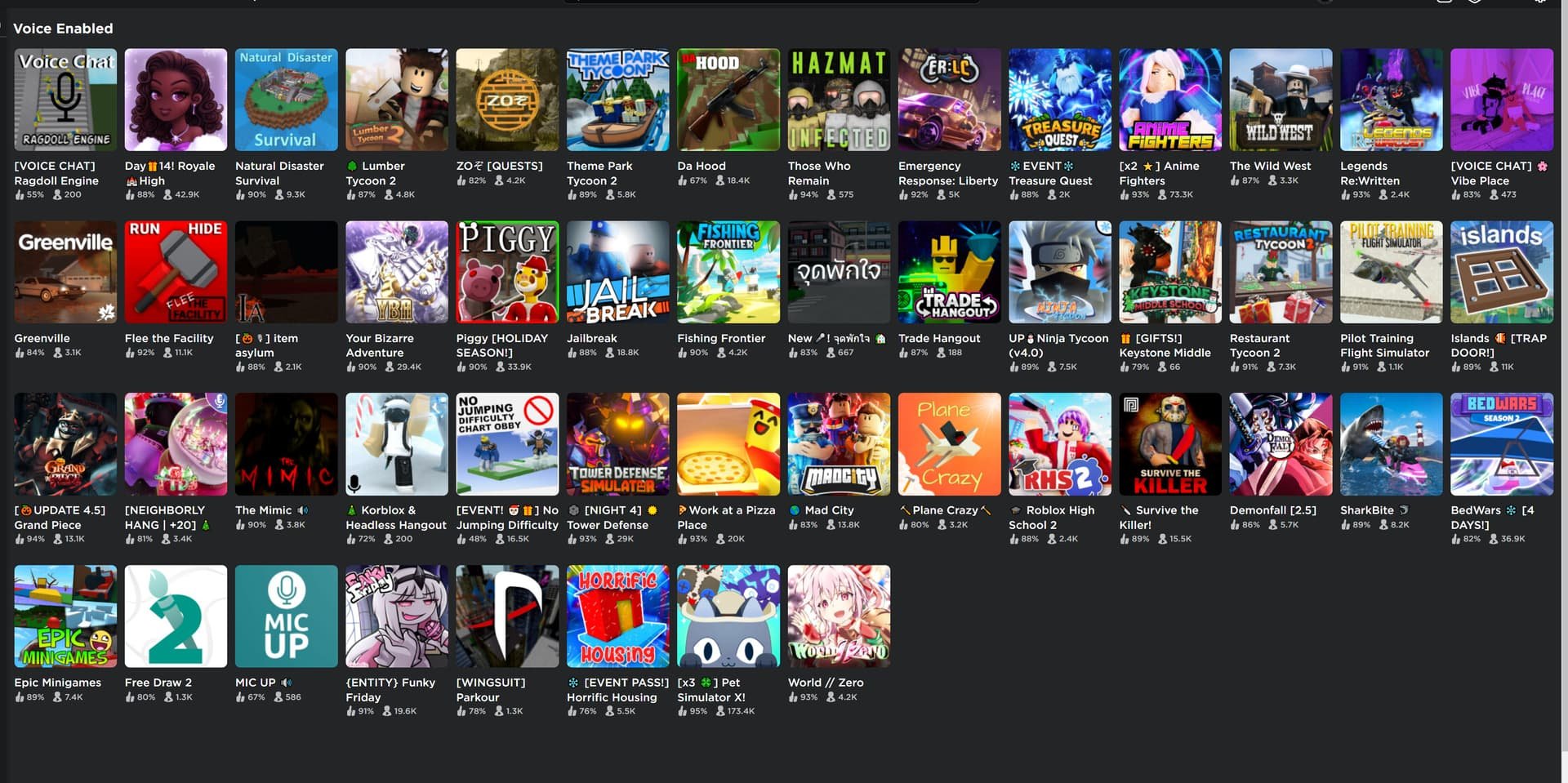
Only Roblox games that have enabled the spatial voice feature offer voice chat.
Have you ever wondered which of the many exciting experiences on Roblox allow you to actually talk to other players? Knowing what roblox games have voice chat can really enhance your gameplay. It creates a more social and immersive environment.
The key is that the game creator must specifically enable this feature. Not every game has voice capabilities right out of the box. If you really enjoy interacting through voice, it’s always worth checking to see which games support it before diving in.

What Roblox Games Have Voice Chat?
Hey there, Roblox fans! Ever wondered which games let you chat with your friends using your actual voice? It’s super cool to talk directly to other players while you’re building, battling, or just hanging out in the Roblox world. Not every game has this feature, so let’s explore which ones do and what you need to know about using voice chat on Roblox. It’s like having a walkie-talkie built right into your game!
What is Voice Chat on Roblox?
Voice chat on Roblox, also known as Spatial Voice, allows players to communicate with each other using their microphones. Imagine you’re playing a game and you can hear your friend’s voice coming from the direction their avatar is in the game! This is Spatial Voice in action. It makes the game feel more real and immersive, just like you’re in the same room. With Spatial Voice, conversations can sound like they’re coming from the left if someone is standing to your left, or from the right if someone is standing on your right, just like real life. This feature makes collaborating on projects and playing team-based games a lot easier and a lot more fun!
How to Enable Voice Chat
Before we jump into which games have voice chat, it’s important to know how to turn it on. You can’t just start chatting right away. There are a few requirements you need to meet first. Here’s what you need to do:
- Age Verification: You must be 13 years or older to use voice chat on Roblox. Roblox needs to make sure kids are safe, so they require age verification. This process typically involves uploading a photo of your ID. Don’t worry, the information is kept safe.
- Enable in Settings: Once you’ve verified your age, you need to go into your Roblox account settings. Look for the Privacy tab, and you’ll see an option to enable voice chat. Switch it on, and you’re good to go!
- Microphone Access: Your device needs to have a microphone, and you’ll have to give Roblox permission to use it. Don’t forget to check if it is properly connected.
- Headphones are recommended: While not mandatory, headphones are recommended to prevent echoes. This allows the sound to come directly to you, and not be picked up by your microphone, which can sometimes happen with speakers.
Once you’ve done all that, you’re ready to dive into the games that have voice chat!
Popular Roblox Games with Voice Chat
Now for the fun part – which games let you talk while you play? There are many games now that support voice chat, and the list keeps growing! It is always fun to try new games with Spatial Voice. Here are a few popular ones that you and your friends can enjoy:
Role-Playing Games
- Brookhaven RP: This game is like a giant neighborhood where you can have your own house, car, and even a job! Voice chat is perfect for coordinating meetups, role-playing as different characters, and having casual chats.
- Livetopia: Similar to Brookhaven, Livetopia lets you explore a big city, own homes, and more. It’s great for role-playing and creating stories with friends using voice chat.
- Welcome to Bloxburg: Here, you can build your dream house and live out your life. Voice chat helps when you’re planning with friends what house to build or organizing a party.
Action and Adventure Games
- Natural Disaster Survival: In this game, you try to survive various disasters. Voice chat is extremely useful for warning your friends about danger and coming up with plans to survive together!
- The Mimic: A horror game where you solve mysteries while trying to avoid a scary monster. Voice chat definitely adds to the suspense! You can whisper to your teammates and plan your next move in order to escape.
- Murder Mystery 2: Someone is a murderer, and others are trying to figure out who it is! Voice chat makes the game much more intense.
Other Genres with Voice Chat
- Adopt Me!: This popular game allows you to raise pets, decorate your home, and interact with others. Use voice chat to arrange trades and plan playdates.
- Royale High: A magical school where you dress up in fancy clothes. Talk with your classmates and plan which events to attend.
- Work at a Pizza Place: Manage a pizza shop with your friends, and communicate efficiently using voice chat to take orders and cook those pizzas.
- Apeirophobia: If you’re looking for a scary experience, you’ll find it here. Coordinate your survival with voice chat to escape the strange locations and scary entities.
This is just a small sample! More games are adding voice chat all the time. It’s always good to check if your favourite game has implemented voice chat now.
Finding Games with Voice Chat
So, how do you find out if a game you like has voice chat? It’s simpler than you might think. Here are some ways to find games that support voice chat:
In-Game Indicators
Many games will show a small icon, usually a microphone, either in the game’s title or in the game’s menu. This little icon tells you right away that you can use voice chat in that game. So, whenever you’re browsing the games library on Roblox, keep an eye out for that icon. It’s a quick and easy way to know if voice chat is available.
Game Descriptions
Another easy method to check for voice chat is by reading the game’s description page. Game developers usually mention voice chat if their game supports it. So, before you jump into a game, read the description carefully. Look for any mention of ‘voice chat’, ‘spatial voice’, or related keywords. If the game has it, the creator is likely to mention it there. This can also give you information on what kind of voice chat implementation is used.
Roblox Game Search Filters
Sometimes, Roblox might have filters you can use in their search. Though, not yet fully implemented for voice chat as of now, this could be something to look out for in the future. Keep an eye out for any filters related to communication or voice chat. You might find a filter that helps you find games that have the voice chat feature enabled.
Ask the Community
If you’re unsure, ask other players or check out online forums or groups. Many Roblox communities are eager to share their knowledge about games. Don’t hesitate to ask in the Roblox forums or Discord channels for advice. Other players would have played the game, so they will be more than happy to confirm if voice chat is implemented.
Benefits of Using Voice Chat
Why is voice chat such a big deal? Well, it has some really great benefits:
- Better Communication: It’s way faster to say “I need help here!” than it is to type it. Voice chat makes communicating in games smoother and quicker, which is great for teamwork.
- More Immersive Gameplay: Games feel more real when you can hear your friends’ voices as they move around. It makes you feel like you’re all playing together in the same space. This leads to a richer and more enjoyable gaming experience.
- Stronger Friendships: Chatting with your friends using your voice adds a more personal touch to playing together. It’s easier to build relationships when you can speak and react in real-time. This enhances the connection between you and other players.
- Improved Teamwork: In team-based games, voice chat helps everyone stay on the same page. You can strategize together and help each other out.
Safety Tips for Using Voice Chat
While voice chat is super fun, it’s important to use it safely. Here are some things to keep in mind:
- Be polite: Always use respectful language when speaking to others. Remember, there are real people on the other side of the microphone.
- Don’t share personal information: Avoid sharing details about your age, where you live, or other personal information. Keeping this private helps protect you from potential risks.
- Block or report bad behavior: If someone makes you feel uncomfortable or is being mean, use Roblox’s tools to block them or report their behavior. It is important to create a safe environment for everyone.
- Use headphones: Headphones help prevent your microphone from picking up sound from your speakers, which can cause echoes and interfere with your conversations.
Troubleshooting Voice Chat Issues
Sometimes, voice chat may not work correctly. If you’re having trouble, here are some things you can try:
- Check your microphone settings: Ensure that the correct microphone is selected and that it is not muted. Your device’s sound settings might be interfering with Roblox.
- Check Roblox settings: Make sure voice chat is enabled in the privacy settings. Sometimes settings can get changed unintentionally.
- Restart your game and device: Sometimes, simply restarting the game or your device can fix the issue.
- Update Roblox: Make sure your Roblox app is updated to the latest version. Sometimes, old versions have glitches.
If problems continue after checking these, consider reaching out to the Roblox support team for more assistance.
As you can see, voice chat can definitely add a lot of fun to Roblox games. It makes communicating easier, gameplay more real, and friendships stronger. Always remember to use it safely and enjoy the experience!
TOP 3 ROBLOX GAMES WITH VOICE CHAT 🎙️🔥
Final Thoughts
Many Roblox experiences now feature voice chat. You can use it in games like Brookhaven and Livetopia. These games permit players to interact vocally, adding a social aspect.
Not every Roblox game supports voice chat. It’s important to check individual game settings. So knowing what roblox games have voice chat is necessary before you start playing.

