
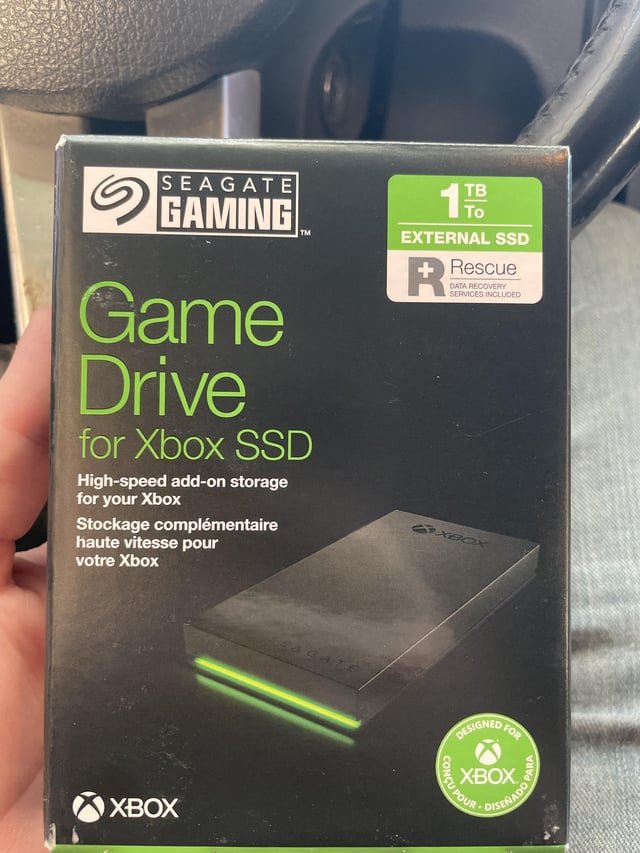
‘Games often require very fast data access, and external storage devices typically have slower read and write speeds than internal storage, which impacts game performance.’
Ever wondered why your console or PC insists on installing games internally? The frustration is real, especially when space is limited. The big question: why cant games be played from external storage reliably as the internal ones? It’s something many gamers grapple with when dealing with large game libraries.
Speed is the key reason. Internal storage, like SSDs, offer much quicker data transfer rates which games critically require. Slower transfer from externals leads to lag and performance hiccups. This makes the gaming experience quite undesirable.

Why Can’t Games Be Played From External Storage?
Have you ever tried to play a game from an external hard drive or USB stick and found it just wouldn’t work properly? Maybe it was super slow, or it wouldn’t even start. It’s a common frustration for gamers. You might think, “Hey, I have all this extra storage, why can’t I just use it for my games?” Well, it’s not as simple as plugging in and playing. There are several technical reasons why gaming from external storage can be a problem, and we’re going to explore them all. Let’s dive into the world of storage, speeds, and why your console or PC isn’t as flexible as you might like.
The Speed Bottleneck: Why Read and Write Speeds Matter
The biggest hurdle with external storage is speed. Games, especially modern ones, are huge. They require lots of data to be read and written constantly. Think about it like this: if your game is a big book, your storage device is like the reader. If the reader is slow, you have to wait ages for the book to load, and turning the pages will feel clunky. The faster the reader, the smoother the experience.
Internal Storage: Built for Speed
Your console or PC comes with internal storage that’s designed for exactly this purpose – speed. Internal hard drives, and more importantly, SSDs (Solid State Drives), use faster connections, letting data move quicker. These are like super-fast readers, compared to their external counterparts. Internal storage is often directly connected to the motherboard, using interfaces like SATA or NVMe, which are like direct highways for data. They can handle massive amounts of information simultaneously with less delay. This leads to less waiting for game levels to load, smoother gameplay, and fewer frustrating hiccups.
Here’s a simple comparison:
- Internal SSD (Solid State Drive): Like a Formula 1 car – super-fast data transfer speeds.
- Internal HDD (Hard Disk Drive): Like a regular car – good for storage but slower than SSDs.
- External HDD: Like a bicycle – okay for simple tasks but not ideal for high-speed gaming.
- External SSD: Like a motorbike – faster than an external HDD, but still typically a bit slower than internal drives.
External Storage: The Slower Lane
External hard drives and USB sticks usually connect through USB ports, which, even with modern USB 3.0 or 3.1 technology, are often slower than the internal connections. It’s like trying to fit a crowd through a small door. The USB connection creates a bottleneck, limiting the speed at which data can be read and written. This slower connection can lead to problems, especially with large, complex games. It can cause:
- Longer loading times: You might spend ages staring at loading screens.
- Texture pop-in: Game graphics might appear blurry or incomplete at first, loading later.
- Stuttering or freezing: The game might pause or skip frames.
- Slowdowns or slowdowns in the game’s performance: Frame rate drops and overall sluggish feel.
The Technology Behind Game Loading and Storage
It’s not just about raw speed; it’s how the game is designed to access data. Modern games don’t load everything at once. Instead, they load parts of the game as you need them. For example, if you enter a new area, the game will load the assets (models, textures, sounds) for that specific location. When loading from external storage, there is always latency, it takes a little bit more time to transfer the data from external device to the memory.
Data Streaming
Modern games use something called ‘data streaming’. They constantly stream information into and out of memory, as you move through the game, which means continuous transfer. A slower external drive struggles to keep up with this constant demand. It’s like trying to fill a bucket with a dripping tap – it takes a long time, and there might not be enough water when you need it. Internal storage can often keep up with a high data stream without a hiccup, but external drives can struggle significantly.
Random Access
Another important aspect is random access speed. Unlike video files that play from start to finish, games access tiny bits of data from different parts of the hard drive all the time. This is called random access. SSDs excel at this because they can access any data point almost instantly. Traditional hard drives have a physical arm that needs to move to find the right spot, taking a bit longer. External storage, especially if it is a traditional hard drive connected by USB, often has the slowest random access speed. This impacts how quickly the game can load new objects or textures into the memory, and how fast it can provide these resources for the game to process them.
File System Compatibility: Not All Formats Are Created Equal
File systems are how your computer or console organizes and stores files on a drive. Different file systems have different properties. Your console or PC usually formats internal storage with a specific file system that is optimized for its use. This file system often allows high transfer rates and efficient access to data.
The Issue with External Formats
External drives often come formatted with different file systems, like FAT32 or exFAT, that are designed to work across various devices. While convenient, these formats often don’t have the same level of performance as the file systems used for internal storage. For example, older file systems like FAT32 have a limitation on the maximum file size. The newer file system like exFAT have improved file size limitations, but there is still a compromise in performance. These file systems may not support some advanced features of the console’s main file system, leading to performance problems and compatibility issues. If you use an external hard drive, the speed of this hard drive will be limited by the file system. The game developers often recommend the use of internal storage because of compatibility and speed reasons.
Specifics by Platform: Console and PC Differences
While the core issues of speed and file systems remain relevant, different platforms have specific nuances in how they handle external storage for gaming. Let’s look at the differences between consoles and PCs.
Consoles: Strictly Regulated Performance
Consoles like PlayStation and Xbox have very controlled environments. These consoles usually have a dedicated port designed for external storage, and they provide specific instructions for proper use. Consoles are designed to ensure a consistent gaming experience. This is why they often impose strict limits on what type of external storage can be used and how it can be used. This might mean:
- Specific speed requirements: Only certain types of external storage (usually USB 3.0 or higher) are supported.
- Limited game installation: Consoles might only allow certain types of games (often older or less demanding ones) to be installed on external drives.
- Compatibility issues: Some external drives might simply not work.
- Formatting limitations: You often need to format the external drive using a specific tool provided by the console system, thus making the external drive unusable for anything else.
The closed nature of consoles means they are often very particular about data transfer and external storage. They focus on consistency and performance, which may limit the flexibility of storage options.
PCs: More Flexibility, More Potential Issues
PCs offer more flexibility when it comes to external storage for gaming. You have more choice over what kind of external hard drive you want to use and how you format it. This comes with some potential pitfalls. While you can install and play games from an external hard drive on your PC, it’s still not always the best idea. Potential problems include:
- Driver issues: Incompatible drivers for your external hard drive can reduce its performance or cause conflicts.
- Inconsistent USB port speeds: Not all USB ports are equal, and you might accidentally connect your drive to a slower port, causing bottlenecks.
- USB power limitations: Some external drives require a lot of power, and USB ports might not provide enough, leading to performance issues or instability.
- Operating system limitations: Different operating systems may handle external storage differently.
While PCs might offer more freedom, you also have to be more careful in choosing your external storage and managing the setup. If you choose to use external storage for games on a PC, it’s crucial to ensure you have high-speed connections, proper drivers, and sufficient power supply for that device to function correctly.
The Future of External Storage for Gaming
The good news is that technology is always improving. We might see a future where external storage is as good as internal storage for gaming. What can we expect from this?
Faster Interfaces and Connections
Newer USB versions, like USB4, offer much higher transfer speeds. With these advancements, data can move faster between the external device and the console or PC, reducing the speed bottleneck. Future versions of these interfaces could significantly close the gap between internal and external storage speeds.
Advanced External SSDs
The price of external SSDs is slowly decreasing, and their performance is constantly improving. Soon, they could be a more viable alternative to internal storage for some gamers, or even if you don’t want to install it in your system.
Optimized Game Design
Game developers could develop games that are better optimized for external storage and data streaming techniques. This could mean better performance on external drives, even with older technology. This would be done by using advanced techniques like data compression, predictive data loading, and intelligent resource management. It is possible that the future generation of games will be optimized in a way that they can be played even on the external devices.
External Storage Optimization
Operating systems and console firmware could be improved to handle external storage more efficiently. This would mean better speed management and overall performance. There might be custom settings for gaming, which will allow external hard drives to perform better.
Making the Most of Your External Storage
While you might not be able to play all games perfectly from an external hard drive, there are many other uses you can find for external storage. External drives can work perfectly for:
- Storing older games: Older games, which are not too demanding, can run well off of an external drive.
- Backup: Storing game saves, photos, videos, and other files.
- Transferring files: Moving large files between computers or consoles.
- Media storage: Storing movies, music, and other media files to use on your PC or consoles.
Choosing the right storage is essential for gaming, but it’s just as important to understand how to utilize all the storage you have available for various other purposes. If you’re experiencing speed issues with a particular drive, you might consider using it for other purposes, while using faster storage devices for your games.
In summary, while external storage seems like a great way to expand your gaming library, technical limitations often prevent it from performing as well as internal storage. Speed bottlenecks, file system incompatibilities, and other system specifics all combine to make the internal drives the first choice for gaming. The future is promising, with advancing technology likely to blur the lines between internal and external storage. However, for now, your internal drive remains the best for your games and high performance. If you can’t install the game in the internal storage, it is recommended to use your external hard drive for other tasks like storage and backup purposes.
How to Play Xbox Series X|S Games from External Storage
Final Thoughts
External storage limitations stem from data transfer speeds. Consoles require rapid data access for game performance. USB or external drives simply cannot match the internal storage’s read speeds, causing lag.
This bottleneck explains why cant games be played from external storage at the same quality and speed. The primary must be on optimizing gameplay. Therefore, system design prioritizes internal storage for core game functions.

