
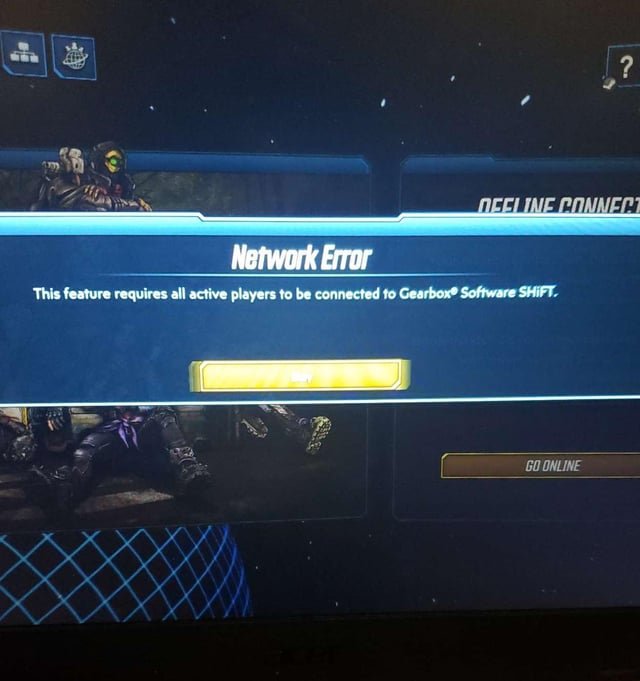
The reason you can’t join your friends’ Borderlands 2 game on Xbox often stems from network issues, differing game versions, or incorrect privacy settings.
Why can’t I join my friends Borderlands 2 game xbox? It’s a frustrating question many Vault Hunters face when wanting to team up. The desire to explore Pandora with your buddies is strong. But technical gremlins sometimes get in the way. Let’s investigate common roadblocks, and get you back to blasting psychos together.
We will break down the typical culprits behind your inability to connect. We will discuss the game’s network infrastructure on Xbox. And also explore settings which might be preventing successful co-op sessions.

Why Can’t I Join My Friend’s Borderlands 2 Game on Xbox?
So, you’re ready to jump into Pandora with your buddies, guns blazing and loot galore, but something’s not working. You keep getting an error, the game doesn’t show up, or you’re just stuck staring at the Xbox menu. It’s frustrating, I know! Getting into a Borderlands 2 game with friends on Xbox should be a blast, but sometimes technical gremlins get in the way. Let’s look into the most common reasons why you might be facing this issue and how to fix them so you can get back to saving (or destroying) the galaxy!
Network Troubles: The Invisible Wall
One of the most frequent culprits behind connection problems is your home network. It’s like a highway system for all your internet traffic, and if there’s a roadblock, you won’t reach your destination. Let’s break down some common network problems:
NAT Type: A Traffic Cop for Your Connection
NAT, or Network Address Translation, is like a traffic cop for your internet. It controls how your Xbox communicates with the outside world. There are a few types, and some are better than others for online gaming:
- Open NAT: This is the ideal scenario. It allows your Xbox to freely connect to anyone online without issue. You should have no problem joining games or hosting.
- Moderate NAT: This can still work, but you might have trouble connecting with some players. You might be able to join some games but not others.
- Strict NAT: This is the biggest problem. You can usually only connect to other players who also have an Open NAT. This will make it very difficult to play with friends.
How to check your NAT Type:
- Press the Xbox button on your controller.
- Go to “Settings”.
- Select “Network”.
- Choose “Network settings”.
- Look at the “NAT Type” section.
What to do about a Strict or Moderate NAT:
- Restart Your Router: This is often the simplest solution. Turn off your router, wait about 30 seconds, and turn it back on.
- Enable UPnP: Universal Plug and Play can help make connections easier. You’ll usually find this setting in your router’s advanced network options.
- Port Forwarding: If UPnP isn’t working, you might need to manually open specific ports on your router. You’ll need to find the specific ports that Borderlands 2 uses and add them to your router’s port forwarding settings. This might be a little tricky, so look up a good guide specific to your router.
- Contact Your Internet Provider: If all else fails, your internet provider might be able to help troubleshoot or give you a better connection.
Internet Speed: Is It Fast Enough?
Even with a good NAT type, your internet speed might be the problem. If your connection is slow, you might have trouble joining or staying connected to a game. Online games need a stable and consistent connection. Imagine trying to run a race while you keep tripping, that’s like playing with slow internet.
How to check your internet speed: You can use a speed test website like speedtest.net on your computer or phone. Compare the results with the minimum speed requirements for Borderlands 2.
Wi-Fi vs. Wired Connection: A Simple Change
Wireless connections are convenient, but they can sometimes be less stable than wired connections. If you are using Wi-Fi and having connection problems, try connecting your Xbox directly to your router using an Ethernet cable. A wired connection gives a more direct path for your data and can improve both speed and stability. Think of Wi-Fi as a radio, it can sometimes get static but a wire is a direct connection so it is more reliable.
Game and Xbox Live Issues
Sometimes the issue isn’t with your network, but with the game itself or Xbox Live. These problems can be a bit harder to pin down.
Game Updates: Is Everyone on the Same Page?
Borderlands 2, like many games, gets updates. If your game version isn’t the same as your friends’, you won’t be able to join them. Make sure that both you and your friends are running the latest version of the game.
How to check for updates:
- Go to “My Games & apps” on your Xbox.
- Select “Borderlands 2”.
- Press the “Menu” button on your controller (the three horizontal lines).
- Choose “Manage game & add-ons”.
- Look for “Updates”.
Xbox Live Status: Is the Service Working?
Xbox Live is the online service that lets you play with friends. If Xbox Live is down, you won’t be able to play online. Check the Xbox Live status page to see if there are any known outages. You can usually find the Xbox Live service status on the Xbox support website.
How to check Xbox Live Status:
- Go to the Xbox Support website.
- Search for “Xbox Live Status”.
- Look for any listed outages.
Game Server Issues: Sometimes It’s Not You, It’s Them
Occasionally, the servers for Borderlands 2 might have problems. This isn’t something you can fix, but it helps to know if that is the problem. There’s not really much you can do but wait and try again later.
In-Game Settings: Little Things Matter
Sometimes the solution is something small within the game.
Game Privacy Settings: Who Can Join?
Borderlands 2 has settings that control who can join your game. Make sure you have your game set to allow your friends to join.
How to check the game privacy settings:
- Start Borderlands 2.
- Go to the “Options” or “Settings” menu.
- Look for “Network” or “Multiplayer” settings.
- Make sure the game is set to “Friends Only” or “Public” rather than “Invite Only”.
Character Level: Are You Ready?
Some missions or areas in Borderlands 2 are locked until you are a certain level. The host’s level must be roughly equal to or higher than yours. If there is a very large level gap between players, this can cause some connection problems.
Xbox Specific Problems
Sometimes the problem isn’t with the game, or network but with the specific device you are playing on.
Console Issues: When Your Xbox Needs a Break
Your Xbox, like any other piece of tech, can have its problems. Sometimes a simple restart can fix weird issues that prevent you from joining a game.
How to restart your Xbox:
- Press and hold the Xbox button on your console for about 10 seconds.
- The console will turn off.
- Turn it back on and try again.
Xbox Cache: Clearing the Cobwebs
Your Xbox stores temporary files called cache. Sometimes these files get corrupted and can cause problems. Clearing the cache can often fix issues.
How to clear your Xbox cache:
- Press the Xbox button on your controller.
- Go to “Settings”.
- Select “System”.
- Choose “Storage”.
- Select “Clear Local Saved Games”.
- Select “Clear Local Xbox 360 Storage”.
Troubleshooting Steps: What to Try
If you’ve gone through all the steps above and you’re still facing issues, here is a small checklist of actions you can take:
- Double-check network connection: Make sure your Xbox is connected to the internet.
- Restart Your Xbox and Router: A classic but often effective solution.
- Check Xbox Live Status: Ensure the service is working correctly.
- Reinstall the Game: If all else fails, uninstalling and reinstalling Borderlands 2 can sometimes solve the problem.
Getting Help: When You Need an Expert
If you are still having trouble connecting after trying all the steps above, consider reaching out for help. Here are some of the best ways you can do that:
- Xbox Support: The Xbox Support website has tons of resources and troubleshooting guides.
- Borderlands Community Forums: Other players might have run into the same problems. See if there are any known solutions there.
- Technical Support: The official game company or Xbox might be able to help with more specific troubleshooting.
It’s never fun when you can’t join your friends online, especially in a game as awesome as Borderlands 2. By going through these steps, you’ll have a better chance of finding out why you can’t join your friend’s game. Remember to be patient and take things one step at a time, and before you know it, you’ll be back on Pandora, looting, shooting, and laughing with your crew. Good luck, Vault Hunter!
How To Fix Can't Join Multiplayer Games On Xbox Series X/S
Final Thoughts
Troubleshooting connection issues is frustrating. Multiple factors cause problems, including network settings and NAT types. Ensure your Xbox Live privacy settings permit joining games. A misconfigured game invite or profile mismatch also presents problems.
Game version differences must also be checked, also consider internet connectivity. The constant question persists: “why cant i join my friends borderlands 2 game xbox?” Resolving the exact cause requires checking these possibilities methodically.

