
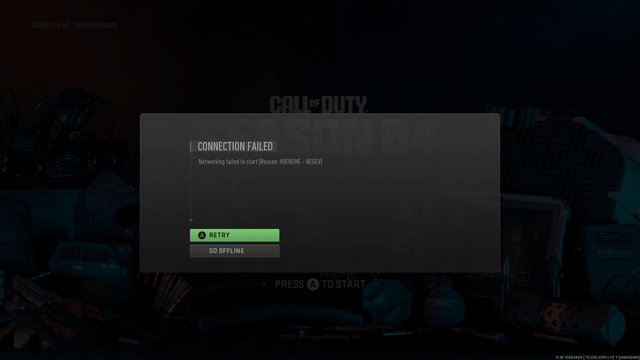
The inability to load into a Warzone game often stems from server issues, network problems, or outdated game files.
Frustration mounts when you’re ready to drop in, but the game simply refuses to cooperate. Why cant i load into a warzone game? This issue plagues many players, turning anticipation into annoyance.
Several factors could be preventing your access to the battlefield. From network hiccups to problems with the game servers themselves, there are numerous potential culprits to consider. We’ll explore these common reasons and how you can possibly address them.

Why Can’t I Load into a Warzone Game?
It’s super frustrating when you’re all geared up to drop into Verdansk or Ashika Island, and your game just…won’t load. You’re stuck staring at a loading screen, or worse, get kicked back to the main menu. Why does this happen? Well, there are lots of reasons, and they’re usually not as scary as they seem. Let’s break down all the common issues that can prevent you from joining a match in Warzone and what you can do to fix them.
Internet Connection Problems: The Most Common Culprit
A shaky internet connection is often the main reason why you struggle to join a Warzone match. Think of your internet like a highway; if it’s jammed, your game data can’t get through properly. This can cause loading issues, disconnections, and overall bad gameplay.
Checking Your Internet Speed
First, let’s see how fast your internet is actually working. You can do a quick speed test online. Many websites offer free speed tests. Look for your download and upload speeds. For playing Warzone, you need decent speeds. Here’s a general idea of what’s good:
- Download Speed: At least 10 Mbps is good, but 25 Mbps or more is better, especially if others in your house use the internet at the same time.
- Upload Speed: Try for at least 3 Mbps. This helps your game send info to the servers.
If your speeds are way lower than what you’re paying for, it might be time to call your internet company.
Wi-Fi vs. Wired Connection
Using Wi-Fi is convenient, but it can be less reliable than a wired connection. Imagine the Wi-Fi signal bouncing around the house. It can get weak, especially if you are far from your router or if there are walls in the way. A wired connection, like using an ethernet cable from your computer or console directly to your router, is much more stable and often faster. Try a wired connection, if possible, to see if it fixes the problem.
Restarting Your Router and Modem
Sometimes, your router and modem just need a little break. Think of them like they need a nap. Turning them off and on again is a simple fix for a lot of internet problems. Here’s how:
- Turn off your router and modem.
- Wait for about a minute.
- Turn your modem back on and wait for all the lights to come on properly.
- Turn on your router.
- Try to load into Warzone again.
Other Devices Using the Network
If your family is streaming movies, playing other games, or downloading big files, it can slow down your internet and make it hard for Warzone to load. When you’re trying to play, ask others to take a break or wait for their downloads to finish. This can free up the internet for your game.
Warzone Server Issues: When the Problem Isn’t You
Sometimes, the problem isn’t on your end but with the game’s servers. Warzone uses huge servers to handle millions of players. When these servers have problems, it can affect everyone’s game. This can happen because of:
- Too many players at once: When lots of people try to play at the same time, especially when a new update is released, the servers can get overloaded.
- Server Maintenance: Sometimes, the game developers take the servers offline to fix them or add new things. This is usually planned, but it can still cause issues.
- Server Outages: Occasionally, servers can have unexpected problems and go down.
Checking Server Status
How do you know if the problem is with the servers? Check the official Call of Duty social media pages (like Twitter) and websites. There are usually announcements if there’s an outage. You can also use third-party websites that track server status for games. If the servers are down, there’s nothing you can do except wait. Grab a snack, read a book, and check back later.
Game Installation and Update Problems
Warzone is a big game, and it needs to be installed and updated correctly to run well. If the game files are damaged or if your game isn’t up-to-date, you may have trouble getting in to play.
Corrupted Game Files
Sometimes, the files that make up Warzone can get damaged. This can happen if your computer or console turned off while the game was being updated, or if there are other software problems. If your game files are corrupted you need to verify them. Most gaming platforms such as Steam, Xbox and PlayStation have built in tools to check the integrity of the game files.
Outdated Game Version
Game developers are always adding new stuff and fixing problems in Warzone. If you don’t have the latest version of the game, you might not be able to play online. Make sure your game is updated to the newest version. Your console or PC usually tells you when updates are available. Always start the update to ensure it is installed successfully.
Hardware and Software Issues
Sometimes, the problem lies in your own hardware or the software on your computer or console. Outdated drivers or problems with your system can also prevent you from loading into Warzone games.
Outdated Graphics Drivers (PC)
If you play on a computer, you have a graphics card that creates the images you see on the screen. These cards use special software called “drivers.” Old drivers can cause problems with games. Make sure your graphics drivers are up to date. Here’s how to do it:
- Nvidia: Go to the Nvidia website, or use the Nvidia GeForce Experience program.
- AMD: Go to the AMD website, or use the AMD Radeon Software program.
Download and install the latest drivers for your card, and then restart your computer. You also need to ensure that you have the latest version of windows installed if you are using a windows operating system. These updates can be found in the windows update settings.
System Requirements
Warzone needs your computer or console to have enough power to run smoothly. Make sure your system meets the minimum requirements for playing the game. If your computer is too old, or doesn’t have enough processing power, you’ll struggle to play the game.
You can find these requirements on the game’s website or the store where you bought the game. If your system barely meets the minimum requirements, you may want to consider upgrading some hardware parts for a smoother experience.
Background Programs (PC)
On a PC, sometimes other programs that are running at the same time as Warzone can cause problems. Close any programs that you are not using while playing the game, especially memory hungry ones like video editing programs or any other games. Check your system tray (the area at the bottom of your screen near the clock) and close unnecessary programs. This can free up computer resources, and it might help Warzone load.
Game Settings and Configuration Problems
Your settings can also play a role in whether you get into a game or not. Sometimes, your game settings may be too high for your computer or console to handle.
Graphics Settings (PC)
If you have the graphics settings turned up really high on your computer, it can be hard for your system to keep up with the game. If you are struggling to load into a game, try reducing your game settings to low or medium and try again. Once you get into the game, you can experiment with your game setting to determine the optimal setting for your system.
Crossplay Settings
Crossplay means you play with people on other platforms like Xbox or PlayStation, and PC. Sometimes issues can arise with crossplay settings, which may stop you from being able to play games with other players. Try toggling off and on the crossplay setting to ensure that there isn’t a conflict between the different platforms.
Account and Platform Issues
Finally, issues related to your account and the platform you’re using can also cause problems.
Account Problems
Sometimes, there can be a problem with your Activision account. This might be because your account has been flagged for suspicious activity. You could try logging out of your account and logging back in. If problems persist, you can contact Activision support to see if there are any issues with your account.
Platform Related Issues
Sometimes, there can be system-wide issues with Xbox, PlayStation, or PC platform. Check if any other players using the same platform are experiencing the same issues. You can also check online forums to see if anyone else is having the same problem on the same platform.
Loading into a Warzone game can be tricky sometimes. But by going through these steps, you can usually figure out why you’re having trouble and get back to playing. Remember to be patient and try different fixes, and soon enough you’ll be dropping in with your squad.
Fix Stuck in Lobby on Warzone 3 – Can’t Find Match in Warzone
Final Thoughts
In short, persistent connection issues, server overload, or game file corruption are the major culprits. These factors often lead to frustrating loading screen freezes or outright game crashes. Poor internet and outdated drivers can also impact your ability to join a match.
Why cant i load into a warzone game? It’s often a combination of the above. You must troubleshoot each aspect, like internet stability or perform a file integrity check to resolve the problem.

