
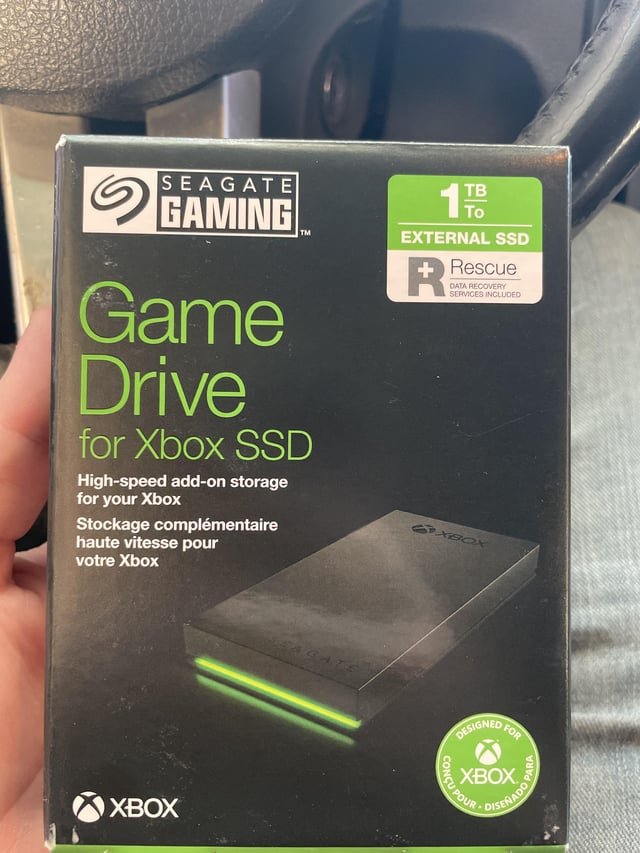
Some games cannot be played on external storage because they require faster read/write speeds only available on internal drives, or they rely on specific operating system configurations not easily replicated on external devices.
Ever wonder why you can install some games on that shiny external drive, but others just refuse to play nice? The frustrating truth is that not all games are created equal. You’ll quickly find yourself pondering, “why cant some games be played on external storage?”
It comes down to speed and how the game accesses data. Some titles demand extremely quick data loading which external storage often cannot provide. This is due to limitations on the interface.
Moreover, some games install parts of their core functionality directly on the internal drive for security or performance reasons which can create complications when you try to run them from external storage.

Why Can’t Some Games Be Played on External Storage?
Have you ever excitedly bought a new video game, only to find that you don’t have enough space on your console or computer to install it? It’s super frustrating! You might think, “Okay, no problem, I’ll just use my external hard drive.” And sometimes, that works great! But sometimes, you’ll hit a wall – some games just refuse to play from an external drive. Why is that? It’s not just a random choice; there are some pretty technical reasons behind it.
Understanding the Basics: Internal vs. External Storage
First, let’s talk about the two main places your games can live: your internal storage and your external storage. Think of your internal storage like the kitchen in your house. It’s built right in, and it’s designed to be super speedy for everyday use. It’s where your console or computer keeps its operating system (the thing that makes everything work) and other important files. External storage, like an external hard drive or SSD (Solid State Drive), is more like a separate storage room. It’s great for keeping lots of things but might not be as quickly accessible as your kitchen.
Speed Matters: The Role of Read and Write Speeds
One big reason why some games won’t play on an external drive is speed. Internal storage, especially in modern consoles and PCs, uses super-fast technology like NVMe SSDs. These drives can read and write data incredibly quickly. Think of it like this: if a game needs to load a big level or lots of characters all at once, it needs to get that information from the storage super fast. The quicker the storage can feed the information to the game, the smoother and faster the game will run. Slow storage can cause loading screens to be longer, make the game stutter, or even make it unplayable. This is often measured in read and write speeds, typically in Megabytes per second (MB/s). The higher these speeds, the faster data can be transferred.
External hard drives are connected through USB ports, and while USB technology has gotten faster over time, it’s generally not as fast as direct connection methods, such as those used for internal storage. This difference in speed is a major reason why some games struggle to run correctly from external drives. The slower transfer rate can bottleneck the game’s performance, leading to frustration instead of fun. For example, an external mechanical HDD may have significantly lower transfer rate compared to a internal NVMe SSD in your PS5 or Xbox Series X console.
Different Types of External Storage and Their Impact
Not all external storage is created equal. You have several options, each with different speeds and reliability. Let’s look at the most common types:
- External Hard Disk Drives (HDDs): These are generally the most affordable but also the slowest. They use spinning disks to store data, which makes reading and writing information slower. It’s like trying to find a specific book in a large, unorganized library.
- External Solid State Drives (SSDs): SSDs are much faster than HDDs because they use flash memory, similar to your phone or USB drive, without any moving parts. They’re a more expensive option, but provide much faster loading speeds and smoother gameplay. Think of SSDs as having a smaller, but highly organised library that allows you to quickly find any book, you need instantly.
- USB Flash Drives: Flash drives are convenient for transferring small files, but often they’re too slow and have limited storage for installing and playing large games. They are good for transferring files, but they are not the ideal solution for running a game directly from them.
The type of external storage you use makes a difference. A game that runs okay on an external SSD might be completely unplayable on a slower external HDD.
Game Design and Optimization: Why Some Games Are Picky
It’s not just the hardware that matters; the way a game is made also plays a big role. Game developers optimize their games to work best with the specific hardware of the console or PC for which they are designed. Here’s why that matters:
Specific Data Access Patterns
Game developers design their games with a specific idea of how quickly data can be retrieved from storage. For instance, a game might constantly load new textures and models. If the game expects to get this data super fast, it is optimized around the internal storage’s capabilities. It might be using special data accessing patterns that are compatible with the faster internal storage. If you move that game to a slower external drive, the game might be constantly waiting for data to load, causing slow downs and sometimes crashing.
Game Engine Requirements
Different game engines, which are the software frameworks used to make games, have different needs for storage access. Some game engines are more demanding than others when it comes to how fast the storage is. Some game engines might be more forgiving to slower storage, while others require very fast reading and writing of data to function properly. This means that some games that are made using certain engines will be more likely to be problematic when played on external storage.
Security and Piracy Prevention Measures
Sometimes, game developers put special security measures in their games. These measures can sometimes interfere with how the game functions when it’s running from an external drive. They might check the speed and connection type, which can cause a problem if the game is not running from the expected storage medium. This is also done to prevent piracy and ensure the authenticity of the software. The game might be checking for file access patterns that are different on external drives and then may restrict its usage.
Operating System Limitations: Another Piece of the Puzzle
The operating system (like Windows, PlayStation OS, or Xbox OS) of your computer or console also has some say in how games can run from external storage. These operating systems have their own rules and ways of handling external storage, which also impact whether games can run on it.
File System Differences
Internal storage and external storage may use different file systems. A file system is a method the operating system uses to store and organize files. These differences may cause issues, because the way the internal drive is organised and accessed is completely different from external drives. The operating system needs to handle these differences which can sometime create a bottleneck when it comes to running games directly from external drive.
Permissions and Security
The operating system manages permissions to access storage, and often treats external storage with more caution than internal storage. This is a security feature. If your game relies on the OS granting full access to the storage medium, that might be problematic for some external storage. For example, some operating systems will not allow a game to access system folders, and that’s fine if the game is installed on the internal system storage, but if the game is on external storage it may lead to errors due to insufficient permissions. These security measures sometimes cause compatibility issues for games running off of an external drive. The games require direct and quick access to its data, and if the operating system slows this process down, or does not grant it permission, it can cause problems for the game.
Driver and Hardware Compatibility
Each storage device requires specific drivers to communicate correctly with your operating system. When it comes to external storage, the drivers and the specific communication protocol may not always work as smoothly as the internal storage that’s hard coded and optimized for the console and PC’s hardware architecture. This also depends on if the external storage hardware is compatible with your console or PC. This also means that the driver provided by the manufacturer for the hardware, may not always be optimized for the best speeds for gaming, so you should make sure the driver is always up to date.
Specific Console and Platform Examples
Let’s look at how these problems show up on specific platforms:
PlayStation 5 (PS5) and Xbox Series X/S
Both the PS5 and Xbox Series X/S have super fast internal SSDs. They use these fast internal drives to load games and reduce loading times. These modern consoles allow the expansion of the storage via the compatible NVMe SSD’s or external USB drives, but only some games can actually be run from the external drives. Older PS4 games and Xbox One games can often be run via external storage on the PS5 and Xbox Series X/S, but not the next-gen versions. This is primarily because of the storage and loading speed requirements that the newer games need to make sure their graphics, frame rates and other key elements work perfectly. The operating systems of these consoles can be restrictive in terms of running games from external devices because of the read and write speeds limitations.
Nintendo Switch
The Nintendo Switch uses cartridges and microSD cards for storage. While you can install most games on the microSD card, some data might still be stored on the console’s internal memory for performance reasons. The microSD cards can be much slower than the internal storage of the console, which can lead to games performing less smoothly on external drives, and the Nintendo Switch operating system may also not fully support all kinds of external storage for running games from external cards.
PC (Windows)
On PC, you have more flexibility, but similar issues can arise. Games benefit greatly from SSDs but some games, especially older ones, may not be affected that much when running from HDDs. While most games will run fine from an external drive on PC, some may still struggle depending on the data access patterns the game requires. The game may not have been fully tested and optimised to run on an external drive by the game developers. You also have to consider the speed of your external drive and the USB interface speeds that you use to connect your external drive to your PC.
What You Can Do: Tips for External Storage
Even though some games are picky about where they live, there are some things you can do to improve your external storage experience:
- Use an SSD: If you’re buying an external drive, an SSD is the way to go if you want better game performance.
- Use a Good Quality USB Cable: A good quality and fast USB cable can help reduce bottlenecks while you run your games off of an external drive.
- Check Your USB Ports: Some ports offer different speeds. Make sure you are using a USB port that supports fast data transfer, such as USB 3.0 or higher, for best performance.
- Keep Your Drivers Updated: Make sure you have the most current drivers for your external storage device for the best performance and compatibility.
- Try Reinstalling: Sometimes, reinstalling a game onto external storage can help if there were issues during the first install.
- Move Less demanding games: Store less demanding games on your external drive to save space on your internal storage.
By taking care with the type of external storage you use, you can manage your storage space and still play the games you love.
While it can be frustrating when you can’t play a game on your external drive, it’s important to remember that there are many technical reasons for this. It’s often a combination of speed requirements, game design, and operating system limitations. By knowing what to look for, you can make better choices about how and where you store your games, and enjoy your gaming experience more smoothly.
How to Play Xbox Series X|S Games from External Storage
Final Thoughts
Game developers implement specific security measures and system requirements. These often tie a game to the internal storage for optimized performance. Some games have dependencies that must reside on the faster internal drive.
This is why some games must run internally; it also prevents piracy. The limitations imposed by certain external storage types can also cause issues. That’s why cant some games be played on external storage.

