
PS5 games require the console’s internal, high-speed SSD to run properly; therefore, you cannot play ps5 games directly from an external hard drive.
Ever wondered why your PlayStation 5 refuses to launch games from that external hard drive? It’s a common question, and the answer lies in the technology powering the PS5. The console’s architecture demands a very fast storage medium for its games to function smoothly, that’s why why cant you play ps5 games from external hard drive is a frequent topic among gamers.
The internal SSD is designed to handle these high-speed read/write operations, a capability that a regular external drive simply does not possess. Using an external drive only allows for storage, not direct gameplay.

Why Can’t You Play PS5 Games From An External Hard Drive?
Ever tried to plug in your external hard drive to your PlayStation 5, hoping to play all those cool games, only to find out it doesn’t work the way you expected? You’re not alone! It’s a common question and a bit frustrating. Unlike the PlayStation 4, the PS5 has some important differences when it comes to using external storage. Let’s dive into why you can’t directly play PS5 games from an external hard drive and what you can do with that storage.
The Need for Speed: Why Internal SSDs are Crucial for PS5 Games
The heart of the matter lies in how the PS5 is built. It uses a super-fast internal storage device called a Solid State Drive (SSD). This SSD is much quicker than the hard drives (HDDs) most of us are used to. Think of it like this: imagine you’re trying to get a toy car moving. An HDD is like a regular car engine – it gets the job done but can be a bit slow. The PS5’s internal SSD is like a super-charged engine, it makes the games load extremely quickly and run very smoothly.
PS5 games are designed to take advantage of this speedy SSD. They’re built with super-fast loading times and quick in-game actions in mind. If you tried to run them from a much slower external HDD, the games just wouldn’t work right. They might take forever to load, stutter, or just freeze altogether. It would be like trying to drive a Formula One car on a dirt road – a complete mismatch. So, Sony made it so PS5 games can only be played from that lightning-fast internal SSD or an upgraded internal SSD that meets specific requirements.
Understanding the Role of External Storage on PS5
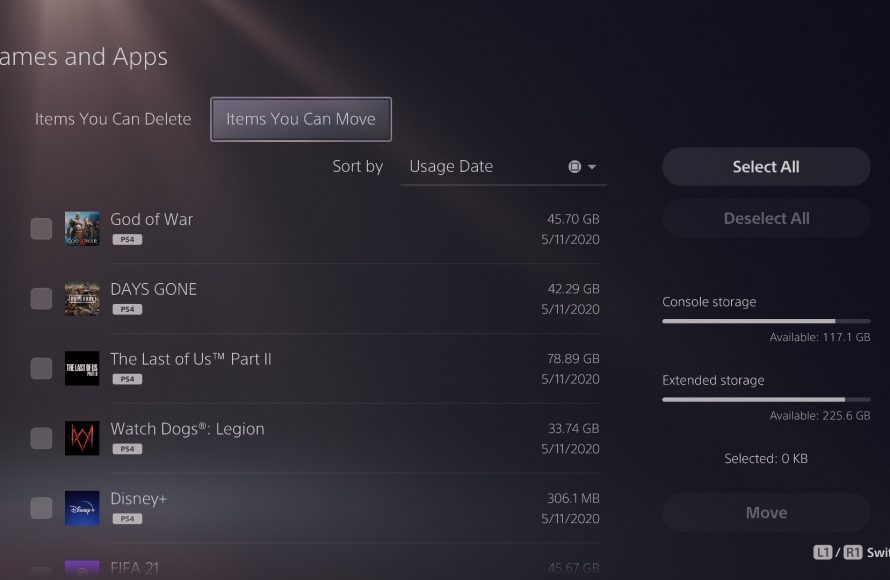
So, if you can’t play PS5 games from an external hard drive, what can you use it for? The answer is still quite helpful! You can use external hard drives to store PS5 games you aren’t currently playing. Think of it as a digital game library where the games are kept, not played. It’s a great way to manage your collection without having to delete and redownload games each time you want to switch.
Storing PS5 Games for Later
Here’s how it works. When you have a PS5 game you’re not currently playing, you can move it to your external drive. When you want to play it again, you’ll need to move it back onto the PS5’s internal storage. This process is usually quite quick because it’s copying the game, not reinstalling it.
Playing PS4 Games on External Drives
Here’s a helpful feature: You can play PS4 games directly from an external hard drive on your PS5! Since PS4 games are not as demanding on loading speeds, you can keep them on your external drive. This is super helpful if you have a big collection of PS4 games, saving that internal storage space for PS5 games.
Other Uses of External Storage on PS5
Apart from storing PS5 and playing PS4 games, external hard drives can be used to back up game saves, screenshots, and videos. This adds extra safety to your gaming data and allows you to keep all your captures safe.
Why Aren’t all External Hard Drives Created Equal?
Not all external hard drives will work with your PS5. For a drive to be compatible, it needs to be a USB 3.0 or later type. This ensures data transfer speeds are fast enough for storing and copying games. If you try to use an older USB 2.0 drive, it won’t work with the PS5.
Let’s dive a bit deeper into specifications:
- Minimum Speed: Your external drive needs to be USB 3.0 or later. Think of USB versions like roads – 3.0 and newer are like super highways; they allow data to travel much faster than older versions.
- Storage Capacity: You can use external drives up to 8TB. It is more than enough space for a big collection of games.
- SSD vs HDD: While you can use both types of external storage, the type matters. External SSDs are faster than HDDs for storing or copying data, but they’re more expensive. HDDs are more budget friendly. You can copy and store on both, but always move them back to the internal for playing.
The Internal SSD Expansion Option
If you really want more space for PS5 games, there is another option: expanding your PS5’s internal SSD. You can add another compatible SSD to a specific slot inside the console. This upgraded storage works just as fast as the built-in SSD, which means you can install and play more PS5 games without needing to move them between drives.
Things to Consider Before Upgrading
Upgrading the internal SSD is a bit more advanced than plugging in an external hard drive. Here are a few things to keep in mind before you do this:
- Compatibility: The new SSD must meet specific speed and size requirements set by Sony. Check the official PlayStation website for a list of compatible devices.
- Installation: You’ll need to open up a part of your PS5 to install the new drive. If you are not comfortable doing this, consider getting help from someone experienced.
- Cost: Internal SSDs that meet PS5 specifications can be expensive. Do your research to find a good balance of price and quality.
Benefits of Internal SSD Expansion
Even though it requires extra work and expense, expanding your internal storage has its advantages.
- Speed: You can play games directly from the expanded storage. You’ll enjoy the same super fast loading times and gameplay that you get with the built-in SSD.
- Seamless Gameplay: Unlike external storage, you won’t have to worry about copying games back and forth. All your PS5 games stay on fast storage.
- Simplified Storage Management: Having all your games on internal storage can be more user friendly as it is all in the same place.
A Quick Comparison of Storage Options
Let’s put together a quick comparison table to help clarify what you can do with each type of storage:
| Storage Type | Can Play PS5 Games Directly? | Can Store PS5 Games? | Can Play PS4 Games Directly? | Notes |
|---|---|---|---|---|
| Internal SSD | Yes | Yes | Yes (via backwards compatibility) | Fastest speeds, required for PS5 games. |
| External HDD (USB 3.0 or later) | No | Yes | Yes | Good for storing PS5 games and playing PS4 games. |
| External SSD (USB 3.0 or later) | No | Yes | Yes | Faster storage and game transfer, but still can’t play PS5 games directly. |
| Expanded Internal SSD | Yes | Yes | Yes | Acts like internal SSD, you can play games directly from it. |
The Future of PS5 Storage
Technology is always changing. While you cannot play PS5 games from an external drive right now, the future might have different possibilities. New storage solutions may be developed that could be faster and more compatible with the PlayStation 5. Who knows what the future of gaming may hold.
For now, understanding how the PS5 uses internal and external storage is key. The built-in SSD is designed for the best performance, while external storage serves as a fantastic way to keep and manage your game collection and game data.
In summary, while it can be frustrating not being able to directly play PS5 games from an external hard drive, there is good reason behind this limitation. The internal SSD ensures you get the best possible gaming experience for PlayStation 5 games. By knowing what your options are with both external and internal storage, you can effectively manage your PS5 storage space.
Why PS5 Games Cant Play From An External Drive
Final Thoughts
You cannot play PS5 games directly from external hard drives due to their architecture. The console needs the games on its internal, super-fast SSD for optimal performance. This speed is a must for the demanding next-gen games.
PS5 games are designed to leverage the ultra-high speed of the internal SSD. This allows for quick loading times and seamless gameplay. why cant you play ps5 games from external hard drive? The slower read speeds of external storage do not meet these requirements. Therefore, you can only store, not play, PS5 titles there.

