
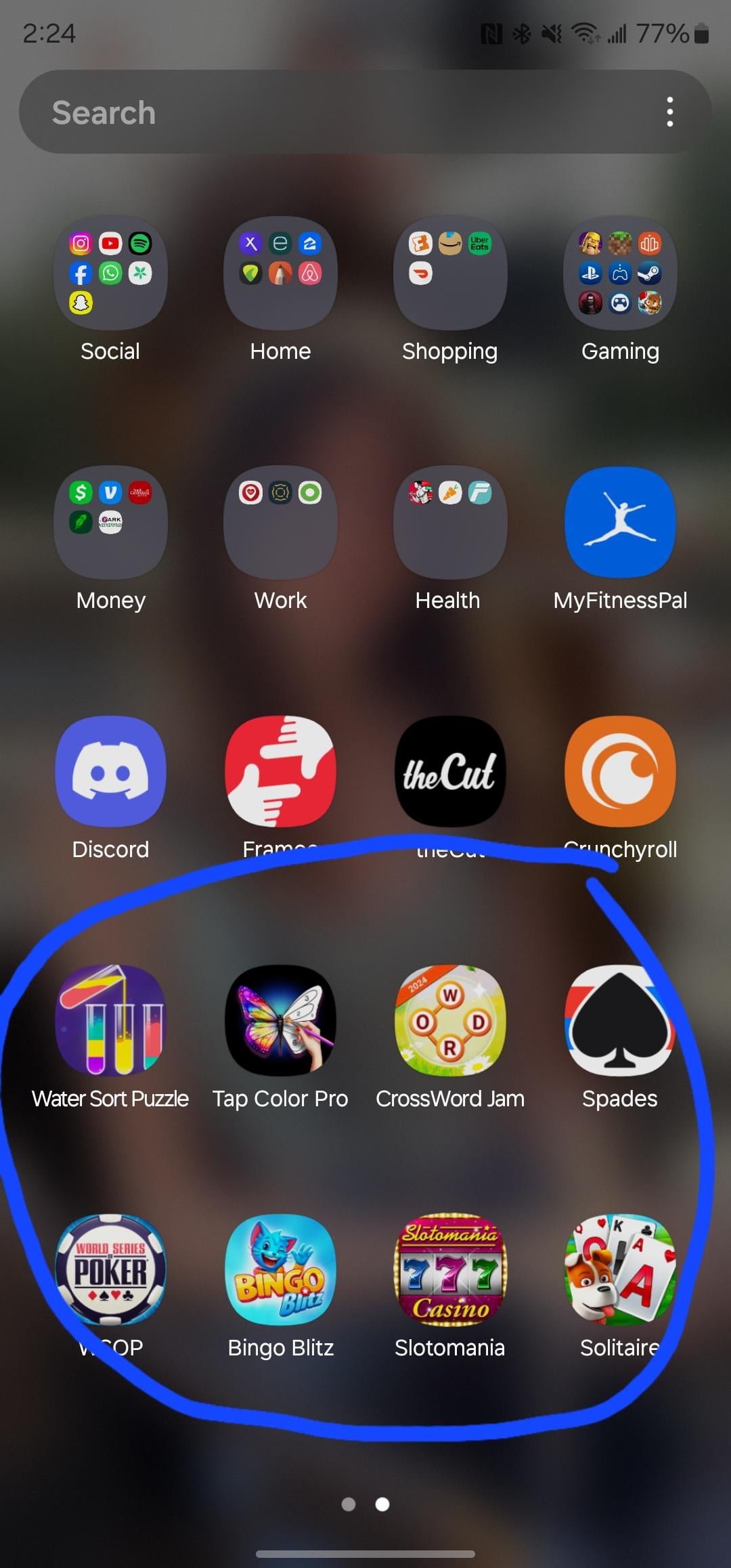
Random games appear on your phone primarily because you’ve likely installed apps that include bundled advertisements, which sometimes automatically download or prompt you to install games.
Have you ever noticed a new game icon suddenly pop up on your phone, seemingly out of nowhere? It can be quite annoying, and you might find yourself asking, “why do random games appear on my phone?” This common occurrence often stems from how some free applications operate.
Many free apps utilize advertisements to generate revenue. These ads sometimes include promotional offers for games that, if clicked, may trigger an automatic download or prompt an install. It’s a sneaky tactic, but understanding this helps you control what enters your device.

Why Do Random Games Appear On My Phone?
It can be really annoying, right? You’re just using your phone, maybe checking your messages or watching a funny video, and then BAM! A game you don’t remember downloading suddenly shows up. It’s like your phone has a secret life of its own. This isn’t some kind of magic trick; there are actual reasons why those random games pop up. Let’s dive in and figure out what’s happening!
The World of App Bundles and Pre-installed Software
One of the main reasons you see random games on your phone is because of something called “pre-installed software.” When phone makers create your phone, they often team up with other companies. Sometimes, these companies pay to have their apps, and yes, often games, included right when you buy the phone. These games are like hidden passengers on your device, waiting for you to find them. They are often bundled, meaning they come together in a package. Even though you didn’t specifically ask for them, they’re there when you unbox your brand new phone. Think of it like a surprise toy in a cereal box, but less exciting and a little more annoying!
These pre-installed apps can vary depending on the phone brand and even the specific mobile carrier you use. Sometimes they will be from well known game studios, and other times they’ll be from smaller developers. They have this deal where, these companies want you to try their games, and it gives them a better chance that you might like them. While this can sometimes introduce you to something you enjoy, it mostly feels like clutter you did not ask for.
Hidden Agreements and the Mystery of Permissions
Have you ever quickly clicked “I agree” without fully reading the fine print? Most of us have! When you’re downloading apps, especially free ones, there is usually a long list of terms and conditions that come along with the install. Buried within all those pages could be the permission to install additional applications, which can sometimes lead to unwanted games popping up on your phone.
Apps often have permissions requests. These are the little pop-ups asking if they can access your photos, your contacts, and so on. But sometimes, these requests are broader than they seem. An app might ask for permission to “install other apps” or “access the internet.” If you’re not careful, you might unintentionally give it permission to download other software, which includes games. It is very important to be very observant, and very careful of what you agree to. Here is a list of things to watch out for:
- Always read the permission requests carefully.
- Be wary of apps requesting permissions that don’t make sense. Does that calculator really need access to your camera?
- Be cautious when clicking “I Agree” without reading the fine print.
- Use the permission settings on your phone to take charge. You can always revoke permissions after an app is installed.
The Role of Third-Party App Stores
While the main app stores like Google Play Store and Apple App Store have ways to check apps, they aren’t completely foolproof. Sometimes, if you install an app from outside of these official stores, those apps might have less strict rules and hidden surprises. If you use a third-party app store, it is possible that the game might not be vetted, and can install unwanted apps. These apps might have games, bundled inside, or might install these games later, without even your permission.
Third-party app stores often promote their apps using enticing promises or by making it sound very user-friendly. Some of these apps use “bundles,” or extra software to entice the user to download. Make sure you do your research before downloading, and also be careful about what you download from the internet, to avoid unwanted softwares to get installed on your device.
The Risks of Sideloading Apps
“Sideloading” is when you install apps from sources other than official app stores. While this might give you access to apps you can’t find elsewhere, it also comes with risks. These apps might not have been tested for security, and they could contain malware, which is nasty software that can cause issues, including installing unwanted games. Sideloaded apps could be created by anyone, and may not be verified for safety, it’s always a good idea to keep this in mind.
Promotional Tactics and Sneaky Advertising
Sometimes those random games appear because of tricky advertising. Ever seen an ad for a game, and then after closing it, a download starts on your phone? Some ads are designed to trick you into thinking you’ve tapped a button to close them, but in reality, you’ve started a download. This can also happen through apps, where the app might install the app, without your full consent. These sneaky tactics try to make you install games, hoping you’ll get hooked and maybe even spend some money on them.
These methods use “adware,” which is software that’s designed to show you ads, but sometimes these ads can take it too far, including triggering game installations. The developers of these games pay for this type of advertising to get their app installed, and hope that you’ll like it.
Identifying Deceptive Ads
It is important to recognize these deceptive advertisements. Some common tricks include:
- “X” Marks the Spot: Sometimes the “close” button is very small or hard to see.
- Fake Warnings or Pop-ups: Some ads pretend to be a warning about a problem with your phone to encourage you to install a game to “fix” it.
- Clickbait: Ads can use shocking or attention-grabbing words or pictures to make you click.
Software Updates and Their Hidden Surprises
Sometimes your phone’s operating system itself, like Android or iOS, might include these apps as part of a software update. Now, most updates are designed to make your phone better, but occasionally, phone makers will add extra apps or games that you might not have wanted. This is because they have partnerships with these game companies. While software updates are important, these extra apps can be annoying when they show up unexpectedly.
Understanding System Updates
Usually, when an update is available on the device, there is notification. There are also settings that allows you to check for updates on demand. The updates fix existing issues and adds security enhancements. However, sometimes with these updates, there are also extra bloatware, like random games, that get added to the device. It is very important to know what type of updates are being installed, to be aware of these situations.
Why Do These Companies Do This?
The core reason behind these random games is money. Game developers pay phone companies, or apps, to show their games to more people. They’re hoping that if you see a game pop up on your phone, you might just give it a try. Sometimes they do this in exchange for a percentage of the revenue. It’s all part of a larger plan, it can be annoying and frustrating, but remember that companies are using these tactics to make money.
Monetization Strategies
Here is a quick run down of why these games get installed on the phone:
- Advertisements: Free apps and games rely on ads. But these ads sometimes go to extreme lengths.
- User Acquisition: Developers want their games on your phone, so that you see it and they get more people to use their apps, in turn making more profit.
- Partnerships: Phone companies and mobile carriers have business deals with game developers, as a way for them to make money.
How Can You Stop Random Games from Appearing?
Okay, so you know why it happens. Now, let’s talk about how to stop it. Here are some tips:
- Be Careful with App Permissions: When downloading apps, especially free ones, read the permissions carefully. If an app asks for more access than it needs, don’t install it.
- Stick to the Official App Stores: Only download apps from the official Google Play Store or Apple App Store whenever possible. These apps have gone through a review process.
- Check Your Phone Settings: Look through your phone’s settings. You might find an option to disable or remove pre-installed apps.
- Keep your software updated: Sometimes updates will remove bloatware from your phone. It is good practice to have your phone up to date with the latest software.
- Use Antivirus Software: Get a reputable antivirus app for your phone. It will help you scan for malicious software or suspicious apps.
- Use a firewall app: Use a firewall app, so that if any game is trying to install software in the background, it will block it.
- Read the Fine Print: Before you click “I agree,” take a moment to glance over the terms and conditions. You might catch a hidden permission.
- Review Existing Apps: Look at the apps already on your phone. Uninstall the ones you don’t use or recognize. You can also revoke permissions for apps you do use, if you want to restrict access for the app.
- Use ad-blockers: Install ad-blocker on your phone, so you can prevent clickbait ads that might install softwares without your permission.
Taking these steps will help keep random games from showing up on your phone. Being careful about what you install and the permissions you give is the best way to stay in control of your device.
In conclusion, random games appear on your phone because of various reasons, mainly due to pre-installed software, hidden permissions, sneaky advertising and partnerships between phone manufacturers and game developers. Understanding these reasons is the first step in preventing unwanted games from cluttering your device. By being mindful about permissions, sticking to official app stores, and using appropriate security measures, you can regain control and enjoy a cleaner and more user-friendly phone experience.
I Caused Mass Murder On Accident | Random Games
Final Thoughts
Ultimately, random games appear on your phone because of bundled software within app installations or sneaky permissions you granted. These bundled apps are often promotional. Sometimes, they’re a result of agreeing to shady terms.
Many free apps use this as a common tactic. Be cautious when granting permissions to any newly installed app. These actions lead to ‘why do random games appear on my phone’. So, always check before granting any permissions, its must.

