
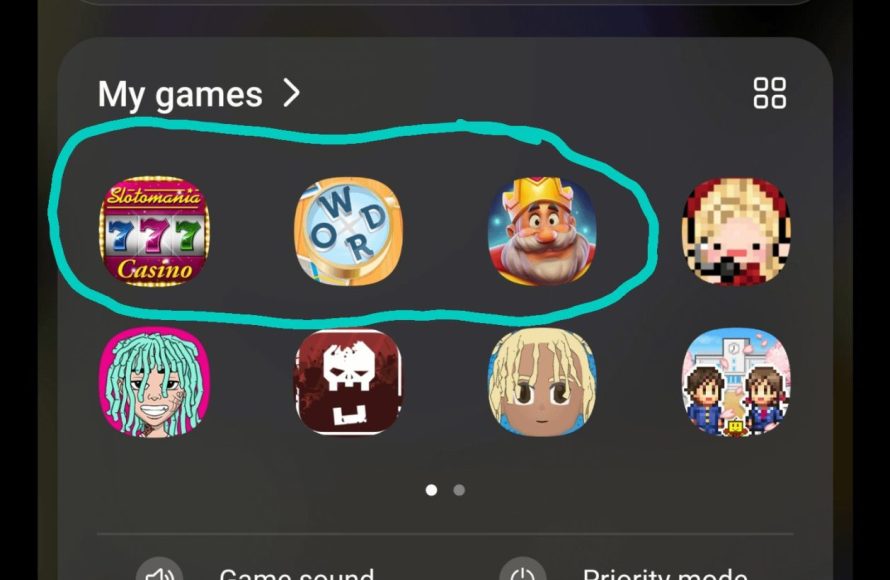
Samsung updates sometimes install games through pre-loaded app packages or promotional partnerships with game developers.
Ever found yourself wondering why do samsung updates install games you never asked for? It can be a bit frustrating to see new game icons pop up after an update. These additions aren’t always malicious, but rather a result of Samsung’s strategy.
Often, the games are pre-installed apps included as part of the software package or due to deals with game companies. This practice helps promote these apps, sometimes providing revenue streams for the company. Users might find these unwanted games, but they can usually be uninstalled if desired.

Why Do Samsung Updates Install Games?
Have you ever updated your Samsung phone and then suddenly found a new game you didn’t ask for? It can feel a bit strange, like your phone is playing a trick on you! You might wonder, “Why does my phone suddenly have games after an update?” Well, you’re not alone, and there are a few reasons why this happens. Let’s explore this topic together and find out what’s really going on when a Samsung update decides to bring along some extra apps.
Understanding Software Updates
Before we dive into the games specifically, let’s talk a bit about software updates in general. Think of software updates like tune-ups for your phone. They’re important because they:
- Fix problems: Sometimes, there are bugs or glitches in the phone’s software. Updates fix these problems so your phone works better.
- Improve performance: Updates can make your phone run faster and smoother. They might make apps load quicker or make the battery last longer.
- Add new features: Sometimes updates add brand new things, like a new camera setting or a different way to use your phone.
- Protect your phone: Updates often include security fixes that keep your phone safe from bad stuff like viruses.
These updates are often provided by Samsung, the company that made your phone, or by Google, who makes the Android system that Samsung phones use. It’s a mix of making your phone better, adding new capabilities, and also making it safer.
The Role of Pre-Installed Apps
Now, let’s talk about pre-installed apps. These are apps that are already on your phone when you buy it. Sometimes, they are apps that Samsung or Google think most people will want to use like Gmail or Google Maps. But sometimes, there are also other apps like games. Why are they there?
Agreements with Developers
One big reason is that Samsung makes deals with game developers. Game developers want more people to use their games, and Samsung wants to make some money. So, Samsung sometimes gets paid to include certain games on their phones. When you see a new game after an update, it’s quite likely part of one of these agreements. It’s like a special advertisement for the game, and your phone is like the billboard.
Partnerships and Promotions
These pre-installed games aren’t always just about making money. Sometimes they’re part of bigger deals, where a game company partners with a phone maker like Samsung. They might try to boost the game’s popularity by adding it to the update. This is a win-win, the game gets more players, and the phone maker gets to add something new without spending too much effort.
Why Updates? Why Not Just When You Buy the Phone?
You might be thinking, “Why do they sneak these games into updates? Why aren’t they just there when I buy the phone?” That’s a great question! There are a few reasons why Samsung uses updates to add these games:
Introducing New Games
One big reason is that new games are coming out all the time. If Samsung only put games on the phone when you bought it, you might miss out on some cool new stuff. So, sometimes, they add games in updates to introduce you to the latest releases. It’s like a surprise present but you didn’t ask for it. These games, in a sense, can be thought of as promotional material, much like store displays for new items.
Regional Considerations
Also, different countries might have different games that are popular. So, Samsung sometimes changes the games in updates to fit the area you are in. If a specific game is trending in your region, it is more likely to find its way onto your device through an update. This makes the phone more appealing and more relevant to users in different areas.
Space and Performance
Another big reason is that sometimes pre-installing every game on every phone could take up a lot of storage space and slow down a phone right out of the box. By including these games during the update they don’t have to do it all at once and they are able to add new ones in the meantime.
Testing New Features
Sometimes, these games serve a dual purpose. They might not just be there for playing, but also for testing new software features. The games may help the company collect user data and see how the phone is working. This is used to improve future updates and the phone’s performance.
The Impact on Your Phone
Okay, so we know why these games sometimes pop up, but how does it affect your phone? Well, there are a few things to consider:
Storage Space
One obvious impact is the space these games take up on your phone. Games can be big, and if you don’t want them, they’re just using up precious storage space. This can be annoying, especially if your phone is already close to being full of photos, videos, or other apps you do use.
Data Usage
Another thing to consider is the data. Some games need an internet connection to work, so having them on your phone could lead to using up data if they download more content. It is true that these downloads are usually done using Wi-Fi, but if you are not careful, the data costs can add up, especially if the game has large updates or you play online often.
Potential Clutter
Having games you don’t want can also make your phone look cluttered and feel more chaotic. It’s like having extra toys in your room that you don’t play with. Having many unused icons can make it harder to find the apps you use regularly and can be annoying to go through.
Performance
Sometimes, having lots of apps on your phone, even if they aren’t open, can make your phone a little slower. While most modern phones are strong enough to handle multiple apps, too many at once can still have a subtle effect on performance. They could make your battery drain faster. If an app uses a lot of processing power it will use more of your phone’s resources.
What Can You Do About It?
The good news is you’re not stuck with these games forever. There are some things you can do if you don’t want them.
Uninstall Unwanted Games
The easiest thing to do is simply to uninstall them. Just like any other app, you can remove these games from your phone. If you see a game you don’t want, you can easily remove it to create more space and clean up your app drawer.
- Find the game on your home screen or in your app drawer
- Press and hold on the app icon.
- Tap on uninstall (or something similar) and confirm.
Disable Notifications
Sometimes, games will send you notifications to try to get you to play. If you don’t want these pop-ups, you can disable notifications for the games. This can prevent those annoying pop-ups when you are trying to do other things on your phone.
- Go to your phone’s settings.
- Go to apps and notifications.
- Find the game in the list of apps.
- Tap on notifications and turn them off.
Use a Custom Launcher
For more control, you can use a custom launcher. Launchers let you change how your home screen looks and how you organize your apps. Some launchers let you hide apps you don’t want to see, so your phone looks cleaner even if the game is still on there. This does not remove the game, but it can make your phone less cluttered and more pleasing to use.
- Install a custom launcher from the Google Play Store.
- Set the launcher as your default home app.
- Use the launcher’s settings to hide the apps you do not want to see.
Consider Custom ROMs (For Advanced Users)
For more advanced users, you can even install a custom ROM, which is a completely different operating system on your phone. This usually gets rid of all the unwanted preinstalled apps at once. Be aware that installing custom ROMs is a lot more technical and may risk damaging your phone if not done right. Only try this option if you are comfortable with advanced settings and understand the possible consequences.
Looking Ahead
As phones and software updates evolve, we might see changes in how app installation is handled. You may see more options to choose which apps you do and don’t want during an update. Samsung and other phone companies may find better ways to keep our phones lean and less cluttered while providing the latest software and features.
In summary, Samsung includes games in updates for a mix of reasons, including partnerships, regional trends, and testing purposes. While these games can sometimes feel unwanted, you always have the ability to uninstall them or disable notifications. This knowledge can empower you to make informed choices about your phone and keep it just the way you like it.
Massive Samsung ONE UI 7 Beta 3 Update is Finally HERE – What's New?
Final Thoughts
Samsung sometimes bundles games during updates as part of promotional deals or to showcase their gaming capabilities. This practice generates revenue or increases app engagement. Users often find these pre-installed games annoying if they do not want them.
Ultimately, the question remains, why do samsung updates install games? It’s primarily a business decision focusing on generating income and promoting services, though customer satisfaction can suffer. This can be a source of frustration for many users.

