
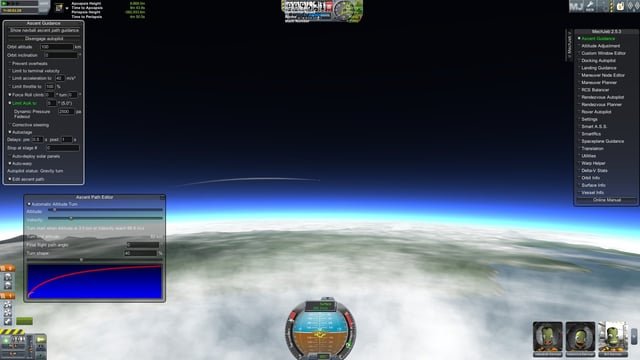
MechJeb can sometimes brick your game due to conflicts with other mods, outdated versions, or corrupted files, causing crashes or instability.
Frustration bubbles up when your Kerbal Space Program adventure suddenly grinds to a halt. You’ve installed MechJeb, eager for some assistance in your spacefaring endeavors, but instead, you’re facing crashes and instability. So why does MechJeb brick my game?
The simple truth often lies within mod conflicts or having an old version. Sometimes a corrupted file of the mod will mess everything. It’s not always MechJeb’s fault but rather the interaction between it and other elements of your KSP setup.

Why Does MechJeb Brick My Game?
So, you’re flying high in Kerbal Space Program (KSP), enjoying the thrill of building rockets and exploring space. You decide to try out MechJeb, that helpful autopilot mod, thinking it will make your space adventures easier. But then, bam! Your game crashes, freezes, or just goes totally bonkers. Why does this happen? It’s frustrating, but there are a lot of reasons why MechJeb might seem to “brick” your game. Let’s dive into the common culprits.
Understanding MechJeb and its Complexity
MechJeb isn’t a simple, one-size-fits-all tool. It’s a complex mod that adds a lot of automated functions to KSP. These functions are wonderful when they work correctly, allowing for precise orbital maneuvers, automatic landings, and even complex docking procedures. However, this complexity is also where things can go wrong. When MechJeb struggles to process information or encounters unexpected issues, it can lead to problems that make it seem like it is “bricking” your game. Think of it like a really smart robot; if you give it confusing instructions or if its sensors get blocked, it won’t work properly. Understanding how complex MechJeb is helps us better figure out why your game might be having problems.
Incompatible Game Versions
One of the most frequent causes for MechJeb-related issues is using an outdated version of the mod with a newer KSP game version, or vice versa. KSP updates often introduce changes to the core game mechanics. These changes can break older mods, including MechJeb. For example, a recent KSP update might have altered how the game calculates the center of mass, and if your MechJeb version hasn’t been updated to accommodate that change, things might go sideways.
- Always check the official MechJeb forum or the mod’s download page to see if your MechJeb version is compatible with your current KSP version.
- Before updating KSP, it’s a good idea to check if your essential mods, like MechJeb, are updated, or wait a few days or a week before updating the game until the mod’s are updated.
Conflicting Mods
KSP is known for its vibrant modding community. While this is great for adding new features and content, sometimes these mods don’t play nicely together. When multiple mods try to change the same game mechanics, conflicts can occur. MechJeb, which can do many different things in the game, is especially sensitive to these conflicts. It might try to change something that another mod is trying to change, creating an endless loop, causing errors and instability, and resulting in your game freezing, crashing or not behaving as intended. Think of it like too many cooks in the kitchen!
How to Identify Mod Conflicts:
- Try disabling your mods, and add MechJeb as only mod, if the game works well without other mods, then try adding mods one by one, and see if game crashes again.
- Check online forums for other users who have reported similar issues with specific mod combinations.
- Look at the logs in your KSP folder after a crash. You may see error messages pointing to mod conflicts.
Resource-Intensive Operations
MechJeb does a lot of calculations in the background, especially when it is actively controlling a vessel. Complex operations, like calculating trajectories for interplanetary transfers or performing very precise landings, require a lot of your computer’s processing power. If your computer struggles to keep up, you might experience slowdowns, freezes, or even crashes. This is particularly true on older machines with limited resources. Consider how many parts are on your spacecraft, how many mods are installed, and the amount of things in your scene at the same time. All of these things take up processing power from your computer. If your computer is not very good at performing these tasks, the game and MechJeb will have a hard time, resulting in crashes and errors.
How to Help Your Computer:
- Lower the graphics settings in KSP to reduce load.
- Close other unnecessary applications running on your computer to free up resources.
- If you have a lot of mods installed, consider removing some less essential mods.
Specific MechJeb Features Causing Problems
Sometimes, it’s not MechJeb as a whole that causes problems but specific features within the mod that are behaving unexpectedly. Let’s look at some common culprits:
Autopilot Features
The autopilot functions in MechJeb are very powerful. They allow you to hand over the controls to the computer for various tasks, like launching into orbit, performing orbital maneuvers, or landing on a planet or moon. While these features are very useful, they can also be very complicated. If the settings are not configured right, or if the vessel is not prepared for the maneuver, they might lead to unexpected results, or crashes, or unexpected outcomes.
- Incorrect Ascent Trajectories: If you use the autopilot to launch into orbit, but set the parameters incorrectly (for example, too steep of a gravity turn), this might put excessive strain on your ship, or even causing it to crash or explode.
- Landing Issues: When landing on a planet or moon, the autopilot might make the wrong choice based on conditions, like the terrain, or if the vessel does not have the right landing gear.
- Maneuver Execution Failures: Sometimes, if your vessel’s engines don’t have enough power to perform a planned maneuver, MechJeb might get stuck in a loop trying to complete the impossible task, this may results in crashes or freezing.
Tips for Using Autopilot Correctly:
- Start with simple autopilot tasks and work your way up to more complex ones.
- Make sure to carefully review the parameters set by the autopilot.
- Ensure that the spacecraft is fully capable of performing the maneuver.
- Use the tutorial option of MechJeb to better understand how specific functions work.
Node Planning Issues
MechJeb’s maneuver node editor helps you plan and execute orbital maneuvers. It allows you to plot complex trajectories, but there are times when things can go wrong here, like if the node isn’t correct. This could happen if the node is very far off or it’s impossible to perform because it requires too much power from the engines, or your vehicle is too weak to make this maneuver. This can cause your game to freeze when trying to compute the maneuver, or a crash.
How to Fix Node Planning Problems:
- Double-check the maneuver node after creating it.
- Adjust the node if it looks impossible to perform.
- Make sure your vessel has the necessary thrust to perform the desired maneuver.
Part-Specific Conflicts
MechJeb relies on accurate data about your ship to function correctly. This data includes information about the ship’s weight, thrust, and control surfaces, etc. If the parts of your ship don’t report this data correctly to the mod, or if a specific part has a bug that makes it incompatible with MechJeb, that may cause instability. This can lead to incorrect calculations and errors, causing your game to freeze or crash.
Troubleshooting Part Issues:
- Check if there are compatibility issues on the mod’s forum for a specific part.
- Try recreating the same vessel without the specific part that might be the cause of the issue, and see if that works.
- If you suspect a part is the issue, try not to use that part or replace it with a similar one if possible.
Debugging and Troubleshooting
If MechJeb is causing problems, here are steps you can take to fix them:
Checking Game Logs
KSP generates log files that can provide valuable information about why your game is crashing. After a crash, check these files for clues about the cause of the problem, like error messages from MechJeb or other mods. These error messages are useful to determine why the game crashed. By looking at the log, you can also check for any mods that might be causing problems with MechJeb.
- How to find the logs: The logs are located in your KSP game folder, usually named ‘output_log.txt’ (on Windows) or ‘Player.log’ (on Mac and Linux).
- Look for errors or messages that include “MechJeb” or that mention other mods which could indicate a conflict.
Testing in a Clean Install
Sometimes it is necessary to do a clean test of the game to determine the problem. This means starting with a fresh install of KSP without any mods. Add MechJeb, and test it by itself. If MechJeb works fine in a clean install, then that means that there may be a mod conflict causing the game to crash. Then, start adding your mods back one by one until you find the culprit causing the crashes. This method is usually the fastest to fix the problems with your game.
Steps to clean install:
- Make a backup of your current KSP game folder.
- Uninstall the game, and install it again, then add MechJeb.
- If it works, then gradually add mods one by one to see if the game will crash, and that will lead to the culprit mod.
Updating MechJeb and KSP
As explained before, keep your mods up to date. If there is a newer version of MechJeb or KSP, it’s best to update the game, and all the mods, as often developers are releasing patches that fixes errors with their program, and these updates can often resolve the issues that you have been having with the game.
Reinstalling MechJeb
If updating doesn’t work, try reinstalling MechJeb from scratch. Sometimes a fresh install of the mod fixes problems that you may not realize existed in previous installations of the mod.
Steps to reinstall:
- Go to the folder with the mod, and delete all the files.
- Download a fresh copy of the mod from the official page, and place it in the game folder.
- Test to see if the game is crashing.
Seek Community Help
If you’ve tried all the steps listed here, and you’re still having problems, don’t hesitate to reach out to the KSP community. There are a lot of dedicated players who have probably experienced the same issues, and are happy to share their tips, tricks, and knowledge of the game. The official MechJeb forum is a great place to ask questions and get support from other users.
Remember, figuring out why MechJeb is causing problems can be a bit of a puzzle. By following these troubleshooting steps, you can find the root of the problem and get back to enjoying your space adventures in KSP.
Space Station! – Kerbal Space Program Ep #4
Final Thoughts
MechJeb, while helpful, can conflict with other mods, causing game crashes. Outdated versions often lack compatibility. These conflicts directly brick your save.
Incorrect installation or incomplete files frequently lead to instability, hindering normal game operation. The ‘why does mechjeb brick my game’ question often boils down to these very issues: mod conflicts and incorrect installations.

