
Why your game keeps stuttering often comes down to hardware limitations, software conflicts, or background processes consuming resources.
Is your gameplay experience consistently interrupted by annoying freezes and hitches? You are not alone; many gamers grapple with this frustrating issue. The question of ‘why does my game keep stuttering’ plagues many of us. It can be incredibly disruptive when a game you are enjoying suddenly jerks and pauses.
These sudden stops can be due to many factors, such as your computer struggling to keep up or another application stealing resources. We will explore these common reasons for stuttering, helping you get back into the game smoothly. We will explore simple fixes you can apply to improve the situation.

Why Does My Game Keep Stuttering?
Okay, so you’re all set to jump into your favorite game, maybe you’re about to win that big race, or finally defeat the boss. But then, it happens. The game starts to hitch, freeze for a split second, and generally not run smoothly. It’s like watching a movie that keeps skipping. This annoying problem is called “stuttering,” and it can seriously ruin your gaming fun. Let’s explore why this happens and what you can do about it.
Understanding Game Stuttering
Before we dive into fixing the problem, let’s understand what’s actually happening. Game stuttering refers to those moments where your game appears to freeze or slow down suddenly, then jump back to normal. It’s different from consistent slow performance (low frame rate) where everything is running slowly all the time. Stuttering is more erratic, like a hiccup in the game’s flow. These hiccups often make precise movements hard and can seriously frustrate you. It is a common issue that even many PC and console players face while playing. We are going to look into the different reasons for these.
Hardware Issues: The Engine of Your Game
Your computer or console is like the engine that powers your game. If the engine isn’t working well, you’ll see some problems. Let’s look at some common hardware reasons for game stuttering.
Graphics Card Problems
Your graphics card, or GPU, is super important for running games smoothly. It’s responsible for creating all the pretty visuals you see on the screen. If your GPU isn’t strong enough or is having some problems, you might face some stuttering.
- Outdated or Underpowered GPU: If your graphics card is old or not powerful enough to handle the game you’re playing, it will struggle to keep up. This can lead to sudden frame drops and stuttering. Check the game’s minimum and recommended specs and compare them to your GPU.
- Overheating: Just like people, GPUs can overheat when they’re working too hard. When they overheat, they might reduce performance to prevent damage, which leads to stuttering. Make sure your computer’s fans are working correctly and that there isn’t too much dust buildup blocking them.
- Driver Issues: The driver software allows your computer to speak with your graphics card. Outdated or faulty drivers can cause all kinds of problems, including game stuttering. Always make sure to update your graphics drivers to the latest version. You can usually do this through the graphics card manufacturer’s website.
CPU Problems
The CPU, or Central Processing Unit, is like the brain of your computer. It takes care of all the calculations and processing that your games need to run. If your CPU is struggling, you will see problems.
- Overheating: Like the GPU, the CPU can also overheat and cause stuttering. You can check your CPU temperature with some software tools. Make sure the CPU is properly cooled.
- Overworked CPU: If your CPU is also doing a lot of other things while you’re trying to play a game (like running a bunch of programs in the background), it might not have enough power to keep your game running smoothly. Close all unnecessary applications before playing a game.
- Old or Weak CPU: If the CPU is too old or not powerful enough to handle the game, it might result in a stuttering game.
RAM Issues
RAM, or Random Access Memory, is like your computer’s short-term memory. It’s where your computer stores the data that your game is currently using. When your RAM is low or has problems, it affects gameplay.
- Not Enough RAM: If you don’t have enough RAM, your computer will start to use your hard drive to store game data, which is much slower. This can cause serious stuttering and slowdowns. Check how much RAM your game needs and make sure you have at least that much.
- Faulty RAM: Sometimes, RAM can go bad. This can cause random crashes and stuttering. You can run a memory test to see if your RAM is working correctly.
Hard Drive/SSD Problems
Your hard drive or SSD is where your game is stored. Slow access to this storage can lead to stuttering. The hard drives read the game files from it, and if there are problems with it, it can cause game stuttering.
- Slow Hard Drive: A regular hard drive (HDD) is much slower than an SSD (Solid State Drive). If you have a lot of storage on the HDD, this can cause stuttering. Consider moving your games to an SSD, if you can.
- Full Hard Drive: When your hard drive or SSD is almost full, it can slow down the reading and writing of data, which causes stuttering. Always keep at least 10-15% of your storage free.
- Failing Drive: Like any hardware, a drive can start to fail, causing slow data access.
Software Issues: The Brain Behind the Scenes
Sometimes the problem isn’t with your hardware, but with the software that runs on your computer or console. Here are some software problems that can cause game stuttering.
Operating System Problems
Your operating system (like Windows or macOS) is the main software that controls all the other programs on your computer. Problems with your OS can affect game performance.
- Outdated OS: Old operating systems might not have all the necessary features or bug fixes to run new games well. Make sure your operating system is up to date.
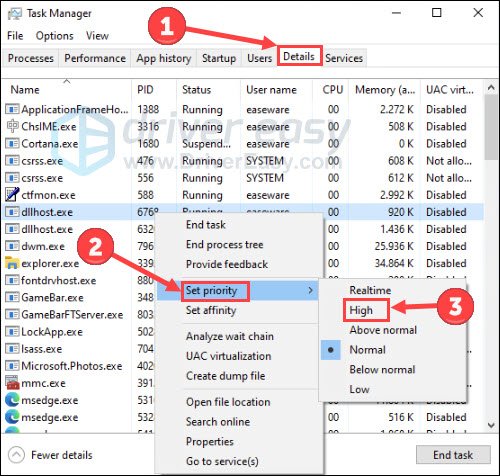
- Background Processes: Lots of programs running in the background while you’re gaming can take up valuable resources and cause stuttering. Close down unnecessary programs before playing.
- Corrupted System Files: Sometimes, essential system files can become damaged. This can cause all sorts of issues, including game stuttering. You can use the system file checker tool to find and fix this problem.
Game Settings
The settings you use in the game itself can also cause stuttering.
- Too High Settings: If you’re playing a game with very high graphics settings, your computer might struggle to keep up, which leads to stuttering. Try lowering the graphics settings to see if it helps.
- Incompatible Settings: Some game settings might conflict with your specific computer hardware or software. Try experimenting with different settings to see if you can find the one that causes the issue.
Driver Conflicts
Sometimes, your graphics card drivers can conflict with other programs or devices on your computer, causing issues.
- Conflicting drivers: If you have multiple drivers installed on your system that can conflict with each other, it might lead to stuttering. Make sure all your drivers are up to date and compatible with your system.
Internet Connection Issues
If you’re playing a game online, your internet connection can also be the reason for stuttering. This is especially the case if you are playing online multiplayer games.
- Unstable connection: If your internet connection is unstable or slow, it can cause the game to stutter. You can use speed testing tools to check if your connection is stable.
- High Latency/Ping: High latency or ping indicates that there is a delay in the communication between your computer and the game server. This can cause stuttering and lag.
- Network congestion: If too many devices are using your internet connection at the same time, this may cause stuttering. Try to limit the number of devices using the internet when you’re gaming.
Other Possible Reasons
There are some other less common reasons that could cause game stuttering.
- Hardware Conflicts: Sometimes different pieces of hardware in your computer might conflict with each other. You might need to troubleshoot this with a professional or your system manual.
- Game Bugs: Sometimes, the game itself might have bugs or issues that cause stuttering. This is more common in newly released games, and the developers should release a patch to fix it.
Troubleshooting Steps: Becoming a Game Mechanic
Now that we know many possible causes of stuttering, let’s look at how you can fix them. This is going to make you an amazing game mechanic!
Basic Checks First
Before doing any complicated fixes, let’s start with some basic checks.
- Restart Your Computer: Sometimes just restarting your computer can fix the issue.
- Update Drivers: Check for updates for your graphics card, network, and other devices.
- Close Background Programs: Close all unnecessary applications that are running in the background.
- Check Game Requirements: Verify that your computer meets the minimum and recommended requirements for the game.
Adjusting Game Settings
Game settings have a big impact on performance. Try these adjustments:
- Lower Graphics Settings: Lowering your game’s graphics settings can help if your computer is struggling. Start by reducing texture quality, shadows, and anti-aliasing.
- Change Resolution: Try playing at a lower screen resolution.
- Fullscreen Mode: Make sure you’re playing in fullscreen mode, as this tends to offer the best performance.
Updating System Software
Make sure all your system software is up-to-date.
- Update Windows/macOS: Install any pending updates for your operating system.
- DirectX/Vulkan: Keep these gaming-related APIs up-to-date.
Hardware Checks
Let’s look at your hardware.
- Check Temperatures: Use software to monitor your CPU and GPU temperatures. If they’re too high, clean the fans and consider better cooling solutions.
- Memory Test: Run a memory test to check for faulty RAM.
- Check Hard Drive Health: See if your hard drive is healthy and has enough space.
- Overclocking: If you have overclocked your CPU/GPU, try setting it to normal clock settings.
Network Troubleshooting
If the stuttering happens in online games, these may be your solutions.
- Restart Router/Modem: Reset your internet equipment.
- Use Ethernet Cable: If possible, use an Ethernet cable for a more stable connection.
- Close Other Network Applications: Limit the number of applications using your network.
Advanced Troubleshooting
Here are some more advanced methods. Be careful when you perform these tasks. If you are not sure of them, get help from a professional.
- Clean Install Graphics Drivers: Uninstall your graphics drivers and install them again.
- System File Check: Use the system file checker to fix any corrupted system files.
- Check for Hardware Conflicts: Try removing any newly installed hardware and see if it fixes the issue.
It is always wise to get professional assistance from a hardware professional if your PC/console has serious underlying problems.
Game stuttering can be a very irritating problem. Thankfully, there are many things you can do to fix the issue. By checking your hardware and software, adjusting settings, and keeping everything up-to-date, you can usually solve most stuttering problems and get back to enjoying your games. Remember, being patient and systematic will help you resolve the stuttering and get you back to smooth gameplay. So, get going and start fixing your stuttering issue.
Fix Games Stuttering In 15 Seconds
Final Thoughts
Game stuttering arises from several potential causes. These include outdated drivers, insufficient hardware, or background apps consuming resources. Poor game optimization also directly contributes to stuttering.
‘why does my game keep stuttering’ becomes a recurring problem when these issues persist. Checking your system and adjusting game settings can significantly improve your gaming experience. It’s vital to pinpoint the specific culprit to create smoother gameplay.

