
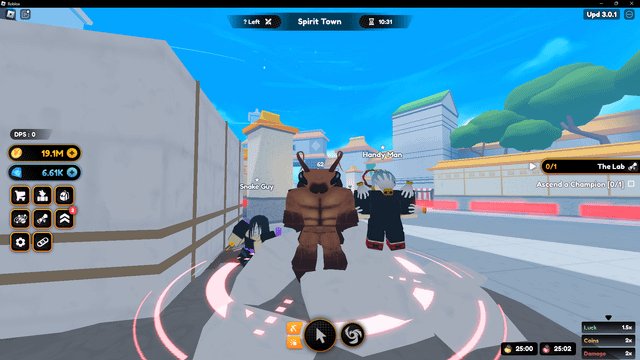
Your Roblox character might look different in-game due to the game’s specific avatar settings, which can override your personal avatar customizations.
Ever jumped into a Roblox game and thought, “Wait, why does my Roblox character look different in game?” It’s a common head-scratcher for many players. One minute you’re rocking your customized avatar, and the next you’re sporting a completely different style.
This change happens because many Roblox experiences use their own avatar systems. These systems can temporarily alter your character’s appearance for gameplay reasons. Games often have specific themes or characters, which your custom avatar may not fit.

Why Does My Roblox Character Look Different In Game?
Ever created an awesome avatar in the Roblox avatar editor, only to find it looks a little off when you actually enter a game? You’re not alone! It’s a common experience for many Roblox players. There are several reasons why your meticulously crafted character might appear different once it steps into the virtual world. Let’s dive into the various factors that contribute to these visual changes.
Understanding the Roblox Avatar System
To understand why these differences occur, it’s helpful to know the basics of how Roblox handles avatars. Think of your avatar as having two main versions: the one you see in the avatar editor and the one that appears in games. The editor shows a simplified, consistent representation, while in-game appearance can be modified by a variety of game-specific or user-defined elements. Here are some things that influence it:
- Avatar Editor: This is where you build your character. Here, you select your body type, clothing, accessories, and so on. You see a very clean, standardized version of your avatar.
- In-Game Appearance: When your avatar enters a game, it is translated into that game’s specific environment and coding structure. This is where most of the differences you observe originate.
Game-Specific Settings and Overrides
One of the biggest reasons for avatar discrepancies is that games have their own rules! Game developers on Roblox have the power to alter how your character looks inside their game. This could be for gameplay reasons, to fit the game’s theme, or simply for performance optimization. Let’s look at some common game specific settings:
Animation Overrides
Some games may have specific animation sets. This means your normal avatar animations (like walking, jumping, or waving) might be replaced by custom animations. This can cause your avatar to move or pose differently than you are used to.
Imagine your character does a cool, elaborate jump in the avatar editor. Then, in a game, your jump is very simple and basic because the game uses its own jump animation. This can definitely make your avatar look very different.
Character Scaling and Resizing
Games might scale your avatar up or down in size. Some games might make characters taller or shorter to fit a specific theme or gameplay purpose. For example, in a role-playing game where you’re playing as a giant, your character will be scaled to a very large size.
You might notice your avatar looks a little “stretched” or “squished” if there’s a scaling difference between the editor and the game.
Body Part Customizations
Certain games can even override certain body part styles, changing the way your hands, feet, or head looks. For instance, a game might use a special blocky head for all players or give every character special gear.
This is a big reason why your usual, unique avatar customizations might be replaced by a general look within that particular game world.
Graphics Settings and Performance
How the game’s graphics are set up can make a big difference in how your character appears. Games must balance performance with visual quality and some games may turn down visual details to help the game run smoothly. Here’s how settings influence your appearance:
Level of Detail (LOD)
LOD systems determine how much detail is shown for your avatar based on how close or far away it is in the game. When far away, your avatar might have simpler features to help the game load quickly, and this might look different than when you are very close to your character on screen.
It’s why distant players can look less detailed, with some fine details like accessories or clothing textures may be reduced, or even removed entirely. However, this feature helps keep the game running smoothly, especially on devices with lower performance.
Texture Resolution
Texture resolution means how clear and detailed the images on your avatar’s clothes and accessories are. If your game is trying to run fast, the texture resolution might be lower, which causes those details to appear a little blurry, rather than crisp and clear.
Think of it like this: high resolution images are like a good photograph, whereas a low resolution images are blurry.
Lighting and Shading
Lighting and shading play a huge role in how your avatar looks in any virtual environment. Different games will have different types of lighting setups. This can make your avatar’s colors appear brighter, darker, or even change hue.
For example, if a game is set in a dark cave, your avatar might look a lot darker than they did in the bright avatar editor. And shadows could change the shape of your avatar.
Roblox Rendering Engine and Compatibility
The way Roblox renders graphics can also affect how you see your avatar, especially across different devices. The underlying graphics engine of Roblox has to handle several things to show your avatar, and differences in these can lead to differences in how your avatar appears.
Client-Side Rendering
The Roblox engine has to generate the image of your avatar on your own device, using your specific hardware (such as your PC, phone, or tablet). This process, known as client-side rendering, can vary how your avatar is seen between different devices.
If you have a powerful gaming PC, your avatar might look fantastic. But on a mobile device with less power, your avatar’s rendering might be simpler, leading to a difference in the overall look.
Platform Differences
Roblox games can be played on different devices like computers, tablets, phones, and even game consoles like Xbox. The way Roblox works on these different platforms can lead to small changes in how your avatar appears.
For example, a game might show more details on a PC than on a phone to ensure that the game runs well on both. Some details or effects that look good on one platform might not translate very well to another platform.
Avatar Accessories and Compatibility Issues
Sometimes the accessories you use on your character can cause some differences in how your character appears inside of games. Here’s why:
Clipping and Placement Issues
Accessories, particularly larger ones, might not always fit perfectly with all body types or animations in every game. This can lead to accessories passing through your body (known as “clipping”), or not being placed where they should be on your body.
For example, you might wear a large hat that appears to be hovering above your character’s head in a game because the game doesn’t understand how to adjust to the accessory properly.
Complex Accessory Issues
More complex accessories with many details or joints can sometimes have trouble rendering accurately in games, particularly on lower-powered devices. The game might simplify complex accessories to help the game run smoothly.
For example, a flowing cape or a detailed armor set could appear more basic in a game because the game engine may not be able to render every single detail.
Accessory Scripting
Some accessories may contain scripts that change how they work or look. If there is an issue with the accessory scripts it might look different than expected.
If an accessory has a programmed animation but that animation does not play correctly in a certain game, it might look static or weird.
Avatar Update Issues
Sometimes, discrepancies occur due to updates made by Roblox to their avatar system.
Roblox Updates
Roblox regularly updates its avatar system. These updates can sometimes cause compatibility problems with older games or older avatar customizations. Sometimes, after an update, things might look different until the game or your character settings are adjusted.
Caching Issues
Sometimes, what you are seeing in a game is not the most recent version of your avatar. This can be because of caching issues. Caching is when your device stores data so that it doesn’t have to load it every time. A cached version of your avatar might be an older version, not showing any recent changes.
The Influence of User Settings
The Roblox settings you have selected might also influence your in-game appearance:
Performance Mode
If you have performance mode enabled, this will change how the game loads textures and effects, and this might make your avatar look different compared to when you have performance mode disabled.
Graphic Quality Settings
How you set your graphic quality settings in Roblox may change how your avatar is rendered. Lower graphic settings may cause the game to use a lower resolution for your avatar.
Common Visual Differences and Why They Happen
Let’s recap some of the usual visual changes and the most likely reasons they occur:
- Missing Accessories: Accessories might not load properly due to game coding, or they might be hidden to improve the game’s performance.
- Different Colors: Lighting differences between the avatar editor and in-game, or the game’s own color settings, may be the reason.
- Slightly Off Proportions: Game-specific scaling, LOD settings, and animation overrides can change the way your avatar’s parts are shown.
- Texture Issues: Lower texture resolution in-game, especially on older or less powerful devices, can cause blurriness or loss of detail.
- Rigid Movement: Custom game animations can replace your avatar’s standard motions.
- Clipped Clothing and Accessories: Incompatibilities or issues with game coding can cause overlapping items.
Tips For Managing Avatar Differences
While you cannot completely make every game look exactly like the Roblox avatar editor, there are some things that you can do to help to reduce the differences:
- Try Different Games: Each game is unique. Try playing different games to see how your avatar looks in various environments.
- Adjust Graphics Settings: Explore different graphic settings and see what looks best on your device. This may help with the look of textures or level of detail.
- Test Your Avatar: Check your avatar in different games to find out if any particular outfits or accessories may be causing issues.
- Be Patient: Updates happen regularly, so try to be patient if something changes, and know that things might revert after an update or two.
- Use Simple Accessories: if you have troubles with complex accessories, try to use accessories that are more simple to see if they work correctly on each games.
In conclusion, the variation in how your Roblox character looks between the avatar editor and individual games is due to a variety of factors, mainly stemming from the game itself having different settings and needs. Game developers often need to make adjustments to performance, and to fit the game’s theme. While it can be a bit frustrating to not always see your avatar exactly as you expect, remember that each game offers a different world to explore, and the slight changes are usually for a better overall gameplay experience. By understanding these reasons, you can have a better time playing Roblox!
Testing Roblox Avatar Hacks!
Final Thoughts
In essence, your Roblox avatar appears different in-game primarily due to the game’s settings. Some games enforce specific appearances, overriding your chosen style. This includes scaling differences or asset variations.
Games often use custom avatars, this can significantly alter how your character must appear. These differences mean you might not see your chosen design. The main factor is always the game’s requirements, which explains why does my roblox character look different in game.

