
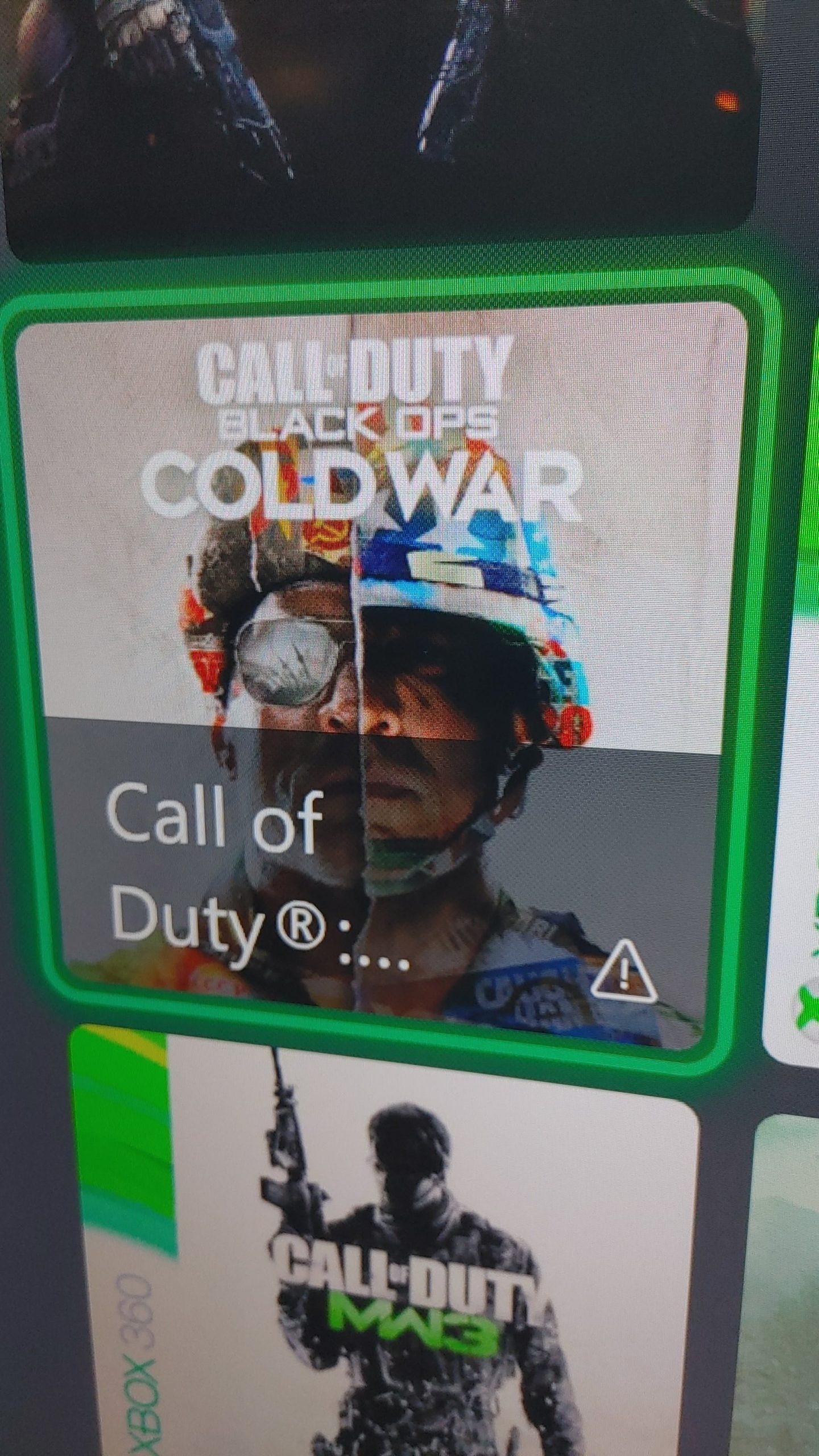
The exclamation point on your Xbox games usually indicates that an update or additional content is available for that specific game.
Ever noticed a little exclamation point beside one of your Xbox games and wondered what it meant? That symbol often pops up, and it’s not just for show. It begs the question, why is there an exclamation point on my xbox games? It’s actually a useful visual cue.
It serves as a notification. The game may have a patch waiting to be installed, or new downloadable content that you haven’t accessed. This could be anything from bug fixes to new levels or characters.

Why Is There an Exclamation Point on My Xbox Games?
Seeing an exclamation point next to your favorite Xbox game can be a little confusing. It’s like a little digital flag waving, trying to get your attention. But what does it mean? It’s usually a sign that something needs your attention related to that specific game, and it’s important to understand these symbols to keep your Xbox gaming experience running smoothly. Let’s dive into all the reasons why that little exclamation point pops up.
Understanding the Basics: What Does the Exclamation Point Mean?
Generally, the exclamation mark on an Xbox game tile indicates a pending action or issue that requires your interaction. It’s not always a bad thing; sometimes, it just means there’s new content waiting for you! Think of it as a friendly reminder from your Xbox, letting you know that something’s up and you might want to check it out. These little flags are part of the Xbox user interface design to help you manage your games effectively.
Here’s a breakdown of common scenarios where you might spot the exclamation point:
- Updates Available: This is perhaps the most common reason. Game developers frequently release updates to fix bugs, add new features, or tweak gameplay. The exclamation point alerts you that an update is ready for download and install.
- Pending Downloads: If you started a game download and it hasn’t completed yet, or if a part of the game content is waiting to get downloaded, the icon appears to let you know.
- Missing Game Data: Sometimes game files get corrupted or go missing. The exclamation point can signal this, indicating that you might need to repair the game or reinstall it.
- Add-ons Ready to Install: Did you purchase an add-on or a DLC for a game? The exclamation point lets you know it’s ready to install, so you can jump back into the game with all the new goodies.
- Content Not Available: The exclamation point might show up if certain content you own is not accessible for some reason. This might be due to licensing issues, server problems, or other temporary blocks.
Delving Deeper: Why These Issues Happen?
Now that we know the basic reasons, let’s understand why these things happen. It helps to think of your Xbox as a computer – it needs updates, downloads, and careful handling, just like your computer at home.
Updates: The Need for New Versions
Game updates are a very important part of modern gaming. They fix problems which could make the game buggy, introduce brand new levels or characters, and even improve how well the game works on your console. These updates often include:
- Bug Fixes: Games can sometimes have errors that cause them to crash or not work properly. These errors are known as ‘bugs,’ and updates help squash them.
- New Features: Game developers frequently add new things to their games to keep them exciting. This could be new areas to explore, new ways to play, or even new characters.
- Performance Tweaks: Sometimes, the game might not run smoothly or have a slow loading time. Updates can enhance the game’s performance to make it better for everyone.
- Security Patches: Just like your computer, video game consoles can have security issues. Updates can help protect your console and prevent problems.
Think of game updates like getting a new version of your favorite toy. It fixes any broken parts, might give you new tools, and helps make the toy work much better. When the update is ready, you see that exclamation point!
Pending Downloads: When Things Get Delayed
Downloading a game or add-on is like bringing home a package that needs time to unpack. When you see an exclamation point because of a pending download, it usually means a few things:
- Slow Internet: If your internet is running slowly, your game download will get affected and may take a longer time than expected or maybe even stop completely.
- Large File Size: Some games are very, very big. Just like a huge puzzle, it takes more time to download.
- Server Issues: Sometimes, the servers that store the game files might get really busy or have a problem of their own. It’s like the store having a big line – it takes longer to get your package.
- Interrupted Downloads: If your console was accidentally turned off during download, the process gets stopped.
When a download gets interrupted or takes a long time, the exclamation point appears to remind you that something is pending. It wants you to know that the download is not yet fully ‘unpacked’ and ready to play.
Missing Game Data: When Files Go Missing
Imagine if some of the pieces of your favorite board game went missing. You can’t play it properly, right? It’s the same with game data. Sometimes, for many reasons, game files can become corrupt or go missing. That’s why that exclamation mark shows up, signaling a problem. Here’s what it could mean:
- Hard Drive Issues: Your Xbox stores game files on its hard drive. Problems with the drive can sometimes cause game data to go missing or get damaged.
- Failed Updates: If a game update is interrupted or fails, it can corrupt the existing files, making them unusable.
- Accidental Deletion: Sometimes we might accidentally delete game files without meaning to.
- Software Glitches: Just like any other software, sometimes the Xbox system can have glitches, causing issues with game files.
If your Xbox shows an exclamation point due to missing game data, it’s usually a good idea to repair or reinstall your game, so it plays smoothly again.
Add-ons: New Content Waiting for You
Add-ons or downloadable content (DLC) are like extra goodies for your games. These could be new levels, characters, maps, and outfits. When you purchase them, they don’t automatically become part of the game. The exclamation mark tells you that these new items are ready to install so that you can enjoy them.
When you see an exclamation point because of add-ons, it’s an exciting thing! It means there’s new stuff waiting for you to try out. Don’t forget to install your new goodies so you can jump in and experience all the new features.
Content Not Available: When You Can’t Access Your Games
Sometimes, the exclamation point pops up because content you own is not currently accessible. This can be puzzling, but there are a few reasons why this could happen:
- Licensing Issues: Sometimes, the rights to a game or its add-ons can expire. It means the store that gives you access has lost permission to let you use it.
- Server Problems: If the game servers are experiencing problems, the game or content might be temporarily unavailable to you.
- Account Issues: If there’s an issue with your Microsoft account or Xbox Live subscription, it might prevent you from accessing your games and add-ons.
- Game Region Issues: Some games and add-ons are only available in certain parts of the world. If you try to play something that’s not available in your region, you might see the exclamation point.
If you see an exclamation mark because of unavailable content, it’s often temporary. It’s best to check your network connection, your subscription status, and game server status for updates. Sometimes, these problems will resolve themselves over time.
Taking Action: What to Do When You See the Exclamation Point
Now that we’ve gone through all the reasons for that exclamation point, let’s figure out what you need to do. You’ll be happy to know that fixing these problems is usually not very difficult. Here’s a step-by-step guide:
Checking for Updates
If the exclamation point means that there’s a game update ready, you will want to download and install it. Here’s how to go about it:
- Go to My Games & Apps: On the Xbox home screen, go to ‘My Games & Apps.’
- Select the Game: Find the game with the exclamation mark.
- Press the Menu Button: Press the menu button (the button with three lines) on your controller.
- Select Manage Game: Choose ‘Manage game & add-ons.’
- Check for Updates: You’ll see any pending updates listed here. Click the update to start the download.
Your game might take some time to download and install the update. Make sure you have enough space and your internet is working properly, so everything goes smoothly. After the process is complete, the exclamation mark should disappear.
Managing Pending Downloads
If the exclamation point is because of a pending download, here is what you can do:
- Go to Downloads: Go to the Xbox guide by pressing the Xbox button on your controller, and navigate to ‘Downloads’ under the ‘My Games & Apps’ section.
- Check Download Status: See if the download is paused or stuck.
- Resume Download: If paused, choose to resume the download.
- Check Internet: Make sure your internet connection is stable. If it is not, try restarting your modem/router.
After making sure your internet is good to go, your download should continue without any problems. Once it’s completed, the exclamation point will disappear.
Fixing Missing Game Data
When the exclamation point shows up because of missing game data, you may have to take a few extra steps. Here’s how you can fix it:
- Go to Manage Game: Go to ‘My Games & Apps,’ select your game, and then select ‘Manage game & add-ons.’
- Repair or Reinstall: Select the option to ‘Repair’ the game, if available. If not, choose to ‘Uninstall’ the game and then reinstall it from the Xbox store.
- Check Storage: Make sure you have enough space on your hard drive for the game.
Reinstalling the game usually takes care of missing files or corrupt data. Remember, your saved game data usually does not get lost, so you can start playing from where you left off.
Installing Add-ons
To make those add-ons ready to play, follow these steps:
- Go to Manage Game: Navigate to ‘My Games & Apps,’ select your game, and choose ‘Manage game & add-ons.’
- Check for Add-ons: You’ll see a list of your add-ons under ‘Ready to install.’
- Install: Select the add-ons you want to install and start the download.
Once the add-ons are installed, they will be available to play within the game. You can now jump in and explore all of the new content.
Resolving Content Availability Issues
If you can’t access the content you have bought, here are some things you can do:
- Check Xbox Live Status: Visit the official Xbox Live Status page to see if there are any ongoing server problems or maintenance.
- Check Your Subscriptions: Make sure your Xbox Live Gold or Game Pass subscription is active, as this might be needed for some games.
- Restart Your Console: Sometimes, restarting your console can fix temporary issues.
- Contact Support: If the problem persists, contact Microsoft support for help and they can provide specific solutions to your problems.
Usually, problems with content availability are temporary and resolve themselves. Be patient and try again later. Sometimes, it is just waiting a little bit for things to work properly.
The exclamation point on your Xbox games is like a little helper, pointing out actions you need to take to enjoy your games to the fullest. It might mean updates, downloads, or missing content, but now you know how to deal with each situation. By understanding why the exclamation point appears, and following the correct steps, you can continue having a great time on your Xbox without having any extra stress. Remember, keeping your games up-to-date and well-maintained helps make your gaming experience better. Happy gaming!
Xbox Series X/S: How to Fix Games Experiencing Issues Tutorial! (Game Outage Alert)
Final Thoughts
The exclamation point on your Xbox games usually signals an update is available or needs attention. It might indicate a game requires installation, a DLC pack is ready, or that the game needs updating to the latest version. This symbol serves as a must-check notification for you.
Therefore, ‘why is there an exclamation point on my xbox games’ is answered: it’s an indicator requiring your action for smooth game play. Always check what it signifies, ensuring you don’t miss necessary updates.

