
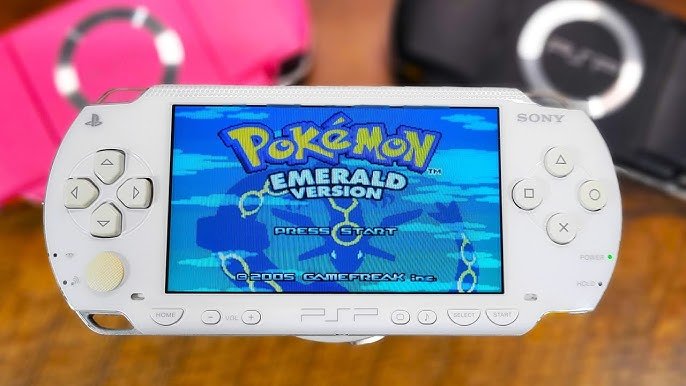
No, gPSP does not directly play Game Boy Color games. It primarily emulates Game Boy Advance titles.
So, you’re wondering, will gPSP play Game Boy Color games? It’s a common question for those exploring emulation. This popular emulator is often associated with handheld consoles, and it’s natural to wonder if it handles both Game Boy Advance and Game Boy Color titles. The answer is a bit nuanced though.
While gPSP does an excellent job of playing Game Boy Advance games, it is specifically designed for those titles. You will not be able to load and play Game Boy Color ROMs directly using gPSP. You’ll need a different emulator for that particular retro gaming experience.

Will gpSP Play Game Boy Color Games?
Let’s dive into the world of retro gaming and explore if gpSP, a popular emulator, can handle your favorite Game Boy Color (GBC) games. Many gamers love to relive the classics, and understanding which emulators work with different consoles is important. This article will guide you through everything you need to know about using gpSP to play Game Boy Color games, ensuring you have the best gaming experience.
Understanding gpSP: A Game Boy Advance Emulator
Before we get into the specifics of Game Boy Color, it’s crucial to understand what gpSP is designed for. gpSP stands for “Game Boy Advance PlayStation Portable”. It’s primarily an emulator made to play Game Boy Advance (GBA) games. Think of it like a special program that makes your computer or phone act like a GBA. Since it focuses on GBA games, it can be different from an emulator that plays different game systems. This is why we need to check if it supports other Gameboy consoles.
Originally developed for the Sony PlayStation Portable (PSP), gpSP has evolved and been ported to various platforms such as:
- Personal Computers (PCs) running Windows, macOS, and Linux
- Android devices
- Various other handheld devices and consoles with homebrew capabilities
The fact it’s available across various devices means lots of people can access and enjoy it. However, the main question remains: Does its core focus on GBA games extend to the Game Boy Color?
The Game Boy Color and Its Technical Differences
To understand if gpSP can play Game Boy Color games, we must consider the differences between the Game Boy Advance and the Game Boy Color. While they both are handheld consoles made by Nintendo and both are Gameboy systems, they have different internal components and hardware.
Key Differences:
- Processor: The Game Boy Advance has a much more powerful processor compared to the Game Boy Color. The GBA uses a 32-bit ARM processor, which is more advanced than the GBC’s 8-bit processor.
- Graphics: The GBA has better graphical capabilities with a higher resolution screen. It can also display more colors simultaneously than the Game Boy Color.
- Game Cartridges: The game cartridges themselves are different. GBA cartridges have a different size, and the internal data is structured differently, meaning that they operate on different code base.
- Sound: The sound capabilities differ between the two systems, with the Game Boy Advance having more advanced audio hardware.
These technical variations make it difficult for a Game Boy Advance emulator to simply play Game Boy Color games without extra coding. Think of it like trying to play a CD on a vinyl record player – they’re just not made to work together without some kind of adapter.
gpSP and Game Boy Color: The Short Answer
Now, let’s get to the heart of the matter. The standard version of gpSP, the one built specifically for GBA emulation, does NOT natively play Game Boy Color games. It is designed specifically to emulate the GBA hardware. It is built with GBA architecture in mind. Thus, it is not able to read, process and run Gameboy Color games without extra coding and adaptation.
If you try to load a Game Boy Color ROM (the game file) into gpSP, it won’t work. gpSP will not recognize it because it’s looking for the unique file structure of a GBA ROM.
Why gpSP Can’t Play Game Boy Color Games Directly
There are several specific reasons why the default gpSP emulator does not work with Game Boy Color ROMs:
- Hardware Emulation: gpSP emulates the specific hardware architecture of the GBA. This means it’s built to understand the way the GBA processes data. It is not coded to understand the structure of the Game Boy Color and its operations.
- ROM Format Compatibility: The way GBA game data is formatted is different from GBC game data. gpSP’s programming expects the specific GBA format and ignores other ROM formats.
- Instruction Sets: The instructions that the GBA’s processor uses are distinct from those used by the Game Boy Color’s processor. Therefore, the emulator code is specific to the instruction sets of GBA processors.
- Memory Management: The memory management of GBA and GBC games are very different, requiring the emulator to have specific code for each platform.
Because of these key differences, using gpSP for Game Boy Color games just won’t work in the normal way.
The Solution: Separate Emulators Are Needed
If you want to play Game Boy Color games, you’ll need a dedicated emulator designed for the Game Boy and Game Boy Color. These emulators are built specifically to understand the Game Boy Color’s hardware and can run these games correctly. Thankfully, many great Game Boy Color emulators exist, and they are available on many of the same platforms where you would find gpSP. These emulators are:
- VisualBoyAdvance (VBA) / VBA-M
- BGB
- mGBA
- RetroArch (with its various Game Boy Color cores)
These emulators have been carefully designed to replicate the hardware of the GBC console. They are able to understand the unique way of processing data and instructions of GBC games.
VisualBoyAdvance (VBA) and VBA-M
VisualBoyAdvance is one of the most popular emulators for GBA and older Game Boy systems like the Game Boy Color and Game Boy. It is widely used because it has:
- High compatibility: It is compatible with a vast library of GBC games.
- User-friendly interface: It has a straightforward and easy-to-use interface that is good for all level of users.
- Customizable Options: VBA lets you modify settings for graphics, sound, and controls.
VBA-M is a fork of VBA and includes various bug fixes and extra features. It’s often seen as an updated and improved version of the original VisualBoyAdvance. If you are on the search of a GBC emulator, these two options should be at the top of your list.
BGB
BGB is a less user-friendly but very accurate emulator. BGB is known for its precision in emulating the original Game Boy hardware, making it a great choice for purists. BGB is often used by:
- Emulator developers for testing
- Speedrunners and players who want the most authentic experience.
It may not have all the flashy features of other emulators, but its focus on accuracy makes it a strong choice, especially if you want the games to perform just as they would on real hardware.
mGBA
mGBA is another highly regarded emulator that is known for its accuracy and performance. It is not only for GBA, but can also emulate Gameboy Color games. mGBA is:
- Very accurate and performs well across various platforms.
- Open source and actively updated, making it a great option for future compatibility.
RetroArch
RetroArch is not an emulator itself but a platform that can run several emulators in form of “cores.” RetroArch is known for:
- Running multiple platforms in the same interface.
- Having a wide range of cores to choose from, allowing you to try out various emulation options.
- Running a variety of older console systems, like the Gameboy, Gameboy Color, and Gameboy Advance
If you want to experiment with different emulators or prefer a single program that can run various games, RetroArch is a good choice for you.
Where to Find Game Boy Color Emulators
You can easily find these emulators online. Here’s where to look:
- Official Websites: You can often find emulators directly on their official project pages, such as VisualBoyAdvance’s or mGBA’s.
- GitHub: Open-source emulators often have their code and releases on GitHub. You can find links to the program there as well.
- Trusted Gaming Websites: Many gaming websites provide downloads of emulators, along with guides on how to use them. Look for websites that are popular and well-regarded by the community.
Always make sure to download emulators from safe and reputable sources. This can protect your device from viruses and malware.
How to Use a Game Boy Color Emulator
The steps for using a Game Boy Color emulator are similar to those for gpSP, but with some key differences:
- Download and Install: Download the emulator from a trusted source, and follow the instructions to install it on your device.
- Find ROMs: You’ll need a ROM file for the Game Boy Color game you wish to play. These are usually found online as well, but make sure to download only files for games that you own physical copies of. It is illegal to download ROMs of games you do not own.
- Load the ROM: Open the emulator and find the “Open ROM” or “Load Game” option. Then, find and open the ROM file you downloaded.
- Configure Settings: You may wish to configure display options, audio settings, and your controls. Most emulators have menus for that.
- Start Playing: Once loaded, you can start playing the game!
Is There a Version of gpSP That Plays GBC?
It’s worth noting that some people have worked on modified versions of gpSP, which could include some level of Game Boy or Game Boy Color support. However, these versions may not be stable or user friendly and are usually not actively supported or updated. You should always use the original intended emulator for the game you want to play. Using unofficial or altered emulators can lead to more issues. For the most trouble-free experience, it’s best to use official Game Boy Color emulators for playing Gameboy Color games.
So, to sum it all up, while gpSP is a great emulator for Game Boy Advance games, it is not designed for Game Boy Color games. To play those classics, you’ll need to use a dedicated Game Boy Color emulator like VisualBoyAdvance, BGB, mGBA, or RetroArch. These emulators ensure you can experience your favorite games accurately and comfortably. Enjoy your retro gaming!
Turn Your PSP Into A Game Boy Advance With Gpsp Kai Emulator – Full Guide 2024
Final Thoughts
Yes, gpsp can play Game Boy Color games. This emulator supports many different platforms. You can enjoy your favorite GBC titles.
The emulator needs correct BIOS files to function properly. Make sure you have these files before playing. This is important for successful emulation.
Therefore, if you’re asking “will gpsp play gameboy color games”, the answer is a definite yes.

