
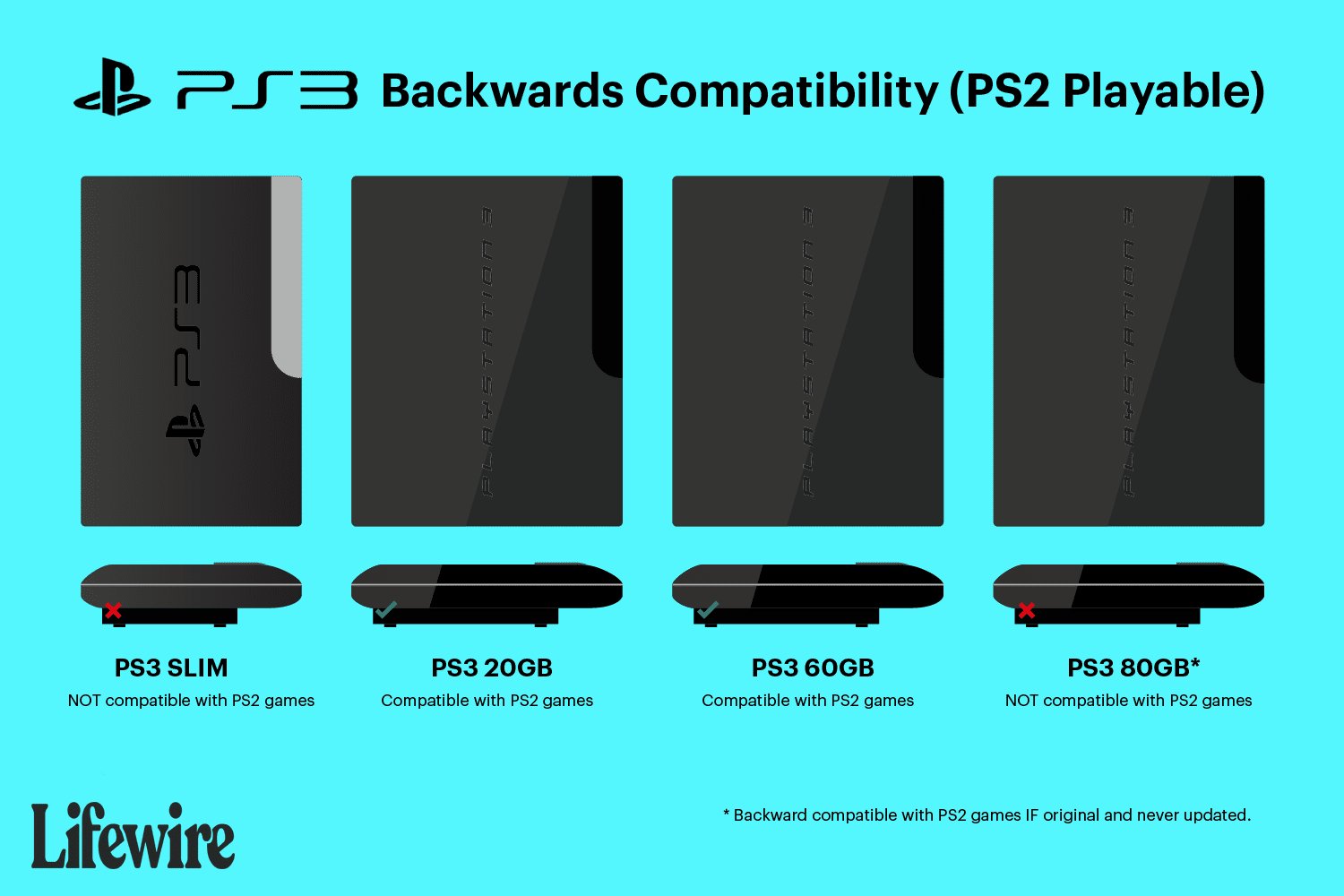
Some PlayStation 3 models can play PlayStation 2 games, but not all of them.
The question of whether or not your older games work on a newer console always pops up with each generation. Many gamers are keen to revisit their beloved classics. Specifically, “will playstation 3 play ps2 games” is a common query among those with a pile of PS2 discs. It’s a valid question when you consider the backward compatibility offered by some consoles, but not all PS3s offer this function.
Some of the initial Playstation 3 versions included the necessary hardware to play PlayStation 2 discs. However, Sony removed this feature in later models, making it crucial to know your PS3 model before you dig out your old games. This change means only select versions will let you experience those old favorites.

Will PlayStation 3 Play PS2 Games?
That’s a question many gamers have asked, especially those who love classic PlayStation 2 titles. The short answer is: it depends! Not all PlayStation 3 consoles can play PS2 games. Let’s dive deeper into why this is the case and what versions of the PS3 actually have this cool feature. We will explore the different PS3 models, their backward compatibility, and how you can potentially enjoy your favorite PS2 games even if your PS3 isn’t one of the special ones.
Understanding Backwards Compatibility
Backwards compatibility is like having a time machine for your video games. It means a newer console can play games from older systems. For many gamers, this is a fantastic feature! It lets them keep playing old favorites without needing to keep a collection of older consoles hooked up. Think about it – you can go straight from the exciting world of a brand-new PS3 game right back into the adventures of a PS2 classic, all on the same machine.
However, making a new console play old games is not as easy as it sounds! It requires careful planning and specific hardware to make the magic happen.
The Different PS3 Models
Sony released several versions of the PlayStation 3 over its lifespan. These models aren’t just about looks; they’re also different on the inside. Some of these changes affected whether or not they could play PS2 games. Here’s a breakdown of the models and their compatibility:
The “Fat” PS3 Models (Original Models)
The very first PS3 consoles, often called the “fat” models because of their bulky design, are the ones that could sometimes play PS2 games. These models came in a few different versions, but it’s crucial to remember that not all “fat” PS3s have PS2 backward compatibility.
- 20GB and 60GB Models: These early models are the kings of backward compatibility. They have real PS2 hardware inside, allowing them to play almost the entire library of PS2 games perfectly! They even use the original PS2 graphics processing and sound chips for authentic gameplay. These are the golden tickets for PS2 game lovers!
- 80GB (Certain Early Versions): Some early 80GB “fat” PS3 models also included the PS2 hardware, while some did not. It’s a bit of a gamble with these. You’ll need to look at the model number on the back of the console, usually on a white sticker, to know for sure. Specific model numbers you need to look for are CECHExx or CECHGxx to know if it has hardware-based PS2 compatibility.
The “Slim” PS3 Models
After the “fat” PS3, Sony released a thinner and more energy-efficient model – the PS3 “slim”. Sadly for PS2 fans, these models do not have hardware-based backward compatibility with PS2 games. This means they cannot play physical PS2 discs.
The main reason for this change was cost. Sony removed the PS2 hardware from the Slim PS3 to make the console cheaper to produce. Instead, they shifted focus to improving the performance of the PS3 system itself, with better graphics and more energy efficiency. But this came at the expense of PS2 game support.
The “Super Slim” PS3 Models
The final version of the PS3 is known as the “Super Slim”. Just like the “Slim,” it also does not have the ability to play PS2 discs. Sony continued focusing on PS3 games and digital downloads at this stage, and again omitted the PS2 hardware to keep the production costs down.
These models are easily recognized by their sliding disc tray and very lightweight design. They are good PS3 consoles but offer zero support for PS2 physical media.
How to Tell if Your PS3 Plays PS2 Games
So, you have a PS3 and you’re wondering if it can play those old PS2 games? It can be a little confusing, especially since there are several different models. But there are a couple of easy ways to check:
Check the Model Number
The most reliable method is to check the model number of your PS3. This number is usually found on a white sticker on the back of the console, typically near the barcode. Let’s look at the models that do (or do not) support playing PS2 games:
- Models with PS2 Hardware Backward Compatibility:
- CECHAxx (20GB)
- CECHBxx (20GB)
- CECHCxx (60GB)
- CECHExx (80GB, some)
- CECHGxx (80GB, some)
- Models without PS2 Hardware Backward Compatibility:
- CECHHxx (Slim models)
- CECHJxx (Slim models)
- CECHKxx (Slim models)
- CECHLxx (Slim models)
- CECH-20xxA, CECH-20xxB (Slim models)
- CECH-21xxA, CECH-21xxB (Slim models)
- CECH-25xxA, CECH-25xxB (Slim models)
- CECH-30xxA, CECH-30xxB (Slim models)
- CECH-40xxA, CECH-40xxB (Super Slim models)
- CECH-42xxA, CECH-42xxB (Super Slim models)
- CECH-43xxA, CECH-43xxB (Super Slim models)
Look for the PlayStation 2 Logo
On the box of the original “fat” models, look for a logo that says “PlayStation 2”. If it’s there, you have a good chance your console plays PS2 games. However, this might not be helpful if you no longer have the original box. Note, that this method is not fully reliable and the model number is the most accurate way to tell. Also, note that even though the box may not have the PS2 logo on it, and the model may also be in the list that supports ps2 games, it does not always means that you will be able to play all ps2 games.
Check the Disc Tray
The early “fat” models have a disc tray that looks similar to the PS2 tray. The later Slim models, and the Super Slim model, have a different style of disc tray, and the Super Slim has a sliding tray.
Software Emulation vs. Hardware Emulation
You may hear the terms “software emulation” and “hardware emulation” when discussing PS2 compatibility. Understanding these terms can help clarify why some PS3 models can play PS2 games and others can’t.
Hardware Emulation
The original “fat” PS3 models that support playing PS2 games (20 GB, 60 GB, and some early 80 GB) use hardware emulation. This means they actually have physical parts from the original PS2 console built inside. It’s like having a mini PS2 living inside your PS3. This allows for near-perfect PS2 game compatibility with very few issues. This is why these versions are very sought after, by gamers, who wants to play the old library of their ps2 games in higher resolution, along with the PS3 game library.
Software Emulation
Later PS3 models, like the Slim and Super Slim, don’t have the PS2 hardware. They rely on software emulation, which means the PS3’s main processor tries to run the PS2 games through special software. The software tries to act as if it were the ps2 hardware. This method does not have the same level of compatibility. Software emulation is also often less accurate and performance can vary from title to title, and sometimes may cause graphical problems and the game might not run as smooth as it is on a hardware emulation console.
Playing PS2 Games on Non-Compatible PS3 Models
What if you have a Slim or Super Slim PS3 that doesn’t play PS2 discs? Don’t worry, there are still options. Sony made many PS2 titles available for digital download on the PlayStation Store. While it’s not the same as playing your old discs, it’s a convenient way to enjoy some of your favorite classic games.
PlayStation Store Digital Downloads
Many classic PS2 games are available as digital downloads in the PlayStation Store. Although the availability of titles depends on region and licensing agreements, there’s a chance you might find some of your old favorites available to purchase. It’s worth checking the store regularly for these titles.
These digital versions often have improved visuals and support for PS3 features, including trophies. Keep in mind that you will have to re-purchase the games even if you own their original disc version.
Pros and Cons of Hardware vs. Software Emulation for PS2 Games on PS3
Let’s take a look at some of the benefits and drawbacks of using either PS3 with hardware or software emulation. This can help you decide on what is best for you:
Hardware Emulation (Original “Fat” PS3)
- Pros:
- High Compatibility: Plays almost all PS2 games.
- Accurate Gameplay: Provides an authentic experience, almost identical to playing the game on the PS2 console.
- No Performance Issues: Games run smoothly and accurately since the original chips are used.
- Cons:
- Rarity: Original PS3 models with full backward compatibility are hard to find and can be expensive.
- Potential Reliability Issues: These are older models, so they could experience hardware issues.
- Bulky and Heavy: They are large, use a lot of power, and make some fan noise due to heat.
Software Emulation (PS3 Slim and Super Slim via Digital Downloads)
- Pros:
- Easier to Find: Slim and Super Slim PS3s are more common.
- More Affordable: These consoles are usually cheaper than the original “fat” models.
- Improved Graphics (Sometimes): Digital games may have improved graphics or other enhancements.
- Cons:
- Limited Compatibility: Not all PS2 games are available digitally.
- Potential Issues: Some games may have glitches or performance problems.
- Additional Cost: You have to purchase the games again digitally even if you own the original disc.
Is it Worth Buying a PS3 Just for PS2 Games?
The question then becomes: should you buy a specific PS3 model just to play PS2 games? The answer depends on your priorities and budget.
If you are a hardcore gamer, who want to play the old library of ps2 games, the original PS3 models with hardware emulation is a very good option. However, these models can be more expensive and have a higher risk of failure due to their age. You should consider if the extra cost is worth it for you.
On the other hand, if you simply want to enjoy a few classic games and are not very bothered about playing original discs, then the digital downloads on a Slim or Super Slim PS3 model might be a more practical option, as you can easily find them in a very affordable price in the market.
Remember to weigh your options carefully before making a purchase!
Other Options to Play PS2 Games
If you do not want to buy a specific PS3 model to play your old PS2 games, then you can consider getting a PS2 console instead. These can be readily available for affordable prices in the market, but make sure to get a good quality working condition console. There are also other gaming systems and emulators that might allow you to play PS2 games, but these systems are usually not reliable, and may result in low quality performance.
For the best experience, playing the old library of PS2 games on an actual PS2 console itself, is the best and most accurate experience you can get.
In conclusion, while only specific, early versions of the PS3 can play PS2 game discs, there are still a number of ways to enjoy classic PS2 games. Be sure to check your PS3 model to determine which version you own, and if you’re looking for an ultimate experience to play the ps2 library, the old fat models can be worth the investment.
Is PS3 Backwards Compatible?
Final Thoughts
The original PlayStation 3 models offered backward compatibility, letting you play PS2 games. Later, Sony removed this feature. Therefore, most PlayStation 3 consoles cannot play PlayStation 2 discs directly.
“Will PlayStation 3 play ps2 games?” is a common question. The answer, sadly, depends on the specific console model. You must check your console’s model number.
Unfortunately, most PS3 owners cannot experience their PS2 game collection on their consoles. You can still explore other methods for playing those games.

