
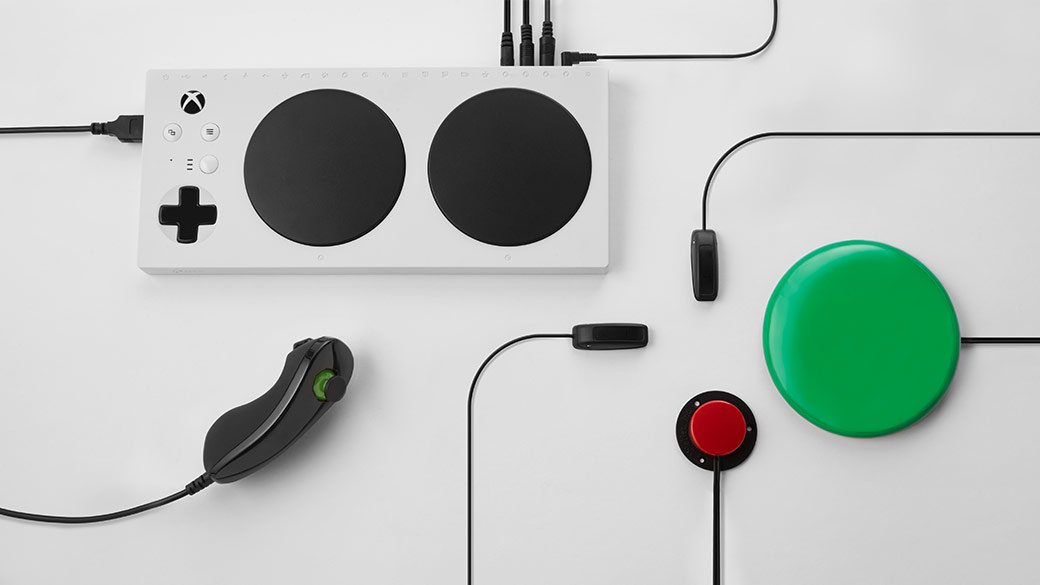
Xbox adaptive gaming accessories enable players with disabilities to customize their gaming experience with specialized controllers, buttons, and switches.
Gaming is for everyone, right? That’s the idea behind Xbox adaptive gaming accessories. These devices are designed to make gameplay accessible to individuals with a range of physical limitations, focusing on inclusivity.
It’s more than just hardware, it’s about creating opportunities for everyone to join in the fun. This focus on customization allows players to build a setup that perfectly matches their needs and play style.

Xbox Adaptive Gaming Accessories: Gaming for Everyone
Gaming is for everyone, right? It’s about fun, challenges, and connecting with friends. But sometimes, standard controllers and setups can make it hard for some people to join in. That’s where Xbox adaptive gaming accessories come in! These amazing tools help make playing video games on Xbox more accessible for people with disabilities. Let’s explore what these accessories are and how they make a big difference.
What are Xbox Adaptive Gaming Accessories?
Think of Xbox adaptive gaming accessories as special puzzle pieces that fit into the world of gaming. They’re designed to work with the Xbox console and allow people with various needs to play games more easily and comfortably. These accessories aren’t just modifications, they are intentionally built to provide the flexibility and customization needed by many gamers who find traditional controls challenging. The range includes things like specialized controllers, buttons, and switches. They can be customized based on individual needs, allowing gamers to create setups that work just right for them.
The Heart of It: The Xbox Adaptive Controller
At the center of the Xbox adaptive gaming universe is the Xbox Adaptive Controller. This isn’t like your regular controller. It’s a central hub that allows gamers to connect various external devices. Imagine it as a blank canvas where you can plug in all sorts of buttons, switches, and joysticks that best suit a player’s abilities. It’s essentially a powerful bridge, connecting standard and non-standard inputs. Here’s a breakdown of what makes this controller so special:
- Multiple Ports: The Adaptive Controller has many ports on its back, like little doors that accept standard 3.5mm jacks. These ports are designed to connect assistive technologies like custom buttons and switches.
- Customizable Button Mapping: You can decide which input does what. The buttons are remapped to fit the user’s physical capabilities and preferences, allowing almost any game function to be placed where it makes the most sense.
- Profiles: The controller saves custom button mappings. This means that players don’t need to reconfigure their setups each time they switch between games or users.
- Mounting Options: The controller is designed to be mounted on a flat surface or wheelchair, making it more convenient for varied setups.
The Xbox Adaptive Controller isn’t a stand-alone solution but serves as the foundation for personalized gameplay.
Essential Input Devices: Buttons and Switches
While the Adaptive Controller is a central hub, the magic happens with the input devices that plug into it. These accessories are crucial for making gaming accessible. They come in various shapes and sizes so that different needs are met. Here’s a deeper dive into some of the most common types:
Buttons: Simple and Powerful
Buttons are among the most basic yet crucial adaptive accessories. They’re designed with ease of use and different physical limitations in mind.
- Standard Buttons: These are larger than typical controller buttons, and made for people who might find it hard to press small buttons. They can be easily pressed with a hand, foot, or head.
- Pneumatic Buttons: These can be activated by puffs of air or gentle pressure, which makes gaming accessible for individuals with limited mobility.
- Proximity Buttons: These buttons activate when a hand or other part of the body gets close, without requiring actual physical contact. This is helpful for players with limited muscle control.
Switches: More Than Just On/Off
Switches are another crucial type of input. They are versatile and can control various actions in a game, and they’re available in different designs. Here are a few common examples:
- Push Switches: These are simple switches that activate when pressed. They can be used by any part of the body.
- Toggle Switches: These switches stay in the activated position until they’re switched off, which is great for sustained actions in games.
- Joystick Switches: These provide directional input, like a joystick. They make movement and camera control more accessible.
The adaptability of these switches means that gamers can find the perfect way to interact with the game that suits their specific needs. Different sizes, shapes, and sensitivities mean options to accommodate all sorts of fine motor skill capabilities.
Joysticks: Moving Around the Game
Joysticks provide analog input for directional control, similar to the sticks on a traditional game controller. But these aren’t your typical joysticks. They are designed for a variety of user needs, and they can be used in many ways.
- Hand-Operated Joysticks: These are controlled by the hand and can be customized for tension and sensitivity. They provide fine control for gamers who have the capacity for hand movement.
- Foot-Operated Joysticks: These can be activated by foot movements. They provide an alternative for gamers who have limited hand mobility.
- Mouth-Operated Joysticks: These are operated by mouth, using a straw or similar device for directional inputs. This expands access to gaming for people with very limited movement.
Joysticks are an important tool for a variety of functions within games, such as character movement or camera control.
Mounting Systems: Setting Up Your Gaming Station
Having the right accessories is only part of the equation, ensuring they are properly mounted is essential. It’s all about comfort, security and ease of access. Here’s why mounting matters:
- Stability: A good mounting system holds accessories securely. It prevents them from shifting during gameplay.
- Accessibility: Mounting allows for correct positioning of switches and joysticks so the player can access them easily and comfortably.
- Versatility: Mounting systems are designed to attach to many surfaces, like desks, tables and wheelchairs. They allow for custom setups.
There are many options for mounting including clamps, suction cups, and specialized mounts. The best setup depends on the individual’s need and the gaming environment. With the right setup, the player can enjoy games without discomfort.
Beyond the Basics: Other Specialized Accessories
The world of adaptive gaming accessories is constantly evolving. Beyond the common input devices, there’s a growing range of specialized accessories that address very specific needs and preferences. Here are some examples:
Head Tracking Systems
These systems track the player’s head movements and convert them into game inputs. They’re particularly helpful for players who may not have the capability to use their hands or feet. By moving the head, players can control the game without using their limbs.
Eye Tracking Systems
Similar to head tracking, eye tracking systems allow gamers to use eye movements to control their games. This is great for individuals with mobility limitations. These systems are incredibly precise and responsive, bringing a new level of independence to gaming.
Voice Recognition Software
Voice recognition allows gamers to control game elements using their voice. They can use voice commands to perform actions within the game, making the gaming experience more engaging and accessible.
Making Connections: How to Set Up Your Adaptive Gaming System
Getting started with adaptive gaming on Xbox might seem a bit tricky at first, but once you grasp the basics, it’s quite straightforward. Here’s a step-by-step guide to get you started:
- Gather Your Equipment: First you need an Xbox Adaptive Controller, along with any specific switches, buttons, joysticks, and mounting solutions you will use.
- Connect the Adaptive Controller: Connect the Adaptive Controller to your Xbox using a USB cable.
- Attach Input Devices: Connect your chosen buttons, switches, and joysticks to the ports on the Adaptive Controller.
- Customize Button Mapping: Go into your Xbox settings and configure the Adaptive Controller to assign specific game functions to your input devices.
- Test and Adjust: Test your setup in a game. Adjust things as you go, until you find the perfect configuration for your needs.
Remember, it’s a journey. What works well for one person might need a bit of adjustment for another. It is all about customization.
The Importance of Adaptive Gaming
Adaptive gaming accessories are far more than just pieces of technology. They represent inclusion, access, and empowerment. They also help build social connections. Here’s why these tools are so vital:
- Inclusivity: They allow people with a variety of physical limitations to enjoy the same games as their friends and family. This promotes a sense of belonging.
- Social Interaction: Gaming is often a shared experience. Adaptive gaming helps those who might otherwise be isolated connect with others and participate in the community.
- Cognitive and Physical Benefits: Playing games can improve cognitive skills, such as problem solving, memory, and hand-eye coordination. Adaptive gaming means more people can benefit from these improvements.
- Empowerment: Adaptive gaming helps people gain a sense of independence by allowing them to participate fully in activities that they might have previously been excluded from.
The impact of adaptive gaming accessories extends beyond the game itself. These tools help people to achieve so much more in their daily lives.
Where to Find Adaptive Gaming Accessories
If you’re ready to start your journey with adaptive gaming accessories, here are some places you can explore:
- The Microsoft Store: This is a great place to find the Xbox Adaptive Controller and some related accessories.
- Specialized Retailers: Many retailers focus on assistive technology. They are good places to find a wider range of buttons, switches, joysticks, and mounting solutions.
- Online Marketplaces: Check out marketplaces like Amazon, where you can find a mix of general and specific adaptive gaming equipment.
- Assistive Technology Organizations: These organizations can provide support, guidance, and resources for people who are new to adaptive gaming.
When selecting accessories, ensure they’re compatible with your Xbox and your Adaptive Controller. It’s also a good idea to read reviews, ask for recommendations, and seek expert advice to ensure you’re getting equipment that best suits your specific needs.
The Future of Adaptive Gaming
The world of adaptive gaming is constantly growing, and it’s exciting to see where it will go in the future. The push for more accessible and inclusive gaming experiences is stronger than ever. We will likely see more advanced technologies, more options for customization, and an increase in the accessibility of gaming on various platforms. More innovative control systems and a greater emphasis on personalized gaming experiences will help ensure that the joy of gaming is truly available to everyone. The focus will remain on making sure that the game adapts to the player, rather than requiring the player to adapt to the game. This shift will make gaming an even more inclusive and fun activity.
Xbox adaptive gaming accessories have created a turning point in gaming. They break down barriers and help more people have access to a wonderful form of entertainment. They also show that with creative thinking, technology can be used to benefit everyone. These tools are not only creating an inclusive environment for people with disabilities but also opening minds, fostering understanding, and demonstrating that gaming can truly be for everyone.
#ProductivityForAll with Microsoft Adaptive Accessories
Final Thoughts
Xbox adaptive gaming accessories offer inclusive gameplay. These tools empower individuals with diverse needs to participate fully. They break down barriers and create accessible experiences for everyone.
These customizable options allow players to tailor controls. Gamers can use switches, buttons, and joysticks they are comfortable with. This promotes joy and inclusion for many players. Xbox adaptive gaming accessories truly change the game.

