
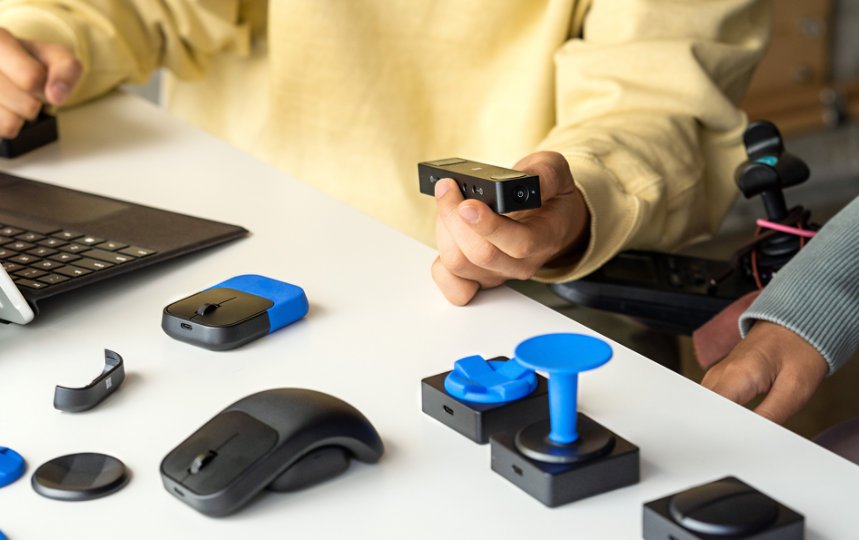
Xbox assistive technology options include features like Copilot mode, controller remapping, and text-to-speech, which aim to make gaming more accessible.
Gaming should be for everyone, right? Microsoft believes so too, and has been making strides in accessibility. The Xbox console comes with a variety of features. These built-in tools significantly impact gameplay for individuals with disabilities.
We will explore these Xbox assistive technology options. These options will help personalize the gaming experience. You can tailor the settings to meet your specific needs and preferences.

Xbox Assistive Technology Options
Hey there, gamers! Have you ever thought about how everyone can play video games, even if they use different kinds of controllers or have special needs? Well, Xbox has been working hard to make sure that gaming is for everyone! They have created lots of cool tools and settings called “assistive technology.” These tools help people with different abilities play games and have a super fun time. Let’s explore all the awesome ways Xbox makes gaming accessible!
The Amazing Xbox Adaptive Controller
One of the coolest things Xbox has made for accessibility is the Xbox Adaptive Controller. It’s not like a regular controller, and that’s the point! Instead of having the usual buttons and sticks all in one piece, the Adaptive Controller is a big, flat base. It has lots of ports where you can plug in different kinds of buttons, switches, joysticks, and more. This means you can set up the controller in a way that works just right for you.
What Can You Plug into the Adaptive Controller?
You can plug in all sorts of things! Think of it like building your own controller. Here are some of the cool things you can use with the Adaptive Controller:
- Big Buttons: These are large, easy-to-press buttons that you can use instead of the smaller buttons on a regular controller. These help if you have trouble with fine movements.
- Joysticks: You can use joysticks that you move with your hand, your chin, or even your feet. This helps you move your character around in the game.
- Switches: These switches can be used to do actions like jumping or shooting. They can be activated by pressing with a hand, foot, or even your head.
- Mounts: Mounts are special stands and arms that let you position your controller components exactly where you need them.
How the Adaptive Controller Helps
The Adaptive Controller is a game-changer because it allows gamers to play games in a way that’s comfortable and natural. It’s not one size fits all, it’s designed to work the way you work. For example, if someone can’t hold a regular controller, they can use their hand, chin or foot to control the game. It’s like having your own custom-made controller. It empowers players to overcome barriers and enjoy gaming with friends and family.
Xbox Controller Customization
Even with a standard Xbox controller, there are many ways to customize it to make it easier to use. Let’s check these out!
Button Mapping
Button mapping is a super handy feature that lets you change what each button does. So, if you find a certain button difficult to reach or press, you can move its function to another button. This makes it so you can play games comfortably. For example, if you find it difficult to press ‘X’ button, you can change it to a button that’s easier for you to press.
Stick Sensitivity
Sometimes moving the stick can be too fast or too slow. That’s why you can adjust the sensitivity of the joysticks. You can make them more or less sensitive to movement. If you want the character to move around slowly and precisely, you can lower the sensitivity. On the other hand, you can raise it to move quickly. You can even set different sensitivities for different games, depending on your preferences!
Vibration Settings
Vibration on the controller can add to the fun, but it can also be distracting. If you prefer not to have the controller vibrate, you can turn it off completely or lower its intensity. This way, you can focus better on the game.
Accessibility Settings within Games
Many games come with their own accessibility settings, which are settings put in the game by the game makers. These settings help players of all abilities. These settings help with vision, hearing and learning, and mobility. Let’s look at some of these settings.
Visual Aids
Many games have settings for visual aids. These can make the game easier to see, such as:
- Colorblind Modes: These modes adjust the colors in the game to make it easier to see for people who have colorblindness.
- Text Size and Contrast: You can often increase the size of the text in the game and make it have a higher contrast so that it’s easier to read.
- Subtitle Options: You can turn on subtitles for speech. You can also change the way that subtitles look on the screen.
Audio Adjustments
Games often offer many audio settings that can help players. Here are some of the most common options:
- Sound Effects Volume: You can control how loud different sounds are in the game. This helps make sure you don’t miss any important audio cues.
- Separate Music and Voice Volumes: Some games let you adjust the volume of music and voices separately, so you can hear important dialogues.
- Audio Cues for Visuals: Games may have settings that add sound cues to important visuals that might otherwise be missed, which is helpful for people with low vision.
Gameplay Modifications
Some games go further in helping with accessibility by changing the way you play:
- Adjustable Difficulty: Many games have settings that allow you to adjust how hard the game is, making it easier or more difficult for you.
- Simplified Controls: Some games offer simpler control schemes which are easier to learn. For example, they may offer more buttons or auto-assistance in certain action or activity.
- Skip Unnecessary Actions: Some games also let you skip certain sections that are too difficult, which allows you to keep enjoying the story.
Xbox System Accessibility Features
Xbox is not only focused on the games but also on how the system as a whole can be made accessible. These system-level features help people in many ways. Let’s explore these settings that work across all games and menus.
Narrator and Screen Reader
The Narrator is a screen reader that speaks the text on the screen. It helps people who have trouble seeing the screen navigate the Xbox interface. It reads out menus, options, and even text during gameplay.
Magnifier
The Magnifier is another useful tool for people with visual impairments. It zooms in on parts of the screen to make it easier to see. You can move the magnified area around the screen and zoom in and out as needed.
High Contrast Mode
High contrast mode helps improve readability by making text and other elements on the screen more visible. This mode increases the contrast between the foreground and background, which can be very helpful for people with low vision or those who find bright screens hard to look at.
Captions and Subtitles
For people who have difficulties in hearing, Xbox supports captions and subtitles. These show spoken words on the screen. You can customize the appearance of the captions, such as the text size and the background color, making them easier to read.
Speech to Text and Text to Speech
Xbox supports speech to text. So, if someone has difficulty using a controller to type, they can use their voice to write messages. Additionally, Text to Speech allows the Xbox to read aloud any text that is on the screen or in messages. This two way voice feature helps with communication.
Third-Party Assistive Technology
Apart from Xbox’s own accessibility tools, several companies also make assistive technology to help gamers. These products allow Xbox users to further customize their gaming setup to their specific needs.
Accessible Controllers and Accessories
Many companies make specialized controllers and accessories that you can use with your Xbox, like special foot pedals, mouth operated switches, or even eye tracking controllers.
Software and Applications
There are also software and apps that help with accessibility. These can include screen readers, voice command programs, and button remapping tools that offer more choices compared to what’s on the system. These software allows players to use whatever input methods they feel are most comfortable.
Resources for Finding Assistive Technology
If you are interested in finding assistive technology, there are resources available. Websites such as the AbleGamers Charity, SpecialEffect, or online retailer with assistive tech options such as Amazon can assist you to find what you are looking for. These resources can help you explore different assistive technology options and choose what suits your needs.
Why is Accessibility Important?
Accessibility is super important because it makes sure that everyone can play games. Video games are not just for fun, they are also great for building important skills like critical thinking, problem-solving, and social skills. When games are accessible, it means everyone gets to enjoy the fun and the benefits. It doesn’t matter what your physical or mental ability is. When a game is made accessible, it brings a smile on everybody’s face!
Xbox is always working hard to make gaming more accessible to everyone. By offering adaptive controllers, customizable controls, and other important accessibility settings, they are helping more people experience the joy of video games. This is a great reminder of how technology can create an inclusive and accessible environment for everyone!
Living Room – Gaming Devices
Final Thoughts
Xbox provides diverse accessibility features, benefiting many players. These options include controller customization and copilot settings. Also, speech-to-text and text-to-speech functions aid communication.
Furthermore, adaptive controllers allow for personalized gaming setups. These are integral to inclusive gameplay for those with mobility challenges. Xbox assistive technology options truly enhance the gaming experience for everyone.

