
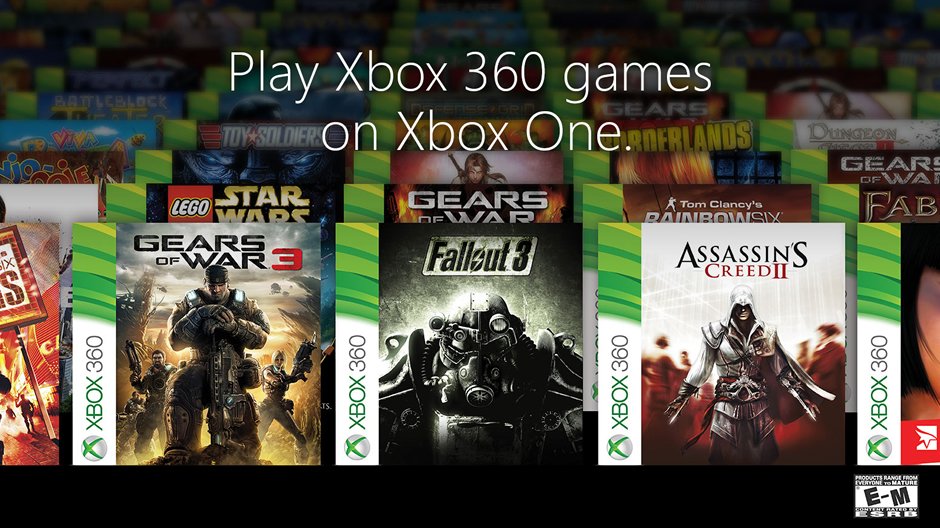
Xbox backwards compatible games are titles from previous Xbox consoles that you can play on newer Xbox systems.
Ever wished you could revisit those classic Xbox games you loved? Well, thanks to a fantastic feature, you can! Xbox backwards compatible games allow you to play select titles from the original Xbox and Xbox 360 on your Xbox One and Xbox Series X|S.
This means dusting off old favorites and experiencing them with modern consoles. It’s a great way to appreciate gaming history and keep those treasured games alive for current and future players.

Xbox Backwards Compatible Games: A Journey Through Gaming History
Hey everyone! Ever wondered if you could play those old Xbox games you loved on your shiny new Xbox? Well, good news – you can! It’s all thanks to something called “backwards compatibility.” Think of it like a time machine for video games. It lets you play games from older Xbox consoles on your newer Xbox One, Xbox Series X, or Xbox Series S. Isn’t that neat? This is a big deal for gamers, because it means that your game library does not have to be limited to the new games. You can dive into nostalgic memories and discover older games with ease. Let’s explore what this amazing feature is all about.
How Backwards Compatibility Works
So, how does this magic happen? It’s not as simple as just popping an old disc into your new console. The Xbox team works hard to make these older games work on the newer systems. They use special software that acts like a translator. This software makes the new Xbox “understand” the code of the old games. This translation is not easy! But it allows the games to run almost exactly how they did on their original consoles. Sometimes, the games even look and play a bit better on the newer hardware. Microsoft has put considerable effort in this feature, as it understands that many people appreciate the history of video gaming and enjoy playing older games.
Which Xbox Games are Backwards Compatible?
Not every single game from the original Xbox, or Xbox 360 library can be played on the new consoles. Microsoft has been working to add more titles to the list over time. The list of compatible games is big, and it keeps growing. Here is the breakdown on what you can expect, and where you can find your favorite game:
Original Xbox Games on Newer Consoles
The original Xbox is the first console in the Xbox family. It was introduced in 2001. While not all the original Xbox games are playable on the newer consoles, several popular titles have made the jump. These include games that many of us played growing up. Games like Star Wars: Knights of the Old Republic, Ninja Gaiden Black, and Fable are available. If you want to know what other titles are available, you can check the official Xbox website. Microsoft has done a good job of making sure a good variety of titles are available from the original Xbox.
- Star Wars: Knights of the Old Republic
- Ninja Gaiden Black
- Fable
Xbox 360 Games on Newer Consoles
The Xbox 360 was a very popular console, and a massive amount of the games available were available in its library. Many popular games are available via backwards compatibility. Games like Red Dead Redemption, Mass Effect trilogy, and Fallout 3 can be played on your new console. The backward compatibility feature also includes Xbox Live Arcade games. This is another win for fans who like smaller, downloadable games. Again, check the official list to make sure your favorites are there.
Here are some of the popular titles:
- Red Dead Redemption
- Mass Effect trilogy
- Fallout 3
Where to Find the Full List
Keeping track of all the games can be tricky. So, here’s where to find the official list: The official Xbox website is your best friend for this. Search for “Xbox backwards compatible games list” and you will find a page on the official Xbox website. This page has the most up to date information. You can even search for specific games to check if they are available. There are also other websites and blogs that keep a list of these games. But, keep in mind that the official list is always the most accurate. This list gets updated, as more games are added to the compatibility program. So make sure you check regularly if you want to know what is added.
Benefits of Backwards Compatibility
Why is backwards compatibility such a cool thing? Well, there are many reasons why gamers love it!
Play Your Old Favorites Again
First, it gives you the chance to play the older games that you grew up with. Maybe there is an old title that you would like to play again, or you never finished a title from your childhood and want to give it another go. Backwards compatibility lets you relive those great moments again. It’s like visiting an old friend and re-enjoying the fun you had together.
Discovering Hidden Gems
Maybe you missed out on a great game when it originally came out. Backwards compatibility gives you a chance to try it for the first time. There may be some real gems in these older libraries that you haven’t had a chance to experience. You might find a new favorite that way!
Preserving Gaming History
Video games are a form of art and history. Backwards compatibility helps preserve these classics for future generations. It allows everyone to experience the games that helped shape the video game industry. This helps ensure that older games don’t get lost or forgotten over time.
Save Money
Instead of having to buy an older console or search for old physical games, you can play the titles that you have already bought. This can be a great way to save money on games and consoles.
How to Play Backwards Compatible Games
The best part about backwards compatible games is that they are quite easy to play. If you have a disc, you can just insert the game into your console, and most of the time, it should work. If you have a digital copy, your console will recognize it. Here is a quick guide on how to get started:
Using Physical Game Discs
If you have the physical copy of an older game, it is fairly simple to start playing it on your console. Here’s what you need to do:
- Make sure your Xbox One, Xbox Series X, or Xbox Series S console is turned on.
- Carefully insert the game disc into the disc drive.
- Your console will recognize that the disc is for an older Xbox or Xbox 360 game.
- If the game is backwards compatible, it will start installing on your console.
- Once it is installed, you are ready to play your game.
Using Digital Games
Many gamers buy games digitally. If you bought a game from the Xbox marketplace, your console will recognize the titles you bought. If the game is backwards compatible, you can download it to your new console. Here is the process:
- Turn on your Xbox console and sign in to your account.
- Go to “My games & apps.”
- Select “Full library” and then select “Owned games.”
- Any backwards compatible games you have bought will appear there.
- Click the game you want to play and install it.
- Once the game is downloaded and installed you are ready to go.
What If a Game Isn’t Backwards Compatible?
It is possible that some games will not work on the new systems. If the title that you are trying to play is not backwards compatible, your console will tell you that it can not be played on the console. For these older games you may have to use your old console, if you still have one. The best way to know if a game is compatible, is to check the official website before trying to play it.
Enhanced Backwards Compatible Games
Sometimes, backwards compatible games get a little bit of extra love. This is known as “enhancements”. The team at Xbox can take older games and make them look and perform better on the newer consoles. Here are some of the improvements:
Higher Resolution
Many older games were made with lower resolution graphics. The newer consoles can make these games look much sharper and clearer. So, these games look better than they did on the original hardware. This is a massive improvement for the older titles. It allows them to fit in with newer games more naturally.
Improved Frame Rates
Frame rate is how smooth the game runs on the screen. Backwards compatible games get boosts to frame rates. This allows them to run very smoothly on the newer consoles. The better frame rate leads to a much better gaming experience for the player. This is an important enhancement for many games.
Auto HDR
HDR makes colors look more vibrant and realistic. The Xbox has auto HDR which will automatically be applied to games that don’t support HDR natively. This enhancement can make the color pop and make the game look much more dynamic.
The Future of Backwards Compatibility
What is the future of backwards compatibility? Well, we can only speculate. Microsoft has shown commitment to backwards compatibility. Gamers love it. It shows a respect for gaming history. It also makes older games relevant to new and old gamers alike.
Continued Support
Microsoft has said that they will continue to support this program. It is expected that we will see more games being added to the backwards compatibility program over time. So, if there is a game you love that is not supported, it is possible that it will be supported in the future.
Expanding the Library
With every new title that is added, the library of backwards compatible games grows. As the library grows, there will be new opportunities for gamers to experience games that they never had the chance to play previously. The ever-growing library makes this feature worthwhile for gamers.
A Focus on Gaming History
Backwards compatibility shows that gaming is not only about new titles. It is also about respecting the history and the games that paved the way for modern games. Preserving these titles is something that many gamers appreciate.
So, there you have it! Backwards compatibility is an awesome feature that lets you play games from the past on your new Xbox. It’s like having a gaming time machine right in your living room. Now, go dust off those old games and start playing!
The Best Xbox 360 Backward Compatible Games To Play In 4K On Xbox Series X Right Now!
Final Thoughts
Xbox backwards compatible games offer a fantastic way to revisit classic titles. These games provide a nostalgic journey for many players. You experience old favorites on newer hardware with improved performance.
The program extends the life of your favorite older games. Playing these games gives you immense value to your Xbox experience. They represent a great benefit for Xbox gamers.

